RTX2060 in 25.10.2.1

I upgraded to 25.10 and am now on 25.10.2.1. I had to remove an older P400 and P2000 since they were no longer supported. I installed an RTX2060 and can now see in lspci:

root@gznas[~]# lspci -nn | grep -i nvidia
02:00.0 VGA compatible controller [0300]: NVIDIA Corporation TU106 [GeForce RTX 2060 Rev. A] [10de:1f08] (rev a1)
02:00.1 Audio device [0403]: NVIDIA Corporation TU106 High Definition Audio Controller [10de:10f9] (rev a1)
02:00.2 USB controller [0c03]: NVIDIA Corporation TU106 USB 3.1 Host Controller [10de:1ada] (rev a1)
02:00.3 Serial bus controller [0c80]: NVIDIA Corporation TU106 USB Type-C UCSI Controller [10de:1adb] (rev a1)

I can also report the installed version:

root@gznas[~]# cat /proc/driver/nvidia/version
NVRM version: NVIDIA UNIX Open Kernel Module for x86_64 570.172.08 Release Build (dvs-builder@U22-I3-AF01-21-3) Tue Jul 8 18:08:21 UTC 2025
GCC version: gcc version 12.2.0 (Debian 12.2.0-14+deb12u1)

I see nothing in nvidia-smi:

root@gznas[~]# nvidia-smi
No devices were found

Anyone encounter a fix for this?

Did you enable the NVIDIA driver under Apps → Configuration → Settings → Install NVIDIA Drivers?

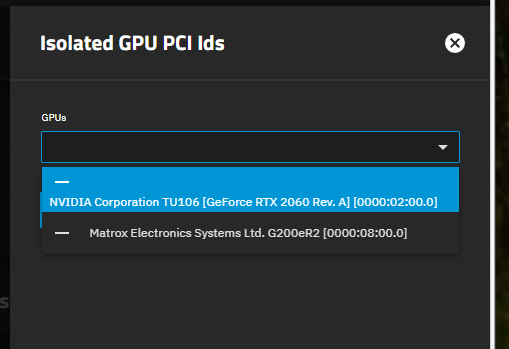
Yes. In fact as you can see from these screenshots, it is visible in TN UI in the GPU Isolation section (Note: I did NOT isolate it)…just no nvidia-smi result.

Can you show me the result of lspci -k | grep -A3 NVIDIA ?

root@gznas[~]# lspci -k | grep -A3 NVIDIA
02:00.0 VGA compatible controller: NVIDIA Corporation TU106 [GeForce RTX 2060 Rev. A] (rev a1)
Subsystem: ASUSTeK Computer Inc. TU106 [GeForce RTX 2060 Rev. A]
Kernel driver in use: nvidia
Kernel modules: nouveau, nvidia_drm, nvidia
02:00.1 Audio device: NVIDIA Corporation TU106 High Definition Audio Controller (rev a1)
Subsystem: ASUSTeK Computer Inc. TU106 High Definition Audio Controller
Kernel driver in use: snd_hda_intel
Kernel modules: snd_hda_intel
02:00.2 USB controller: NVIDIA Corporation TU106 USB 3.1 Host Controller (rev a1)
Subsystem: ASUSTeK Computer Inc. TU106 USB 3.1 Host Controller
Kernel driver in use: xhci_hcd
Kernel modules: xhci_pci
02:00.3 Serial bus controller: NVIDIA Corporation TU106 USB Type-C UCSI Controller (rev a1)
Subsystem: ASUSTeK Computer Inc. TU106 USB Type-C UCSI Controller
05:00.0 PCI bridge: Renesas Technology Corp. SH7758 PCIe Switch [PS]
Subsystem: Renesas Technology Corp. SH7758 PCIe Switch [PS]

So it’s loading the correct driver, which is good.

Is it visible in midclt call app.gpu_choices | jq ?

root@gznas[~]# midclt call app.gpu_choices | jq
{
“0000:02:00.0”: {
“vendor”: “NVIDIA”,
“description”: “NVIDIA GeForce RTX 2060”,
“error”: null,
“vendor_specific_config”: {
“uuid”: “GPU-95782328-7ae2-bcf4-a541-389b9bd10d30”
},
“gpu_details”: {
“addr”: {
“pci_slot”: “0000:02:00.0”,
“domain”: “0000”,
“bus”: “02”,
“slot”: “00”
},
“description”: “NVIDIA Corporation TU106 [GeForce RTX 2060 Rev. A]”,
“devices”: [
{
“pci_id”: “10DE:1ADA”,
“pci_slot”: “0000:02:00.2”,
“vm_pci_slot”: “pci_0000_02_00_2”
},
{
“pci_id”: “10DE:1F08”,
“pci_slot”: “0000:02:00.0”,
“vm_pci_slot”: “pci_0000_02_00_0”
},
{
“pci_id”: “10DE:1ADB”,
“pci_slot”: “0000:02:00.3”,
“vm_pci_slot”: “pci_0000_02_00_3”
},
{
“pci_id”: “10DE:10F9”,
“pci_slot”: “0000:02:00.1”,
“vm_pci_slot”: “pci_0000_02_00_1”
}
],
“vendor”: “NVIDIA”,
“uses_system_critical_devices”: false,
“critical_reason”: null,
“available_to_host”: true
},
“pci_slot”: “0000:02:00.0”
},
“0000:08:00.0”: {
“vendor”: null,
“description”: “Matrox Electronics Systems Ltd. G200eR2”,
“error”: null,
“vendor_specific_config”: {},
“gpu_details”: {
“addr”: {
“pci_slot”: “0000:08:00.0”,
“domain”: “0000”,
“bus”: “08”,
“slot”: “00”
},
“description”: “Matrox Electronics Systems Ltd. G200eR2”,
“devices”: [
{
“pci_id”: “102B:0534”,
“pci_slot”: “0000:08:00.0”,
“vm_pci_slot”: “pci_0000_08_00_0”
},
{
“pci_id”: “1912:001A”,
“pci_slot”: “0000:07:00.0”,
“vm_pci_slot”: “pci_0000_07_00_0”
},
{
“pci_id”: “1912:001D”,
“pci_slot”: “0000:06:00.0”,
“vm_pci_slot”: “pci_0000_06_00_0”
}
],
“vendor”: null,
“uses_system_critical_devices”: false,
“critical_reason”: null,
“available_to_host”: true
},
“pci_slot”: “0000:08:00.0”
}
}

Can you try unchecking the “Install NVIDIA drivers” - let the job complete (wait for nvidia-smi to be detached/unavailable, and lspci to show it unbound) and then recheck it?

Still get:

root@gznas[~]# lspci -nn | grep -i nvidia
02:00.0 VGA compatible controller [0300]: NVIDIA Corporation TU106 [GeForce RTX 2060 Rev. A] [10de:1f08] (rev a1)
02:00.1 Audio device [0403]: NVIDIA Corporation TU106 High Definition Audio Controller [10de:10f9] (rev a1)
02:00.2 USB controller [0c03]: NVIDIA Corporation TU106 USB 3.1 Host Controller [10de:1ada] (rev a1)
02:00.3 Serial bus controller [0c80]: NVIDIA Corporation TU106 USB Type-C UCSI Controller [10de:1adb] (rev a1)
root@gznas[~]# nvidia-smi
No devices were found
root@gznas[~]#

I even tried unchecking, waiting for it to finish, then rebooting and checking it again. Same result.

When I try nvidia-smi on the console I get additional details but I can only include as an image!

Could this be a bad GPU? Is there a way to test this?

More likely this is a driver issue. There’s been some notes internally with NVIDIA tickets about issues initializing the GPU GSP firmware.

Can you check to see if “Above 4G Decoding” and “Resizable BAR” are enabled in your BIOS?

I have an older Dell PowereEdge T430…I see no such options in Bios.

Anything else I can do on my end? Is this a bug that I should report?

Is it possible to do a test boot into a TN26 nightly, which carries a much newer (590 series) driver to see if this is related to a GSP firmware bug that NVIDIA is tracking internally?

This is just a homelab but I still don’t want to kill it with alpha code! I’ll wait until 26 release and re-test.