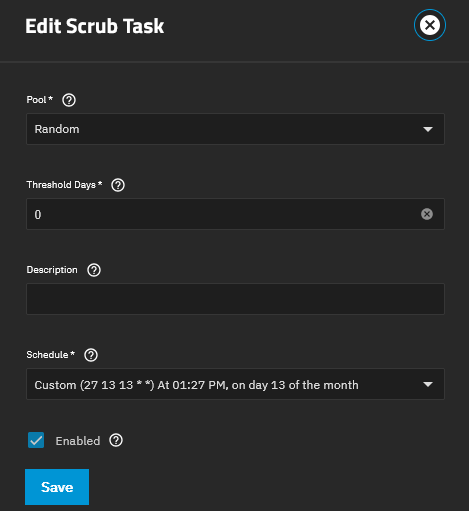
Scrubs are simply not starting with the built in Scrub Tasks. I can start the scrub manually, but no matter what settings I use with Scrub Tasks they will not get started.
Below some information
My testing pool’s zpool status (last scrub was manually triggered and ran without errors):
  pool: Random
 state: ONLINE
  scan: scrub repaired 0B in 00:01:35 with 0 errors on Tue Aug  5 10:21:55 2025
config:

        NAME                                    STATE     READ WRITE CKSUM
        Random                                  ONLINE       0     0     0
          b9d554a0-ef5f-41a6-86d8-d011241ac789  ONLINE       0     0     0

errors: No known data errors
My Scrub Task for the pool (just for testing purposes):
Please post the current output of zpool status Random
Suggestions before I see that output message:
Change Threshold Days to 7.
While it may still not be an issue, at one time there was a problem with running scrubs. It was fixed but it got very confusing for a while. That was back in the FreeNAS days.
root@truenas[~]# zpool status Random
  pool: Random
 state: ONLINE
  scan: scrub repaired 0B in 00:01:35 with 0 errors on Tue Aug  5 10:21:55 2025
config:

        NAME                                    STATE     READ WRITE CKSUM
        Random                                  ONLINE       0     0     0
          b9d554a0-ef5f-41a6-86d8-d011241ac789  ONLINE       0     0     0

errors: No known data errors
I set the Threshold days to 7, rescheduled a scrub to be ran and the result was the same again. Logs below:
Aug 13 23:15:01 truenas CRON[20058]: (root) CMD (PATH="/bin:/sbin:/usr/bin:/usr/sbin:/usr/local/bin:/usr/local/sbin:/root/bin" midclt call pool.scrub.run Random 7 > /dev/null 2> /dev/null)
From the CLI/Shell, while logged in as root, enter the following command: midclt call pool.scrub.run Random 3 and you should have a return of null.
Now wait 5 to 10 seconds and run zpool status then check to see if the scrub running? If not, wait another 10 seconds and check again. While it should be virtually immediate, I don’t know your system ad you have not posted any details other than the TrueNAS version. If no scrub, post that output.
I know it should be the same as the others, just humor me. Communications is key to providing help.
If the scrub did not start, provide the output of these commands: zpool list -H -o name | cat -A zpool list -H -o name | hexdump -C
I’m looking for a bad pool name, possible hidden characters.
If the scrub did start, then do you have another pool you can try? If not, then I’m out of ideas, but How was the pool created? Maybe that is the mystery.
Does anyone think that Random could be a reserved word? if it were all lowercase I might believe it but it has a capital letter in it.
root@truenas[~]# midclt call pool.scrub.run Random 3
[ENOTAUTHENTICATED] Not authenticated
Traceback (most recent call last):
  File "/usr/lib/python3/dist-packages/middlewared/api/base/server/ws_handler/rpc.py", line 323, in process_method_call
    result = await method.call(app, params)
             ^^^^^^^^^^^^^^^^^^^^^^^^^^^^^^
  File "/usr/lib/python3/dist-packages/middlewared/api/base/server/method.py", line 47, in call
    await self.middleware.authorize_method_call(app, self.name, methodobj, params)
  File "/usr/lib/python3/dist-packages/middlewared/main.py", line 866, in authorize_method_call
    raise CallError('Not authenticated', ErrnoMixin.ENOTAUTHENTICATED)
middlewared.service_exception.CallError: [ENOTAUTHENTICATED] Not authenticated
So it has to do something with the root users permissions now? When I run the command with user admin (the WebGUI built-in user) the command returns null and the scrub starts to run.
E: I checked the Auxiliary groups for users admin and root. Admin had builtin_administrators, root did not. After adding the group for root user the command worked. Is this an acceptable way of fixing this? I have not altered the root user settings before other than added public SSH-keys for management. The only thing that could’ve gone wrong is that I’ve accidentally removed the group, not noticed the mistake and saved changes.
I don’t think so. Having to make these changes is very odd. The TrueNAS system should be able to run the scrubs without having to do anything with permissions.
Maybe @HoneyBadger can shed some light on this. I’ve just never heard of having to do this before.
I’m not sure what would have happened then, unless you did accidentally remove it from that usergroup. root is a member of the builtin_administrators group out of the box, even when you install with the truenas_admin account being used - just checked on a few test boxes and it appears that way back to 24.10 for sure.
There’s probably a spot in the middleware audit log that we could look at if you want to check that, but it sounds like it’s been rectified now, unless you somehow bopped it when adding the SSH keys or used the Linux CLI.