How to remove a disk from a 2x1 pool?

hi! Im a complete noob and wanted to extend my current drive to a new disk.

I think what happened is I went to extend and the new drive was not populated in the pick list for some reason so I went the other route of adding the drive to the pool which clearly is not what I intended as it eliminated the redundancy!

How do I remove the disk (sdb) from the pool and create a mirror of the first disk?

TrueNAS starts to remove the disk and then it throws this error:

Error: concurrent.futures.process._RemoteTraceback: 
"""
Traceback (most recent call last):
  File "/usr/lib/python3/dist-packages/middlewared/plugins/zfs_/pool_actions.py", line 71, in __zfs_vdev_operation
    with libzfs.ZFS() as zfs:
  File "libzfs.pyx", line 534, in libzfs.ZFS.__exit__
  File "/usr/lib/python3/dist-packages/middlewared/plugins/zfs_/pool_actions.py", line 76, in __zfs_vdev_operation
    op(target, *args)
  File "/usr/lib/python3/dist-packages/middlewared/plugins/zfs_/pool_actions.py", line 89, in impl
    getattr(target, op)()
  File "libzfs.pyx", line 2386, in libzfs.ZFSVdev.remove
libzfs.ZFSException: cannot remove /dev/disk/by-partuuid/c71c5a2d-5fa6-4a10-992c-5e2e1bae3c90: permission denied

During handling of the above exception, another exception occurred:

Traceback (most recent call last):
  File "/usr/lib/python3.11/concurrent/futures/process.py", line 261, in _process_worker
    r = call_item.fn(*call_item.args, **call_item.kwargs)
        ^^^^^^^^^^^^^^^^^^^^^^^^^^^^^^^^^^^^^^^^^^^^^^^^^
  File "/usr/lib/python3/dist-packages/middlewared/worker.py", line 116, in main_worker
    res = MIDDLEWARE._run(*call_args)
          ^^^^^^^^^^^^^^^^^^^^^^^^^^^
  File "/usr/lib/python3/dist-packages/middlewared/worker.py", line 47, in _run
    return self._call(name, serviceobj, methodobj, args, job=job)
           ^^^^^^^^^^^^^^^^^^^^^^^^^^^^^^^^^^^^^^^^^^^^^^^^^^^^^^
  File "/usr/lib/python3/dist-packages/middlewared/worker.py", line 41, in _call
    return methodobj(*params)
           ^^^^^^^^^^^^^^^^^^
  File "/usr/lib/python3/dist-packages/middlewared/schema/processor.py", line 178, in nf
    return func(*args, **kwargs)
           ^^^^^^^^^^^^^^^^^^^^^
  File "/usr/lib/python3/dist-packages/middlewared/plugins/zfs_/pool_actions.py", line 125, in remove
    self.detach_remove_impl('remove', name, label, options)
  File "/usr/lib/python3/dist-packages/middlewared/plugins/zfs_/pool_actions.py", line 92, in detach_remove_impl
    self.__zfs_vdev_operation(name, label, impl)
  File "/usr/lib/python3/dist-packages/middlewared/plugins/zfs_/pool_actions.py", line 78, in __zfs_vdev_operation
    raise CallError(str(e), e.code)
middlewared.service_exception.CallError: [EZFS_PERM] cannot remove /dev/disk/by-partuuid/c71c5a2d-5fa6-4a10-992c-5e2e1bae3c90: permission denied
"""

The above exception was the direct cause of the following exception:

Traceback (most recent call last):
  File "/usr/lib/python3/dist-packages/middlewared/job.py", line 515, in run
    await self.future
  File "/usr/lib/python3/dist-packages/middlewared/job.py", line 560, in __run_body
    rv = await self.method(*args)
         ^^^^^^^^^^^^^^^^^^^^^^^^
  File "/usr/lib/python3/dist-packages/middlewared/schema/processor.py", line 174, in nf
    return await func(*args, **kwargs)
           ^^^^^^^^^^^^^^^^^^^^^^^^^^^
  File "/usr/lib/python3/dist-packages/middlewared/schema/processor.py", line 48, in nf
    res = await f(*args, **kwargs)
          ^^^^^^^^^^^^^^^^^^^^^^^^
  File "/usr/lib/python3/dist-packages/middlewared/plugins/pool_/pool_disk_operations.py", line 229, in remove
    await self.middleware.call('zfs.pool.remove', pool['name'], found[1]['guid'])
  File "/usr/lib/python3/dist-packages/middlewared/main.py", line 1005, in call
    return await self._call(
           ^^^^^^^^^^^^^^^^^
  File "/usr/lib/python3/dist-packages/middlewared/main.py", line 728, in _call
    return await self._call_worker(name, *prepared_call.args)
           ^^^^^^^^^^^^^^^^^^^^^^^^^^^^^^^^^^^^^^^^^^^^^^^^^^
  File "/usr/lib/python3/dist-packages/middlewared/main.py", line 734, in _call_worker
    return await self.run_in_proc(main_worker, name, args, job)
           ^^^^^^^^^^^^^^^^^^^^^^^^^^^^^^^^^^^^^^^^^^^^^^^^^^^^
  File "/usr/lib/python3/dist-packages/middlewared/main.py", line 640, in run_in_proc
    return await self.run_in_executor(self.__procpool, method, *args, **kwargs)
           ^^^^^^^^^^^^^^^^^^^^^^^^^^^^^^^^^^^^^^^^^^^^^^^^^^^^^^^^^^^^^^^^^^^^
  File "/usr/lib/python3/dist-packages/middlewared/main.py", line 624, in run_in_executor
    return await loop.run_in_executor(pool, functools.partial(method, *args, **kwargs))
           ^^^^^^^^^^^^^^^^^^^^^^^^^^^^^^^^^^^^^^^^^^^^^^^^^^^^^^^^^^^^^^^^^^^^^^^^^^^^
middlewared.service_exception.CallError: [EZFS_PERM] cannot remove /dev/disk/by-partuuid/c71c5a2d-5fa6-4a10-992c-5e2e1bae3c90: permission denied

I have a snapshot of Pool1 (created in the GUI - is this the same as a checkpoint?) and the TrueNAS configuration file before adding the 2nd disk as an attempt to capture the state of the system before I made this change. Will this help us roll back?

A snapshot is not a checkpoint. I want to verify what your current Pool1 looks like.

Please run the following command and post back the results using Preformatted Text (</>) or Ctrl + e.

sudo zpool list -v
1 Like

Single stripe VDEV and adding a disk to make a mirror.
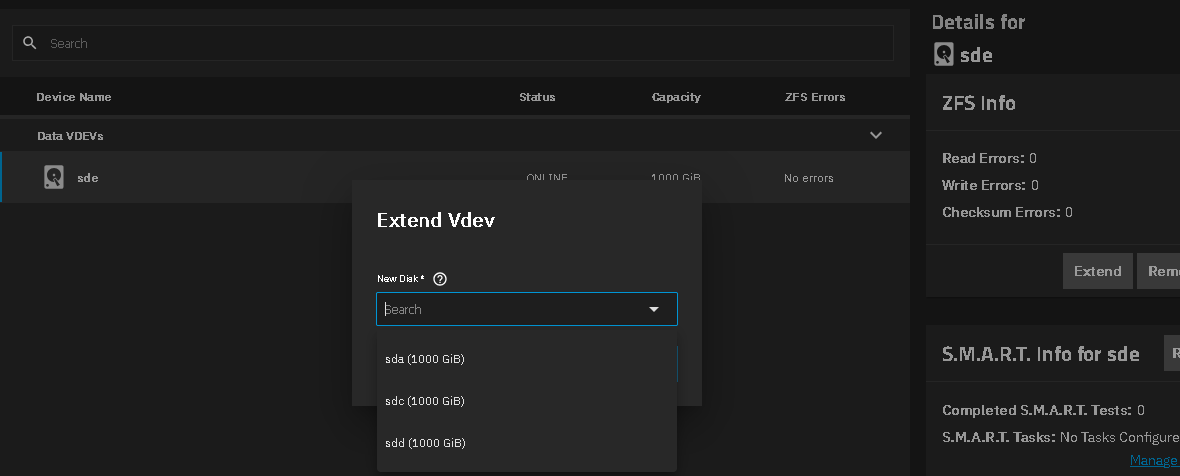
Select Storage, then for your pool, select Manage Devices.
Select the VDEV and then Extend. Chose the disk to add
It should end up looking like the third picture.


2 Likes

thank you for those screenshots. For some reason my pick list didn’t populate with my unused disk (but perhaps I clicked the wrong extend button)

Here’s the output you requested:

NAME                                     SIZE  ALLOC   FREE  CKPOINT  EXPANDSZ   FRAG    CAP  DEDUP    HEALTH  ALTROOT
BackupPool                              5.45T   353G  5.11T        -         -     0%     6%  1.00x    ONLINE  /mnt
  3521fe72-5f06-4853-9aa5-75621ec6ef70  5.46T   353G  5.11T        -         -     0%  6.31%      -    ONLINE
Pool1                                   25.4T  5.05T  20.4T        -         -     0%    19%  1.00x  DEGRADED  /mnt
  34f7484d-6074-4f16-af41-ba714767a30c  12.7T  5.03T  7.69T        -         -     1%  39.5%      -    ONLINE
  c71c5a2d-5fa6-4a10-992c-5e2e1bae3c90  12.7T  22.7G  12.7T        -         -     0%  0.17%      -  DEGRADED
boot-pool                                236G  2.87G   233G        -         -     0%     1%  1.00x    ONLINE  -
  nvme0n1p3                              238G  2.87G   233G        -         -     0%  1.21%      -    ONLINE

just minutes after this snafu happened, my 2nd disk got degraded (so ignore this, I’m in the process of replacing it)

please let me know if it is possible to remove the disk from the pool - I read around other posts and it doesn’t sound possible and that I need to start over - is this true?

So I have a replication task running right now to backup all my data to an external disk. I couldn’t believe how easy it was and love how flexible it is once you’ve organized all your data sets. I’m prepared to nuke my original pool and start over and create the mirror correctly using the steps you just shared.

But if it possible to address the permissions issue and remove the disk, please let me know.

I feel this was all a catalyst to get my spare disk out sooner and learn how to automate backups - what a journey!

Let your ZFS replication go. I would try to run a manual scrub on Pool1 and see how that comes back. You have enough free space so it should let you remove the second disk from Pool1. I tested adding and removing inside a VirtualBox VM on Fangtooth 25.04.2.4 I didn’t have any troubles but my pool for testing was empty.

You could also try a reboot and then attempt

1 Like

quick update: I swapped both drives to isolate whether it was the 2nd SATA connector. The scrub completed & cleared all the previous ZFS errors so I’m going to assume reseating helped.

It’s finishing up an extended smart test & if this passes I’ll clear the degraded status & make at attempt to remove the drive from the pool again (rebooting if necessary)

When one is logged in as truenas_admin are there certain tasks that need to be run as root from the CLI?

@SmallBarky when you removed the disk in your VM instance (thanks for trying it out btw!), did you do it in the GUI or in the CLI? Who were you logged in as?

If all else fails, I will rerun the replication task (assume it will send only the delta snapshot), nuke the pool & create the mirror from scratch & replicate going the other direction to populate it.

I’d rather learn to remove the disk & avoid creating a large resilvering-like window though!

You use the GUI for almost all tasks. Using the CLI can cause problems in the GUI. truenas_admin should be able to do all tasks. I was logged in as truenas_admin and used the GUI to do the add and remove.

1 Like

thanks for confirming you did it from the GUI and that I should stick to the GUI as much as possible.

ok - it took forever but the extended smart test finally finished with no errors. So I cleared the degraded status:

zfs clear Pool1

My replication task successfully pushed the periodic snapshot at midnight.

I couldn’t figure how to push a manual snapshot so I just rsync’ed a small directory to my local computer.

Now that all my data is safe, I made an attempt to remove what should be an empty disk from my main pool. Initially it says:

Initiating removal of '3003935003089860600' ZFS device

and it returns the same error as I got initially above (same partuuid):

middlewared.service_exception.CallError: [EZFS_PERM] cannot remove /dev/disk/by-partuuid/c71c5a2d-5fa6-4a10-992c-5e2e1bae3c90: permission denied

At this point, I can only assume your hunch is right that you were able to remove the disk because there were no datasets on it.

Is there an easy way to push a manual snapshot to my BackupPool so I don’t need to wait until midnight for my automated task?

I’m pretty much ready to nuke the entire pool and replicate all the datasets from the BackupPool back to a newly recreated pool that is a mirror.

I assume this will accurately rebuild my pool from backup with my shares intact.

I have yet another backup of the most critical data on an offline disk.

Are there any other details I might have missed before I nuke my main pool?

I’m also curious had I created a checkpoint (not snapshot as you confirmed) prior to adding the disk to my pool incorrectly, if rolling back would have been possible and saved a lot of work?

I don’t think you have enough free space on the backup pool for the data on your Pool1. Going by the sudo zpool list -v results.

@HoneyBadger looking for second opinion on removal of a disk from a 2 wide stripe VDEV

thanks for noticing that. Amazingly enough through the miracle of ZFS, a few daily snapshots of my datasets fit w 2.7% to spare in the backup pool!

I just finished duplicating data a 2nd time on a few offline disks but I’ll wait to see if HoneyBadger has anything to add in regards to solving the permissions problem removing a disk or if starting over is best.

Weird, a permission issue from a zfs operation would imply that you aren’t running as the necessary service to do it. The permissions of files or datasets in the pool shouldn’t impact the ability to detach the disk itself from underneath, and it does look like you’ve got all of the necessary space.

What version of TrueNAS are you running @udance4ever ?

You should aim to keep pools below 80% capacity. 97% is well into the danger zone of losing the pool and crashing. We have seen the pools lock up or become unrecoverable.

1 Like

thank you for the heads up! This is only temporary and I will immediately delete the number of datasets I replicate after I get my mirrored pool set up correctly.

to be clear: the permissions error is happening at the device level:

[EZFS_PERM] cannot remove /dev/disk/by-partuuid/c71c5a2d-5fa6-4a10-992c-5e2e1bae3c90: permission denied

I can only assume SmallBarky’s hunch the pool cannot have any datasets in it to remove a disk from the pool and the error handling could be clearer.

I’m on 25.4

Right, it was just to clarify that “permission denied” is almost like a sudo kind of thing going on. This error is popping up in the webUI when you do it, or are you on the CLI?

Nope. Datasets, zvols, you can remove from a fully functional and in-use system and it will shrink (provided you’re only working with mirrors or stripes) and it should work.

This is a two disk stripe VDEV

“Stripes are just 1-way mirrors” -ZFS, Probably

1 Like

WebUI. interesting you mention sudo as that was my first reaction when I saw that error. I’d like to give it a shot on the CLI before I hit the nuke button.

I tried:

$ sudo zpool detach Pool1 /dev/disk/by-partuuid/c71c5a2d-5fa6-4a10-992c-5e2e1bae3c90
cannot detach /dev/disk/by-partuuid/c71c5a2d-5fa6-4a10-992c-5e2e1bae3c90: only applicable to mirror and replacing devs

What is the correct command to remove a stripe from the pool?

zpool remove pool device should do it. If the command succeeds then you’ll want to monitor the actual removal status with zpool status -v to show the evacuation process.

1 Like

that worked great - much easier than recreating the pool & copying data back over! :slight_smile:

remove: Removal of vdev 1 copied 33.3G in 0h3m, completed on Wed Oct 15 09:14:50 2025
        274K memory used for removed device mappings

@HoneyBadger I followed your steps and it’s now resilvering. thanks for providing clear screenshots.

  scan: resilver in progress since Wed Oct 15 09:21:25 2025
        368G / 5.19T scanned at 1.99G/s, 21.5G / 5.19T issued at 119M/s
        21.5G resilvered, 0.40% done, 12:40:14 to go

as soon as this is done, I will promptly delete datasets off BackupPool to get it under 80%.

You both have provided excellent support - feels good to be part of the TrueNAS community - I’m glad I decided to be patient :sweat_smile: thanks again.

ps. Where do we file a bug to fix the missing sudo in the GUI?

Let’s make sure @SmallBarky gets their props for the screenshots as well :wink:

Use the “smiley face” icon in the top toolbar to “Send Feedback” and check off “Include debug” - that’s the easiest way. Mention the time/date of the attempts to remove the drive.

It’s definitely not something that I’m expecting to see, and if there was a broken sudo or permissions problem we’d be seeing it more widespread. I just did a test removal on my own through the GUI and it worked correctly. :thinking: