
Just upgraded to Scale 25.04.1. Tranmission runs fine, but I would like to set up a watch folder for automatic torrent downloading. I’m a total noob, but usually I can google a solution. But here I’m stuck, I can’t even figure out how to access the settings.json. Also from what I read getting the changes to stick after restart seems to not work?
Any help would be much appreciated.
I switched from Transmission to qBittorrent quite a while ago, but hopefully this will help…
The first thing you need to do is set up a drive mapping from within the Docker container to the outside pool. For me, this means I created and mapped /watch from within the Docker container to /mnt/pool/plex/Torrent Watch which is mapped as a SMB drive as P:\Torrent Watch.
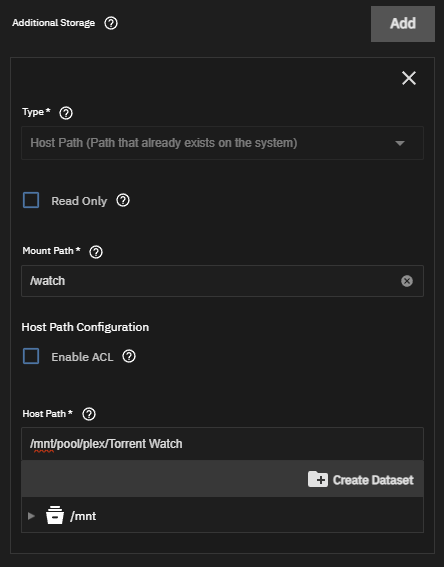
The next part is to configure the directory. From qBittorrent, I set up the following:
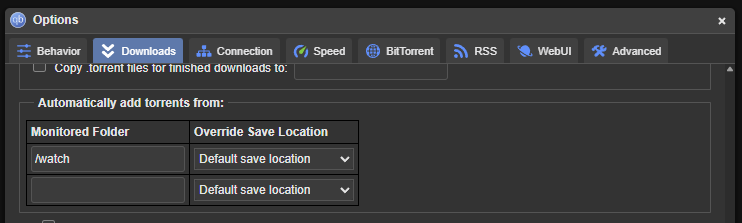
For Transmission, you will need to edit the settings.json file and add these two lines:
	"watch-dir": "/watch",
	"watch-dir-enabled": true
Mind spaces in paths tough…
Thanks for the reply, I have set up the drive mappings in the container, incl a watch folder. But I can’t figure out how to access the settings.json file. trying to navigate the shell i get permission denied to even navigate to a folder.
You will need to go to the Apps → Transmission → Shell (icon) to access the CLI. Once logged in, go to the /config directory for the settings.json file.