Setting permissions so apps can use Generic type datasets?

I’m running SCALE/Community Goldeye on a UGREEN DXP4800+.

I’m trying to get Syncthing to work. Unfortunately, Syncthing doesn’t work properly on datasets set up using the Apps share type because the case-insensitive file system screws up its function. If I delete a file on my computer, Syncthing puts it right back as though I’d never deleted it. I have to delete it a second time before Syncthing properly recognizes the deletion. From posts I’ve found on forums, this is a known limitation of Syncthing caused by the case-insensitive file system, with no likely solution. I haven’t found a workaround anywhere.

I’m trying to get apps to work with a Generic share type dataset to avoid the case-insensitive problem. Unfortunately, 90% of help material seems to focus on SMB or Apps share type datasets, and the few I’ve found that cover POSIX permissions don’t talk much about using apps.

A file sync machine was one of the main reasons I purchased and set up a NAS. If the answer is just that apps will only work with SMB type permissions–aka, Syncthing won’t work properly–then I might as well just swap to Debian with OpenZFS. I’d rather stick to TrueNAS if possible so I don’t waste the hours I’ve made taking notes, lol.

I’m using Filebrowser as a convenient way to test this. I’ve added test_dataset to its Additional Storage, set the host path and given it the mount path of /test_dataset. test_dataset shows up as a folder in the Filebrowser home directory, so it seems to be set up correctly.

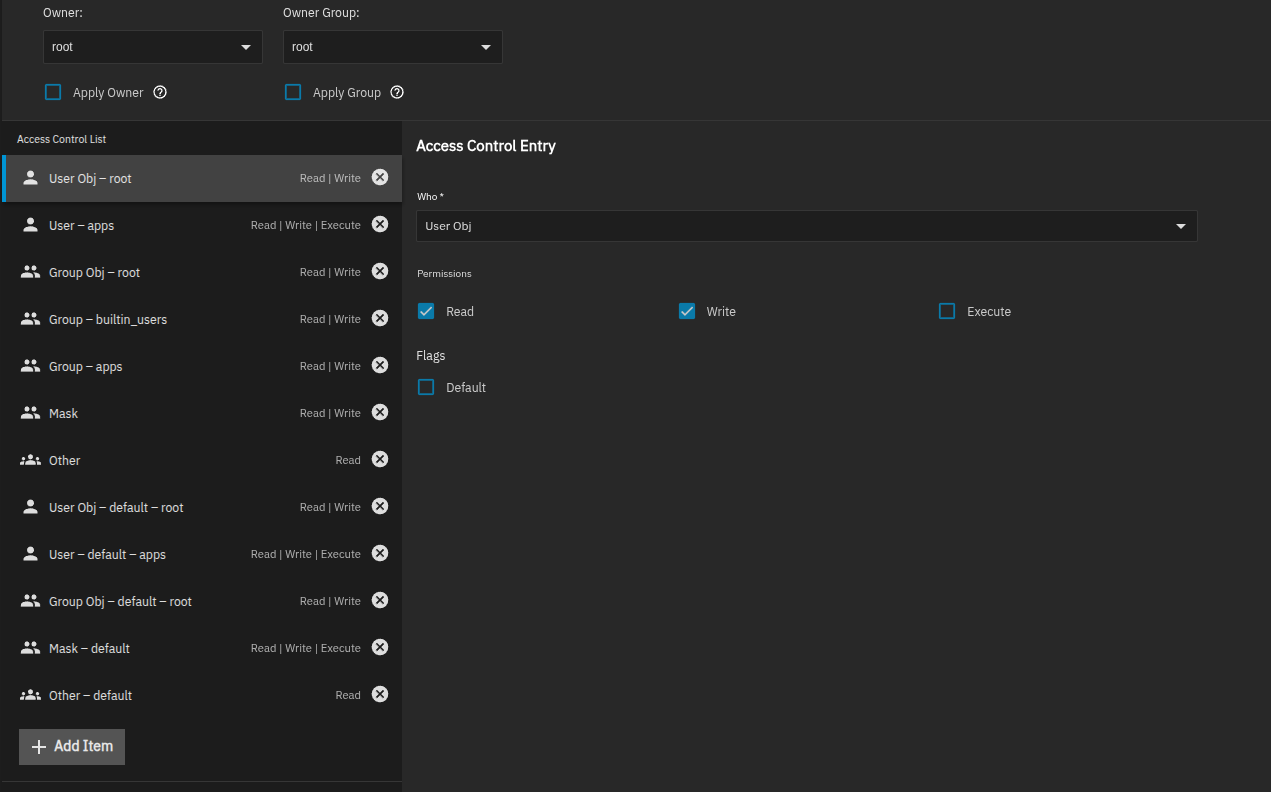
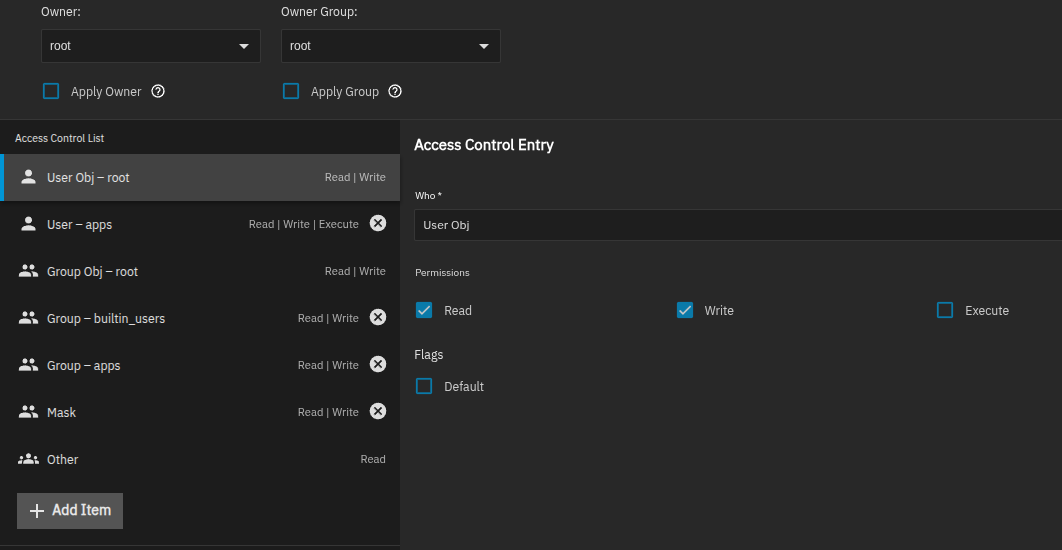
I’ve attached pictures of the current permissions lists I’ve been trying for a test dataset. Owner and Owner Group are left as root. On the second screenshot, I’ve deleted some of the default permissions in case they were causing conflicts. Both setups just lead to Error 403 when I try to upload a file to the dataset using Filebrowser.

Any insights or help in getting apps to work with Generic datasets? Does it even work, or am I just chasing my tail?
1 Like

Hi, @RxgfHQBrmBlx.

I’m relatively new to TrueNAS, so what I’m doing might not be a best practice. It works, though, so you might find it helpful.

I’ve installed Komodo as a TrueNAS app and everything else is a compose deployed using Komodo.

Here’s the rest of the story.

User/Group:

  • I’ve created two user/group pairs as:
    • containersvc (PUID/GUID: 2000)
    • containersvc-admin (PUID/GUID: 2001)
  • Services that need access to “data” datasets run as containersvc-admin (or as root if necessary). All other services run as containersvc (or as root if necessary)
  • Examples of services that run as containersvc-admin are Syncthing, Duplicati, File Browser

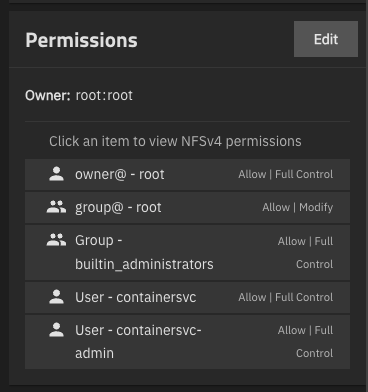
Each app gets its own “app” dataset. Every app’s dataset is ACL’d like this:

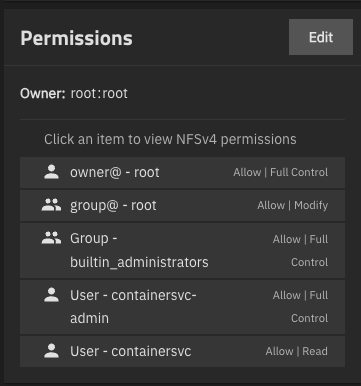
For the “data” datasets, including the datasets that Syncthing syncs, the ACLs are:

To create the “data” datasets, the pattern I’ve found that always works is to create them as “Multiprotocol” and then uncheck the “Create NFS Share” and “Create SMB Share” checkboxes. Then just set the ACLs.

In Syncthing’s compose, I set PUID and PGID to 2001 so it’s running as “containersvc-admin”. I map in the “data” datasets I want to sync. I map everything into Syncthing under a made-up path of /syncthing-folders. An example is:

       - /mnt/data/Music:/syncthing-folders/music

That’s really it. I run a couple of music systems as containers (Roon & Lyrion). Those don’t need write access, so they run as 2000 and then I map the same Music folder in. Because containersvc only has Read, that guarantees read only for those services.

File Browser was a little trick to get working in a way that made it easy to see and manage all of my app and data datasets. I ultimately did it with this bit in volumes in the File Browser compose:

    volumes:
      # File Browser’s own config/database
      - /mnt/apps/appdata/filebrowser/database:/database
      - /mnt/apps/appdata/filebrowser/config:/config

      # Datasets that contain child datasets (needs rshared)
      - type: bind
        source: /mnt/apps/appdata
        target: /srv/appdata
        bind:
          propagation: rshared
      - type: bind
        source: /mnt/data
        target: /srv/data
        bind:
          propagation: rshared

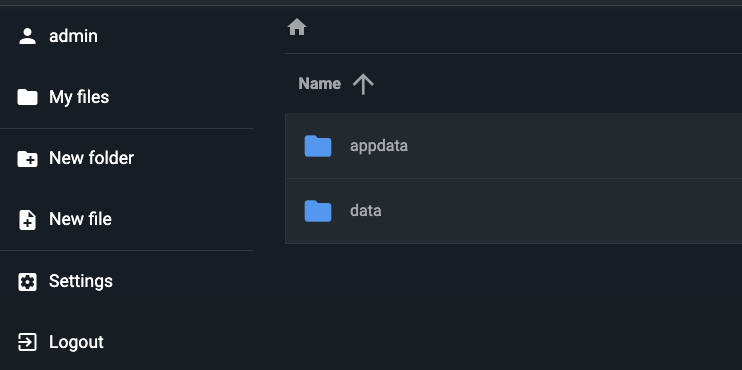
With the ACL model I showed you above, and File Browser running as containersvc-admin (2001), this gives me two root folders in File Browser and everything underneath is writeable.

So in my case, it looks like this at the root, which may be what you want, too:

Hopefully something here gets you moving in the right direction!

Hey, thanks! Really appreciate the help.

So you’re setting datasets up as Multiprotocol? From what I understand, Multiprotocol shares use SMB-type permissions but will work for both SMB and NFS. Do you know if that sets the dataset to use a case-insensitive filesystem like a typical SMB setup, or does it use normal case-sensitive filing and then sort of superimpose SMB permissions over the top?

I did a quick test. I created new datasets, one with each option. The only changes I made duirng creation were to disable the creation of shares.

Here’s what ZFS has to say about their case sensitivity:

zfs get casesensitivity \
  data/test-apps \
  data/test-generic \
  data/test-multiprotocol \
  data/test-SMB

NAME                     PROPERTY         VALUE        SOURCE
data/test-SMB            casesensitivity  insensitive  -
data/test-apps           casesensitivity  sensitive    -
data/test-generic        casesensitivity  sensitive    -
data/test-multiprotocol  casesensitivity  sensitive    -

The only thing the apps preset does is automatically add the apps user to the ACL list…

1 Like

It sets NFSv4 acltype, sets aclmode to passthrough, and sets a default ACL that grants apps permissions. This allows apps in theory to chmod to their heart’s content, but apps user 568 will still have access to files (obviating a lot of permissions hurdles in theory – until users modify the ACL recursively for various reasons). We could in theory tweak it if there is conclusive feedback that some settings work best for apps that aren’t beneficial overall.

2 Likes

Hmm, you’re right. When I query the case sensitivity on my test dataset, it comes back as sensitive. The error I was getting from Syncthing was error=“file modified but not rescanned; will try again later”. From a couple of threads I found, the Syncthing team seemed to think this error was mostly likely caused by a case-only rename. Based on the SMB case-insensitivity, I thought that might be the culprit. Apparently that’s not the case. (No pun intended.) Guess I’m back to square one, lol.

Was this a one-time error on a single file, or a group of files?

It sounds like you’ve already raised the issue on the Syncthing forum and gotten feedback, so you don’t have to go deep here. I’m a long-time Syncthing user and I don’t recall ever seeing that error though I think it’s typically caused by something having the file open/locked.

Haven’t raised it in the Syncthing forums, but I found existing posts about that error message. I’m having issues with Syncthing putting a file back on the computer a few moments after I delete it. I’ve got a laptop and a desktop I’m trying to sync through the NAS. Both are running linux Mint. It wasn’t a problem when I was first testing it, but then I synced the Desktop folders on both machines and started having issues. I can create a file, like just a blank text file, wait for it to appear on the other machine, but then if I delete it, Syncthing just puts it back. If I delete it a second time, it stays gone and syncs through the whole setup. It’s not consistent, though. I’ve been playing around with it, trying to figure out what conditions cause it. Based on the log error message and the Syncthing forums, I thought it must be due to case insensitivity, but apparently that’s not the issued. I’m not editing the file when I delete it. For testing, I was just using Templates to make a new blank text file, then name it. I don’t know if that would create a lock file for a short time or not. I know Syncthing has problems with file renames where only the case is changed, but since I’m changing Blank Note File.txt to something.txt, I don’t know why that would cause an issue.