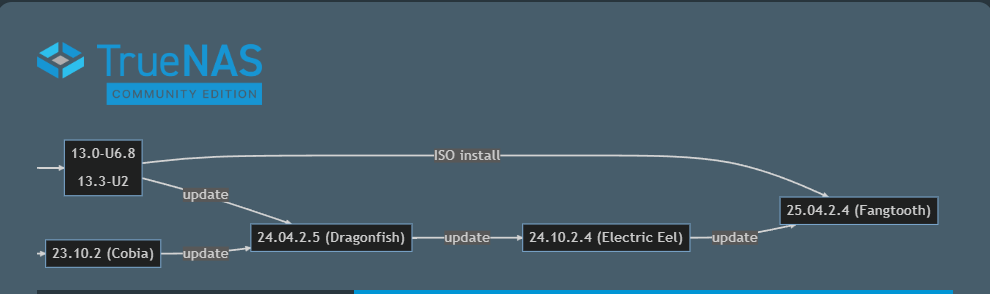
I’ve been running TN Core w/o incident for nearly two years. Just updated to 13.0-U6.8 because that seemed easy enough. Looks like moving to the Community Supported 25.04.2.4 is generally recommended. Given my modest requirements and the lack of problems w my EOL version of TN, I’m not sure I should change.
I use TN for remote SMB access via a WireGuard VPN running on a dedicate RPi. I also have FTP access enabled for a single application (w a single “user” and PW), also reached via the WG VPN. No port forwarding to the FTP server, so it’s not visible on the internet except via WG VPN. It all works.
Looks like the 25.04.2.4 upgrade has been fairly painless for those w configurations as simple as mine is, as well as for most w far more demanding requirements.
QUESTION: is the move to 25.04.2.4 Community Edition really as simple as selecting it from the GUI menu? I found the Migration Overview a bit perplexing. It DOES seem that I need to configure a separate ADMIN account since ROOT cannot be used for access in 25.04.2.4.
I have no “CORE configuration items cannot migrate to SCALE” so that’s not a concern.
I’m trying to anticipate any “gotchas” that would leave my NAS inaccessible. So, since my level of comprehension is on the low side, I may be better w what I have which is working well-enough. I KNOW I can make things worse by an upgrade gone bad…
They have a pretty neat diagramm in the release notes outlining the update path you should take.
If you use any smb aux parameters i’d suggest removing them before updating.
Thank you for the immediately reply. I have no Auxillary Parameters in my SMB Service configuration. I had reviewed the diagram, which is what made me consider the update.
And the new ADMIN account to replace the deprecated ROOT login? That would seem to be clearly needed to be created before the update, and tested, but HOW, since AFAIK, the GUI access to TN 13.0-U6.8 is ONLY via ROOT. Or am I missing something?
I did not go through the update process from core to scale, since i moved to scale in 2022 during the first beta phase. But i think it will get created automatically during one of the step-updates you have to make.
The typical route is to migrate to 25.X and login as truenas_admin, then import your config file, which will erase the truenas_admin account and restore Root (since that’s what is in your Core config). Then you can recreate the admin account and disable root access:
Thanks. I’ve read the article and the linked Preparing to Migrate one. Neither references 2FA, which IS enabled on my current system. Perhaps that should be disabled until after the update?
If your hardware will need replacing within the next year or two and CORE is working well for you stay where you are. When you bring in your new hardware then that’s the time to migrate. If however you’re one of these people that run hardware like trigger’s broom in only fools and horses (UK reference) then migrate within the next year or two.
Well, considering my NAS is built from a GB mobo from 2011, I may be in queue for an award myself. It’s plenty to see me in, and I expect no hardware changes. Thanks.
I guess picking 2024 to rebuild on a 4U rackmount NAS case with 8TB x 6 in RaidZ2 and on a supermicro board with a 10G ethernet card and 32GB RAM was ill-conceived because I am on TN Core 13.0-U6.8 and I think I will stay on this for quite awhile. Maybe even by the time 8TB SSD SATA drives will be sub $300. Then replace all my 8TB 3.5” with 8 TB SSD, one at a time and then when done it’s read/write will be multiples of it’s current. Yeah, that’s like 6 years out, then move to Scale.