Server defaulting to unfamiliar GRUB menu, randomly disconnected storage pool, constant Checksum errors

I have no idea how to best title this thread, because I have had SO many issues in the last 6 months that are very likely all related, so… I just tried to estimate which were the most important. (I am a total idiot as far as TrueNAS and have followed video tutorials for everything so far. I understand almost nothing, just doing my best). Hopefully this is resolved one way or another and helps someone else down the road. SO.

(For context, system info:
ASRock H670m ITX-ax motherboard
Intel Core i5-12600K CPU
Teamgroup T-Create 2x 16gb RAM
No GPU, integrated…
3x 4TB HDD’s in RAIDZ1, 2x are IronWolf NAS, one of which is the Pro version, 1x is the Skyhawk video recording drive.
TrueNAS Scale 25.10.1)

I have basically had CONSTANT checksum errors, ranging from 15-70 errors each month, per disk… almost perfectly equal numbers of errors across all 3 of my storage disks (it would usually be ~62 on two, maybe 63 on the third.. I would clear the errors ~monthly, and it would repeat. Now listen.. no matter WHAT I tried, no matter HOW many scrubs, how many resets, no matter what I did, I would still CONSTANTLY have my ZFS pool in the TrueNAS GUI showing as “unhealthy,” and I could never, ever figure out why, despite TrueNAS (AND the “Scrutiny” app telling me that ALL of my drives are perfectly healthy except for one failing a minor test, I don’t remember which..) At best, I had ~13 checksum errors per disk in a month). My searching led me to believe this is usually an issue with cabling or my storage controller chip on my motherboard. Well, I didn’t have money to replace it so I just unplugged/re-seated my HDD cables 3 times, kept scrubbing, making backups, and crossing fingers.

About two months(?) ago I had an issue where I couldn’t log in to my server, and had to re-install TrueNAS, I have a post about it: here
Basically, got a “kernel panic” error at boot and had to re-install TrueNAS.

NOW… just this week, again, smart devices not working, Jellyfin server unresponsive, so I log into my server GUI.. Guess what? I can log into it just fine, but I check my storage pool and it says it detects 3 drives that were.. IIRC.. “exported to another pool”? I am trying to find the exact error message in my Google photos but I can’t, so I don’t remember exactly what the message was. Point is, I tried to import the pool, but it would not show up on the drop down menu in the GUI. It was just blank when I went to the “import pool” button…

So, I tried to do it manually, as I said, via the following comand, which I got from Google Gemini by asking the stupid AI for help: "sudo zpool import -f -R /mnt/ (“Pool Name”)”

And in response, I got the error message:
”cannot import ‘JacobsNAS’: I/O error
Destroy and re-create the pool from a backup source.”

So.. my memory is hazy and I am not certain this is exactly right, but I believe my next move was to use the actual Pool ID number with the same command.. so I tried, IIRC:
”bash
sudo zpool import -f -R /mnt/ (pool partition ID#)”

Again, at the recommendation of Google Gemini AI, and THIS time.. I got a frozen screen, for an hour. I then tried to log into the server GUI again, and couldn’t. At all. So.. I plugged in my portable monitor, mouse and keyboard to the server, and THIS is what I saw on the screen:
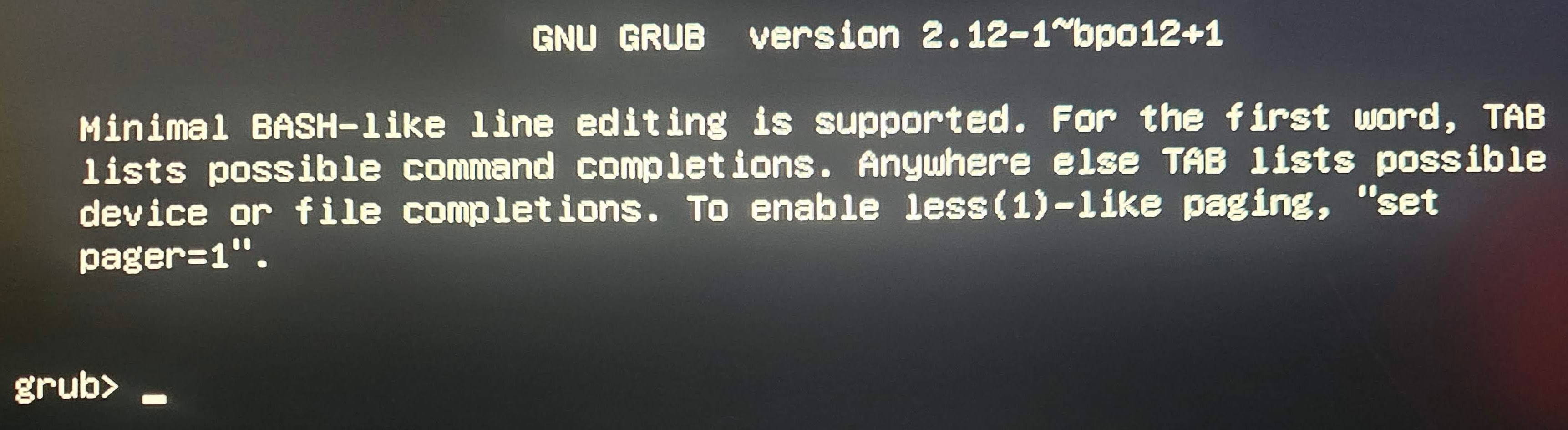
I have no idea what I was looking at here.

Now, I’m trying to re-install TrueNAS Scale 25.10.1 yet again because, idk what else to do, and I’m getting these errors..

Which my searching indicates implies an issue with my USB installation media, or with my mobo’s USB controller. So. I am re-flashing my USB intallation media (old flash drive) and hoping that it will help, if no I will try a micro SD card in a USB adapter.

(BTW, I just accidentally ruined an SD card with photos from the 5 day trip my partner and I took to see the total solar eclipse in 2024, including eclipse photos that I cared a lot about, because I rushed through the Balena Etcher menus out of frustration.. and now I’m even more frustrated, obviously :frowning:)

But. I was hoping that all of this info might lead someone smarter than me to an idea for an underlying problem.. considering that I’ve had nearly constant issues with this server, I am betting that my motherboard or some other hardware aside from my HDD’s is bad… but I need advice for sure, to help figure that out. Please :confused: Thank you SOOO much…

**EDIT**: I have tried reformatting and re-installing the TrueNAS installation .iso to the same USB drive, which gave the same errors as shown above, and then, on my only spare USB device (a brand new micro SD card in a USB adapter), which also gave the same exact errors (“cannot enumerate USB device”) Soooooo…. at a loss here. Do I need to buy a new mobo?

Booting from a live Linux version and running memtest86 and CPU stress tests is where I would start. You want at least 5 or more runs of the memory test.

If that all comes back clean, then we can work on checking the status of your TrueNAS and see about getting the pool back.

5 Likes

Thank you for your help. I installed memtest86 onto a Ventoy bootable USB drive, apparently it comes as a standalone iso.. but how do I ——- NEVERMIND. See below. Memtest86 ran fine (I think) with what seem to be terrible, awful results. Again see below :’) Thank you

Well. Guess what :sweat_smile: I don’t know if I did something wrong in beginning this test, I used Ventoy, and started memtest86 with an option I don’t recall (it gave like 4 options at the startup menu, I only recall that one was “legacy with keyboard support” and one was “keyboard support ____”) but, I doubt it makes much of a difference. This is the results I’m getting so far… literally 0 “pass” and 14,000 “fail”… so… wtf? How is my memory 100% busted like that? What does this tell me?
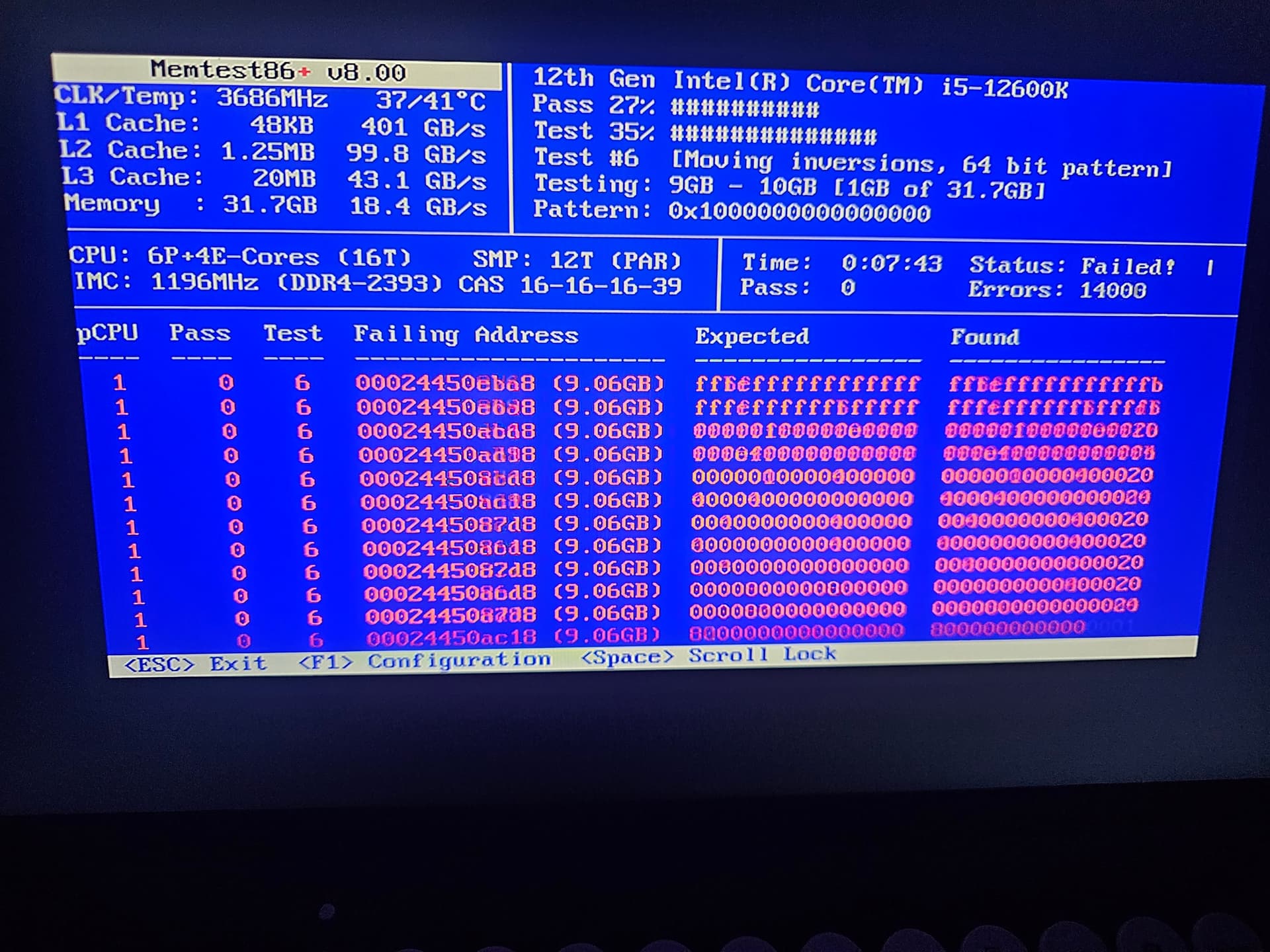
To be clear, this is still running, taking forever, but I doubt it needs to run any longer for us to know either 1. I started the test with the wrong settings or 2. My RAM is somehow messed up BAD…

I don’t know. Thank you for any input. Again, this is RAM I bought only a year ago and was T-Create RAM that cost a premium.. why would it just suddenly stop working, both sticks at the same time?

I found a method for doing a CPU stress test using a Debian Live image, which was:

Bash

apt update
apt install stress-ng s-tui

then running “stress-ng” and “s-tui”… is this correct? Thank you as always

There’s also mprime which will stress and cook your CPU and RAM and test for stability.

you should repeat the test one stick at time, maybe only one is faulted.

BTW, your ram frequency is way low for a 12 gen platform, unless you are not really using low frequency ram

Pretty sure that is DDR4, not DDR5 ram. ~3600Mhz is pretty standard for DDR4.

Honestly kinda clutch that LGA1700 had motherboards that support both. Considering OP might be forced to buy new ram (hopefully he can RMA, most vendors have lifetime warranty), he is lucky that he won’t be paying the crazy price premium that DDR5 has had in the last couple of months…

1 Like

At this point there’s no reason to think that RAM ever worked properly, and as you describe in your original post, you’ve had issues with the system from the very start, basically.

It could be due to modules being improperly seated so test that first. Also try disabling any enabled memory overclocking (XMP/DOCP/EXPO) just to see if it changes anything.

2 Likes

Yep they are for sure ddr4, but i see 2393mhz… 3600mhz on top Is not the CPU frequency?
Also the bandwith 18.4 seems odd.

He also says that they have 1 year, hopefully he can RMA… And if only 1 Stick Is defected at least can use the Nas with 1 only Stick meanwhile replacement arrive

1 Like

Whoops, you’re 100% correct. Mixed up cpu 3.6Ghz for ram frequency

1 Like

Not that a lower RAM speed can create instability, but to me Is worth to check what settings are selected in BIOS because to me something feels very off

Never heard of…
“MemTest86 v8.00” looks strange (current is 11.6), as does “DDR4-2393” [sic] instead of “2933”.

You may want to download the latest version, check that there are NO overclocking settings in BIOS and re-run the test. But it walks like bad RAM and quacks like bad RAM.

Quick reply as I continue to troubleshoot, thank you everyone as always. I’m sorry this has become a basic PC troubleshooting thread on the TrueNAS forum but I am very appreciative.

@Fleshmauler Exactly that, it was the cheapest mobo I could get with 2x network ports, cheap CPU platform w/ DDR4 ram, DDR5 didn’t seem worth it for a NAS (6 drives max) and media/HA server.. I hope I don’t have to replace them or that they’re warrantied, the price on the ones I have is up ~$100 from what I paid.. ECC seems even more expensive too. Geeze.

@etorix Thank you, I don’t recall where I downloaded it, I’m making a new bootable drive now to re-run it.

And as for the weird clock speed, I will check my BIOS.. I could’ve accidentally done something dumb there, I thought it was set to an XMP profile, I will make sure it’s standard settings before the test.

Will report back shortly, thank you all

This warranted a tangent…

MY GOD. I just checked. I paid $54 for that 32GB kit of RAM in May ‘24. It’s $250 right now. A 400% increase?? What the hell has happened? Did I miss another chip shortage? Is it just tariffs? :open_mouth: Jeeeezus. Wow, well anyway.. I just checked and thank god they are under warranty, “limited lifetime” so hopefully I won’t have issues getting a replacement… anyway, back to the issue:

-I checked that XMP was off, not intuitive on ASRock BIOS, just set XMP profile to “auto,” apparently.
-I removed one stick at a time, ran the latest, official memtest86, much better UI this time, on each stick. The first I ran in sequential CPU mode thinking it would help to also see if CPU cores were faulty, not knowing it will tell you which ones had errors anyway.

  • Stick “1” I’ll call it, the test failed on pass 1 due to “too many errors,” basically nothing but errors. I will share the logs if it seems useful.
  • Stick “2” is still being tested after an hour. It fared better, but it’s still had 28 errors after completing pass 1/4. According to a Google search that’s a failed test, already.. Interestingly I noted that the errors were mostly on CPUs 12 and 10, a few on 8 and 2. Don’t know if that implies an issue with the CPU or not, I don’t understand how they interact.
  • I considered testing the stick that did better in the slot that stick “1” was in, just to check the physical connection there, but, that seems silly?

Regardless, I’m assuming that means this mystery may be resolved…? Any chance it could still be the CPU? Should I do some tests there as well?

It’s a shame I/my family will have to do without Jellyfin for a while (I fall asleep to Star Trek DS9/Voyager every dang day).. I know, wahhh lol.. while Teamgroup fixes/replaces them for me. I have a Dell office mini PC I could theoretically use USB HDD docks to connect my ZFS pool to, but that sounds like a bad idea for a few reasons. Aside from being painfully slow. I’ll probably try get the cheapest single stick of RAM I can as an emergency backup in the meantime.. IF I can find an “affordable” one. Still cannot believe those prices.

Thank you all so much as always. You are so helpful. Sorry it wasn’t really an issue related to TrueNAS :sweat_smile:

1 Like

AI happened.

Don’t think any tests would be valid until memory is valid. Hopefully RMA goes through :frowning:

I don’t think it’s necessary at this point but I’m uploading the memtest86 logs for thoroughness’ sake.

Memtest86 log “Stick 1” (14,000 errors and stopped by memtest)
Memtest86 log “Stick 2” (~120 errors after 4 pass test)

Still hoping there’s not some underlying problem that has caused them both to fail, but I’m finishing up the RMA requests now and fingers crossed we get some replacements.. soon-ish.. Teamgroup says ~a month after they receive them. I definitely cannot justify $250 to replace currently. Maybe 16GB temporarily, honestly 32GB was overkill. Anyway

@winnielinnie Thank you, I just heard about this, I am shocked that the demand is that high (and that I haven’t even noticed, I knew about GPU’s..) but, hopefully it levels off. I have been doing nothing but installing AI.. servers I suppose you’d call them, at work this year (I am a Telecommunications Installer), entire cabinets of Nvidia equipment that has a whole-rack water cooling system.. last was a $200 million project for Eli Lilly which, curious why a medical research group needs their own AI system but it goes to show how many companies are demanding the supply. Yet I’ve been oblivious to the impacts since I haven’t had to buy any server parts in 2 years. Blissfully ignorant. I also read that DDR4 might be going up as much because it’s being “phased out” but I’m skeptical they’d stop making it this soon with so many devices needing it still. But enough lore.

Thank you all for your help again. Maybe I’ll report back to share how Teamgroup’s RMA process went and if it fixed the issue. Off to set up my old mini Dell and an external drive as my temporary solution.

See if they’ll do an advanced RMA - sometimes you have to ask. It’ll basically be a deposit that you pay upfront & they’ll ship you the warranty replacement, then when they receive your faulty ram, they’ll refund the deposit.

1 Like

Already went up…
Remember DDR4 can still be leveraged as RAM for DDR5 servers through CXL.
DDR3 seems to be the last safe resort.

You haven’t been paying attention to AlphaFold a few years ago…