Thank you for looking into it! In case it helps you troubleshoot, here are the previous version of your script that worked on my system under CORE for years as well as the config for the current script. Perhaps I made a mistake while carrying over the settings.
spinpid2.sh, worked under CORE
#!/usr/local/bin/bash
# spinpid2.sh for dual fan zones.
VERSION="2018-01-01"
# Run as superuser. See notes at end.
##############################################
#
# Settings
#
##############################################
################# LOG SETTINGS ################
# Create logfile and sends all stdout and stderr to the log, as well as to the console.
# To append to existing log, add '-a' to the tee command.
LOG=/mnt/tank4/scripts/log/spinpid2.log # Change to your desired log location/name
exec > >(tee -i $LOG) 2>&1
# CPU output sent to a separate log for interim cycles
CPU_LOG=/mnt/tank4/scripts/log/cpu.log
################# FAN SETTINGS ################
# Supermicro says:
# Zone 0 - CPU/System fans, headers with number (e.g., FAN1, FAN2, etc.)
# Zone 1 - Peripheral fans, headers with letter (e.g., FANA, FANB, etc.)
# Some want the reverse (i.e, drive cooling fans on headers FAN1-4 and
# CPU fan on FANA), so that's the default. But you can switch to SM way.
ZONE_CPU=1
ZONE_PER=0
# Set min and max duty cycle to avoid stalling or zombie apocalypse
DUTY_PER_MIN=30
DUTY_PER_MAX=80
DUTY_CPU_MIN=40
DUTY_CPU_MAX=100
# Your measured fan RPMs at 30% duty cycle and 100% duty cycle
# RPM_CPU is for FANA if ZONE_CPU=1 or FAN1 if ZONE_CPU=0
# RPM_PER is for the other fan.
RPM_CPU_30=400 # Your system
RPM_CPU_MAX=1500
RPM_PER_30=1000
RPM_PER_MAX=3100
# RPM_CPU_30=500 # My system
# RPM_CPU_MAX=1400
# RPM_PER_30=500
# RPM_PER_MAX=1400
################# DRIVE SETTINGS ################
SP=37 # Setpoint mean drive temperature (C)
DRIVE_T=5 # time interval for checking drives (minutes). Drives change
# temperature slowly; 5 minutes should be frequent enough.
Kp=4 # Proportional tunable constant
Ki=0 # Integral tunable constant
Kd=40 # Derivative tunable constant
################# CPU SETTINGS ################
# Time interval for checking CPU (seconds). 1 to 12 may be appropriate
CPU_T=3
# Reference temperature (C) for scaling CPU_DUTY (NOT a setpoint).
# At and below this temperature, CPU will demand minimum
# duty cycle (DUTY_CPU_MIN).
CPU_REF=40 # Integer only!
# Scalar for scaling CPU_DUTY.
# CPU will demand this number of percentage points in additional
# duty cycle for each degree of temperature above CPU_REF.
CPU_SCALE=6 # Integer only!
################# OTHER SETTINGS ################
# Duty cycle isn't provided reliably by all boards. Therefore, by
# default we don't try to read them, and the script just assumes
# that they are what the script last set. If you want to try reading them,
# go to the function read_fan_data and uncomment the first 4 lines,
# where it reads/converts duty cycles.
##############################################
# function get_disk_name
# Get disk name from current LINE of DEVLIST
##############################################
# The awk statement works by taking $LINE as input,
# setting '(' as a _F_ield separator and taking the second field it separates
# (ie after the separator), passing that to another awk that uses
# ',' as a separator, and taking the first field (ie before the separator).
# In other words, everything between '(' and ',' is kept.
# camcontrol output for disks on HBA seems to change every version,
# so need 2 options to get ada/da disk name.
function get_disk_name {
if [[ $LINE == *",p"* ]] ; then # for ([a]da#,pass#)
DEVID=$(echo "$LINE" | awk -F '(' '{print $2}' | awk -F ',' '{print$1}')
else # for (pass#,[a]da#)
DEVID=$(echo "$LINE" | awk -F ',' '{print $2}' | awk -F ')' '{print$1}')
fi
}
############################################################
# function print_header
# Called when script starts and each quarter day
############################################################
function print_header {
DATE=$(date +"%A, %b %d")
let "SPACES = DEVCOUNT * 5 + 48" # 5 spaces per drive
printf "\n%-*s %3s %16s %29s \n" $SPACES "$DATE" "CPU" "New_Fan%" "New_RPM_____________________"
echo -n " "
while read -r LINE ; do
get_disk_name
printf "%-5s" "$DEVID"
done <<< "$DEVLIST" # while statement works on DEVLIST
printf "%4s %5s %6s %6s %5s %6s %3s %-7s %s %-4s %5s %5s %5s %5s %5s" "Tmax" "Tmean" "ERRc" "P" "I" "D" "TEMP" "MODE" "CPU" "PER" "FANA" "FAN1" "FAN2" "FAN3" "FAN4"
}
#################################################
# function read_fan_data
#################################################
function read_fan_data {
# Read duty cycles, convert to decimal. This is commented out by
# default because some boards report incorrect data. In this case,
# the script will set the duty cycles and assume those values.
# DUTY_CPU=$($IPMITOOL raw 0x30 0x70 0x66 0 $ZONE_CPU) # in hex with leading space
# DUTY_CPU=$((0x$(echo $DUTY_CPU))) # strip leading space and decimalize
# DUTY_PER=$($IPMITOOL raw 0x30 0x70 0x66 0 $ZONE_PER)
# DUTY_PER=$((0x$(echo $DUTY_PER)))
# Read fan mode, convert to decimal, get text equivalent.
MODE=$($IPMITOOL raw 0x30 0x45 0) # in hex with leading space
MODE=$((0x$(echo $MODE))) # strip leading space and decimalize
# Text for mode
case $MODE in
0) MODEt="Standard" ;;
1) MODEt="Full" ;;
2) MODEt="Optimal" ;;
4) MODEt="HeavyIO" ;;
esac
# Get reported fan speed in RPM from sensor data repository.
# Takes the pertinent FAN line, then 3 to 5 consecutive digits
SDR=$($IPMITOOL sdr)
FAN1=$(echo "$SDR" | grep "FAN1" | grep -Eo '[0-9]{3,5}')
FAN2=$(echo "$SDR" | grep "FAN2" | grep -Eo '[0-9]{3,5}')
FAN3=$(echo "$SDR" | grep "FAN3" | grep -Eo '[0-9]{3,5}')
FAN4=$(echo "$SDR" | grep "FAN4" | grep -Eo '[0-9]{3,5}')
FANA=$(echo "$SDR" | grep "FANA" | grep -Eo '[0-9]{3,5}')
}
##############################################
# function CPU_check_adjust
# Get CPU temp. Calculate a new DUTY_CPU.
# Send to function adjust_fans.
##############################################
function CPU_check_adjust {
# Old methods of checking CPU temp:
# CPU_TEMP=$($IPMITOOL sdr | grep "CPU Temp" | grep -Eo '[0-9]{2,5}')
# CPU_TEMP=$($IPMITOOL sensor get "CPU Temp" | awk '/Sensor Reading/ {print $4}')
# Find hottest CPU core
MAX_CORE_TEMP=0
for CORE in $(seq 0 $CORES)
do
CORE_TEMP="$(sysctl -n dev.cpu.${CORE}.temperature | awk -F '.' '{print$1}')"
if [[ $CORE_TEMP -gt $MAX_CORE_TEMP ]]; then MAX_CORE_TEMP=$CORE_TEMP; fi
done
CPU_TEMP=$MAX_CORE_TEMP
DUTY_CPU_LAST=$DUTY_CPU
# This will break if settings have non-integers
let DUTY_CPU="$(( (CPU_TEMP-CPU_REF)*CPU_SCALE+DUTY_CPU_MIN ))"
# Don't allow duty cycle outside min-max
if [[ $DUTY_CPU -gt $DUTY_CPU_MAX ]]; then DUTY_CPU=$DUTY_CPU_MAX; fi
if [[ $DUTY_CPU -lt $DUTY_CPU_MIN ]]; then DUTY_CPU=$DUTY_CPU_MIN; fi
adjust_fans $ZONE_CPU $DUTY_CPU $DUTY_CPU_LAST
sleep $CPU_T
#print_interim_CPU | tee -a $CPU_LOG >/dev/null
}
##############################################
# function DRIVES_check_adjust
# Print time on new log line.
# Go through each drive, getting and printing
# status and temp. Calculate max and mean
# temp, then calculate PID and new duty.
# Call adjust_fans.
##############################################
function DRIVES_check_adjust {
echo # start new line
# print time on each line
TIME=$(date "+%H:%M:%S"); echo -n "$TIME "
Tmax=0; Tsum=0 # initialize drive temps for new loop through drives
i=0 # initialize count of spinning drives
while read -r LINE ; do
get_disk_name
/usr/local/sbin/smartctl -a -n standby "/dev/$DEVID" > /var/tempfile
RETURN=$? # have to preserve return value or it changes
BIT0=$(( RETURN & 1 ))
BIT1=$(( RETURN & 2 ))
if [ $BIT0 -eq 0 ]; then
if [ $BIT1 -eq 0 ]; then
STATUS="*" # spinning
else # drive found but no response, probably standby
STATUS="_"
fi
else # smartctl returns 1 (00000001) for missing drive
STATUS="?"
fi
TEMP=""
# Update temperatures each drive; spinners only
if [ "$STATUS" == "*" ] ; then
# Taking 10th space-delimited field for WD, Seagate, Toshiba, Hitachi
TEMP=$( grep "Temperature_Celsius" /var/tempfile | awk '{print $10}')
let "Tsum += $TEMP"
if [[ $TEMP > $Tmax ]]; then Tmax=$TEMP; fi;
let "i += 1"
fi
printf "%s%-2d " "$STATUS" "$TEMP"
done <<< "$DEVLIST"
DUTY_PER_LAST=$DUTY_PER
# if no disks are spinning
if [ $i -eq 0 ]; then
Tmean=""; Tmax=""; P=""; D=""; ERRc=""
DUTY_PER=$DUTY_PER_MIN
else
# summarize, calculate PID and print Tmax and Tmean
if [[ $ERRc == "" ]]; then ERRc=0; fi # Need value if all drives had been spun down last time
Tmean=$(echo "scale=3; $Tsum / $i" | bc)
ERRp=$ERRc
ERRc=$(echo "scale=3; ($Tmean - $SP) / 1" | bc)
# For accurate calc of D, we should round ERRc now as ERRp is
ERRc=$(printf %0.2f "$ERRc")
P=$(echo "scale=3; ($Kp * $ERRc) / 1" | bc)
ERR=$(echo "$ERRc * $DRIVE_T + $I" | bc)
I=$(echo "scale=2; ($Ki * $ERR) / 1" | bc)
D=$(echo "scale=3; $Kd * ($ERRc - $ERRp) / $DRIVE_T" | bc)
PID=$(echo "$P + $I + $D" | bc) # add 3 corrections
# round for printing
Tmean=$(printf %0.2f "$Tmean")
P=$(printf %0.2f "$P")
D=$(printf %0.2f "$D")
PID=$(printf %0.f "$PID") # must be integer for duty
let "DUTY_PER = $DUTY_PER_LAST + $PID"
# Don't allow duty cycle outside min-max
if [[ $DUTY_PER -gt $DUTY_PER_MAX ]]; then DUTY_PER=$DUTY_PER_MAX; fi
if [[ $DUTY_PER -lt $DUTY_PER_MIN ]]; then DUTY_PER=$DUTY_PER_MIN; fi
fi
# DIAGNOSTIC variables - uncomment for troubleshooting:
# printf "\n DUTY_PER=%s, DUTY_PER_LAST=%s, DUTY=%s, Tmean=%s, ERRp=%s \n" "${DUTY_PER:---}" "${DUTY_PER_LAST:---}" "${DUTY:---}" "${Tmean:---}" $ERRp
# pass to the function adjust_fans
adjust_fans $ZONE_PER $DUTY_PER $DUTY_PER_LAST
# DIAGNOSTIC variables - uncomment for troubleshooting:
# printf "\n DUTY_PER=%s, DUTY_PER_LAST=%s, DUTY=%s, Tmean=%s, ERRp=%s \n" "${DUTY_PER:---}" "${DUTY_PER_LAST:---}" "${DUTY:---}" "${Tmean:---}" $ERRp
# print current Tmax, Tmean
printf "^%-3s %5s" "${Tmax:---}" "${Tmean:----}"
}
##############################################
# function adjust_fans
# Zone, new duty, and last duty are passed as parameters
##############################################
function adjust_fans {
# parameters passed to this function
ZONE=$1
DUTY=$2
DUTY_LAST=$3
# Change if different from last duty, update last duty.
if [[ $DUTY -ne $DUTY_LAST ]] || [[ FIRST_TIME -eq 1 ]]; then
# Set new duty cycle. "echo -n ``" prevents newline generated in log
echo -n "$($IPMITOOL raw 0x30 0x70 0x66 1 "$ZONE" "$DUTY")"
fi
}
##############################################
# function print_interim_CPU
# Sent to a separate file by the call
# in CPU_check_adjust{}
##############################################
function print_interim_CPU {
RPM=$($IPMITOOL sdr | grep "$RPM_CPU" | grep -Eo '[0-9]{2,5}')
# print time on each line
TIME=$(date "+%H:%M:%S"); echo -n "$TIME "
printf "%7s %5d %5d \n" "${RPM:----}" "$CPU_TEMP" "$DUTY"
}
#####################################################
# SETUP
# All this happens only at the beginning
# Initializing values, list of drives, print header
#####################################################
# Print settings at beginning of log
printf "\n****** SETTINGS ******\n"
printf "CPU zone %s; Peripheral zone %s\n" $ZONE_CPU $ZONE_PER
printf "CPU fans min/max duty cycle: %s/%s\n" $DUTY_CPU_MIN $DUTY_CPU_MAX
printf "PER fans min/max duty cycle: %s/%s\n" $DUTY_PER_MIN $DUTY_PER_MAX
printf "CPU fans - measured RPMs at 30% and 100% duty cycle: %s/%s\n" $RPM_CPU_30 $RPM_CPU_MAX
printf "PER fans - measured RPMs at 30% and 100% duty cycle: %s/%s\n" $RPM_PER_30 $RPM_PER_MAX
printf "Drive temperature setpoint (C): %s\n" $SP
printf "Kp=%s, Ki=%s, Kd=%s\n" $Kp $Ki $Kd
printf "Drive check interval (main cycle; minutes): %s\n" $DRIVE_T
printf "CPU check interval (seconds): %s\n" $CPU_T
printf "CPU reference temperature (C): %s\n" $CPU_REF
printf "CPU scalar: %s\n" $CPU_SCALE
# Get number of CPU cores to check for temperature
# -1 because numbering starts at 0
CORES=$(($(sysctl -n hw.ncpu)-1))
CPU_LOOPS=$( echo "$DRIVE_T * 60 / $CPU_T" | bc ) # Number of whole CPU loops per drive loop
IPMITOOL=/usr/local/bin/ipmitool
I=0; ERRc=0 # Initialize errors to 0
FIRST_TIME=1
# Alter RPM thresholds to allow some slop
RPM_CPU_30=$(echo "scale=0; 1.2 * $RPM_CPU_30 / 1" | bc)
RPM_CPU_MAX=$(echo "scale=0; 0.8 * $RPM_CPU_MAX / 1" | bc)
RPM_PER_30=$(echo "scale=0; 1.2 * $RPM_PER_30 / 1" | bc)
RPM_PER_MAX=$(echo "scale=0; 0.8 * $RPM_PER_MAX / 1" | bc)
# Get list of drives
DEVLIST1=$(/sbin/camcontrol devlist)
# Remove lines with flash drives, SSDs, other non-spinning devices; edit as needed
DEVLIST="$(echo "$DEVLIST1"|sed '/KINGSTON/d;/ADATA/d;/WDC/d;/SanDisk/d;/OCZ/d;/LSI/d;/INTEL/d;/TDKMedia/d;/SSD/d')"
DEVCOUNT=$(echo "$DEVLIST" | wc -l)
# These variables hold the name of the other variables, whose
# value will be obtained by indirect reference
if [[ ZONE_PER -eq 0 ]]; then
RPM_PER=FAN1
RPM_CPU=FANA
else
RPM_PER=FANA
RPM_CPU=FAN1
fi
read_fan_data
# If mode not Full, set it to avoid BMC changing duty cycle
# Need to wait a tick or it may not get next command
# "echo -n" to avoid annoying newline generated in log
if [[ MODE -ne 1 ]]; then
echo -n "$($IPMITOOL raw 0x30 0x45 1 1)"
sleep 1
fi
# Need to start drive duty at a reasonable value if fans are
# going fast or we didn't read DUTY_* in read_fan_data
# (second test is TRUE if unset).
if [[ ${!RPM_PER} -ge RPM_PER_MAX || -z ${DUTY_PER+x} ]]; then
echo -n "$($IPMITOOL raw 0x30 0x70 0x66 1 $ZONE_PER 50)"
DUTY_PER=50
fi
if [[ ${!RPM_CPU} -ge RPM_CPU_MAX || -z ${DUTY_CPU+x} ]]; then
echo -n "$($IPMITOOL raw 0x30 0x70 0x66 1 $ZONE_CPU 50)"
DUTY_CPU=50
fi
# Before starting, go through the drives to report if
# smartctl return value indicates a problem (>2).
# Use -a so that all return values are available.
while read -r LINE ; do
get_disk_name
/usr/local/sbin/smartctl -a -n standby "/dev/$DEVID" > /var/tempfile
if [ $? -gt 2 ]; then
printf "\n"
printf "*******************************************************\n"
printf "* WARNING - Drive %-4s has a record of past errors, *\n" "$DEVID"
printf "* is currently failing, or is not communicating well. *\n"
printf "* Use smartctl to examine the condition of this drive *\n"
printf "* and conduct tests. Status symbol for the drive may *\n"
printf "* be incorrect (but probably not). *\n"
printf "*******************************************************\n"
fi
done <<< "$DEVLIST"
printf "\n%s %36s %s \n" "Key to drive status symbols: * spinning; _ standby; ? unknown" "Version" $VERSION
print_header
# for first round of printing
CPU_TEMP=$(echo "$SDR" | grep "CPU Temp" | grep -Eo '[0-9]{2,5}')
# Initialize CPU log
printf "%s \n%s \n%17s %5s %5s \n" "$DATE" "Printed every CPU cycle" $RPM_CPU "Temp" "Duty" | tee $CPU_LOG >/dev/null
###########################################
# Main loop through drives every DRIVE_T minutes
# and CPU every CPU_T seconds
###########################################
while true ; do
# Print header every quarter day. awk removes any
# leading 0 so it is not seen as octal
HM=$(date +%k%M)
HM=$( echo $HM | awk '{print $1 + 0}' )
R=$(( HM % 600 )) # remainder after dividing by 6 hours
if (( R < DRIVE_T )); then
print_header;
fi
DRIVES_check_adjust
sleep 5 # Let fans equilibrate to duty before reading fans and testing for reset
read_fan_data
FIRST_TIME=0
printf "%7s %6s %5s %6.6s %4s %-7s %3d %3d %6s %5s %5s %5s %5s" "${ERRc:----}" "${P:----}" $I "${D:----}" "$CPU_TEMP" $MODEt $DUTY_CPU $DUTY_PER "${FANA:----}" "${FAN1:----}" "${FAN2:----}" "${FAN3:----}" "${FAN4:----}"
# See if BMC reset is needed
# ${!RPM_CPU} gets updated value of the variable RPM_CPU points to
if [[ (DUTY_CPU -ge 95 && ${!RPM_CPU} -lt RPM_CPU_MAX) || \
(DUTY_CPU -le 30 && ${!RPM_CPU} -gt RPM_CPU_30) ]] ; then
$IPMITOOL bmc reset cold
printf "\n%s\n" "DUTY_CPU=$DUTY_CPU; RPM_CPU=${!RPM_CPU} -- I reset the BMC because RPMs were too high or low for DUTY_CPU"
sleep 60
fi
if [[ (DUTY_PER -ge 95 && ${!RPM_PER} -lt RPM_PER_MAX) || \
(DUTY_PER -le 30 && ${!RPM_PER} -gt RPM_PER_30) ]] ; then
$IPMITOOL bmc reset cold
printf "\n%s\n" "DUTY_PER=$DUTY_PER; RPM_PER=${!RPM_PER} -- I reset the BMC because RPMs were too high or low for DUTY_PER"
sleep 60
fi
i=0
while [ $i -lt "$CPU_LOOPS" ]; do
CPU_check_adjust
let i=i+1
done
done
# For SuperMicro motherboards with dual fan zones.
# Adjusts fans based on drive and CPU temperatures.
# Includes disks on motherboard and on HBA.
# Mean drive temp is maintained at a setpoint using a PID algorithm.
# CPU temp need not and cannot be maintained at a setpoint,
# so PID is not used; instead fan duty cycle is simply
# increased with temp using reference and scale settings.
# Drives are checked and fans adjusted on a set interval, such as 5 minutes.
# Logging is done at that point. CPU temps can spike much faster,
# so are checked and logged at a shorter interval, such as 1-15 seconds.
# CPUs with high TDP probably require short intervals.
# Logs:
# - Disk status (* spinning or _ standby)
# - Disk temperature (Celsius) if spinning
# - Max and mean disk temperature
# - Temperature error and PID variables
# - CPU temperature
# - RPM for FANA and FAN1-4 before new duty cycles
# - Fan mode
# - New fan duty cycle in each zone
# - In CPU log:
# - RPM of the first fan in CPU zone (FANA or FAN1
# - CPU temperature
# - new CPU duty cycle
# Relation between percent duty cycle, hex value of that number,
# and RPMs for my fans. RPM will vary among fans, is not
# precisely related to duty cycle, and does not matter to the script.
# It is merely reported.
#
# Percent Hex RPM
# 10 A 300
# 20 14 400
# 30 1E 500
# 40 28 600/700
# 50 32 800
# 60 3C 900
# 70 46 1000/1100
# 80 50 1100/1200
# 90 5A 1200/1300
# 100 64 1300
# Because some Supermicro boards report incorrect duty cycle,
# you have the option of not reading that, assuming it is what we set.
# Tuning suggestions
# PID tuning advice on the internet generally does not work well in this application.
# First run the script spincheck.sh and get familiar with your temperature and fan variations without any intervention.
# Choose a setpoint that is an actual observed Tmean, given the number of drives you have. It should be the Tmean associated with the Tmax that you want.
# Set Ki=0 and leave it there. You probably will never need it.
# Start with Kp low. Use a value that results in a rounded correction=1 when error is the lowest value you observe other than 0 (i.e., when ERRc is minimal, Kp ~= 1 / ERRc)
# Set Kd at about Kp*10
# Get Tmean within ~0.3 degree of SP before starting script.
# Start script and run for a few hours or so. If Tmean oscillates (best to graph it), you probably need to reduce Kd. If no oscillation but response is too slow, raise Kd.
# Stop script and get Tmean at least 1 C off SP. Restart. If there is overshoot and it goes through some cycles, you may need to reduce Kd.
# If you have problems, examine PK and PD in the log and see which is messing you up. If all else fails you can try Ki. If you use Ki, make it small, ~ 0.1 or less.
# Uses joeschmuck's smartctl method for drive status (returns 0 if spinning, 2 in standby)
# https://forums.freenas.org/index.php?threads/how-to-find-out-if-a-drive-is-spinning-down-properly.2068/#post-28451
# Other method (camcontrol cmd -a) doesn't work with HBA
spinpid.config
#!/usr/bin/zsh
# Config file for spinpid.zsh

#################  IPMITOOL ################

# Path to ipmitool.  If you're doing VM you may need to add (inside quotes) the following
# to remotely execute commands: -H <hostname/ip> -U <username> -P <password>
IPMITOOL="/usr/bin/ipmitool"

#################  OUTPUT SETTINGS ################

# Where do you want the main log?
# Change to your desired log location/name
LOG=/mnt/tank4/scripts/log/spinpid.log
# LOG=/mnt/MyPool/MyDataSet/MyDirectory/spinpid.log
# OR automatically put it in the parent directory of the script's location:
# (${0:A} is absolute path to script; h strips the filename)
# LOG="${0:A:h}/../spinpid.log"

# Path/name of cpu log
CPU_LOG=/mnt/tank4/scripts/log/cpu.log
# CPU_LOG=/mnt/MyPool/MyDataSet/MyDirectory/cpu.log
# CPU_LOG=$(dirname "${BASH_SOURCE[0]}")/../cpu.log

# Do you want a CPU log for CPU cycles?
# It can get big so turn off after testing. 1=yes, 0=no
CPU_LOG_YES=0

# Do you want to preserve previous main log when script starts?
# This can be useful if something goes wrong and you want to
# restart the script before looking at the log, or you just want a record.
# Appends last modification date to the filename.
# 1=yes, 0=no.
LOGSAVE=1

# Where do you want output to go?
# "1" sends all standard output and standard error to the log file only.
#     No feedback if running manually, but it won't take over the console.
#     This is normal mode, when errors are not expected.
# "2" same as "1", but appends to existing log instead of replacing.
#     Set LOGSAVE to 0, or there will be nothing to append to.
# "3" sends stdout and stderr to the log file AND to the console, good for testing.
# "4" same as "3", but appends to existing log.  Set LOGSAVE to 0
OUTPUT=3

#################  FAN SETTINGS ################

# How many fan zones does your motherboard have? (1 or 2):
# This is now ignored; ZONES is auto-assigned based on presence of FANA.
# ZONES=1

# Supermicro says:
# Zone 0 - CPU/system fans, headers with number (e.g., FAN1, FAN2, etc.)
# Zone 1 - PERipheral fans, headers with letter (e.g., FANA, FANB, etc.)
# Most want the reverse (i.e, drive fans on headers FAN1-4 and
# CPU fan on FANA), so that's the default.  But you can switch to SM way.
# If you have only one zone (ZONES=1), ZONE_PER must be 0.
ZONE_PER=0
ZONE_CPU=1

# Set min and max duty cycle to avoid stalling or zombie apocalypse.
# If one zone, only DUTY_PER_* values are used.
DUTY_PER_MIN=30
DUTY_PER_MAX=80
DUTY_CPU_MIN=40
DUTY_CPU_MAX=100

# Using spintest.zsh, read fan RPMs at 30% and 100% duty cycles.
# RPM_CPU is for FANA if ZONE_CPU=1 or FAN1 if ZONE_CPU=0
# RPM_PER is for the other fan.
# If one zone, only RPM_PER_* values are used.
RPM_PER_30=1000
RPM_PER_MAX=3100
RPM_CPU_30=400
RPM_CPU_MAX=1500

# How should we determine what the fan duty (% of full power) is?
# Normally we want to read that from the board (HOW_DUTY=1).
# However, some dual-zone boards report incorrect fan duty,
# and then we need to assume duty is what we set last time (HOW_DUTY=0)
# 1: let the script read it (preferred)
# 0: assume it's where it was set.
HOW_DUTY=1

#################  DRIVE SETTINGS ################

SP=37   #  Setpoint mean drive temperature (C)

# Number of warmest drives to include in mean that is compared to SP
# for determining needed fan speed.  '0' means all drives will be used.
NUMKEEP=5

#  Time interval for checking drives (minutes).  Drives change
#  temperature slowly; 5 minutes is probably frequent enough.
DRIVE_T=5

# Tunable constants for drive control (see comments at end of script)
Kp=4    #  Proportional tunable constant
Kd=45   #  Derivative tunable constant

#################  SHUT DOWN LIMIT  ################
# If mean drive temperature (C) exceeds this, the script will shut down the server.
# If you don't want that, set this high (like SP + 100).
(( SDL = SP + 18 ))


#################  CPU SETTINGS ################

#  Time interval for checking CPU (seconds).  1 to 12 may be appropriate
CPU_T=3

#  Reference temperature (C) for scaling CPU_DUTY (NOT a setpoint).
#  At and below this temperature, CPU will demand minimum
#  duty cycle (DUTY_CPU_MIN).
# CPU_REF=54  # Integer only!
CPU_REF=50
#  Scalar for scaling CPU_DUTY.
#  CPU will demand this number of percentage points in additional
#  duty cycle for each degree of temperature above CPU_REF. If this is
#  higher than necessary, CPU cooling demand (CPU_DUTY) may cycle up and down.
CPU_SCALE=5  # Integer only!

#################  ERROR ALERT EMAIL  ################
# If the script encounters an error, it will
#   1. print diagnostics to the log
#   2. attempt to send an alert email with same
#   3. attempt to set fans to Full for safety
#   4. exit
# If you want the email, configure these settings.  The function uses
# SSL/TLS security. Don't use Gmail as they deny authentication.
# Using a mac.com email address also not currently working for some reason.

SMTP='mail.domain.com' # SMTP (outgoing) mail server
PORT=465  # SMTP port used by the server for SSL/TLS
USER='you@domain.com'
PASS='your_mail_password'  # Password
SERVER='My Server'  # Server name to show from where the email comes
FROM='you@domain.com'  # From email address
TO='you@domain.com'  # To email address

# You can test the error handling by adding a
# nonsense word anywhere in the script and running.
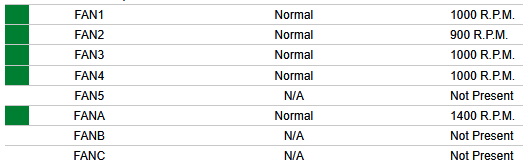
I’ve “tamed” the fans for now by killing the script after it had set them to 900, 1000 and 1400 rpm so the server doesn’t cosplay as a fog horn (10 3000 rpm fans are quite loud).
And in case it’s relevant, here are the sensor readings for the fans from IPMI:

 and it’s working great on my system now.