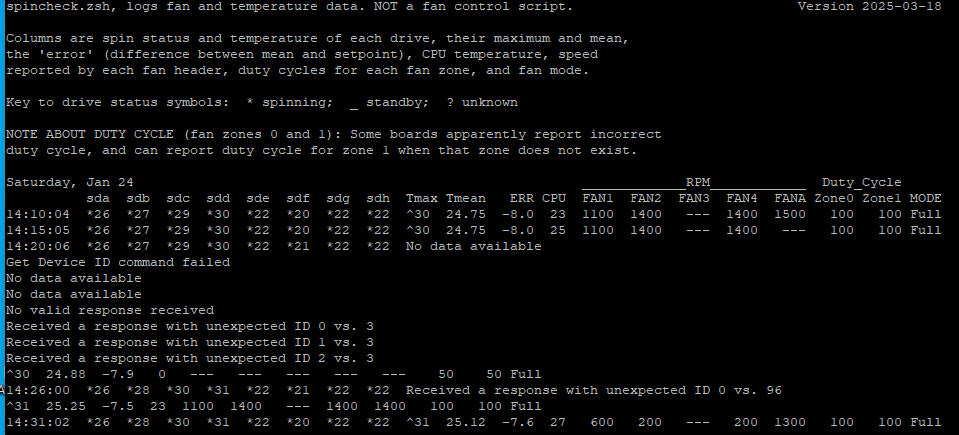
Running the script on truenas-scale with a supermicro X11SSH-LN4F board.When I ran the script previously on the free-bsd version I never experienced problems. This is a spincheck result with some strange outcome. I changed the setpoint from 0 decimals to 1 decimal but with no better results:
What could be the cause of these errors: "no data available” , “Get device ID command failed”, “no valid response” and “received a response with unexpected ID … vs … “ ?
I will only note that on my X10SDV I have a similar problem: the script can’t get drive temperatures using ipmitool to control that zone. Scale has no problem reading the temperatures, and the IPMI can read the temperatures and slow down the fans just fine.
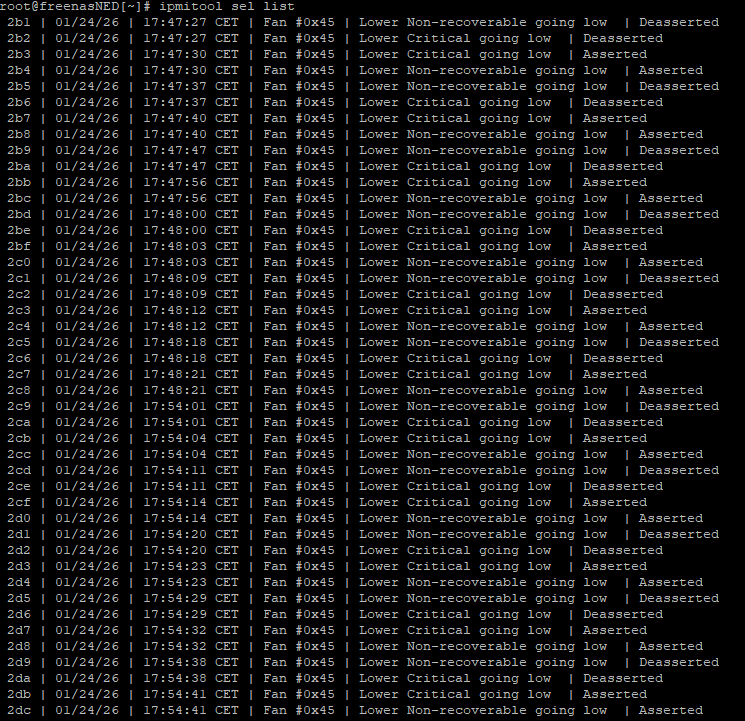
I restarted te system after a power cycle, but I am still getting errors with spincheck. I also noticed that although I had given the new limits via ipmitool for evey fan, some fans were still going als low as 400….
Then you set wrong limits…
This does not work by setting limits to constrain the fan. Rather, you work out what the fan is capable of and set limits accordingly: Quiet fans will go VERY low, limits should be set EVEN LOWER.
I doubt it’s the board and it can be tested with the suggested command I provided to run all fans at 50%. What was the result of that?
Noctua make many different fans so models would be useful for your setup. My settings are as follows for 3 systems (H12 systems based).
Location
Zone
PORT
Flow
Model
Top fan
0
FAN1
Exhaust
NF-A14 PWM chromax.black
FF Top
0
FAN2
Intake
NF-A14 PWM chromax.black
FF middle
0
FAN3
Intake
NF-A14 PWM chromax.black
FF bottom
0
FAN4
Intake
Rear Fan
0
FAN5
Exhaust
NF-A14 PWM chromax.black
Exp blower
1
FANB
NF-A14 PWM
CPU Fan
1
FANA
Exhaust
NF-A9 Black split with AF-12 15 PWM (3-pin)
ajaxnas04% ipmitool sensor list all | grep -i fan
FAN1             | 560.000    | RPM        | ok    | 140.000   | 140.000   | na        | na        | 25340.000 | 25480.000
FAN2             | 560.000    | RPM        | ok    | 140.000   | 140.000   | na        | na        | 25340.000 | 25480.000
FAN3             | 560.000    | RPM        | ok    | 140.000   | 140.000   | na        | na        | 25340.000 | 25480.000
FAN4             | na         |            | na    | na        | na        | na        | na        | na        | na
FAN5             | 560.000    | RPM        | ok    | 140.000   | 140.000   | na        | na        | 25340.000 | 25480.000
FANA             | 700.000    | RPM        | ok    | 280.000   | 420.000   | na        | na        | 25340.000 | 25480.000
FANB             | 560.000    | RPM        | ok    | 140.000   | 140.000   | na        | na        | 25340.000 | 25480.000
Once the thresholds set, I control everything with the minimum spin % to ensure I never come close to the low end. Something like 25-30% speed at all times.
Cool thanks for the info. All look similar at the high RPM but the Kaze variants do not appear to go to 0 but 300. A guess that a 200 LOWER may do the trick for your configuration.
As highlighted, this is not about the limiting but adjusting ranges so it doesn’t error out within your configuration. Nothing will be perfect when your talking about voltage controlled speeds so +/- 10% should be expected as the manufacture highlights. Not all same model fans spin the same speed at the same time.
The SMC H12xxx boards uses a BMC2600 and only requires lower – These are the upper defaults which I left after messing myself with upper limits and fell back to defaults. Why change something if you don’t have to!
Finally found the problem for all the weird behavior of the fanscript! The post about the different fans and zones got me thinking about a line in de config-file where ZONE_PER= and ZONE_CPU= are defined as “1” or “0”. I reviewed the file and I found out that I mixed them up for my usecase . After setting ZONE_PER=1 and ZONE_CPU=0 in the spinpid.config file (instead of the other way around as by default in the script) and restarting the system → the spincheck-results were normal!! .
As you said for the KAZE flex FAN I had allready set 150 200 250 for the lower threshhold-values, further I increased the lower dutycycles per ZONE from 20 to 30, as I head read someone who expecienced stalling of Noctua fans with dutycycles below 30.




 . After setting ZONE_PER=1 and ZONE_CPU=0 in the spinpid.config file (instead of the other way around as by default in the script) and restarting the system → the spincheck-results were normal!!

 .
.