Tiered Remote Replication Tasks

Hi there!

I am relatively new to TrueNAS (coming from an old QNAP TS-859 Pro+) but so far LOVE it and got the hang of it. My TrueNAS system currently runs on a Ryzen 5 3600 w/ 32GB DDR4-3200 ECC and for storage I have one mirrored enterprise grade SSD VDEV for boot/system, one mirrored NVME VDEV (nvme-pool) for apps, VM and other short lived/fast accessible data and one Ironwolf RAIDZ1 VDEV (ironwolf-pool) consisting at the moment of 3x Ironwolf 4TB.

Even on my old QNAP I’ve always followed the usual 3-2-1 principle, for which I used Rsync until now. On my new TrueNAS setup I’m doing / trying to accomplish the following:

  • one local copy in other room (basic Rsync task for mission critical datasets) → working
  • one offsite copy in other location (remote replication task to another TrueNAS SCALE system) → in progress
  • one offsite copy in cloud (Hetzner Storage Box BX21 w/ Restic) → not yet implemented

Since I’m relatively new to ZFS and it’s snapshots, I proceeded and set up tiered Snapshots tasks (followed “Capt Stux - TrueNAS Scale: Setting up and using Tiered Snapshots” guide on Youtube, can’t post the link here, probably because my account is too new) like such:

  • nvme-pool hourly, recursive, do NOT allow empty, retention 24h
  • nvme-pool daily, recursive, allow empty, retention 7 days
  • ironwolf-pool daily recursive, allow empty, retention 7 days
  • ironwolf-pool weekly recursive, allow empty, retention 4 weeks
  • ironwolf-pool monthly recursive, allow empty, retention 6 months

For nvme-pool daily, I have two Replication Tasks, both of which are working just fine:

  • LOCAL, copy from nvme-pool to ironwolf-pool
  • REMOTE, copy from nvme-pool to remote encrypted dataset on offsite TrueNAS, retention = 2 weeks (double)

For ironwolf-pool I also have two Replication Tasks, but I’m struggling to get them right:

  • REMOTE copy from ironwolf-pool WEEKLY to remote encrypted dataset on offsite TrueNAS, retention = 8 weeks (double of source)
  • REMOTE copy from ironwolf-pool MONTHLY to remote encrypted dataset on offsite TrueNAS, retention = 12 months (double of source)

The latter two are semi-working. Every time either of them runs, it ends up removing the existing snapshots on the remote TrueNAS of the other replication task (i.e. monthly removes weekly or vice-versa), eventually leading to an “no incremental base” error on the other replication task.

The destination dataset structure looks like this:

  • tank
    • replicas
      • nvme-pool
      • ironwolf-pool

The nvme-daily replication task obviously points to tank/replicas/nvme-pool as the destination and both ironpool-weekly / ironpool-monthly point to tank/replicas/ironwolf-pool on the offsite TrueNAS respectively.

Reason I’m not selecting both ironwolf snapshot tasks in the same remote replication task is because I want different retention times for both of them.

Trying to get my head around this for some days now but not able to figure out what I am missing here. Searching Google and the Forum/Community unfortunately also didn’t lead me in the correct direction, neither did the official documentation and/or other guides. Maybe I’m overthinking it too much and I can’t see the solution in front of the forest? :smiley:

Any help will be much appreciated! :slight_smile:
I generally give my snapshot schedules a retention name on the end. For example snapshot1-1d will keep those for one day or snapshot2-2w will keep those for two weeks. This may help with the inadvertent pruning that you’re seeing.

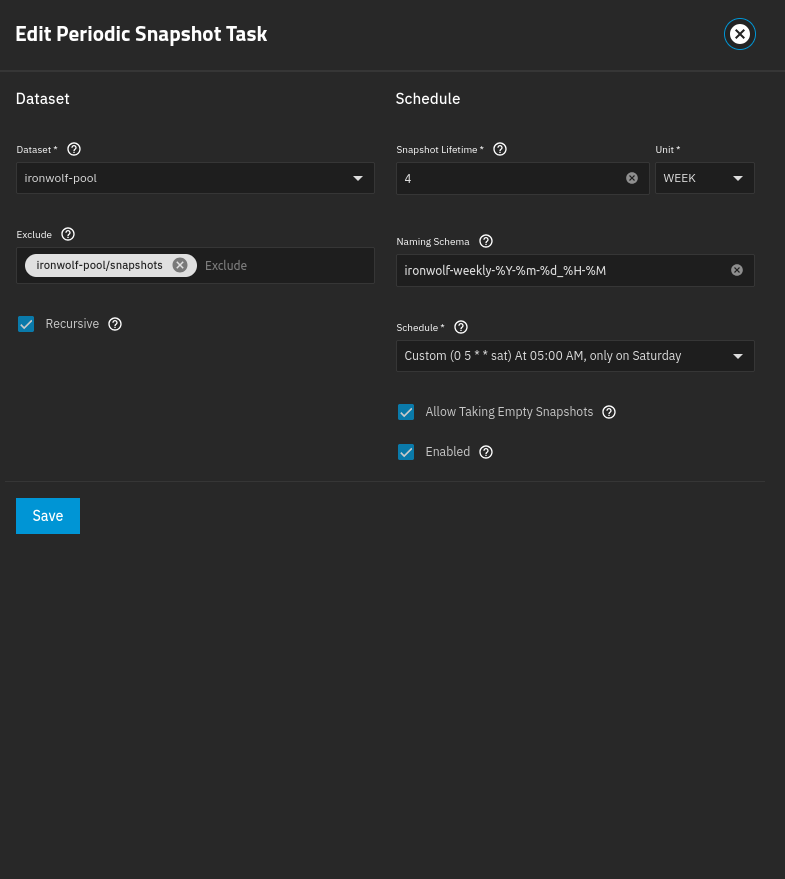
The naming convention of the snapshot tasks looks like this:
ironwolf-weekly-%Y-%m-%d_%H-%M or ironwolf-monthly-%Y-%m-%d_%H-%M and so on.

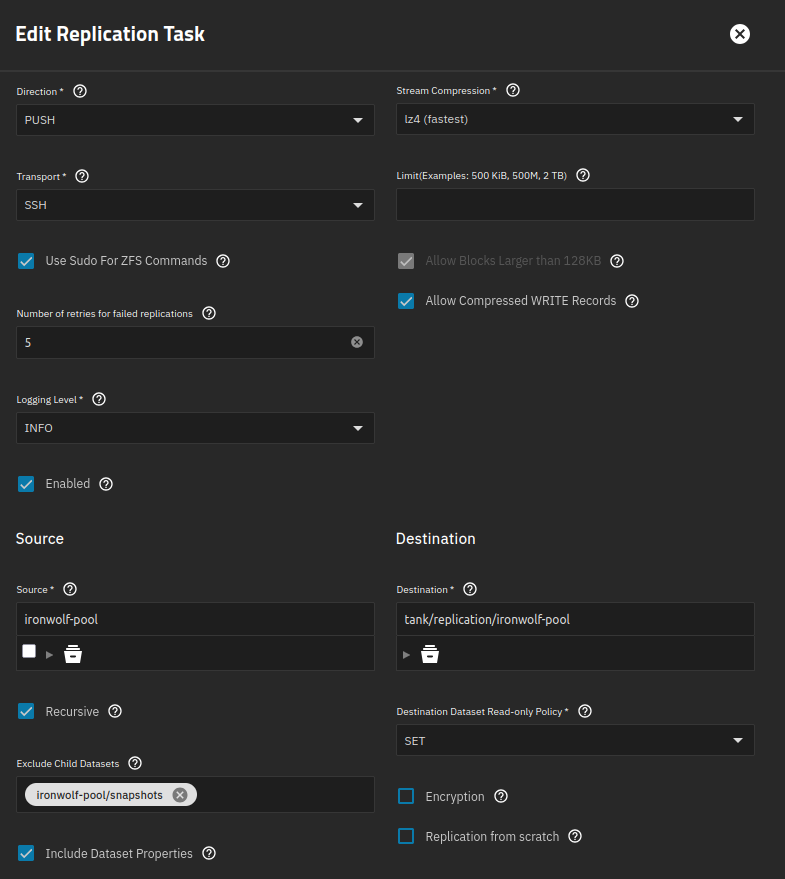
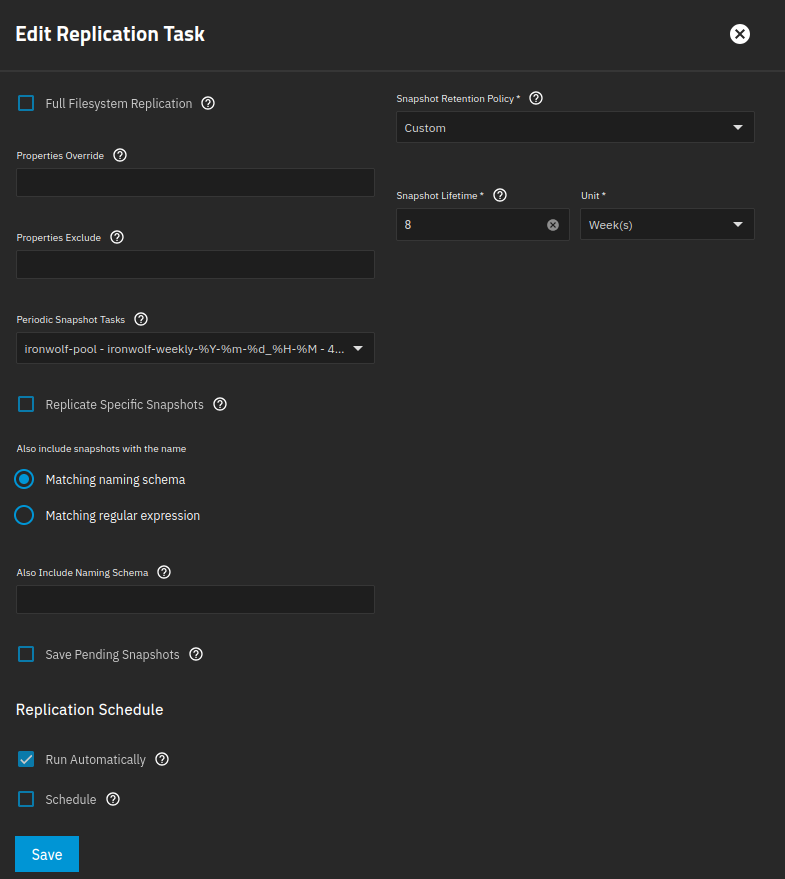
In the replication task I then selected the corresponding snapshot task in the “Periodic Snapshot Tasks” section, without specifying a name schema and/or a regular expression.

For disclosure I attached the corresponding snapshot and replication task for “ironwolf-weekly”:

Any reason your snapshot retention policy is set to custom and not same as source in replication?

Out of interest is the time each snapshot schedule happens the same?

Any reason your snapshot retention policy is set to custom and not same as source in replication?

Yes, because I want a longer retention time for offsite backup (double of what is configured on the prod NAS).

Out of interest is the time each snapshot schedule happens the same?

Not sure I understood correct: the replication tasks are set to “Run Automatically” and have the corresponding Periodic Snapshot Task selected in each of them.
If you mean whether monthly and weekly snapshot tasks happen at the same time, then no. The weekly snapshot will be executed at 5am on Saturdays and the monthly will be executed at 10am every 29th day of month.

Quick update: so far I’ve been using PUSH replication from source to destination. I just gave it a try to setup PULL replication (destination host to pull from source) instead, with the following result:

  • [before switch PUSH to PULL] weekly PUSH replication task executed on source system gave me “No incremental base on dataset ‘ironwolf-pool’ and replication from scratch is not allowed“ error (that is after the monthly replication task ran)
  • [after switch PUSH to PULL] weekly PULL replication task executed on destination (with same criteria) gives me no error, but “No snapshots to send for replication task” instead (even though there are four generations of weekly snapshots available on the source)

When I switch on the “Replication from scratch” option on the source’s weekly PUSH task, it removes all monthly snapshots on the destination host (duh).

If I then let the weekly replication task finish and try to run the monthly replication task again, I’m experiencing the same “No incremental base on dataset ‘ironwolf-pool’ and replication from scratch is not allowed” error.

It seems that somehow it won’t let me keep the tiered weekly and monthly snapshots on the same destination dataset. Any idea as to why?

As mentioned in my initial post, I followed the guide of @Stux but can’t seem to get the tiered layout work properly with remote replication tasks.

I will remove the monthly remote replication task and instead keep just the weekly replication task but with an override retention time of 2 years on the destination. That’s the best compromise for the moment I guess, unless somebody is able to tell me if and what I did wrong :slight_smile:
Apparently if I wanted to keep two replication tasks for monthly and weekly, each with a different retention policy, that would have required each to have it’s own destination dataset - hence, double storage consumption, which isn’t worth it IMO.

Not sure if this will help but try check marking the Save Pending Snapshots and see if it assists with making the error go away. I played with differing retention policies before and eventually gave up because I couldn’t get it right.

It’s an odd one. I’ve just got round to testing this on a couple of VMs running 25.04.1 and it works fine. Not sure what version you are running? I’ll upgrade just to check. UPDATE: Updating to 25.04.2.6 made no difference all still working well and as expected.

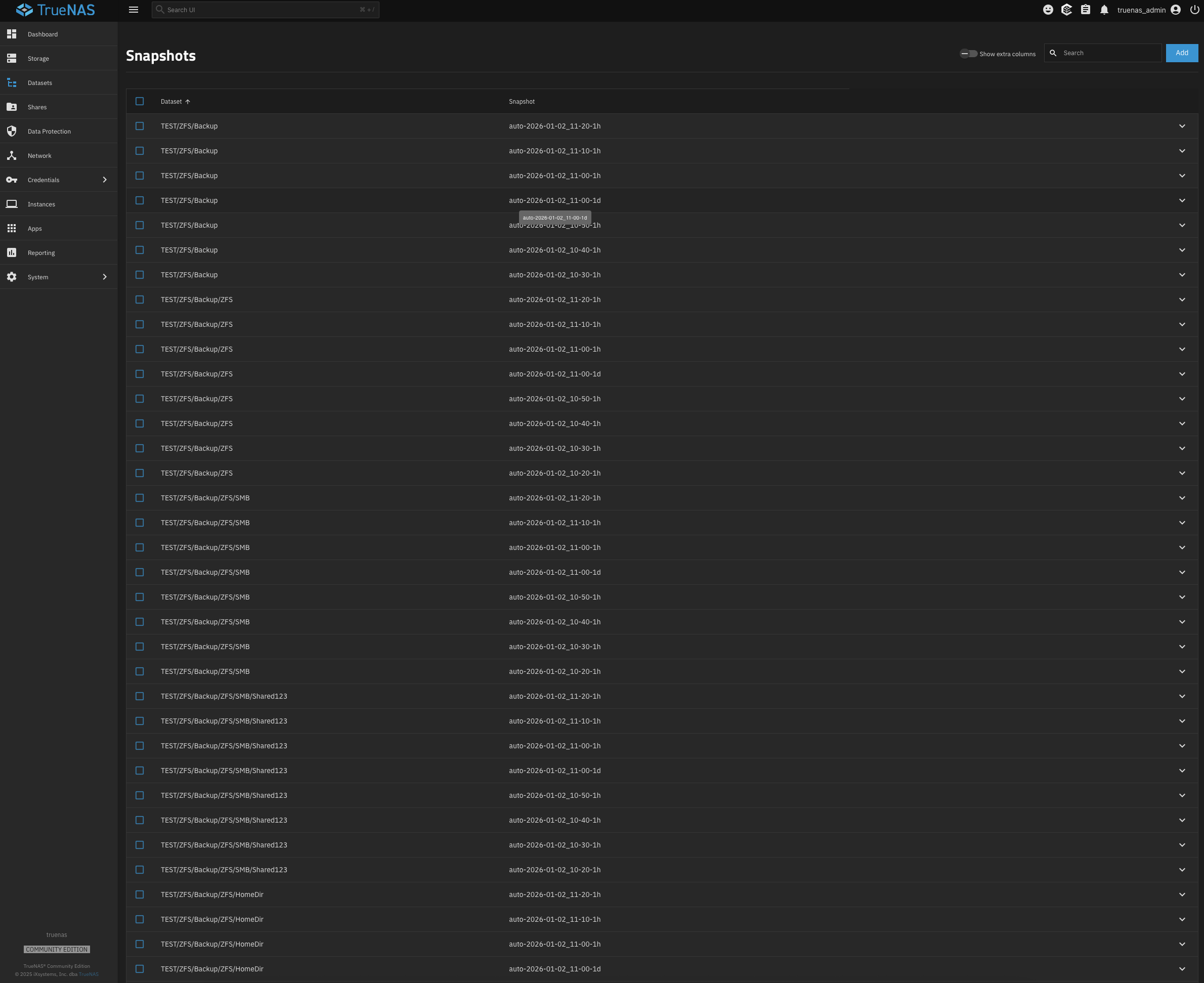
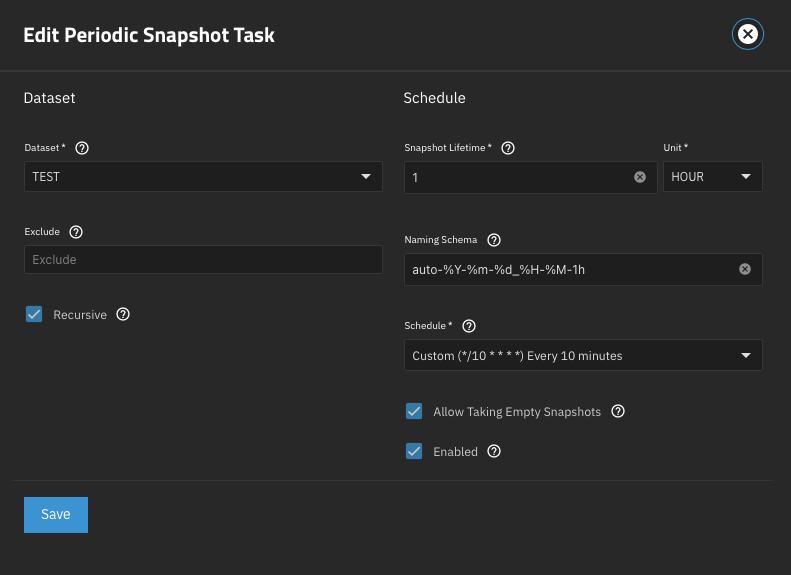
I’ve attached some screenshots for you to compare but I’ve tried my best to copy your exact config albeit with much shorter snapshot and retention frequency for obvious reasons.

Backup system showing both schedules coexisting together.

Tried that aswell already with no success unfortunately but thank you very much for the heads up :slight_smile:

Thank you for trying to reproduce the issue!

Do you have both snapshot tasks selected (i.e. */10 & hourly) in the replication task? Unfortunately I cannot tell from the screenshot. If so, that’s also working fine for me.

What’s not working is to have a dedicated replication tasks for each snapshot task (in my case weekly & monthly) so I am able to set different retention times for each of them on the destination.

Yes.

Ah I didn’t realise that. So you have two replication tasks one for each snapshot schedule so you can have different retention of each schedule on the receive side correct?

I’ve never tried that and that’s probably where the issue is but please confirm and I’ll test.

1 Like

Just as Im mocking this up it seems obvious to me that the two replication tasks are going to conflict with each other as they are not aware of each other (which they did).

I think your best bet is what you have already done and just use your weekly with a longer retention on the receive system.

It might be worth raising a feature request and see if others would benefit if this was incorporated somehow.

1 Like