How to keep more snapshots on the replication target than the source?

I want to set up a system that has daily/weekly/monthly snapshots that are retained for a certain length of time, and I want to replicate that system to a backup TrueNAS server on which the snapshots are retained for longer. I have searched forums and the internet as a whole, and I have dug into the menus of TrueNAS, and it seems like that is impossible. Please help me, as that seems like something that should be easy to do. Surely I am misunderstanding something.

The creation of different types of snapshots is easy. You go into ā€œPeriodic Snapshot Tasksā€, and create a task for each type of snapshot. You set retention there.

As for replication, let’s look at push replication. If you set up a replication task, under ā€œPeriodic Snapshot Tasksā€ you can select all the snapshot tasks. Excellent. Under ā€œSnapshot Retention Policyā€ you can say ā€œnoneā€, which isn’t what I want, or ā€œSame as Sourceā€ which isn’t what I want, or ā€œCustomā€. That sound great, but there’s just one edit box to specify a fixed lifetime for all snapshots, and I want a different retention for daily vs weekly vs monthly ones.

One might say, ā€œuse the ā€˜none’ retention policy, but on the remote side purge snapshots on the schedule you wantā€. OK; how does one do that? Snapshot tasks only purge when run, and they’re only run to create snapshots on a schedule. If my replication target dataset is read-only, which I’d want it to be, I can’t create the snapshots, and so I can’t purge them on schedule.

Switching to pull replication doesn’t seem to help. If I use pull replication, I no longer have a popup of ā€œPeriodic Snapshot Tasksā€ to select tasks, so either I provide the naming schema of one type of snapshot, or craft a regex to get multiple tasks. If I craft a regex to include the multiple tasks, then the ā€œSnapshot Retention Policyā€ is only ā€œnoneā€ or ā€œsame as sourceā€ which doesn’t help, and if I give the naming schema, then I get the ā€œcustomā€ again.

And I can’t have multiple replications going on, one for each type of snapshot, in which I can set individual expirations, as that would replicate everything multiple times if it allows me to do that at all.

Maybe zrepl would work better for my use case, but there’s no good way to get that going on TrueNAS. Does zettarepl have a magic switch not in the UI?

I’m in shock that this basic task of keeping snapshots longer on a replication target than a source seems so impossible. Surely I’m missing something. Any help would be appreciated.

Thanks!
Im not a snapshot expert. But with ZFS replication, snapshots are compared to find the delta. How would that work if there is no snapshot to compare it with ?

Maybe with a ZFS bookmark on the target?

@winnielinnie , maybe you can shed some light into this.

What I want is:

  • On the originating system, daily snapshots kept for 3 weeks, weekly snapshots kept for 3 months, monthly snapshots kept for 3 years
  • On the backup replica, daily snapshots kept for 8 weeks, weekly snapshots kept for 6 months, monthly snapshots kept for 6 years

If I’m replicating daily, then there’s no chance that a snapshot would fall out of retention in that time. Every night, there’s a replication job where the backup replica is updating its state from day n-1 to day n. The expiration of snapshots from day n-21 shouldn’t ever become an issue.

Have you tried setting this up the the CLI ? Maybe its a GUI limitation.

Can you point me to CLI documentation on this topic? I can’t even find v26 CLI documentation at all, not to say anything about adding them to a scheduled task.

Neither do I, sorry.
ZFS send/receive does have a documentaition of course.

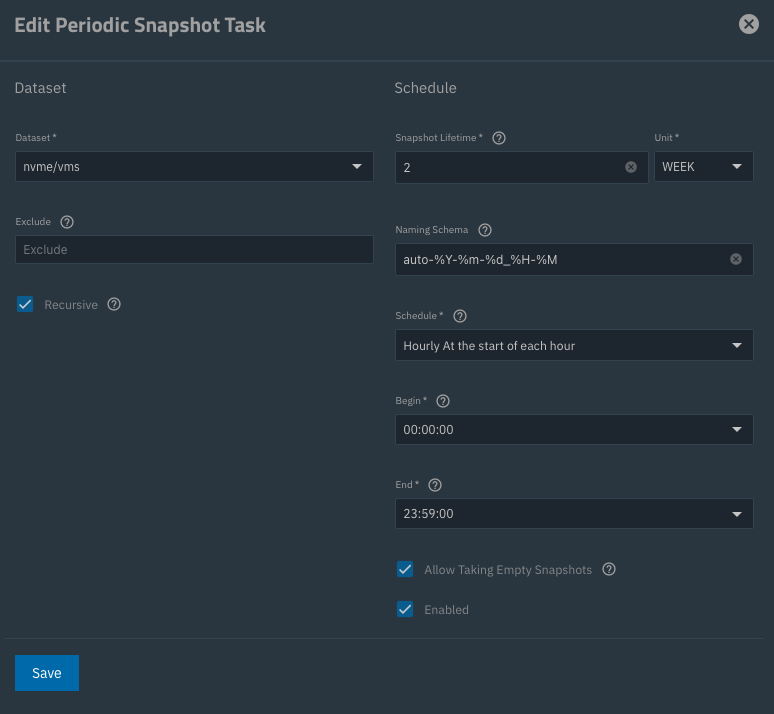
You can define different retention times for a snapshot and its corresponding replication task in the UI.

E.g. snapshot task, retention 2 weeks:

Replication task, retention 4 weeks:

HTH,
Patrick

I think the issue here is wanting different retentions on different snapshot schedules for the same dataset on both primary and secondary.

Thank you, but I’m not quite following.

In your screenshots, you have two week retention of hourly snapshots, which you replicate with a lifetime for four weeks. However, that’s a single snapshot series, just the hourly snapshots.

If I want hourly + weekly + monthly snapshots, and I want those to have different lifetimes on primary and backup, how would I do so? zrepl has a ā€œgridā€ policy which makes this a one-liner. TrueNAS is weird in that they offer you, within one replication task, the opportunity to replicate multiple lines of snapshots, but in terms of managing the lifetimes, they only handle a single line.

It’s a good point and one that’s come up before. Unless someone has a solution using the UI that I’m not aware of perhaps you could raise a feature request?

Yes, I partly missed that.

The entire mechanism of zettarepl as used by the UI depends on snapshot naming, not any other metadata like creation time or similar.

So create three snapshot tasks: hourly, weekly, monthly with ā€œhourlyā€, ā€œweeklyā€, ā€œmonthlyā€ as part of the naming scheme. They will still be differential and each snapshot will only ā€œeat upā€ the space with respect to the next older one.

Then create three different replication tasks based on these with yet different retention times on the destination. Again snapshots will only use as much space as necessary to get from one to the next younger one, regardless of the name or by which job they are created.

I have never tried this but I am quite confident it should work.

HTH,
Patrick

1 Like

By all means try this and report back but I feel like I have in the past and they collide with each other and break.

Did you change the naming schemes from

auto-%Y-%m-%d_%H-%M

to e.g.

auto-hourly-%Y-%m-%d_%H-%M
auto-weekly-%Y-%m-%d_%H-%M
auto-monthly-%Y-%m-%d_%H-%M

?

I normally add the retention on the end like this:

auto-%Y-%m-%d_%H-%M-1d

auto-%Y-%m-%d_%H-%M-1w

auto-%Y-%m-%d_%H-%M-1m

auto-%Y-%m-%d_%H-%M-1y

Defo worth giving it a shot.

Can you have multiple replication tasks from the same source to the same target? I thought you couldn’t. And even if you could, that’s triple the replication traffic, and this is an offsite server.

Re turning this into a feature request, this is an issue that keeps coming up:

and in fact, this was filed for a feature request last year: [Not Accepted] Set different retention times for each snapshot task within replication task

So I thought I’d check in to see if this had changed, with the hope that surely this would have been an added feature by now.

Is the most straightforward solution to erase TrueNAS off my remote server, reinstall it as a generic Linux server, and then use zrepl?

1 Like

IMHO you should if the naming schemes are different. As for the traffic I guess you’ll have to try.

I’m happy with my scheme:

  • do only hourly for two weeks on the source
  • replicate the midnight snapshots to second NAS in the same location, keep four weeks
  • replicate the midnight snapshots to third NAS offsite, keep six months

That definitely works with just three tasks.

Yes so you have three schedules, one local and the other two replicating to different backup targets. Nothing wrong with this at all.

On the other hand having three or four schedules for the same dataset going to the same target via three or four different replication streams and that’s potentially a different kettle of fish.

At the very least you would have to schedule them at different times so they don’t collide otherwise replication stream 1 could be sending while replication stream 2 tries and fails.

This poooooooosibly could maaaaaybe work?

zettarepl/zettarepl/replication/snapshots_to_send.py at master Ā· truenas/zettarepl Ā· GitHub :

# Find the newest common snapshot and send the rest

So, maybe, if you make multiple replication tasks, each with a different ā€œPeriodic Snapshot Tasksā€ set (so that you can expire them differently) but each replication task including every other task’s snapshots as ā€œAlso include snapshots with the nameā€, then in theory, each of the replications should be able to find the snapshots from any other replication that uploaded it, and avoid duplicates.

Or this will explode. I haven’t tried.

In any case this is ridiculously complicated. The concept of ā€œkeep x copies of this frequency snapshot, y copies of this frequence snapshot, etcā€ is super common, and it’s disappointing that TrueNAS can’t handle this in a reasonable way.

Thinking out loud here so don’t shoot me but could you take a snapshot on the backup target using a different naming convention and set a longer duration to accomplish the same aim?

Would need testing of course.

Again, if they are based on disjunct naming schemes I don’t see why two or three could not be running at the same time.

1 Like