Hmm, I’m not completely sure about that. I’ve definitely had the AD issue on 25.04 occasionally, but now getting it a lot more on 25.10, like multiple times per day.
The “added issue” in 25.10 seems to be that AD actually switches to a “faulted” state now and removes all users/groups cache, until it’s “fixed” 10 minutes later.
I believe in 25.04, it stayed “Healthy”, which actually might have been an issue that’s fixed in 25.10, and did not remove the cached users/groups. So, it was never as big of a deal, since it seemed like a warning with no effects on 25.04.
But again, I’m not 100% sure about all the 25.04 behavior. The initial post in Unclear error message backs up my memories though.
If needed, I can set up a 25.04 TN machine again to try to fully compare it, but it’s harder to catch there. It could have even been an issue on 24.10, but not sure either. I would say it’s worse on 25.10, so far.
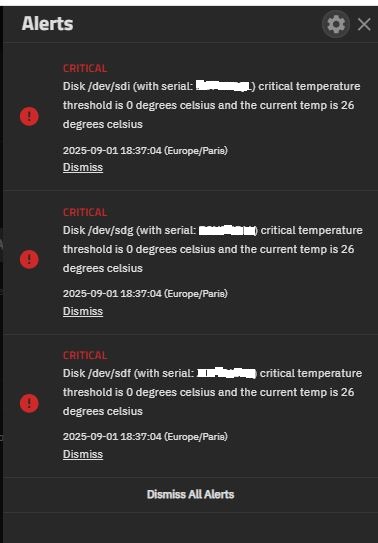
I set 55°C for critical temperature for all my 8 HDDs but the notifications are only for 3 of them (Seagate Iron Wolf 4TB 5900 rpm). The 5 other HDDs (1 Seagate Ironwolf Pro and 4 HGST) are 7200 rpm.
In 25.10 Beta the option for setting critical temparature was removed
I’m usually a Negative Nancy when it comes to “change” (I know - getting old), but I really agree with your approach but my dude - you need a Cron calendar.
I can’t currently visualise any period tasks in TrueNAS. Compounding the issue - the tasks are spread out all over the place, from periodic SMART, scrubs, and my custom ZFS trims - all in separate sections and even separate web UI pages. It’s… not great.
Let me lay it all out formally:
PROBLEM: Scheduled tasks are disjointed with no visualisation. One has no easy way to visualise scheduled start times, nor know how long previous tasks have run.
SOLUTION: Put everything in one spot - Cron. Then VISUALISE cron with a calendar. There’s plenty of code online with permissive licensing to… take inspiration from. Here’s a representation of what I mean:
My dream setup for TrueNAS is a single page for all periodic tasks. Top of the page - you can see the text representation in a “crontab -e” format. Bottom of the page - the calendar. One would see all the periodic tasks on the calendar and can click on them to edit. You save an immediately the calendar updates. The API would also track task finish times, and then updates the calendar accordingly. That way you can log in and see straight away if any previous tasks have overlapped (which could be very bad).
A single Cron page with calendar would make life so much easier. On that page, then add buttons for adding the most common tasks (scrubs, smart short tests, ssd trims etc)
Please reinstate the SMART screen and deveop it further so that it is useful. I would rather rely on iX’s implementation of this than on a third-party tool which would likely be a volunteer effort with no guarantee of being updated or supported in future.
Also, please move the Network menu selection back to the sidebar. This is one of the screens I use most frequently and having it on a sub-menu is inconvenient. IMO the Services menu could usefully be be moved to the main sidebar too.
Yes, I did deploy 25.10-BETA 1 on a spare server here.
I know that data integrity is iX’s first product priority and was not suggesting otherwise. I’d just prefer to rely on iX’s implementation of something; that’s why I first started using FreeNAS 9.3 and have trusted it with all my data since then.
I’d be interested to know the name of that third-party you mentioned.
I see why you did that, maybe think about at least a RAG indicator of health of disks (green or issue). Folks don’t just want to know when things are bad, they like to know when things are healthy as too many people have experience alert failures on systems of all sorts (and no i am not syaing there is an issue with alerts).
Also given the large number of curated aps i think it is fine for the truenas team to defer a more detail smart dashboard to someting like Scruitny app. Though it has some seriouos bugs, like reporting some segates as faulty when they are 100% fine (i filed the bug upstream)
request: add a RAG health indicator to the disk screen so show that the new deeper logic knows a drive is good
request: please enable Nvidia persistence mode by default in 25.10
For example this lowered my doing nothing wattage on a T4 from 30W to 14W, i see no downsides of doing this and we can help reduces peoples power consumption, especiall on higher end cards.
(yes i know i could have a bootime cro-job to do this)