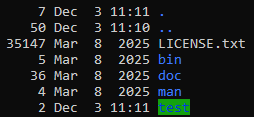
Hi, I’m hoping this is an easy one. I’ve SSHd into a fresh truenas but the LS command output is mostly unreadable, see screenshot below. I can’t fathom why such an illegible colour scheme is used as the default?
First questions of course is how do I change it to something readable, but my follow up is why do I need to this seems like a pretty obvious bad design?
You would have to ask the developer of your terminal emulator on why they chose those colours. Check the settings of your terminal emulator on how to change the colours, or choose a different terminal emulator.
Agreed, it’s pretty much a normal debian install. The truenas_admin user is “unusual” because it uses the zsh shell (probably due to TrueNAS having its roots in FreeBSD).
When using the bash shell, it does set the ls color option.
$ alias
alias ls='ls --color=auto'
Which is also another option you have: you can remove colors from ls if you remove the alias (comment the line in .bashrc).
Neither zsh nor the truenas_admin user have anything in particular to do with FreeBSD, and zsh is the default shell for other users as well, if you give them shell access at all–it’s just a nicer shell all-around than bash. But of course you can change that (for the admin or any other user) to bash, dash, rbash, sh, tmux, or the TrueNAS CLI or console.
OP, there’s nothing at all TrueNAS-specific about this–it’s using whatever the default is under zsh. You’d change it the same way you would for any other zsh installation, or change to a different shell if you prefer.
For most linux distributions, bash is the default shell. Of course it is up to user preferences and can be changed.
*BSD (for example FreeBSD) is different. Bash can be used there but it is not the default. If you want to go further you can also go into license “purity” territory, Bash is GPL licensed which some BSD do not like.
The fact that root and truenas_admin users use zsh as the shell is uncommon in debian. That is a deliberate choice made by the TrueNAS developers.
Of course, this doesn’t matter at all to the issue of OP. OP is likely using bash (because the default bash profile enables coloured ls output).
Well theming alacritty has at least helped but i’m still struggling to understand who thought this colour scheme would ever work for anything, and why nobody has thought to maybe change the default to be more friendly so that theming your terminal emulator isn’t required to use the colour output, or perhaps just not having the colour output on by default if we can’t be bothered to make it useable.
Regardless, I’ll be getting used to cyberpunk neon alacritty, appreciate everyones help and input
If OP is using bash, it’s because a deliberate change has been made; zsh is the default shell. And its default configuration also results in colored output to ls.
I haven’t seen that behaviour in any TrueNAS version I tested. Which version of TrueNAS are you using? In your output provided previously there is no alias for ls.
For bash there is /etc/skel/.bashrc which provides the defaults:
$ grep alias /etc/skel/.bashrc
# enable color support of ls and also add handy aliases
    alias ls='ls --color=auto'
    #alias dir='dir --color=auto'
I checked /etc/skel and /etc/zsh and could not find any alias configuration for ls. And I cannot reproduce the behavior you are describing with the built-in truenas_admin user.