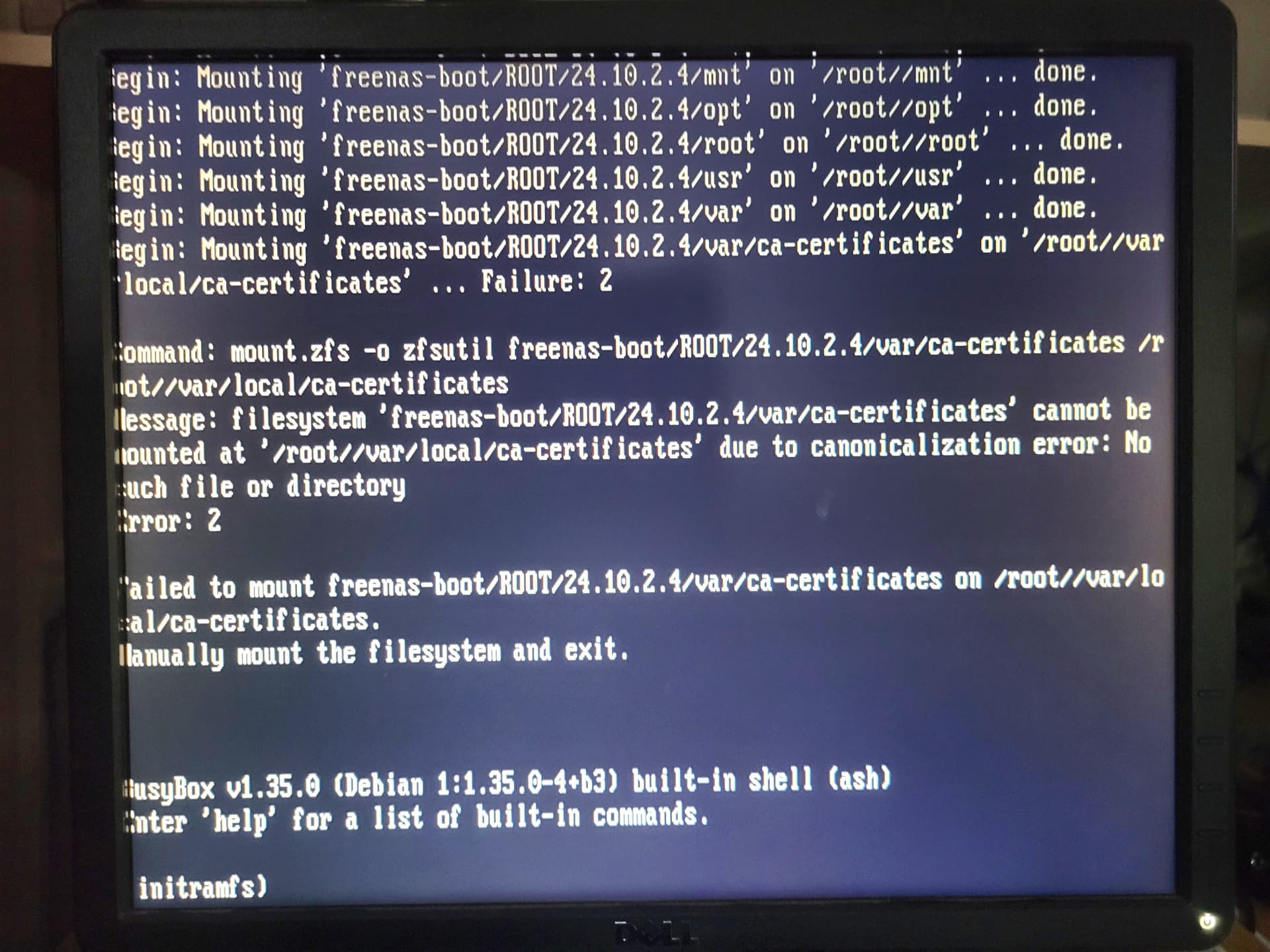
My TrueNAS server has been working fine for the last 12/13 years, when it was Freenas.
For the last 7 or 8 years TrueNAS has been booting from dual Intel ssds.
More recently, this last week, all I have done is replace a failed disc in my Raidz1 pool, and tried to get an Intel 2.5Gbe nic and a TP-Link 2.5Gbe nic working , but neither did give me a connection on my home lan. I removed TP-Linl nic, then booted TrueNAS up, and all was well again, briefly. On a further reboot ,as it was doing so it was beeping quite continuously. I shut it down and tried again, but still was beeping continuously, untill it stopped boot as per my phone camera picture.
Look for a hardware failure or power off and double check all connections and nothing got dislodged. Consult the mother board manual for the beep error codes and figure out what it is complaining about. The BIOs / UEFI may have built in hardware tests you can run.
Your running TrueNAS Scale 24.10.2.4? That’s what it appears in your screenshot.
I can’t see anything that is amiss regarding connections after checking. When I try to get into the BIOS, it goes to a blue screen with no information. I can’t help thinking it may be something to do with the TrueNAS files on the boot disks.
The motherboard manual is just a sheet of glossy paper showing all the connections etc, with no other information on error codes or beeps. The board is a supermicro, and googling error beeps gives a whole list of 1 to 8, then continuous beeps.
All I can determine is 2 short beeps before ipmi is loaded?, then a reboot with what seems to be a hee haw, hee haw sound continuously until it stops at the command prompt of initramfs
Continuous Beeps: System Overheat (System OH), but nothing is even warm when I put my hand inside the case. I have x3 case fans and x1 cpu fan on the cooler.
Guessing a temp sensor failure causing the system to think it is overheating? Usual advice is to tear down the system to bare items of just cpu and ram. No drives or add on cards and see if the system will boot and allow you into BIOS / UEFI. Graphics card if the system needs it for booting, etc. is fine.
If you can’t boot with stripped down system then you look at motherboard, cpu, ram or power supply failures. Posting the make and model of the motherboard may help others find the manuals or help with hardware testing options.
I disconnected all the drives and LSI card which just left cpu and ram. I tried rebooting and getting into the BIOS, but no joy, just a blue screen again.
The motherboard is a supermicro X9SCM(-F) which is about 13 years old now. the cpu is an intel xeon which was 2nd hand off ebay 6 years ago.
From my basic computer hardware knowledge, if the cpu had failed, then it wouldn’t boot at all.
The psu seems to running ok when it powers up, and again if that was faulty, then it wouldn’t power up
It could be the motherboard if it won’t let me get into the BIOS??
Some hardware failure are partial, like a power supply that can’t provide enough power anymore. You can still boot but have problems under load or weird issues. Temp sensors could fail and report the incorrect temps. Either a resistance value too high or a sensor short would cause that.
The age of your system and the problems you seem to have been having may point to it’s failure. You can only try to diagnose in a logical order and sort of guess from info provided. Not being able to boot a stripped down system isn’t good and we can’t see anything in the bios to see if anything is reporting or run a diag in the BIOS or IPMI systems.
You can wait to see if anyone else posts advice. I am out of ideas at this point, otherwise. I thought maybe you had bumped something or didn’t connect something back while trying the NICs. If you try reseating all connectors, ram, cpu and you still can’t get at least a BIOS boot, I don’t know what else to do.
I’m in a bit of a quandry now, as I built it a couple years or so before I retired, and did hope that the current hardware would last me a few more years.
Have you pulled the cpu heatsink and checked for dried out heat sink paste or poor contact? Supermicro will report overheat on this. I would clean and redo the paste and make sure the contact is good.
I have a supermicro board with an Opteron cpu and the paste had dried out and gave that alarm. A little cleaning and all is good and that was now 4 years ago.
Well new thermal paste and new cooler didn’t solve the3 bootup problem but it cured the continuous beeping noise.
Failed to mount freenas-boot/ROOT/24.10.2.4/var/ca-certificates on /root/local/ca-certificates.
Manually mount the filesystem and exit.
I tried that but it returned that it couldn’t find ca-certificates in /etc/fstab. As I couldn’t see what was in /etc/fsab, I rebooted and loaded version 24.10.2.3, TrueNAS booted up and is back up and running.