
Should anyone have any clues how i’d go about solving the root cause of this error
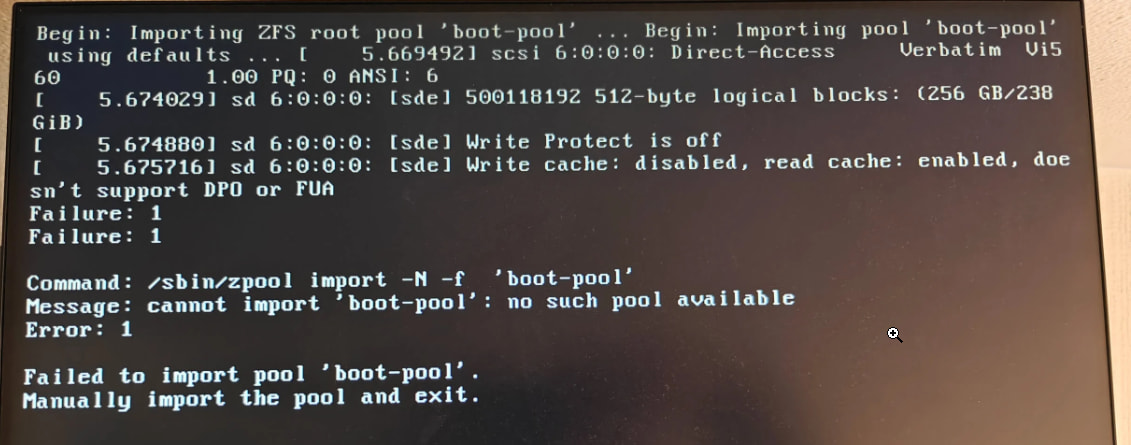
It started happening after the update to 25.10.3 from 25.10.2.1 , if i manually import the boot-pool, it boots, but only once.
I’m trying to figure out to make it reboot to the new version without this error.
IF i switch back to my old version 25.10.2.1 , i have no boot issues at all?
It might be important tot note that SDE is a USB attached NVMe drive
i tried reinstalling the 25.10.3 update using the web UI, but that didn’t appear to have fixed the booting issue
root@truenas[~]# zpool status boot-pool
pool: boot-pool
state: ONLINE
status: One or more features are enabled on the pool despite not being
requested by the ‘compatibility’ property.
action: Consider setting ‘compatibility’ to an appropriate value, or
adding needed features to the relevant file in
/etc/zfs/compatibility.d or /usr/share/zfs/compatibility.d.
scan: scrub repaired 0B in 00:09:01 with 0 errors on Thu Apr  9 03:54:03 2026
config:

    NAME        STATE     READ WRITE CKSUM
    boot-pool   ONLINE       0     0     0
      sde2      ONLINE       0     0     0

errors: No known data errors

root@truenas[~]# lsblk -f
NAME        FSTYPE            FSVER LABEL     UUID                                 FSAVAIL FSUSE% MOUNTPOINTS
loop1       squashfs          4.0
sda
├─sda1      linux_raid_member 1.2   swap0     f104c48f-12d3-965e-3dd9-0589ce89f963
└─sda2      zfs_member        5000  ssdxl     6159281286513869433
sdb
├─sdb1      linux_raid_member 1.2   swap1     309cc15a-d1f8-7ace-5c16-f2b81fa8df95
└─sdb2      zfs_member        5000  ssdxl     6159281286513869433
sdc
├─sdc1      linux_raid_member 1.2   swap0     f104c48f-12d3-965e-3dd9-0589ce89f963
└─sdc2      zfs_member        5000  ssdxl     6159281286513869433
sdd
├─sdd1      linux_raid_member 1.2   swap1     309cc15a-d1f8-7ace-5c16-f2b81fa8df95
└─sdd2      zfs_member        5000  ssdxl     6159281286513869433
sde
├─sde1
└─sde2      zfs_member        5000  boot-pool 12337834706996266549
zd0
nvme0n1
├─nvme0n1p1 linux_raid_member 1.2   swap1     309cc15a-d1f8-7ace-5c16-f2b81fa8df95
└─nvme0n1p2 zfs_member        5000  ssdxl     6159281286513869433
nvme1n1
├─nvme1n1p1 linux_raid_member 1.2   swap0     f104c48f-12d3-965e-3dd9-0589ce89f963
└─nvme1n1p2 zfs_member        5000  ssdxl     6159281286513869433
