[Unit Review] Scale 25.10 on the YXK Iron Cow Zero1 Pro

I recently acquired a few of these puppies under deep discount with the intent of them being low power sync targets I could drop off and share with friends.

Currently going for $400 as an asking price, but I got them at a steal for a quarter of that.

Specs are below minimum at just 8Gb (single slot DDR4 non-ECC) and an N100 Intel chip. But apparently being Intel based means they have a real BIOS inside so messing with the bootloader isn’t as fiddly with arm-based systems.

The TrueNAS installer gets very confused because the eMMC has two 4Mb partition slices, so I ended up making it install to an appropriately-sized virtual disk and DD’d it over. Apparently there are some shell commands you can use to make it not read-only that might help let the installer run through, but I didn’t have the patience.

Note that the eMMC’s write performance is shadowed by a portion being slated for SLC mode, after that cache gets exhausted the write performance is about 35MBps, so it will take about half an hour to fully write the 64GiB-ish drive.

The LAN ports are labeled in reverse, enp3s0 is the left port, enp2s0 is the right port (closest to the power jack). They are Intel Corporation Ethernet Controller I226-V (rev 04).

Performance-wise the N100 is nothing to write home about. This unit is passively cooled, the CPU heatsink does not have a fan (though it should be possible to replace it with an active cooler once you add the appropriate fan socket, it is not populated). The BIOS does appear to power-limit it, dropping the boosts to only about 1.2GHz, which will greatly impact performance if you’re going to try taking advantage of the 2.5Gbps interfaces, but should be fine for single-gig speeds.

There are two NVMe slots accessible through easy disassembly of the unit (there are only a few Phillips-head screws in easily identifiable locations, the rear panel is the only one that needs to be removed), I’m unsure how many lanes but I don’t assume it would matter.

The CPU does not exceed 55C under full load so I’ll try messing with the power settings in the BIOS, maybe see how large a stick of RAM I can slide into the single slot available, but so far things are going relatively well for my intended purpose.

I’ll report back if anything interesting happens with the power limits tweaking.

2 Likes

So, the default power limits are PL1 6k and PL2 10k. Using very unscientific tests I’ve concluded a PL1 of 10k and PL2 of 20K should be reasonable. This will let it boost to 2.8GHz for half a minute and then fall down to 2.5GHz, maintaining 85C temps. This is probably not great but I think the fan can be tweaked to actually spin in this situation and make it a non-issue, or just attach a cooler with a fan as mentioned before.

Speaking of the fan, it seems unusually ineffective. It makes a lot of noise but there’s not a lot of airflow out of the chassis. It’s possible this is mostly because the fan isn’t against the back grill and so air just splashes against it and recirculates inside the case instead of actually exiting the chassis because the slats are really thin. I’m going to fashion a piece of foam to ensure the airflow can only go out the grill, open up the grill by widening the slats and see if anything interesting happens. I’ll also be adjusting the slopes to start the fan at 36C (so it’s basically always spinning), PWN init 70, and slope 5. The front plate also doesn’t let a lot of air through. Oddly terrible design in my opinion…

1 Like

Intrigued by this – first and foremost, the ability to snag one for ~$100. Can you provide more insight as to the route by which you acquired these for such a steal?

I am looking for a deal on one of these, at which point I will follow along with you and add any updates or relevant information I stumble upon as well

These units were being liquidated at auction, in this case specifically Nellis Auction in Arizona. Here’s an eBay listing for the same product currently going for $220.

I did win a few and sometimes it’s hit/miss (one was apparently factory sealed but was missing the motherboard :scream: )

Nice – I grabbed one on eBay for ~$200 before I saw your post. Wouldn’t surprise me if it was someone flipping their auction unit. Oh well, still better than retail!

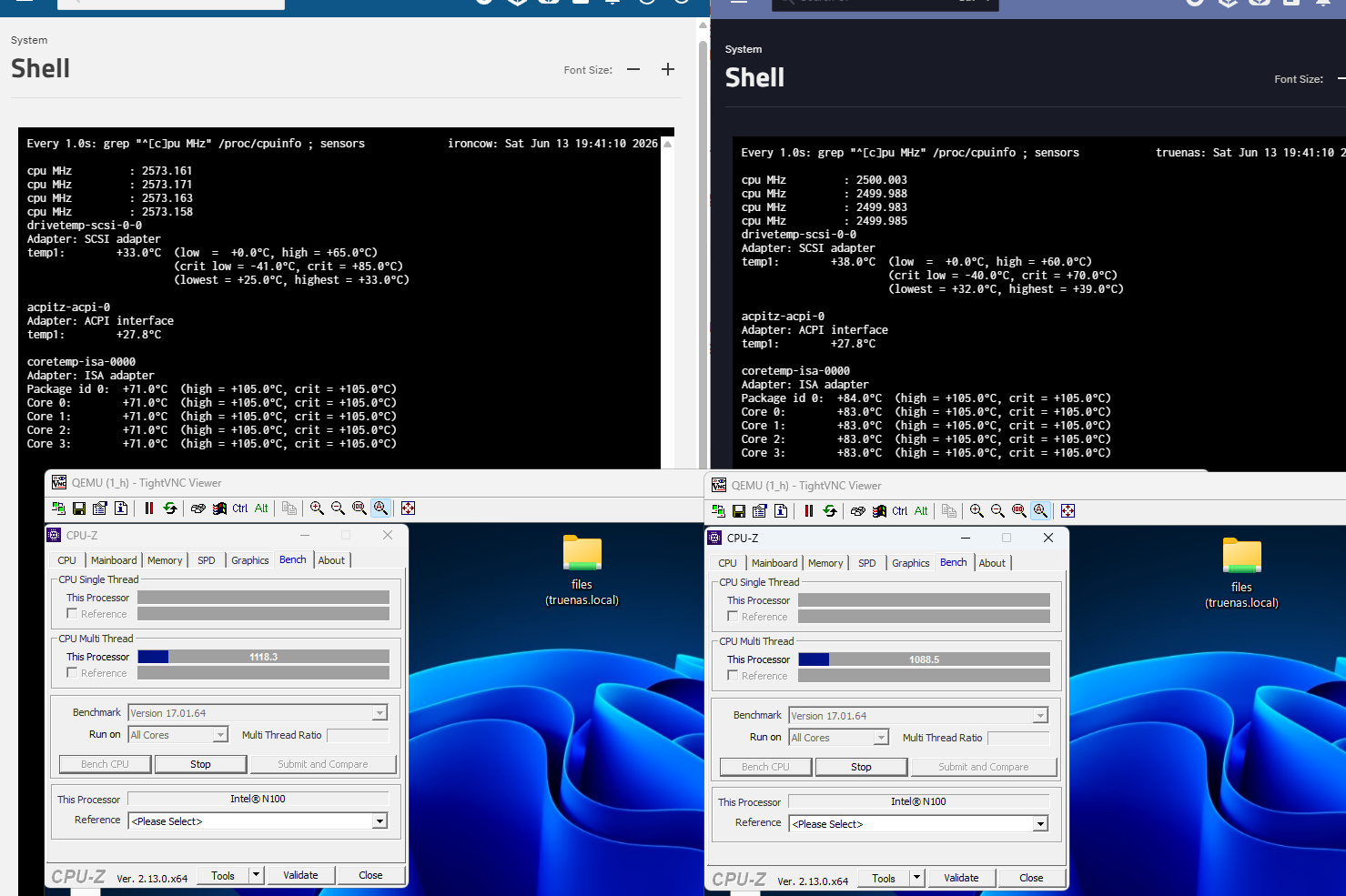
Something interesting happened. Just kidding, the increased airflow Is definitely noticeable in both actual airflow and internal temps. Here (through the magic of having two of them) I’m doing the CPU benchmark for half an hour with the units side by side.

Despite using the same power settings and fan settings, the modified one is definitely a bit cooler by about 10C.

Interestingly, removing the front panel baffle doesn’t seem to impact thermals despite the audibly higher RPMs on both sides.

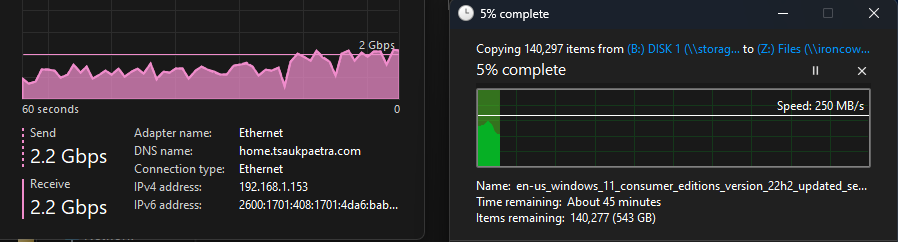
I did also have the opportunity to test single-port 2.5GBps throughput.

It appears adequate but definitely runs the CPU pretty decently to get that to happen, the cores boost to 2.9GHz to satisfy the load. Using a VM on the NAS to copy things over SMB is somewhat reasonably going well, I’m assuming the disks are the bottleneck on both sides, the CPU isn’t pegged for that at least.

Do you know the type of used sata controller ? And how does it behave under a sustained heavy load ? E.g. a scrub or a resilver operation ?

It uses

01:00.0 SATA controller: ASMedia Technology Inc. ASM1064 Serial ATA Controller (rev 02)

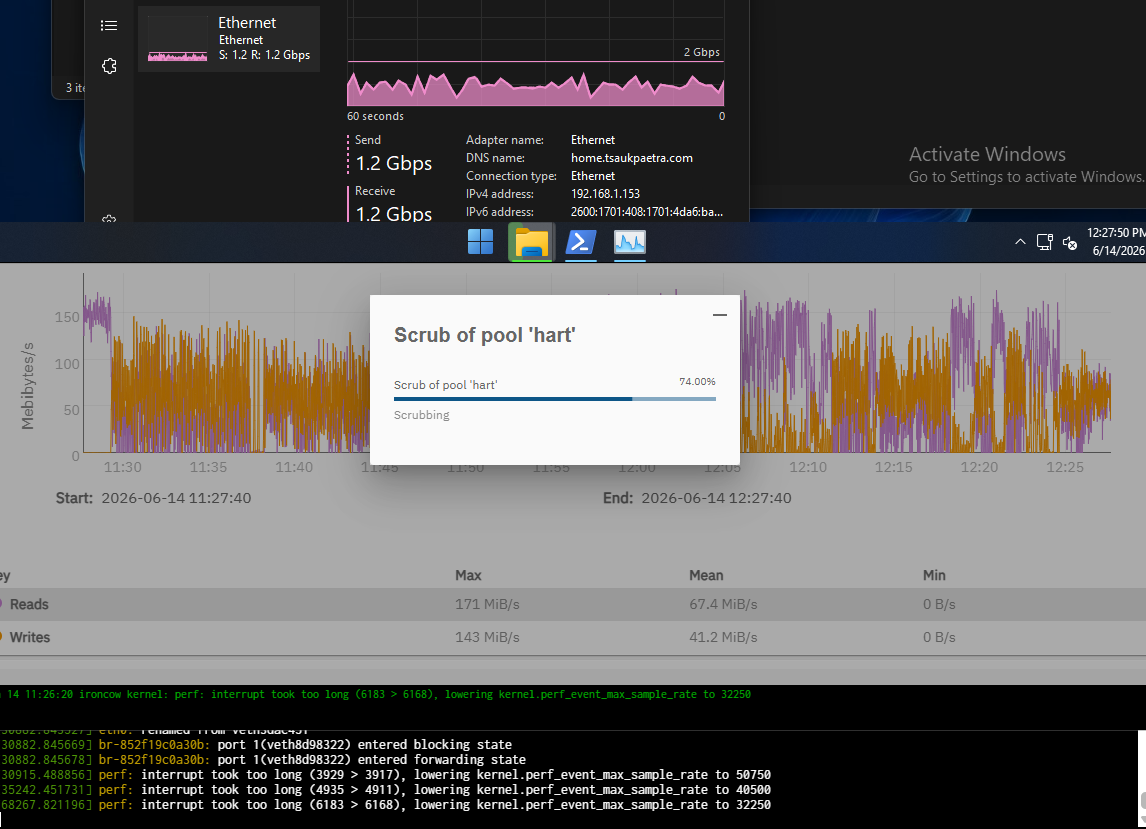
Once the initial copy of the above happens I’ll trigger a scrub and see. I feel there will be no surprises with the given performance profile (it’s an N100, can’t expect miracles).

I think the interesting part will be how the SATA controller behaves under hours of full load.

2 Likes

Ah, right. Well it’s a cheap controller. The hallucination engine suggests overwhelming the command queue might be easy to overwhelm and glitch out, so we’ll see. It should be able to handle spinners okay, so we shall see. :upside_down_face:

So far so good, tried inducing some thrashing by making another copy into the system, nothing special to report in that regard.

I’m going to spend some time amplifying written data and do it again, but so far seemingly so good…

1 Like

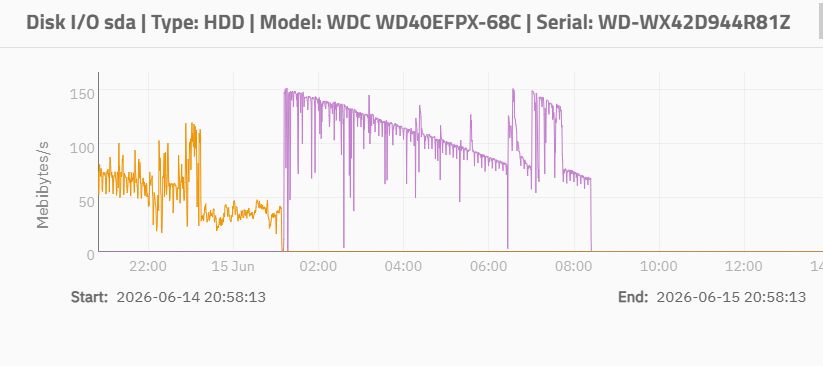
9 hours later and scrubbing 5.27 TiB went through without a hitch.

Kinda cool to see the actual effect of head location on the platter determining the transfer rate.

The drives themselves maintained a cool 35C likely owing to the fan always spinning. I might lower the aggressiveness of the curve. :sweat_smile:

1 Like

Am I correct in understanding that most of this is profiling, and the modifications you have made to the unit as of now are limited to the quotes below?

My unit will be here shortly and it would be supremely useful to have a list of what you’ve changed that you feel should be standard for these units/things which have marked impact on performance, what things you may not have had time or energy to try (which I could potentially contribute), things you’d like to see tested/replicated by a third party, etc.

I’m not super familiar with the networking/infra-related side of CS just yet, so forgive me if I am asking things that are obvious, etc.

For future readers, some important insights provided to this point are below.

TrueNAS Related:

The TrueNAS installer gets very confused because the eMMC has two 4Mb partition slices, so [Tsaukpaetra] ended up making it install to an appropriately-sized virtual disk and DD’d it over. Apparently there are some shell commands you can use to make it not read-only that might help let the installer run through, but [Tsaukpaetra] didn’t have the patience.

Hardware Related:

The LAN ports are labeled in reverse, enp3s0 is the left port, enp2s0 is the right port (closest to the power jack).

the increased airflow [from the addition of the foam, etc.] is definitely noticeable in both actual airflow and internal temps … the modified one is definitely a bit cooler by about 10C. Interestingly, removing the front panel baffle doesn’t seem to impact thermals despite the audibly higher RPMs on both sides.

It uses: 01:00.0 SATA controller: ASMedia Technology Inc. ASM1064 Serial ATA Controller (rev 02)

Bios Related:

The BIOS does appear to power-limit it, dropping the boosts to only about 1.2GHz, which will greatly impact performance if you’re going to try taking advantage of the 2.5Gbps interfaces, but should be fine for single-gig speeds.

the default power limits are PL1 6k and PL2 10k. Using very unscientific tests [Tsaukpaetra] concluded a PL1 of 10k and PL2 of 20K should be reasonable. This will let it boost to 2.8GHz for half a minute and then fall down to 2.5GHz, maintaining 85C temps.

start the fan at 36C (so it’s basically always spinning), PWN init 70, and slope 5.

I’ll try to keep this updated, even from posts that come later, so there’s a single list that can be referenced vs. needing to scroll and read every post or command + f. Hopefully this will help make the process a bit easier for someone else in the future (I personally struggle when things are scattered and spend way too much time on a lot of projects just getting everything written down in one place, etc.) – but I digress

Thanks again for all the work you’re doing with this @Tsaukpaetra

That seems like a good summary, I’ll make this the sticky for the thread. :smiley:

So far indeed the most important mod is the foam filling that ensures the airflow from the fan is actually directed out of the case, without it the ~3/4” gap from the fan to the grill just makes it ineffective at best. The next mod with the grill itself just helps the flow rate, I’m not sure how much more it helps but since it’s an unseen enhancement I figured why not.

The CPU cooler seems to be the same kind I saw on a few half-height RAID controllers so I’m looking to see if maybe there at ones that have fans that could be used.

Seeing the consistency with the temps I will probably ease the slope a bit, the airflow down to the motherboard doesn’t seem particularly impacted with the higher speeds anyways, just the fact that it’s getting flow at all.

1 Like

You are truly so kind and encouraging to a new member – thank you for your patience and willingness to share your expertise

My unit arrived at the distribution facility in my city today, so I will be doing my best to catch-up keep pace on anything else you come up with (otherwise, please do also feel free to ask for replicate data from my unit, or similar, if it would be of value to you – I’m eager to pay back your time in kind where/as possible!

I’m thinking I’ll probably swap the provided fan for a Noctua model that I happen to have, if only to drop the decibels, but the CPU cooler itself wasn’t something I’d considered swapping out. Probably worth re-pasting it at the very least, but I’ll be very eager to hear about your efforts there and if they are fruitful. The only other modification I’ve considered (aside from the added foam) is dropping in another 8 Gb of RAM I have laying around – let me know if you want any data or replications from the 16 Gb unit

P.s. Just to be absolutely clear for anyone reading, I’ve contributed next to nothing here – 100% of the credit to @Tsaukpaetra (I just happen to have terrible ADHD and require the kind of high level summary from the marked “Solution” in order to function when things are across multiple posts). Clearly I’m not even especially familiar with this forum, as I cannot manage to edit the aforementioned post (whether I’m failing to find how or because my account is so new, is not readily apparent to me)…

Ah, that is definitely something to note: the unit has only a single SODIMM DDR4 slot.

Make sure it’s a 4-pin CPU style one, I didn’t get the size but I do know it’s a 4-pin type and I’m unsure if the motherboard would recognize and switch to 3-pin mode.

Thank you for both of those considerations!

The product listing I saw has a picture that is probably AI or just whipped up by the marketing team that implied two slots (see below), but I saw some conflicting stuff online elsewhere, so knowing that it is just one is both useful and unfortunate

I’ll keep the pinning in mind. I don’t know off the top of my head, but I’ll check and report back either way (will likely test even if 3-pin, just out of curiosity)

I’m not able to embed the image mentioned above, nor link to it formally, so here’s my best attempt to cite the source for anyone who would like to see: [https]://m.media-amazon.[com/images/I/81wBqXFUYzL.AC_SL1500].jpg

Actually, apparently this is a known thing with emmc devices where the partition layout just doesn’t get updated very quickly.

This guy actually confirmed making the installer retry confirmation of the partitions for longer does work.

I have done also and it is a solution for the initial install.

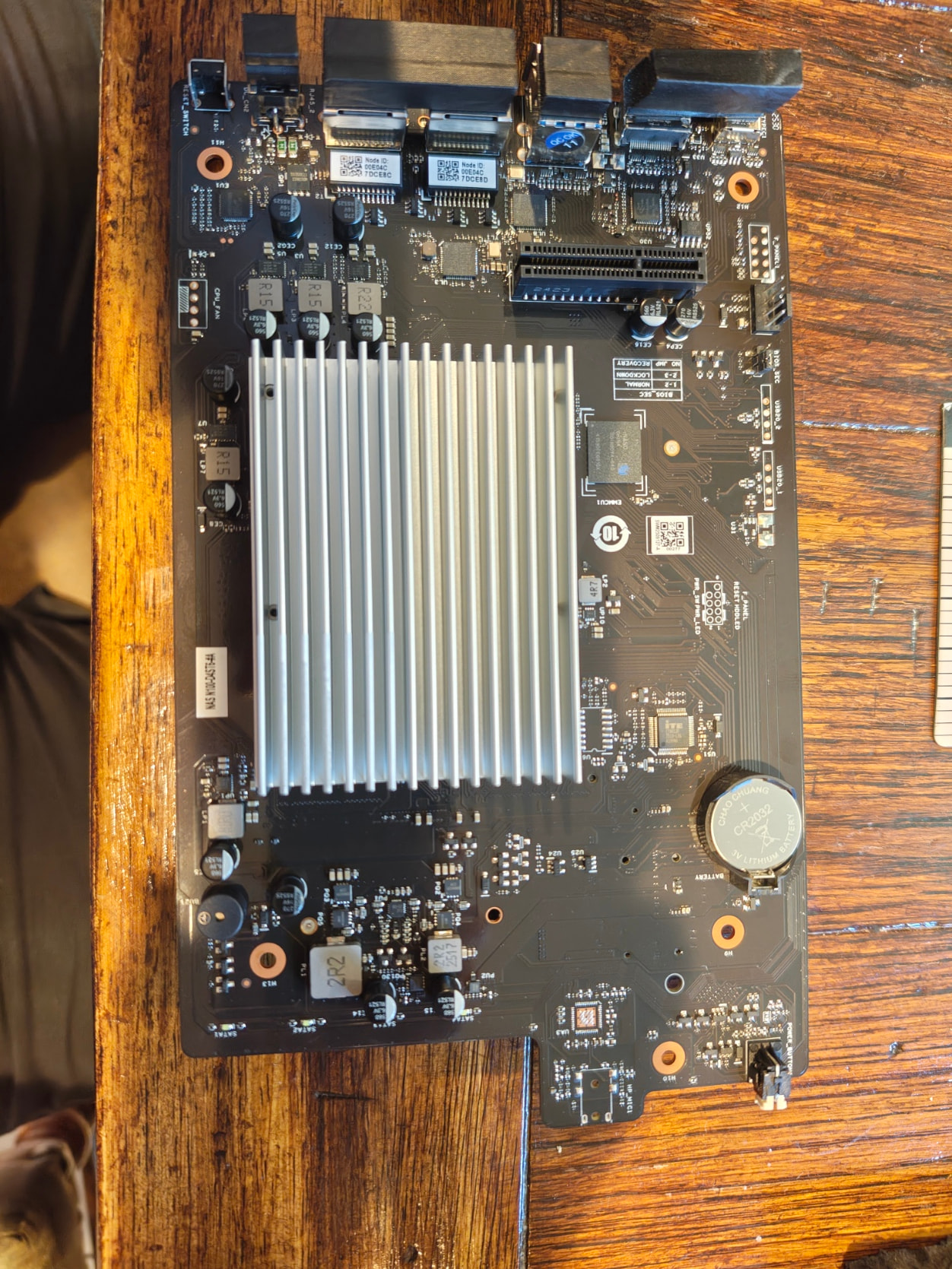
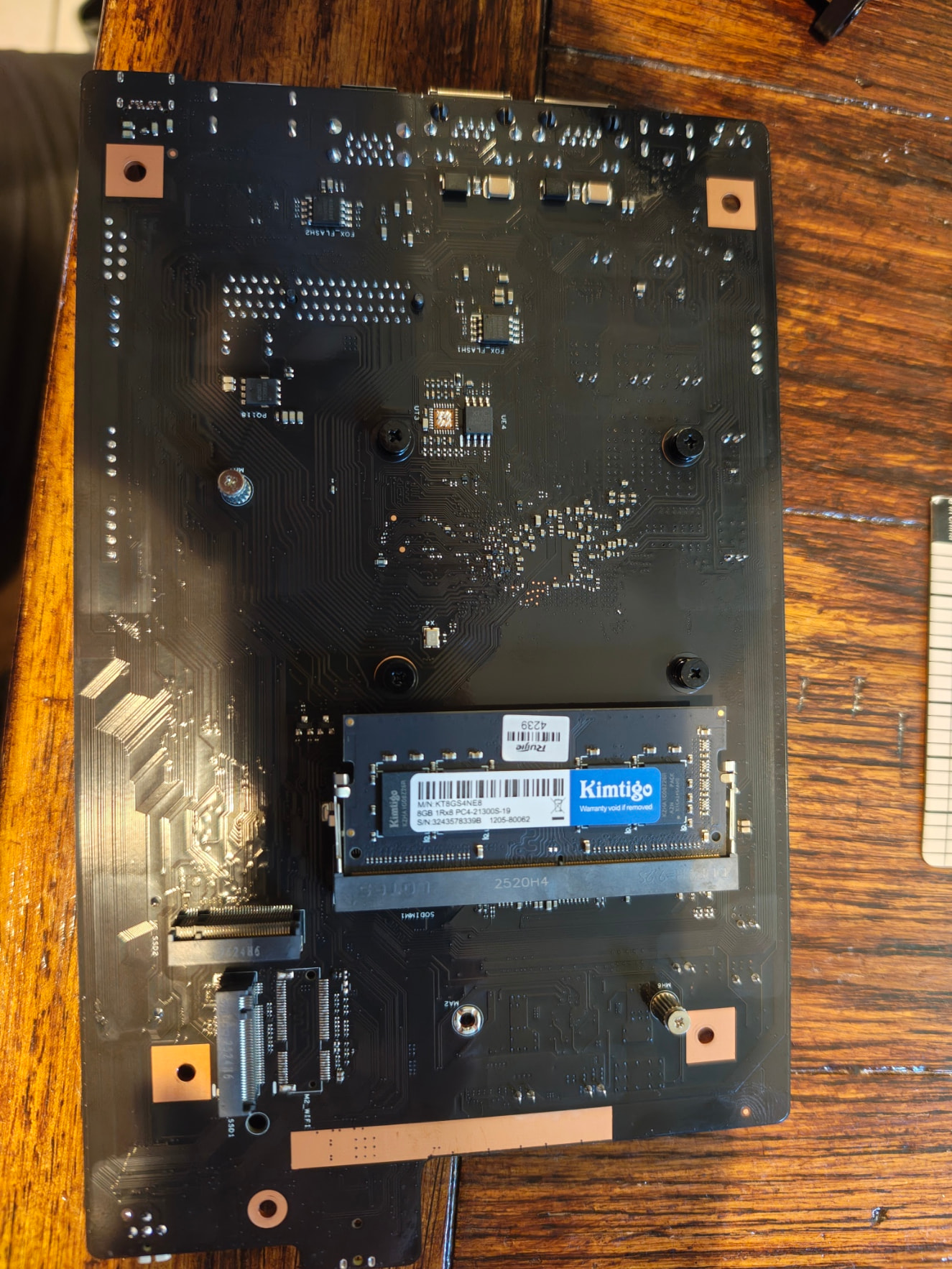
Here are some pics for consideration.

The unpopulated CPU fan header is to the left. Getting to this point is easy, just a bunch of phillips head screws.

The single DDR4 slot and two NVME slots. I believe the unpopulated socket at the bottom is a Mini PCIe slot, but I’m not sure because the orientation would make it have most cards be upside down if so.

The CPU heatsink’s screwholes are 45mm and 55mm

The chassis fan is 120mm standard.

Here’s my little design for the foam. The depth is about 9mm. The cutouts at the top and slight offset are for the mounting pegs.

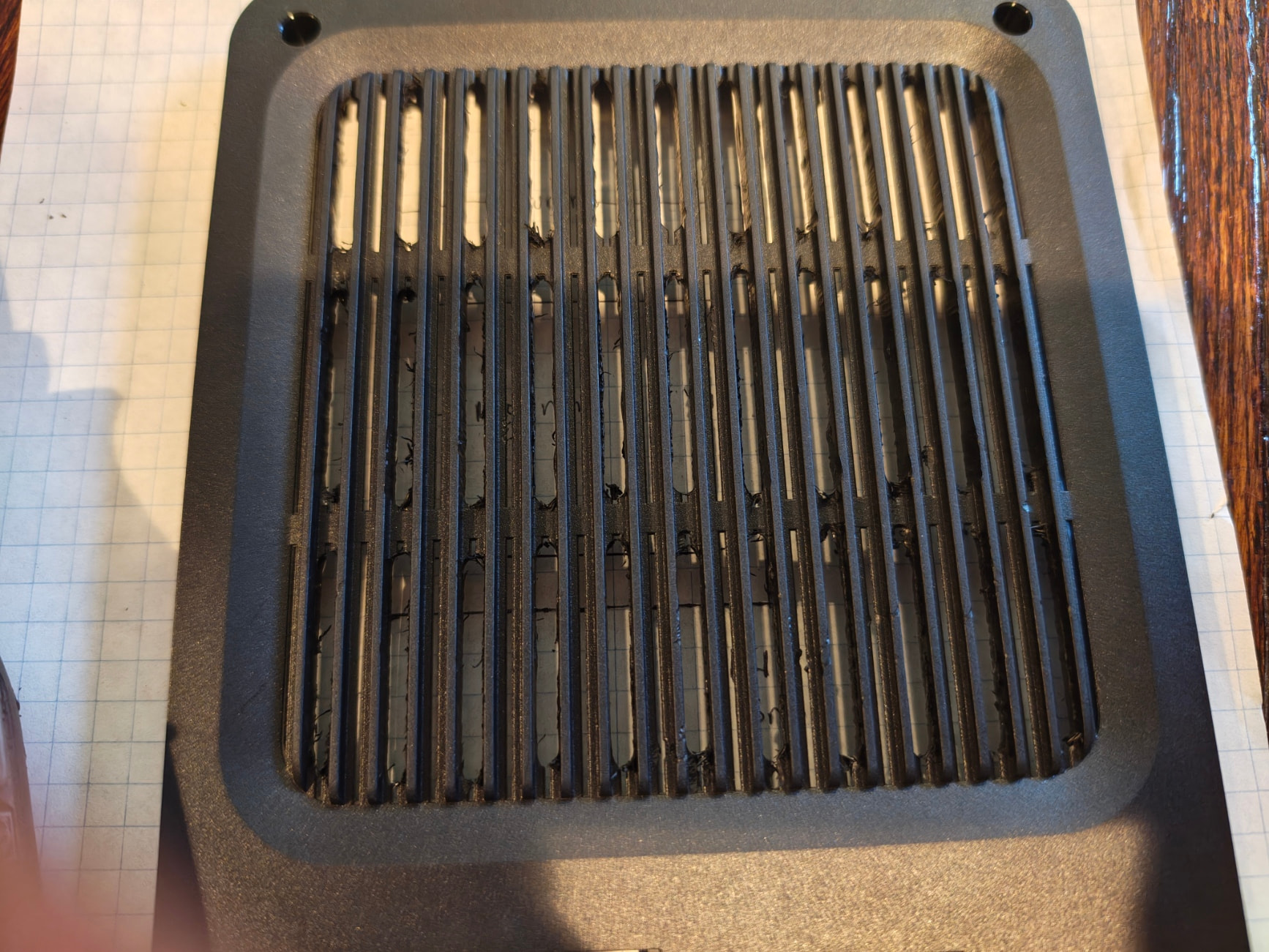
Here’s my inexpert cutting out of the grill slats. I just opened up every other one.

If I remember correctly, these are not partitions per say, but appear to the OS as additional devices. This is why it appears you can’t just delete the partitions and reclaim the tiny amount of space.

My guess from various info over the years, is that one of the main uses for eMMC was for embedded devices, including phones. These needed both regular OS space, like for Android. But, also the SoC, (System on a Chip), needed a BIOS / boot code.

These 2 small storage spaces could be for primary BIOS and backup BIOS. Thus have a bit of high availability for embedded uses. Or even use the second for storing BIOS configuration parameters, making the BIOS storage “device” 100% Read/Only.

While eMMCs are “real” storage, meaning they do have spare blocks and do ECC, as well as have some decent speed, higher level OSes tend to have minor issues with them. Embedded OSes don’t because the Vendor made them that way.