Hi,
I’ve been getting to know TrueNAS recently which has been great and getting along well so far! I have a very small amount of experience with ZFS elsewhere.
To familiarise with it, I hosted TrueNAS in a VM on a Proxmox host and passed through a 5tb disk (not the SATA controller) which resulted in a funky serial number (QM0000007 or the like) being passed through to TrueNAS. I was able to build my ZFS pool, create a dataset or two, etc.
I want to add a disk so I achieve a mirrored setup, but there aren’t enough ports on my motherboard. So I purchase an HBA (an ASM1166 based NVMe adapter).
Before shutting down TrueNAS and setting up PCIe passthrough, I exported the existing pool, rebooted, and re-imported it. This worked fine. So I exported again, shut down the VM, configured PCIe passthrough, and moved the original disk over.
On booting up TrueNAS, I imported the pool using sudo zpool import -d /dev/disk/by-id tank on the shell. The pool imports fine and I’m happy. I can see the HDD’s actual serial number, and other diagnostic info (e.g. temperature) which I couldn’t see before.
The problem is on a reboot: the pool is not imported automatically successfully. Is this because the serial number has changed, and TrueNAS hasn’t registered that change perhaps? What’s the best approach here: adjust the recorded serial number somehow, or export the pool and re-import again through the UI?
Really grateful for any advice.
I’m using TrueNAS 25.10.3.1
ZFS uses the partition GUID to identify VDEV members, not the disk serial number. I would try exporting and reimporting via the UI vs. the command line, as the middleware does a lot more behind the scenes than just a straightforward import.
Thanks @Samuel_Tai - alright, I’ll try that. Would it be necessary also to “Delete saved configurations from TrueNAS” when I do that? I have an iSCSI Extent I’d need to reconfigure if so. Hopefully not as this config only refers to the pool and not the disks?
Delete saved configurations just refers to anything in the UI (e.g., replication tasks, sharing configs, etc.) that references datasets/zvols in the pool. You can uncheck it for the export, and it’ll pick back up on the import.
I thought that ZFS uses some other identifier to identify VDEV members (labels?) but I understand your point that the serial number is probably much too coarse an identifier to be used.
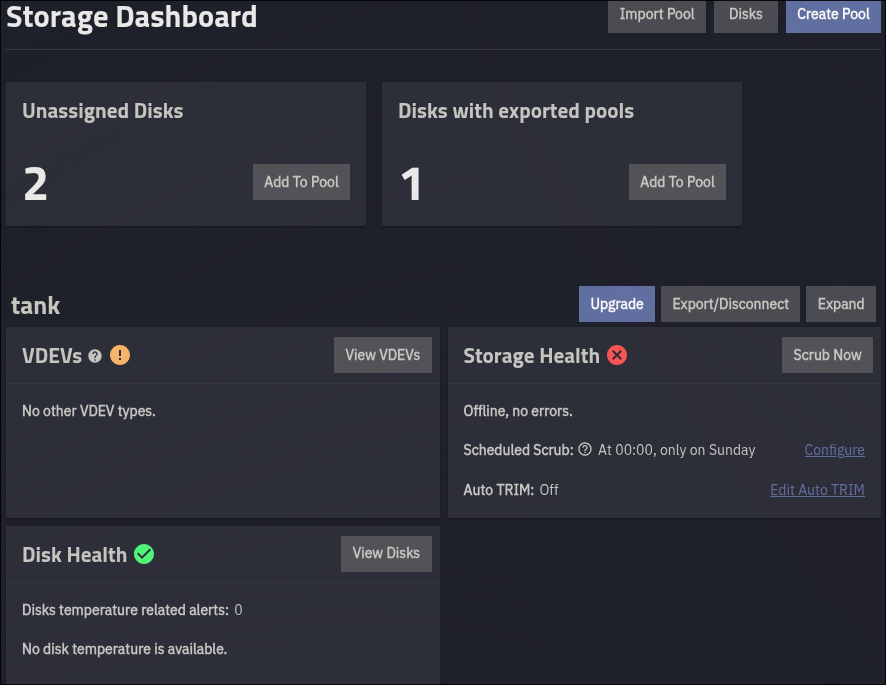
The export/import process via Web UI worked, but on reboot the pool is still showing “Offline”. And strangely, even though my pool is listed in Storage, I see “Disks with exported pools” as below.
As session with Codex suggested that running zpool import can mess with the normal TrueNAS process of pool import. It suggested I run midclt call pool.import_pool ‘{“guid”:“xxx”,“name”:“tank”}’. I tried that, but no improvement again.
Strange. Sometimes, it’s helpful to export and import the pool on a different bare-metal system.
I’m thinking either I’ll create a new pool and move the data over into it, or reset this VM back to the original state just after TrueNas installation and then import the pool again.
Also just found another post suggestion attention to this advice which is certainly relevant:
Particularly as I haven’t blacklisted the HBA on Proxmox yet…
For any future searches, this is the solution I came to (or Codex, truthfully):
Summary
tank failed to auto-import on TrueNAS boot because /dev/sdb1 had a stale ext4 signature alongside valid ZFS labels. blkid reported the partition as ambiguous, so udev did not mark it
as zfs_member; TrueNAS boot import then could not discover the pool.
How We Found It
- Confirmed tank imported manually with -d /dev or -d /dev/disk/by-id.
- Confirmed TrueNAS boot import used bare zpool import and failed.
- Reproduced on a fresh TrueNAS VM, ruling out stale middleware config.
- Created testpool; it survived reboot, proving ASM1166 passthrough and TrueNAS import were generally OK.
- Compared tank vs testpool.
- Found blkid /dev/sdb1 returned “ambivalent result”.
- wipefs -n /dev/sdb1 showed stale ext4 plus valid zfs_member signatures.
Fix
Backed up first 64 KiB, then erased only the stale ext4 signature:
dd if=/dev/sdb1 of=/root/sdb1-first-64k-before-ext4-wipe.bin bs=64K count=1
wipefs --backup --offset 0x438 /dev/sdb1
After reboot, tank auto-imported successfully and is ONLINE.
That’s an interesting anomaly I’ve not seen before. Glad you figured it out.