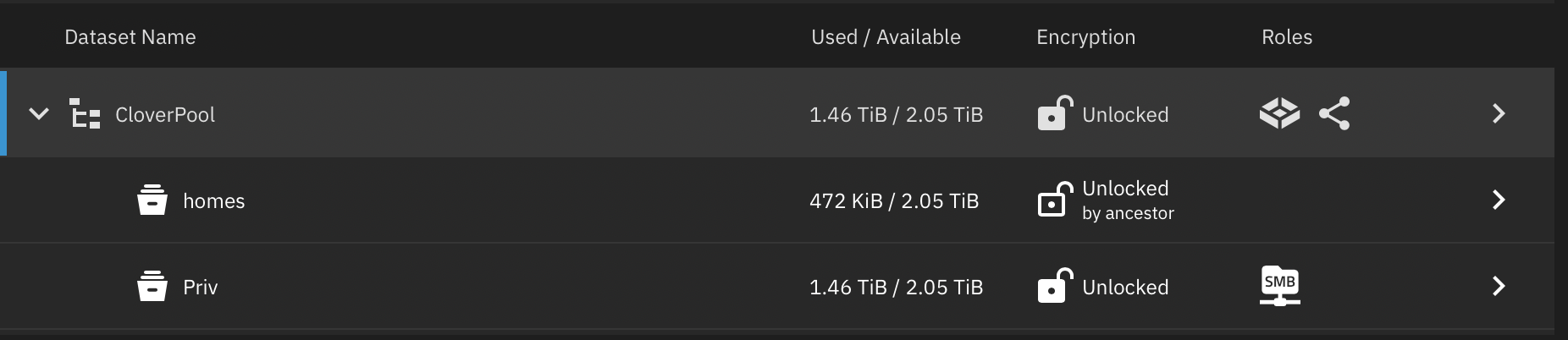
I’m reaching out in desperate need of guidance to avoid losing critical data. I understand the importance of the 3-2-1 backup rule, but as this is my first TrueNAS box, I didn’t yet have a secondary backup.
Here’s what happened:
I was using an application via SMB to remove duplicate files from my NAS. Unfortunately, the software deleted many files related to important coding projects.
Realizing these files were essential, I decided to restore from a snapshot taken a few days ago. From reading the rollback warnings, my understanding was that performing a rollback would remove data created after the snapshot but retain the snapshot itself.
The rollback completed successfully. However, my data folder is now completely empty.
Additional details:
The dataset still shows disk space being used, so I’m hoping the data is still recoverable.
I haven’t performed any operations on the dataset other than restarting the SMB service and enabling SSH.
I’ve checked via SSH, and the files are not visible under /mnt/CloverPool/Priv/.
At this critical moment, I want to avoid any action that could further risk the data.
I would greatly appreciate guidance on:
How to verify whether the data is truly gone or still recoverable.
Steps I can safely take to attempt recovery.
Any precautions I should follow to prevent permanent loss.
Thank you so much for your support, I truly appreciate any help to recover these important files.
$ sudo zfs list -o space CloverPool/Priv@auto-2025-08-28_00-00
cannot open 'CloverPool/Priv@auto-2025-08-28_00-00': snapshot delimiter '@' is not expected here
Since I’m getting the error ‘snapshot delimiter ‘@’ is not expected here’, I’m not sure if this output is useful. The command is a bit different, and I’m not skilled enough to interpret the output.
**zfs get all CloverPool/Priv@auto-2025-08-28_00-00**
NAME                                   PROPERTY                 VALUE                    SOURCE
CloverPool/Priv@auto-2025-08-28_00-00  type                     snapshot                 -
CloverPool/Priv@auto-2025-08-28_00-00  creation                 Thu Aug 28  0:00 2025    -
CloverPool/Priv@auto-2025-08-28_00-00  used                     0B                       -
CloverPool/Priv@auto-2025-08-28_00-00  referenced               1.46T                    -
CloverPool/Priv@auto-2025-08-28_00-00  compressratio            1.06x                    -
CloverPool/Priv@auto-2025-08-28_00-00  devices                  on                       default
CloverPool/Priv@auto-2025-08-28_00-00  exec                     on                       default
CloverPool/Priv@auto-2025-08-28_00-00  setuid                   on                       default
CloverPool/Priv@auto-2025-08-28_00-00  createtxg                141237                   -
CloverPool/Priv@auto-2025-08-28_00-00  xattr                    on                       inherited from CloverPool/Priv
CloverPool/Priv@auto-2025-08-28_00-00  version                  5                        -
CloverPool/Priv@auto-2025-08-28_00-00  utf8only                 off                      -
CloverPool/Priv@auto-2025-08-28_00-00  normalization            none                     -
CloverPool/Priv@auto-2025-08-28_00-00  casesensitivity          insensitive              -
CloverPool/Priv@auto-2025-08-28_00-00  nbmand                   off                      default
CloverPool/Priv@auto-2025-08-28_00-00  guid                     14257309702931290399     -
CloverPool/Priv@auto-2025-08-28_00-00  primarycache             all                      default
CloverPool/Priv@auto-2025-08-28_00-00  secondarycache           all                      default
CloverPool/Priv@auto-2025-08-28_00-00  defer_destroy            off                      -
CloverPool/Priv@auto-2025-08-28_00-00  userrefs                 1                        -
CloverPool/Priv@auto-2025-08-28_00-00  objsetid                 7654                     -
CloverPool/Priv@auto-2025-08-28_00-00  mlslabel                 none                     default
CloverPool/Priv@auto-2025-08-28_00-00  refcompressratio         1.06x                    -
CloverPool/Priv@auto-2025-08-28_00-00  written                  0                        -
CloverPool/Priv@auto-2025-08-28_00-00  logicalreferenced        1.55T                    -
CloverPool/Priv@auto-2025-08-28_00-00  acltype                  nfsv4                    inherited from CloverPool/Priv
CloverPool/Priv@auto-2025-08-28_00-00  context                  none                     default
CloverPool/Priv@auto-2025-08-28_00-00  fscontext                none                     default
CloverPool/Priv@auto-2025-08-28_00-00  defcontext               none                     default
CloverPool/Priv@auto-2025-08-28_00-00  rootcontext              none                     default
CloverPool/Priv@auto-2025-08-28_00-00  encryption               aes-256-gcm              -
CloverPool/Priv@auto-2025-08-28_00-00  encryptionroot           CloverPool/Priv          -
CloverPool/Priv@auto-2025-08-28_00-00  keystatus                available                -
CloverPool/Priv@auto-2025-08-28_00-00  prefetch                 all                      default
CloverPool/Priv@auto-2025-08-28_00-00  org.freenas:description                           inherited from CloverPool/Priv
This is where I’m confused. I transferred everything from my old Synology last week and was in the process of re-installing it to use as an off-site backup. I’m certain all the data was stored in the Data folder. The snapshot restored my other folder sysseman, but not the content in Data folder.
root@nas[~]# ls -lh /mnt/CloverPool/Priv/
total 17K
drwxrwx--- 11 root root 11 Aug 25 03:12 Data
drwxrwx---  3 root root  6 Aug 21 23:28 Tools
root@nas[~]# ls -lh /mnt/CloverPool/Priv/Data
total 0
root@nas[~]# ls -lh /mnt/CloverPool/Priv/Tools
total 9.0K
-rwxrwx--- 1 root root 7.8K Aug 21 23:06 dupfind2.sh
-rwxrwx--- 1 root root 6.3K Aug 21 23:09 dupfind.sh
root@nas[~]# du -sh /mnt/CloverPool/Priv
77K     /mnt/CloverPool/Priv
Oh my God!, thank you so much, Winnie! You truly saved all my memories by guiding me through this heartbreaking moment.
I did a rollback from the WebUI from the Child Dataser snapshot CloverPool/Priv Snapshot.
Not sure if this was just bad luck or an actual bug, but for reference, I’m running TrueNAS Scale version 25.04.2.1 if anyone else would find this post in the future.
# ls -lh /mnt/CloverPool/Priv/Data
total 77K
drwxrwx---  3 root  root  4 Aug 22 23:11  IT
Happy to see that you were able to recover the data.
Just a thought to add for future reference: Next time you have a similar situation; avoid rolling back, and create a clone of the snapshot. That way you can safely inspect everything is fine and once you are happy you can promote it as the main dataset.