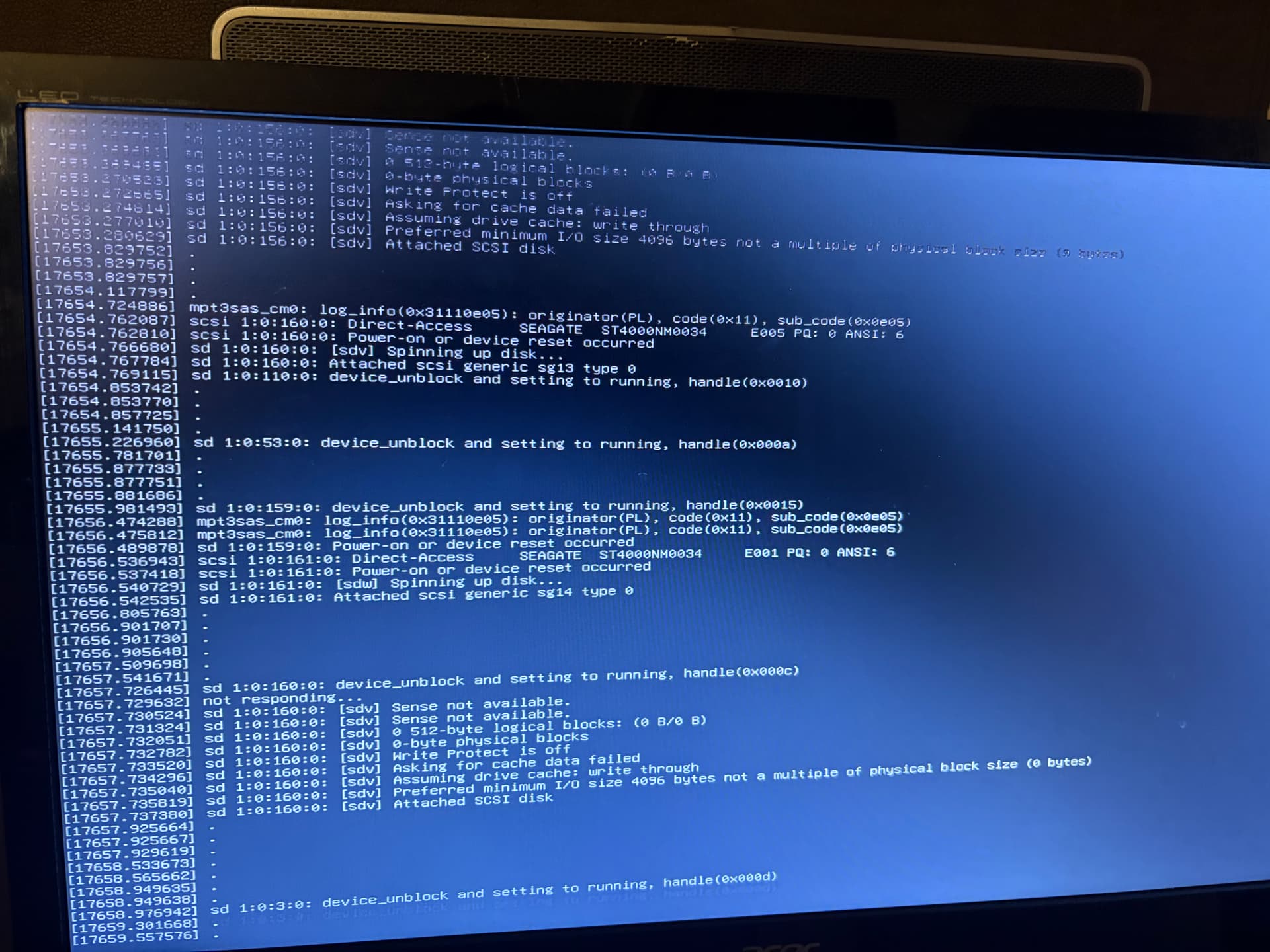
Here it is:
root@NAS01[~]# dmesg | tail -n 150
[19496.209710] .
[19496.241728] .
[19496.450443] mpt3sas_cm0: log_info(0x31110e05): originator(PL), code(0x11), sub_code(0x0e05)
[19496.493765] sd 1:0:679:0: Power-on or device reset occurred
[19496.561711] .
[19496.704321] sd 1:0:681:0: device_block, handle(0x0012)
[19496.814003] br-8c06a3c723e5: port 1(veth5e419bd) entered disabled state
[19496.814262] vetha31f0f2: renamed from eth0
[19496.863515] br-8c06a3c723e5: port 1(veth5e419bd) entered disabled state
[19496.864201] veth5e419bd (unregistering): left allmulticast mode
[19496.864212] veth5e419bd (unregistering): left promiscuous mode
[19496.864218] br-8c06a3c723e5: port 1(veth5e419bd) entered disabled state
[19496.968147] systemd[1]: run-docker-netns-a12ada9019dd.mount: Deactivated successfully.
[19496.968310] systemd[1]: mnt-.ix\x2dapps-docker-overlay2-ec43c0c31cc40f284252d7280a3dccd710c053bd4ef79d921022b35fe5d050fa-merged.mount: Deactivated successfully.
[19497.076306] .
[19497.201515] mpt3sas_cm0: log_info(0x31110e05): originator(PL), code(0x11), sub_code(0x0e05)
[19497.201534] mpt3sas_cm0: log_info(0x31110e05): originator(PL), code(0x11), sub_code(0x0e05)
[19497.202556] sd 1:0:601:0: [sds] tag#1363 FAILED Result: hostbyte=DID_SOFT_ERROR driverbyte=DRIVER_OK cmd_age=1s
[19497.203977] sd 1:0:601:0: [sds] tag#1363 CDB: Read(16) 88 00 00 00 00 01 d1 c0 be 00 00 00 00 08 00 00
[19497.203981] I/O error, dev sds, sector 7814036992 op 0x0:(READ) flags 0x80700 phys_seg 1 prio class 0
[19497.204110] sd 1:0:601:0: Power-on or device reset occurred
[19497.233685] .
[19497.265689] .
[19497.275064] systemd[1]: Stopping smartmontools.service - Self Monitoring and Reporting Technology (SMART) Daemon...
[19497.277558] systemd[1]: smartmontools.service: Deactivated successfully.
[19497.277978] systemd[1]: Stopped smartmontools.service - Self Monitoring and Reporting Technology (SMART) Daemon.
[19497.338488] systemd[1]: Starting smartmontools.service - Self Monitoring and Reporting Technology (SMART) Daemon...
[19497.374117] systemd[1]: Started smartmontools.service - Self Monitoring and Reporting Technology (SMART) Daemon.
[19497.521726] .
[19497.589671] .
[19498.101680] .
[19498.289669] .
[19498.545661] .
[19498.613614] .
[19498.704215] sd 1:0:681:0: device_unblock and setting to running, handle(0x0012)
[19498.705781] sd 1:0:679:0: device_block, handle(0x0015)
[19498.708926] not responding...
[19498.709383] sd 1:0:681:0: [sdx] Read Capacity(16) failed: Result: hostbyte=DID_ERROR driverbyte=DRIVER_OK
[19498.709387] sd 1:0:681:0: [sdx] Sense not available.
[19498.709947] sd 1:0:681:0: [sdx] Read Capacity(10) failed: Result: hostbyte=DID_ERROR driverbyte=DRIVER_OK
[19498.709949] sd 1:0:681:0: [sdx] Sense not available.
[19498.710374] sd 1:0:681:0: [sdx] 0 512-byte logical blocks: (0 B/0 B)
[19498.710799] sd 1:0:681:0: [sdx] 0-byte physical blocks
[19498.711224] sd 1:0:681:0: [sdx] Write Protect is off
[19498.711651] sd 1:0:681:0: [sdx] Mode Sense: 00 00 00 00
[19498.711657] sd 1:0:681:0: [sdx] Asking for cache data failed
[19498.712084] sd 1:0:681:0: [sdx] Assuming drive cache: write through
[19498.712531] sd 1:0:681:0: [sdx] Preferred minimum I/O size 4096 bytes not a multiple of physical block size (0 bytes)
[19498.713447] sd 1:0:681:0: [sdx] Attached SCSI disk
[19498.798498] mpt3sas_cm0: mpt3sas_transport_port_remove: removed: sas_addr(0x5000c50085a559b9)
[19498.798508] mpt3sas_cm0: removing handle(0x0012), sas_addr(0x5000c50085a559b9)
[19498.798511] mpt3sas_cm0: enclosure logical id(0x56c92bf001193120), slot(12)
[19498.798513] mpt3sas_cm0: enclosure level(0x0000), connector name(     )
[19498.953145] mpt3sas_cm0: handle(0x12) sas_address(0x5000c50085a559b9) port_type(0x1)
[19499.121663] .
[19499.185976] mpt3sas_cm0: log_info(0x31120101): originator(PL), code(0x12), sub_code(0x0101)
[19499.211701] sd 1:0:670:0: device_block, handle(0x000f)
[19499.211726] sd 1:0:674:0: device_block, handle(0x0010)
[19499.313634] .
[19499.453228] mpt3sas_cm0: log_info(0x31110e05): originator(PL), code(0x11), sub_code(0x0e05)
[19499.569619] .
[19499.663206] loop2: detected capacity change from 0 to 3277304
[19499.693286] systemd[1]: tmp-tmp5cvp2c35.mount: Deactivated successfully.
[19499.793640] .
[19500.337626] .
[19500.770622] systemd[1]: Stopping netdata.service - netdata - Real-time performance monitoring...
[19501.361598] ..
[19502.454147] sd 1:0:584:0: device_block, handle(0x000d)
[19503.036165] systemd[1]: netdata.service: Killing process 698679 (netdata) with signal SIGKILL.
[19503.036963] systemd[1]: netdata.service: Killing process 701509 (cgroup-network) with signal SIGKILL.
[19503.037791] systemd[1]: netdata.service: Killing process 701510 (bash) with signal SIGKILL.
[19503.038462] systemd[1]: netdata.service: Killing process 701513 (bash) with signal SIGKILL.
[19503.039258] systemd[1]: netdata.service: Killing process 701522 (lsns) with signal SIGKILL.
[19503.042340] systemd[1]: netdata.service: Deactivated successfully.
[19503.042785] systemd[1]: Stopped netdata.service - netdata - Real-time performance monitoring.
[19503.042881] systemd[1]: netdata.service: Consumed 11.931s CPU time.
[19503.098292] systemd[1]: Started netdata.service - netdata - Real-time performance monitoring.
[19503.413489] .
[19503.455830] sd 1:0:678:0: device_block, handle(0x000b)
[19504.702525] mpt3sas_cm0: log_info(0x31110e05): originator(PL), code(0x11), sub_code(0x0e05)
[19505.454075] sd 1:0:679:0: device_unblock and setting to running, handle(0x0015)
[19505.457486] not responding...
[19505.458569] sd 1:0:679:0: [sdw] Read Capacity(16) failed: Result: hostbyte=DID_NO_CONNECT driverbyte=DRIVER_OK
[19505.458576] sd 1:0:679:0: [sdw] Sense not available.
[19505.459635] sd 1:0:679:0: [sdw] Read Capacity(10) failed: Result: hostbyte=DID_NO_CONNECT driverbyte=DRIVER_OK
[19505.459641] sd 1:0:679:0: [sdw] Sense not available.
[19505.460631] sd 1:0:679:0: [sdw] 0 512-byte logical blocks: (0 B/0 B)
[19505.461627] sd 1:0:679:0: [sdw] 0-byte physical blocks
[19505.462644] sd 1:0:679:0: [sdw] Test WP failed, assume Write Enabled
[19505.463646] sd 1:0:679:0: [sdw] Asking for cache data failed
[19505.464632] sd 1:0:679:0: [sdw] Assuming drive cache: write through
[19505.465679] sd 1:0:679:0: [sdw] Preferred minimum I/O size 4096 bytes not a multiple of physical block size (0 bytes)
[19505.467552] sd 1:0:679:0: [sdw] Attached SCSI disk
[19508.451343]  end_device-1:0:683: add: handle(0x0012), sas_addr(0x5000c50085a559b9)
[19508.451776] mpt3sas_cm0: mpt3sas_transport_port_remove: removed: sas_addr(0x5000c50085a559b9)
[19508.451780] mpt3sas_cm0: removing handle(0x0012), sas_addr(0x5000c50085a559b9)
[19508.451783] mpt3sas_cm0: enclosure logical id(0x56c92bf001193120), slot(12)
[19508.451786] mpt3sas_cm0: enclosure level(0x0000), connector name(     )
[19508.452058] mpt3sas_cm0: handle(0x0015), ioc_status(0x0022) failure at drivers/scsi/mpt3sas/mpt3sas_transport.c:225/_transport_set_identify()!
[19508.453930] mpt3sas_cm0: handle(0x12) sas_address(0x5000c50085a559b9) port_type(0x1)
[19508.957155] sd 1:0:601:0: device_block, handle(0x000a)
[19510.219224] mpt3sas_cm0: log_info(0x31130000): originator(PL), code(0x13), sub_code(0x0000)
[19510.220498]  end_device-1:0:684: add: handle(0x0012), sas_addr(0x5000c50085a559b9)
[19510.221133] mpt3sas_cm0: mpt3sas_transport_port_remove: removed: sas_addr(0x5000c50085a559b9)
[19510.221142] mpt3sas_cm0: removing handle(0x0012), sas_addr(0x5000c50085a559b9)
[19510.221147] mpt3sas_cm0: enclosure logical id(0x56c92bf001193120), slot(12)
[19510.221151] mpt3sas_cm0: enclosure level(0x0000), connector name(     )
[19510.221634] sd 1:0:674:0: device_unblock and setting to running, handle(0x0010)
[19510.223394] sd 1:0:670:0: device_unblock and setting to running, handle(0x000f)
[19510.225542] mpt3sas_cm0: device is not present handle(0x04c)!!!
[19510.226983] sd 1:0:584:0: device_unblock and setting to running, handle(0x000d)
[19510.228136] mpt3sas_cm0: device is not present handle(0x0413)!!!
[19510.229413] sd 1:0:674:0: Power-on or device reset occurred
[19510.229585] mpt3sas_cm0: device is not present handle(0x000b), flags!!!
[19510.232294] mpt3sas_cm0: device is not present handle(0x000b), flags!!!
[19510.233597] mpt3sas_cm0: handle(0x0012), ioc_status(0x0022) failure at drivers/scsi/mpt3sas/mpt3sas_transport.c:225/_transport_set_identify()!
[19510.241433] sd 1:0:584:0: Power-on or device reset occurred
[19510.299312] sd 1:0:670:0: Power-on or device reset occurred
[19510.314336] mpt3sas_cm0: mpt3sas_transport_port_remove: removed: sas_addr(0x5000c50085a5705d)
[19510.314346] mpt3sas_cm0: removing handle(0x0015), sas_addr(0x5000c50085a5705d)
[19510.314351] mpt3sas_cm0: enclosure logical id(0x56c92bf001193120), slot(9)
[19510.314356] mpt3sas_cm0: enclosure level(0x0000), connector name(     )
[19510.314759] mpt3sas_cm0: device is not present handle(0x000b), flags!!!
[19510.316330] mpt3sas_cm0: handle(0x15) sas_address(0x5000c50085a5705d) port_type(0x1)
[19510.317516] scsi 1:0:685:0: Direct-Access     SEAGATE  ST4000NM0034     E005 PQ: 0 ANSI: 6
[19510.318892] scsi 1:0:685:0: SSP: handle(0x0015), sas_addr(0x5000c50085a5705d), phy(19), device_name(0x5000c50085a5705c)
[19510.318900] scsi 1:0:685:0: enclosure logical id (0x56c92bf001193120), slot(9)
[19510.318904] scsi 1:0:685:0: enclosure level(0x0000), connector name(     )
[19510.318910] scsi 1:0:685:0: qdepth(254), tagged(1), scsi_level(7), cmd_que(1)
[19510.318992] scsi 1:0:685:0: Power-on or device reset occurred
[19510.323022] sd 1:0:685:0: [sdw] Spinning up disk...
[19510.324096] sd 1:0:685:0: Attached scsi generic sg13 type 0
[19510.325149]  end_device-1:0:685: add: handle(0x0015), sas_addr(0x5000c50085a5705d)
[19510.325256] mpt3sas_cm0: device is not present handle(0x0413)!!!
[19510.326374] mpt3sas_cm0: device is not present handle(0x000a), flags!!!
[19510.454208] sd 1:0:601:0: device_unblock and setting to running, handle(0x000a)
[19510.456545] sd 1:0:678:0: device_unblock and setting to running, handle(0x000b)
[19510.704193] sd 1:0:674:0: device_block, handle(0x0010)
[19510.706299] mpt3sas_cm0: handle(0xc) sas_address(0x5000c50085a594a5) port_type(0x1)
[19511.214608] sd 1:0:489:0: device_block, handle(0x0011)
[19511.216181] sd 1:0:489:0: [sdr] tag#1507 FAILED Result: hostbyte=DID_TRANSPORT_DISRUPTED driverbyte=DRIVER_OK cmd_age=15s
[19511.216194] sd 1:0:489:0: [sdr] tag#1507 CDB: Read(16) 88 00 00 00 00 01 d1 c0 bc 08 00 00 00 08 00 00
[19511.216199] I/O error, dev sdr, sector 7814036488 op 0x0:(READ) flags 0x0 phys_seg 1 prio class 0
[19511.217362] Buffer I/O error on dev sdr, logical block 976754561, async page read
[19511.249299] .
[19511.313322] .
[19511.345325] .
[19512.337276] .
[19512.369272] .
[19513.361224] .