Please feel free to redirect me if I’m asking in the wrong place.
I woke up this morning to find my UPS was off! and a switch in my home lab rack seems to have died. I was able to get everything back online truenas came back up also but my pool looks like its disconnected even though all 9 disks are present.
is there any way to have truenas scan the disks for the pool data and bring it back online. I host an iscsi drive and a small SMB share on this pool.
Full hardware details along with how your pools were set up. We can check the status of your system by CLI. You can expand the section below my signature to get an idea of hardware details.
Browse some other threads and do the Tutorial by the Bot to get your forum trust level up and post images and links
TrueNAS-Bot
Type this in a new reply and send to bring up the tutorial, if you haven’t done it already.
@TrueNAS-Bot start tutorial
Please run these in the web Shell and post back the results using preformatted text (</>) or Ctrl + e in the reply box. Each command to a preformatted box, please
Thanks for the prompt reply.
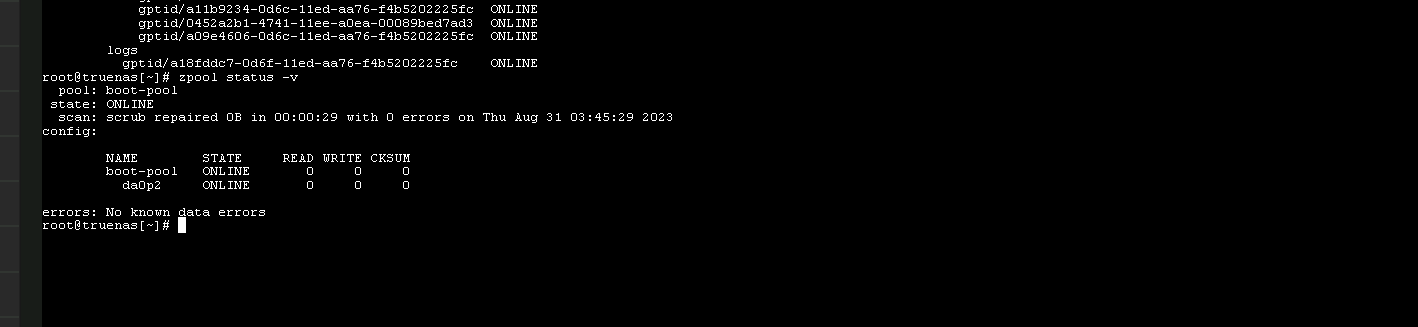
Please see attached picture of zpool import
Device is a a Biostar X470 matx board running a AMD Athlon x4 450
It has 32 Gig of non ECC ddr4
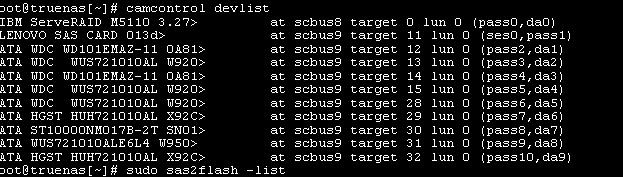
I run a LSI/IBM serverRAID M5100 with a lenovo sas expander card
main pool ISCSI is 9 10tb Sata enterprise drives in a raidz2
I can see now that it is showing pool metadata is corrupted.
pool: ISCSI
id: 14162219034866600371
state: FAULTED
status: The pool metadata is corrupted.
action: The pool cannot be imported due to damaged devices or data.
The pool may be active on another system, but can be imported using
the ‘-f’ flag.
see:
config:
I think one of the following comands should work to show your serverRAID M5100 info. You can post back info on the one that works, if one of them does. What we’re looking for is the card is flashed to ‘IT Mode’ and checking the firmware version, etc.
Just realized you stated TrueNAS CORE above. You probably don’t need the ‘sudo’ portions.
    sudo sas2flash -list
    sudo sas3flash -list
    sudo storcli show all
none of those seems to work. I believe the device is using and IT mode firmware. However I its has been a very long time since setup so the specifics escape me.
Thanks for your help so far. I did make a backup of critical files the other weeks to my other truenas box. However it also has an issue at the moment where it boots but I cannot access it in any way or ping it at all. Still working on that one. device show its up when I view it on its monitor.
Got my other truenas box going so i have a backup of my most critical files should I need to recover them. but please if there is any advice on getting my main truenas pool going let me know.
RAID controller with a LSI2208. Probably no IT mode, and if it was doing its sneaky dirty RAID work when power went off, you’re toasted.
The error message suggest to try zpool import -f ISCSI
Yeah it was servicing iscsi from raidz2. Was a hangover for an old nas and windows server setup i had. I know thats not the ideal way to do things.
Home lab stuff🤷
I fairly certain there is not raid funny stuff going on as i get correct smart data from the drives and have had drives fail and replace without an issue in the past. The card is set to jbod mode.
But who knows. Maybe you are right. Isnit worth trying a -F import if the lower case one fails?
If it fails we want to see the error message and logs from sysctl kstat.zfs.misc.dbgmsg
Then ‘F’ isn’t an upgraded form of ‘f’: The latter is “force even if pool is held by another client”, which could be the result of an unclean shutdown, while the former is “Force even if this results in data loss”.
So the next step would rather be ‘-fFn’, with ‘n’ for “no-op” (simulate only).
1661170672   vdev.c:161:vdev_dbgmsg(): disk vdev '/dev/gptid/a18fddc7-0d6f-11ed-aa76-f4b5202225fc': best uberblock found for spa ISCSI. txg 19299978
1661170672   spa_misc.c:419:spa_load_note(): spa_load(ISCSI, config untrusted): using uberblock with txg=19299978
1661170672   spa_misc.c:404:spa_load_failed(): spa_load(ISCSI, config untrusted): FAILED: unable to open rootbp in dsl_pool_init [error=6]
1661170672   spa_misc.c:419:spa_load_note(): spa_load(ISCSI, config untrusted): UNLOADING
1661170672   spa_misc.c:419:spa_load_note(): spa_load(ISCSI, config untrusted): spa_load_retry: rewind, max txg: 19299977
1661170672   spa_misc.c:419:spa_load_note(): spa_load(ISCSI, config untrusted): LOADING
1661170672   vdev.c:161:vdev_dbgmsg(): disk vdev '/dev/gptid/a18fddc7-0d6f-11ed-aa76-f4b5202225fc': best uberblock found for spa ISCSI. txg 18700318
1661170672   vdev.c:161:vdev_dbgmsg(): disk vdev '/dev/gptid/a18fddc7-0d6f-11ed-aa76-f4b5202225fc': label discarded as txg is too large (19299978 > 18700318)
1661170672   vdev.c:161:vdev_dbgmsg(): disk vdev '/dev/gptid/a18fddc7-0d6f-11ed-aa76-f4b5202225fc': failed to read label config
1661170672   spa_misc.c:419:spa_load_note(): spa_load(ISCSI, config untrusted): using uberblock with txg=18700318
1661170672   spa_misc.c:404:spa_load_failed(): spa_load(ISCSI, config untrusted): FAILED: label config unavailable
1661170672   spa_misc.c:419:spa_load_note(): spa_load(ISCSI, config untrusted): UNLOADING
ZFS tried to rewind nearly 600,000 txgs, and still failed to import the pool. That’s more than two years…
My very unskilled assessment is that the pool is FUBAR and that it is time to replace that very suspicious M5100 RAID controller and restore from backup. Unless @HoneyBadger can advise otherwise.