VDEV storage health issue

Hi all,

Quick heads-up: I’ve already tried following joeschmuck’s instructions to work through the troubleshooting flowchart, but the problem has actually got worse rather than better. That’s why I’m posting this here in the hope that you can help me out.

Yesterday, I noticed that one out of four hard drives was showing a few read and write errors. The status of the problematic HDD was still showing as ‘online’. Unfortunately, after attempting to troubleshoot the issue (by running ‘zpool clear’ and ‘scrub’ again), the status changed to ‘Faulted’.

To be honest, I’m surprised that, after less than six months, I’m already seeing the first errors and, in the worst-case scenario, even a faulty hard drive.

Setup:
VDEV: Split Mirrow (2 x mirrow, 2 x wide –> 4 HDD)
HDD: WD Red Plus WD60EFPX NAS HDD - 6 TB 5400
NAS: TERRAMASTER F4-425 Plus
OS: TrueNas 25.10.1
First use of the hard drive: 21.02.2026

Output status: zpool status -v

pool: boot-pool
state: ONLINE
scan: scrub repaired 0B in 00:00:05 with 0 errors on Mon Jun 8 03:45:06 2026
config:

    NAME         STATE     READ WRITE CKSUM
    boot-pool    ONLINE       0     0     0
      nvme0n1p3  ONLINE       0     0     0

errors: No known data errors

pool: zpool
state: DEGRADED
status: One or more devices are faulted in response to persistent errors.
Sufficient replicas exist for the pool to continue functioning in a
degraded state.
action: Replace the faulted device, or use ‘zpool clear’ to mark the device
repaired.
scan: scrub repaired 7.88M in 01:08:41 with 0 errors on Sat Jun 13 08:19:50 2026
config:

    NAME                                      STATE     READ WRITE CKSUM
    zpool                                     DEGRADED     0     0     0
      mirror-0                                ONLINE       0     0     0
        f178472c-07ce-46bf-82fc-7b47aa85c665  ONLINE       0     0     0
        942fa512-b848-4400-9fc8-89921ec4ddb0  ONLINE       0     0     0
      mirror-1                                DEGRADED     0     0     0
        291b119f-3f1d-410b-853f-641f0eb6c1d0  FAULTED     19     2    53  too many errors
        b8f5b715-01a8-4913-836d-cb7bf3196590  ONLINE       0     0     0

errors: No known data errors

My question is: is the HDD damaged, or is it just the data on the hard drives?
If it’s just the data, I could restore it from the mirror drive as a backup, couldn’t I?

Running Smartctl on the affected hard drive returns the following error:

SMART overall-health self-assessment test result: PASSED

General SMART Values:
Offline data collection status: (0x00) Offline data collection activity
was never started.
Auto Offline Data Collection: Disabled.
Self-test execution status: ( 0) The previous self-test routine completed
without error or no self-test has ever
been run.
Total time to complete Offline
data collection: (59400) seconds.
Offline data collection
capabilities: (0x7b) SMART execute Offline immediate.
Auto Offline data collection on/off support.
Suspend Offline collection upon new
command.
Offline surface scan supported.
Self-test supported.
Conveyance Self-test supported.
Selective Self-test supported.
SMART capabilities: (0x0003) Saves SMART data before entering
power-saving mode.
Supports SMART auto save timer.
Error logging capability: (0x01) Error logging supported.
General Purpose Logging supported.
Short self-test routine
recommended polling time: ( 2) minutes.
Extended self-test routine
recommended polling time: ( 616) minutes.
Conveyance self-test routine
recommended polling time: ( 5) minutes.
SCT capabilities: (0x3039) SCT Status supported.
SCT Error Recovery Control supported.
SCT Feature Control supported.
SCT Data Table supported.

SMART Attributes Data Structure revision number: 16
Vendor Specific SMART Attributes with Thresholds:
ID# ATTRIBUTE_NAME FLAG VALUE WORST THRESH TYPE UPDATED WHEN_FAILED RAW_VALUE
1 Raw_Read_Error_Rate 0x002f 200 200 051 Pre-fail Always - 18
3 Spin_Up_Time 0x0027 100 253 021 Pre-fail Always - 0
4 Start_Stop_Count 0x0032 100 100 000 Old_age Always - 2
5 Reallocated_Sector_Ct 0x0033 200 200 140 Pre-fail Always - 0
7 Seek_Error_Rate 0x002e 100 253 000 Old_age Always - 0
9 Power_On_Hours 0x0032 096 096 000 Old_age Always - 3081
10 Spin_Retry_Count 0x0032 100 253 000 Old_age Always - 0
11 Calibration_Retry_Count 0x0032 100 253 000 Old_age Always - 0
12 Power_Cycle_Count 0x0032 100 100 000 Old_age Always - 2
192 Power-Off_Retract_Count 0x0032 200 200 000 Old_age Always - 0
193 Load_Cycle_Count 0x0032 200 200 000 Old_age Always - 44
194 Temperature_Celsius 0x0022 119 112 000 Old_age Always - 31
196 Reallocated_Event_Count 0x0032 200 200 000 Old_age Always - 0
197 Current_Pending_Sector 0x0032 200 200 000 Old_age Always - 2
198 Offline_Uncorrectable 0x0030 100 253 000 Old_age Offline - 0
199 UDMA_CRC_Error_Count 0x0032 200 200 000 Old_age Always - 0
200 Multi_Zone_Error_Rate 0x0008 100 253 000 Old_age Offline - 0

SMART Error Log Version: 1
No Errors Logged

SMART Self-test log structure revision number 1
No self-tests have been logged. [To run self-tests, use: smartctl -t]

SMART Selective self-test log data structure revision number 1
SPAN MIN_LBA MAX_LBA CURRENT_TEST_STATUS
1 0 0 Not_testing
2 0 0 Not_testing
3 0 0 Not_testing
4 0 0 Not_testing
5 0 0 Not_testing

I really hope you can help me with this.

Many thanks in advance

That drive has 2 unreadable sectors according to SMART. This is not good for a new drive, but certainly not unheard of . Did you burn in the drives before using them ?

BTW, all you data is now in peril. If all your drives are from the same faulty batch, the 2nd drive in that mirror vdev has a chance to also fault out and take your data with it.

What @Farout said.

To add to what he said, you never ran any selftests. A short SMART selftest might reveal a failing drive. If it doesn’t, a long test might. I would at least run a short test. You might have to RMA the bad drive, since it appears to be infant mortality.

No, to be honest, I didn’t even know you had to burn in the new HDDs. That’s the first I’ve heard of it.

In theory, I should be able to use the serial number to find out whether all four HDDs are from the same batch, shouldn’t I?

If I remember correctly, the current version of TrueNAS that I’m using no longer offers any SMART testing functionality. Wasn’t that removed in version 25.x?

Silly question, but would you send the HDD back to the supplier or directly to the manufacturer (in this case, Western Digital)?

It is very advisable to so one way or the other. Albeit there is no standard tool. Some say badblocks does the job. But it overwrites the data.

Drive failure follows a bathtub curve, meaning more failures in the beginning, less in the middle and a higher amount towards the end of the drives expected lifetime.

Also, if you dont need the IOPS, or are using the pool for storing block storage (VMs, iSCSI), i would use a 4-wide RAIDZ2, instead of a stripe of mirrors.

I’ve now figured out how to run the Short SMART test in the shell.

MART Attributes Data Structure revision number: 16
Vendor Specific SMART Attributes with Thresholds:
ID# ATTRIBUTE_NAME FLAG VALUE WORST THRESH TYPE UPDATED WHEN_FAILED RAW_VALUE
1 Raw_Read_Error_Rate 0x002f 200 200 051 Pre-fail Always - 18
3 Spin_Up_Time 0x0027 100 253 021 Pre-fail Always - 0
4 Start_Stop_Count 0x0032 100 100 000 Old_age Always - 2
5 Reallocated_Sector_Ct 0x0033 200 200 140 Pre-fail Always - 0
7 Seek_Error_Rate 0x002e 100 253 000 Old_age Always - 0
9 Power_On_Hours 0x0032 096 096 000 Old_age Always - 3106
10 Spin_Retry_Count 0x0032 100 253 000 Old_age Always - 0
11 Calibration_Retry_Count 0x0032 100 253 000 Old_age Always - 0
12 Power_Cycle_Count 0x0032 100 100 000 Old_age Always - 2
192 Power-Off_Retract_Count 0x0032 200 200 000 Old_age Always - 0
193 Load_Cycle_Count 0x0032 200 200 000 Old_age Always - 62
194 Temperature_Celsius 0x0022 119 112 000 Old_age Always - 31
196 Reallocated_Event_Count 0x0032 200 200 000 Old_age Always - 0
197 Current_Pending_Sector 0x0032 200 200 000 Old_age Always - 2
198 Offline_Uncorrectable 0x0030 100 253 000 Old_age Offline - 0
199 UDMA_CRC_Error_Count 0x0032 200 200 000 Old_age Always - 0
200 Multi_Zone_Error_Rate 0x0008 100 253 000 Old_age Offline - 0

SMART Error Log Version: 1
No Errors Logged

SMART Self-test log structure revision number 1
Num Test_Description Status Remaining LifeTime(hours) LBA_of_first_error

1 Short offline Completed: read failure 90% 3106 3888762208

SMART Selective self-test log data structure revision number 1
SPAN MIN_LBA MAX_LBA CURRENT_TEST_STATUS
1 0 0 Not_testing
2 0 0 Not_testing
3 0 0 Not_testing
4 0 0 Not_testing
5 0 0 Not_testing

Yeah it failed.

Would you recommend that I run this badblocks on the three HDDs that are still working? Having, of course, backed up the data beforehand.

Does badblocks work via the TrueNAS shell? Is there a procedure for doing this with Truenas?

Here is a thread from the old forum about it

Warning: The test might take a while.

Do the SMART test results actually just mean that the files on the hard drive are corrupted, or that these sectors are physically damaged and can no longer be read or written to?

In the first case, I could format the hard drive and mount it to the VDEV again. In the second case, I would obviously have to replace the HDD.

According to the supplier, they will forward the hard drive to Western Digital, who will then inspect it. They say this will take at least 14 days.

Would you recommend that I switch off the NAS until then, to prevent the other two hard drives in the still-functioning VDEV from being damaged?

BR

SMART tests dont see data. These 2 sectors are damaged and cannot be read from or written to.

I would do a backup.

No, you have actually “burnt-in” the drives by putting them in production… and one failed early.
But do schedule regular SMART tests, e.g. daily short and weekly (or at least monthly) long.

If a scrub reported no error, the files are fine despite the faulty hardware: ZFS is designed to handle this.

SMART result told you just that. Send the drive for RMA. I’d suggest to first open the procedure with WD if they accept the drive directly; if not, go through your supplier.
In any case you need another drive NOW to replace the faulty one.

In the current AI-induced supply crisis, I’ve seen reports of RMA taking months to be fulfilled, or manufacturers issuing a refund instead. I advise getting another drive, new or second-hand, to replace the defective one (if possible, before sending out the defective drive, and with said drive still present while replacing), and using the replacement as a spare if and when you eventually receive it.

This is sadly where were are now. :frowning: A refund for what you originally paid which cannot be used to pay for a new one because of this silly AI squeeze on the market.
A related story.

Over the past few hours, I’ve formatted my HDD running Windows so that my data wouldn’t be sent directly to the supplier.

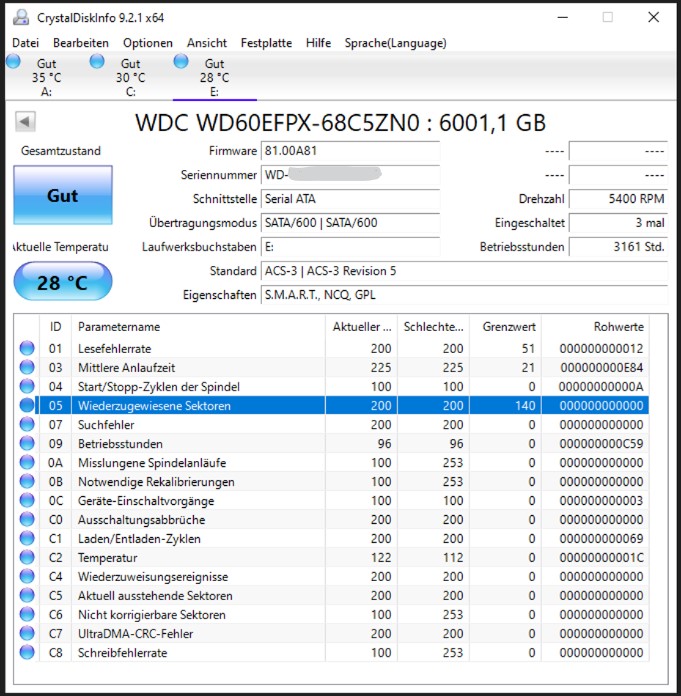
In the process, I now believe the drive’s SMART status has changed. Can you tell me if the sectors are still damaged, or if this damage has been fixed? Apparently, “C5 Pending Sectors” has been reset from 2 to 0.

Do you think WD will still replace the HDD for me? Was it a bad idea to format the HDD before sending it in?

The first image is before the HDD was formatted; the second image is after it was formatted.

(03) WDC WD60EFPX-68C5ZN0
----------------------------------------------------------------------------
           Model : WDC WD60EFPX-68C5ZN0
        Firmware : 81.00A81
   Serial Number : WD-WX....
       Disk Size : 6001,1 GB (8,4/137,4/6001,1/6001,1)
     Buffer Size : Unbekannt
     Queue Depth : 32
    # of Sectors : 11721045168
   Rotation Rate : 5400 RPM
       Interface : Serial ATA
   Major Version : ACS-3
   Minor Version : ACS-3 Revision 5
   Transfer Mode : SATA/600 | SATA/600
  Power On Hours : 3161 Std.
  Power On Count : 3 mal
     Temperature : 28 C (82 F)
   Health Status : Gut
        Features : S.M.A.R.T., NCQ, GPL
       APM Level : ----
       AAM Level : ----
    Drive Letter : E:

-- S.M.A.R.T. --------------------------------------------------------------
ID Cur Wor Thr RawValues(6) Attribute Name
01 200 200 _51 000000000012 Lesefehlerrate
03 225 225 _21 000000000E84 Mittlere Anlaufzeit
04 100 100 __0 00000000000A Start/Stopp-Zyklen der Spindel
05 200 200 140 000000000000 Wiederzugewiesene Sektoren
07 200 200 __0 000000000000 Suchfehler
09 _96 _96 __0 000000000C59 Betriebsstunden
0A 100 253 __0 000000000000 Misslungene Spindelanläufe
0B 100 253 __0 000000000000 Notwendige Rekalibrierungen
0C 100 100 __0 000000000003 Geräte-Einschaltvorgänge
C0 200 200 __0 000000000000 Ausschaltungsabbrüche
C1 200 200 __0 000000000069 Laden/Entladen-Zyklen
C2 122 112 __0 00000000001C Temperatur
C4 200 200 __0 000000000000 Wiederzuweisungsereignisse
C5 200 200 __0 000000000000 Aktuell ausstehende Sektoren
C6 100 253 __0 000000000000 Nicht korrigierbare Sektoren
C7 200 200 __0 000000000000 UltraDMA-CRC-Fehler
C8 100 253 __0 000000000000 Schreibfehlerrate

-- IDENTIFY_DEVICE ---------------------------------------------------------
        0    1    2    3    4    5    6    7    8    9
000: 427A 3FFF C837 0010 0000 0000 003F 0000 0000 0000
010: 2020 2020 2057 442D 5758 3232 4441 3534 5231 5850
020: 0000 0000 0000 3831 2E30 3041 3831 5744 4320 5744
030: 3630 4546 5058 2D36 3843 355A 4E30 2020 2020 2020
040: 2020 2020 2020 2020 2020 2020 2020 8010 4000 2F00
050: 4001 0000 0000 0006 3FFF 0010 003F FC10 00FB 0110
060: FFFF 0FFF 0000 0007 0003 0078 0078 0078 0078 0D00
070: 0000 0000 0000 0000 0000 001F 9F0E 0006 004C 0040
080: 07FE 006D 706B 7401 6123 7069 B401 6123 407F 8145
090: 8145 0000 FFFE 0000 0000 0000 0000 0000 0000 0000
100: F4B0 BAA0 0002 0000 0000 000A 6003 0000 5001 4EE2
110: 170B 8325 0000 0000 0000 0000 0000 0000 0000 401C
120: 401C 0000 0000 0000 0000 0000 0000 0000 0029 0000
130: 0001 0000 0000 0000 0000 0000 0000 0000 0000 0000
140: 0000 8001 0004 8160 0000 0000 0000 0000 0000 0000
150: 0000 0000 0000 0000 0000 0000 0000 0000 0000 0000
160: 0000 0000 0000 0000 0000 0000 0000 0000 0002 0000
170: 0000 0000 0000 0000 0000 0000 0000 0000 0000 0000
180: 0000 0000 0000 0000 0000 0000 0000 0000 0000 0000
190: 0000 0000 0000 0000 0000 0000 0000 0000 0000 0000
200: 0000 0000 0000 0000 0000 0000 3039 0000 0000 4000
210: 0000 0000 0000 0000 0000 0000 0000 1518 0000 0000
220: 0000 0000 107E 0000 0000 0000 0000 0000 0000 0000
230: 0000 0000 0000 0000 0001 1000 0000 0000 0000 0000
240: 0000 0000 0000 0000 0000 0000 0000 0000 0000 0000
250: 0000 0000 0000 0000 0000 DEA5

-- SMART_READ_DATA ---------------------------------------------------------
     +0 +1 +2 +3 +4 +5 +6 +7 +8 +9 +A +B +C +D +E +F
000: 10 00 01 2F 00 C8 C8 12 00 00 00 00 00 00 03 27
010: 00 E1 E1 84 0E 00 00 00 00 00 04 32 00 64 64 0A
020: 00 00 00 00 00 00 05 33 00 C8 C8 00 00 00 00 00
030: 00 00 07 2E 00 C8 C8 00 00 00 00 00 00 00 09 32
040: 00 60 60 59 0C 00 00 00 00 00 0A 32 00 64 FD 00
050: 00 00 00 00 00 00 0B 32 00 64 FD 00 00 00 00 00
060: 00 00 0C 32 00 64 64 03 00 00 00 00 00 00 C0 32
070: 00 C8 C8 00 00 00 00 00 00 00 C1 32 00 C8 C8 69
080: 00 00 00 00 00 00 C2 22 00 7A 70 1C 00 00 00 00
090: 00 00 C4 32 00 C8 C8 00 00 00 00 00 00 00 C5 32
0A0: 00 C8 C8 00 00 00 00 00 00 00 C6 30 00 64 FD 00
0B0: 00 00 00 00 00 00 C7 32 00 C8 C8 00 00 00 00 00
0C0: 00 00 C8 08 00 64 FD 00 00 00 00 00 00 00 00 00
0D0: 00 00 00 00 00 00 00 00 00 00 00 00 00 00 00 00
0E0: 00 00 00 00 00 00 00 00 00 00 00 00 00 00 00 00
0F0: 00 00 00 00 00 00 00 00 00 00 00 00 00 00 00 00
100: 00 00 00 00 00 00 00 00 00 00 00 00 00 00 00 00
110: 00 00 00 00 00 00 00 00 00 00 00 00 00 00 00 00
120: 00 00 00 00 00 00 00 00 00 00 00 00 00 00 00 00
130: 00 00 00 00 00 00 00 00 00 00 00 00 00 00 00 00
140: 00 00 00 00 00 00 00 00 00 00 00 00 00 00 00 00
150: 00 00 00 00 00 00 00 00 00 00 00 00 00 00 00 00
160: 00 00 00 00 00 00 00 00 00 00 00 00 08 E8 01 7B
170: 03 00 01 00 02 FF 05 68 02 00 00 00 00 00 00 00
180: 00 00 01 06 00 00 00 00 00 00 00 00 00 00 00 00
190: 00 00 00 00 00 00 00 00 00 00 00 00 00 00 00 00
1A0: 00 00 00 00 00 00 00 00 00 00 00 00 00 00 00 00
1B0: 00 00 00 00 00 00 00 00 00 00 00 00 00 00 00 00
1C0: 00 00 00 00 00 00 00 00 00 00 00 00 00 00 00 00
1D0: 00 00 00 00 00 00 00 00 00 00 00 00 00 00 00 00
1E0: 00 00 00 00 00 00 00 00 00 00 00 00 00 00 00 00
1F0: 00 00 00 00 00 00 00 00 00 00 00 00 00 00 00 0A

-- SMART_READ_THRESHOLD ----------------------------------------------------
     +0 +1 +2 +3 +4 +5 +6 +7 +8 +9 +A +B +C +D +E +F
000: 10 00 01 33 C8 C8 C8 C8 C8 C8 00 00 00 00 03 15
010: 00 00 00 00 00 00 00 00 00 00 04 00 00 00 00 00
020: 00 00 00 00 00 00 05 8C 00 00 00 00 00 00 00 00
030: 00 00 07 00 C8 C8 C8 C8 C8 C8 00 00 00 00 09 00
040: 00 00 00 00 00 00 00 00 00 00 0A 00 00 00 00 00
050: 00 00 00 00 00 00 0B 00 00 00 00 00 00 00 00 00
060: 00 00 0C 00 00 00 00 00 00 00 00 00 00 00 C0 00
070: 00 00 00 00 00 00 00 00 00 00 C1 00 00 00 00 00
080: 00 00 00 00 00 00 C2 00 00 00 00 00 00 00 00 00
090: 00 00 C4 00 00 00 00 00 00 00 00 00 00 00 C5 00
0A0: 00 00 00 00 00 00 00 00 00 00 C6 00 00 00 00 00
0B0: 00 00 00 00 00 00 C7 00 00 00 00 00 00 00 00 00
0C0: 00 00 C8 00 00 00 00 00 00 00 00 00 00 00 00 00
0D0: 00 00 00 00 00 00 00 00 00 00 00 00 00 00 00 00
0E0: 00 00 00 00 00 00 00 00 00 00 00 00 00 00 00 00
0F0: 00 00 00 00 00 00 00 00 00 00 00 00 00 00 00 00
100: 00 00 00 00 00 00 00 00 00 00 00 00 00 00 00 00
110: 00 00 00 00 00 00 00 00 00 00 00 00 00 00 00 00
120: 00 00 00 00 00 00 00 00 00 00 00 00 00 00 00 00
130: 00 00 00 00 00 00 00 00 00 00 00 00 00 00 00 00
140: 00 00 00 00 00 00 00 00 00 00 00 00 00 00 00 00
150: 00 00 00 00 00 00 00 00 00 00 00 00 00 00 00 00
160: 00 00 00 00 00 00 00 00 00 00 00 00 08 E8 01 7B
170: 03 00 01 00 02 FF 05 68 02 00 00 00 00 00 00 00
180: 00 00 01 06 00 00 00 00 00 00 00 00 00 00 00 00
190: 00 00 00 00 00 00 00 00 00 00 00 00 00 00 00 00
1A0: 00 00 00 00 00 00 00 00 00 00 00 00 00 00 00 00
1B0: 00 00 00 00 00 00 00 00 00 00 00 00 00 00 00 00
1C0: 00 00 00 00 00 00 00 00 00 00 00 00 00 00 00 00
1D0: 00 00 00 00 00 00 00 00 00 00 00 00 00 00 00 00
1E0: 00 00 00 00 00 00 00 00 00 00 00 00 00 00 00 00
1F0: 00 00 00 00 00 00 00 00 00 00 00 00 00 00 00 76

Unfortunately, I can’t post a photo here, and no link (?)

edit:
P.s. Thanks for pointing out how to enable the image upload feature

Browse some other threads and do the Tutorial by the Bot to get your forum trust level up and post images and links

TrueNAS-Bot
Type this in a new reply and send to bring up the tutorial, if you haven’t done it already.
@TrueNAS-Bot start tutorial

I’ve now reinserted the HDD into the NAS, and I ran a Short SMART Test, and got the following result:

SMART Attributes Data Structure revision number: 16
Vendor Specific SMART Attributes with Thresholds:
ID# ATTRIBUTE_NAME          FLAG     VALUE WORST THRESH TYPE      UPDATED  WHEN_FAILED RAW_VALUE
  1 Raw_Read_Error_Rate     0x002f   200   200   051    Pre-fail  Always       -       18
  3 Spin_Up_Time            0x0027   225   225   021    Pre-fail  Always       -       3716
  4 Start_Stop_Count        0x0032   100   100   000    Old_age   Always       -       11
  5 Reallocated_Sector_Ct   0x0033   200   200   140    Pre-fail  Always       -       0
  7 Seek_Error_Rate         0x002e   200   200   000    Old_age   Always       -       0
  9 Power_On_Hours          0x0032   096   096   000    Old_age   Always       -       3161
 10 Spin_Retry_Count        0x0032   100   253   000    Old_age   Always       -       0
 11 Calibration_Retry_Count 0x0032   100   253   000    Old_age   Always       -       0
 12 Power_Cycle_Count       0x0032   100   100   000    Old_age   Always       -       4
192 Power-Off_Retract_Count 0x0032   200   200   000    Old_age   Always       -       0
193 Load_Cycle_Count        0x0032   200   200   000    Old_age   Always       -       107
194 Temperature_Celsius     0x0022   121   112   000    Old_age   Always       -       29
196 Reallocated_Event_Count 0x0032   200   200   000    Old_age   Always       -       0
197 Current_Pending_Sector  0x0032   200   200   000    Old_age   Always       -       0
198 Offline_Uncorrectable   0x0030   100   253   000    Old_age   Offline      -       0
199 UDMA_CRC_Error_Count    0x0032   200   200   000    Old_age   Always       -       0
200 Multi_Zone_Error_Rate   0x0008   100   253   000    Old_age   Offline      -       0

SMART Error Log Version: 1
No Errors Logged

SMART Self-test log structure revision number 1
Num  Test_Description    Status                  Remaining  LifeTime(hours)  LBA_of_first_error
# 1  Short offline       Completed without error       00%      3161         -
# 2  Short offline       Completed: read failure       90%      3106         3888762208

SMART Selective self-test log data structure revision number 1
 SPAN  MIN_LBA  MAX_LBA  CURRENT_TEST_STATUS
    1        0        0  Not_testing
    2        0        0  Not_testing
    3        0        0  Not_testing
    4        0        0  Not_testing
    5        0        0  Not_testing
Selective self-test flags (0x0):
  After scanning selected spans, do NOT read-scan remainder of disk.
If Selective self-test is pending on power-up, resume after 0 minute delay.

Now I’m even more confused about whether WD will repair or replace the HDD….

I’d really appreciate any advice you can give me!

Run a long smart test first

smartctl -t long /dev/sdX

That was a good tip with the long SMART test. Again, a reading error:

SMART Attributes Data Structure revision number: 16
Vendor Specific SMART Attributes with Thresholds:
ID# ATTRIBUTE_NAME          FLAG     VALUE WORST THRESH TYPE      UPDATED  WHEN_FAILED RAW_VALUE
  1 Raw_Read_Error_Rate     0x002f   200   200   051    Pre-fail  Always       -       18
  3 Spin_Up_Time            0x0027   225   225   021    Pre-fail  Always       -       3716
  4 Start_Stop_Count        0x0032   100   100   000    Old_age   Always       -       11
  5 Reallocated_Sector_Ct   0x0033   200   200   140    Pre-fail  Always       -       0
  7 Seek_Error_Rate         0x002e   200   200   000    Old_age   Always       -       0
  9 Power_On_Hours          0x0032   096   096   000    Old_age   Always       -       3174
 10 Spin_Retry_Count        0x0032   100   253   000    Old_age   Always       -       0
 11 Calibration_Retry_Count 0x0032   100   253   000    Old_age   Always       -       0
 12 Power_Cycle_Count       0x0032   100   100   000    Old_age   Always       -       4
192 Power-Off_Retract_Count 0x0032   200   200   000    Old_age   Always       -       0
193 Load_Cycle_Count        0x0032   200   200   000    Old_age   Always       -       114
194 Temperature_Celsius     0x0022   120   112   000    Old_age   Always       -       30
196 Reallocated_Event_Count 0x0032   200   200   000    Old_age   Always       -       0
197 Current_Pending_Sector  0x0032   200   200   000    Old_age   Always       -       0
198 Offline_Uncorrectable   0x0030   100   253   000    Old_age   Offline      -       0
199 UDMA_CRC_Error_Count    0x0032   200   200   000    Old_age   Always       -       0
200 Multi_Zone_Error_Rate   0x0008   200   200   000    Old_age   Offline      -       8

SMART Error Log Version: 1
No Errors Logged

SMART Self-test log structure revision number 1
Num  Test_Description    Status                  Remaining  LifeTime(hours)  LBA_of_first_error
# 1  Extended offline    Completed: read failure       70%      3164         3885948016
# 2  Short offline       Completed without error       00%      3161         -
# 3  Short offline       Completed: read failure       90%      3106         3888762208

SMART Selective self-test log data structure revision number 1

We knew it. Failing any kind of SMART test, just once, means that the drive is defective by the manufacturer’s standard, full stop.
The long test assesses each and every sector and will catch any defect, while the short test only takes a (very) small sample. As someone put it, failing a long test is bad but failing a short test is catastrophic. This drive had already failed a short (at a different LBA, so we know there are at least two defective sectors).

:lemon: