I’ve purchased a second hand 10TB hard drive and when I inspected the SMART table, it looks like someone reset the power-on usage field.
Maybe not a big deal, I wasn’t expecting the drive to be new and as long as it works fine, I think it’s fine.
However, the SMART data is different than I am used with consumer drives so I was hoping someone could take a look and tell me if there is anything I should be aware of.
I’m about to run a LONG test - I believe smartctl -t long /dev/sdb is now the only way to do a full test with TrueNAS 25.10? - and then I’ll transfer some data and do some scrubbing to make sure all is well. For example, are those corrected errors expected?
I’ve removed the serial number
Thanks!
truenas% sudo smartctl -a -d scsi /dev/sdb

smartctl 7.4 2023-08-01 r5530 [x86_64-linux-6.12.33-production+truenas] (local build)
Copyright (C) 2002-23, Bruce Allen, Christian Franke, www.smartmontools.org

=== START OF INFORMATION SECTION ===
Vendor:               SEAGATE
Product:              ST10000NM0096
Revision:             E005
Compliance:           SPC-4
User Capacity:        10,000,831,348,736 bytes [10.0 TB]
Logical block size:   512 bytes
Physical block size:  4096 bytes
LU is fully provisioned
Rotation Rate:        7200 rpm
Form Factor:          3.5 inches
Logical Unit id:      0x5000c500adbf51b7
Serial number:        XXXXXXXXXXXXXXXX
Device type:          disk
Transport protocol:   SAS (SPL-4)
Local Time is:        Mon Jan 26 15:50:00 2026 GMT
SMART support is:     Available - device has SMART capability.
SMART support is:     Enabled
Temperature Warning:  Enabled

=== START OF READ SMART DATA SECTION ===
SMART Health Status: OK

Grown defects during certification <not available>
Total blocks reassigned during format <not available>
Total new blocks reassigned <not available>
Power on minutes since format <not available>
Current Drive Temperature:     32 C
Drive Trip Temperature:        60 C

Accumulated power on time, hours:minutes 0:58
Manufactured in week 16 of year 2019
Specified cycle count over device lifetime:  50000
Accumulated start-stop cycles:  212
Specified load-unload count over device lifetime:  600000
Accumulated load-unload cycles:  3378
Elements in grown defect list: 0

Vendor (Seagate Cache) information
  Blocks sent to initiator = 251488
  Blocks received from initiator = 6264744
  Blocks read from cache and sent to initiator = 50552
  Number of read and write commands whose size <= segment size = 1857
  Number of read and write commands whose size > segment size = 29

Vendor (Seagate/Hitachi) factory information
  number of hours powered up = 0.97
  number of minutes until next internal SMART test = 9

Error counter log:
           Errors Corrected by           Total   Correction     Gigabytes    Total
               ECC          rereads/    errors   algorithm      processed    uncorrected
           fast | delayed   rewrites  corrected  invocations   [10^9 bytes]  errors
read:      35702        0         0     35702          0          0.129           0
write:         0        0         0         0          0          3.210           0

Non-medium error count:        0

SMART Self-test log
Num  Test              Status                 segment  LifeTime  LBA_first_err [SK ASC ASQ]
     Description                              number   (hours)
# 1  Background short  Completed                   -       0                 - [-   -    -]

Long (extended) Self-test duration: 56512 seconds [15.7 hours]
Huh - I’ve never seen something like that either. Take my response with a huge grain of salt; if this is a discount purchase & it’ll be running in a raidz2/3, I’d send it unless uncorrected errors go up. Or unless you have no backups & the entire pool is made up of similar drives.
I’d still put it through a badblocks run & smart long before & after the run. So expect like a week of testing prior to deployment…
badblocks command would do a full write, then a full read, several times (three if I remember?) in different patterns to validate every block of the drive… it takes a LONG time & would write over any & all data already present on the drive. Be very careful running it on a system with any data that you wish to keep; triple check before hitting ‘enter’.
You’d also likely need to get familiar with tmux if you’re using the web gui to execute the command.
Do not run it on a drive that is part of a pool.
…Wow I make it sound not fun at all to run.
Guides that Barky linked are 99% still valid, with maybe only a relic or two from older versions of truenas that can be ignored.
Expect ~1 week if you include smart long tests before & after badblocks finishes running on 10TB drives.
So tmux is a tool to run terminal commands which would be otherwise terminated once the terminal window is closed (or connection lost), correct?
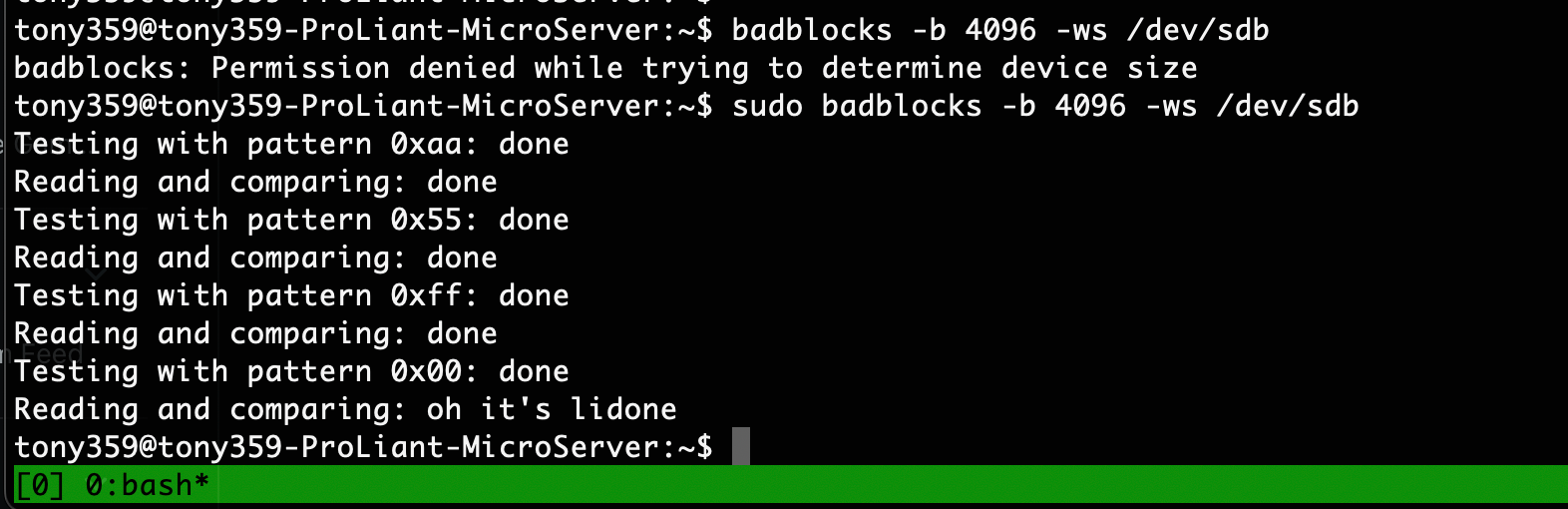
I shall do those tests for sure, thanks for recommending badblock, I had been wondering how to properly test a drive like that.
I’m optimistic on the drive: it was manufactured in 2019 and even if it’s been running 24/7, it means it’s got 50k hours which is not the end of the world for an enterprise-grade drive.
One more question: why is it that I don’t see my usual SMART table on this drive? Is that normal for a SAS drive?
Correct. Also lets you open/navigate multiple terminal windows that’d otherwise be lost when connection is closed/lost. So you can run multiple badblocks (on different disks) at the same time!
Realistically, no clue. Different manufacturers and different drives present the info differently. Couldn’t tell you for sure without having same brand in hand purchased new from manufacturer.
Edit: it also could be worth running badblocks outside of truenas on some lightweight linux distro. I remember “recently” having some trouble with tmux on TrueNAS. I don’t remember what the trouble was, how or if I fixed it, or anything at all other than it was a bit of pain.
Yes, I’m aware that different manufacturers report things differently, it’s just that the SMART table seem to be completely missing on this drive and wondering whether that’s expected. Is there anybody familiar with the Seagate EXOS drives?
Indeed the Exos on the other thread looks different but I believe there are many Exos revisions. I think the name has been going on for a while?
truenas% sudo smartctl -x /dev/sdb

smartctl 7.4 2023-08-01 r5530 [x86_64-linux-6.12.33-production+truenas] (local build)
Copyright (C) 2002-23, Bruce Allen, Christian Franke, www.smartmontools.org

=== START OF INFORMATION SECTION ===
Vendor:               SEAGATE
Product:              ST10000NM0096
Revision:             E005
Compliance:           SPC-4
User Capacity:        10,000,831,348,736 bytes [10.0 TB]
Logical block size:   512 bytes
Physical block size:  4096 bytes
LU is fully provisioned
Rotation Rate:        7200 rpm
Form Factor:          3.5 inches
Logical Unit id:      0x5000c500adbf51b7
Serial number:        XXXXXXXXXXXXXX
Device type:          disk
Transport protocol:   SAS (SPL-4)
Local Time is:        Mon Jan 26 20:11:45 2026 GMT
SMART support is:     Available - device has SMART capability.
SMART support is:     Enabled
Temperature Warning:  Enabled
Read Cache is:        Enabled
Writeback Cache is:   Enabled

=== START OF READ SMART DATA SECTION ===
SMART Health Status: OK

Grown defects during certification <not available>
Total blocks reassigned during format <not available>
Total new blocks reassigned <not available>
Power on minutes since format <not available>
Current Drive Temperature:     32 C
Drive Trip Temperature:        60 C

Manufactured in week 16 of year 2019
Specified cycle count over device lifetime:  50000
Accumulated start-stop cycles:  212
Specified load-unload count over device lifetime:  600000
Accumulated load-unload cycles:  3400
Elements in grown defect list: 0

Vendor (Seagate Cache) information
  Blocks sent to initiator = 5355512
  Blocks received from initiator = 1571454496
  Blocks read from cache and sent to initiator = 828240
  Number of read and write commands whose size <= segment size = 47820
  Number of read and write commands whose size > segment size = 499

Vendor (Seagate/Hitachi) factory information
  number of hours powered up = 5.33
  number of minutes until next internal SMART test = 47

Error counter log:
           Errors Corrected by           Total   Correction     Gigabytes    Total
               ECC          rereads/    errors   algorithm      processed    uncorrected
           fast | delayed   rewrites  corrected  invocations   [10^9 bytes]  errors
read:     670920        0         0    670920          0          2.742           0
write:         0        0         0         0          0        804.613           0

Non-medium error count:        0

SMART Self-test log
Num  Test              Status                 segment  LifeTime  LBA_first_err [SK ASC ASQ]
     Description                              number   (hours)
# 1  Background short  Completed                   -       0                 - [-   -    -]

Long (extended) Self-test duration: 56512 seconds [15.7 hours]

Background scan results log
  Status: no scans active
    Accumulated power on time, hours:minutes 5:20 [320 minutes]
    Number of background scans performed: 0,  scan progress: 0.00%
    Number of background medium scans performed: 0
Device does not support General statistics and performance logging

Protocol Specific port log page for SAS SSP
relative target port id = 1
  generation code = 0
  number of phys = 1
  phy identifier = 0
    attached device type: SAS or SATA device
    attached reason: power on
    reason: loss of dword synchronization
    negotiated logical link rate: phy enabled; 6 Gbps
    attached initiator port: ssp=1 stp=1 smp=1
    attached target port: ssp=0 stp=0 smp=0
    SAS address = 0x5000c500adbf51b5
    attached SAS address = 0x5003005ffffffff0
    attached phy identifier = 3
    Invalid DWORD count = 0
    Running disparity error count = 0
    Loss of DWORD synchronization count = 2
    Phy reset problem count = 0
relative target port id = 2
  generation code = 0
  number of phys = 1
  phy identifier = 1
    attached device type: no device attached
    attached reason: unknown
    reason: unknown
    negotiated logical link rate: phy enabled; unknown
    attached initiator port: ssp=0 stp=0 smp=0
    attached target port: ssp=0 stp=0 smp=0
    SAS address = 0x5000c500adbf51b6
    attached SAS address = 0x0
    attached phy identifier = 0
    Invalid DWORD count = 0
    Running disparity error count = 0
    Loss of DWORD synchronization count = 0
    Phy reset problem count = 0
BTW, I found another SMART report on this very forum for the same type of drive and it also comes with the info so at least that should be expected.
The runtime has obviously been reset - but the drive is from 2019 (confirmed by the label) so it can’t have more than 50k hours or so and this model’s MTBF is 2.5 million hours so I’d say if it passes all the tests I should be good (knock knock!)
SAS drives vary alot when it comes to the SMART info they give you, as sas drives are mainly intended for enterprise environments. The corrected data by ECC is perfectly fine and the drive is doing its job as an enterprise drive. They only time I would worry is when/if those errors start accumulating in the uncorrected section. They may of wiped the power on hours, but I’ll bet a nickel it will be fine.
I have sas drives that are over 20 years old still spinning. Especially if its an enterprise drive, which most sas drives are, they are built with tighter tolerances and go through a more rigorous testing before being sold to enterprise customers unlike consumer sata drives.
Wow, that drive was turned on and off really fast! 212 times in only 58 minutes? Have you tried to read the FARM values and see what the runtime of the individual heads is? FARM values cannot be reset so easily!
Thanks, I’ll try once the smartblocks tests have completed - so far so good, running the second pattern.
BTW, I understand that these Exos drive are not very reliable. According to BackBlaze’s own report they have a 7% failure rate! Probably why they can be found online for cheap?
I also use SAS disks (i got them used, because they were very cheap…).
I always struggle with the values that smartctl outputs (most of it I have to “Google” to understand…).
Here is the output from one of my disks (this one has already logged quite a few hours and TBs…):
=== START OF INFORMATION SECTION ===
Vendor:               HGST
Product:              HUS726060AL5214
Revision:             NE01
Compliance:           SPC-4
User Capacity:        6,001,175,126,016 bytes [6.00 TB]
Logical block size:   512 bytes
Physical block size:  4096 bytes
Formatted with type 2 protection
8 bytes of protection information per logical block
LU is fully provisioned
Rotation Rate:        7200 rpm
Form Factor:          3.5 inches
Logical Unit id:      0x5000cca2555ad0e0
Serial number:        K1HLY9PF
Device type:          disk
Transport protocol:   SAS (SPL-3)
Local Time is:        Sun Feb  1 12:20:24 2026 CET
SMART support is:     Available - device has SMART capability.
SMART support is:     Enabled
Temperature Warning:  Enabled

=== START OF READ SMART DATA SECTION ===
SMART Health Status: OK

Current Drive Temperature:     36 C
Drive Trip Temperature:        55 C

Accumulated power on time, hours:minutes 46862:40
Manufactured in week 10 of year 2017
Specified cycle count over device lifetime:  50000
Accumulated start-stop cycles:  154
Specified load-unload count over device lifetime:  600000
Accumulated load-unload cycles:  2097
Elements in grown defect list: 0

Vendor (Seagate Cache) information
  Blocks sent to initiator = 31448262833602560

Error counter log:
           Errors Corrected by           Total   Correction     Gigabytes    Total
               ECC          rereads/    errors   algorithm      processed    uncorrected
           fast | delayed   rewrites  corrected  invocations   [10^9 bytes]  errors
read:          0      254         0       254   30749063     992128.499           0
write:         0        4         0         4     966780     277610.106           0
verify:        0        0         0         0    1706139          0.000           0

Non-medium error count:        0
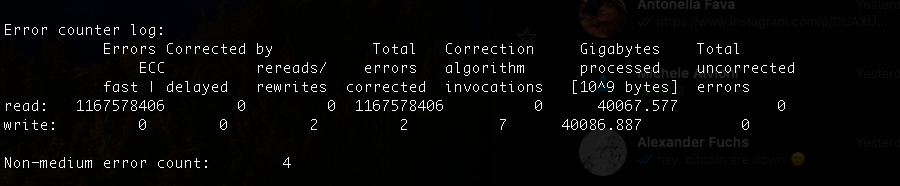
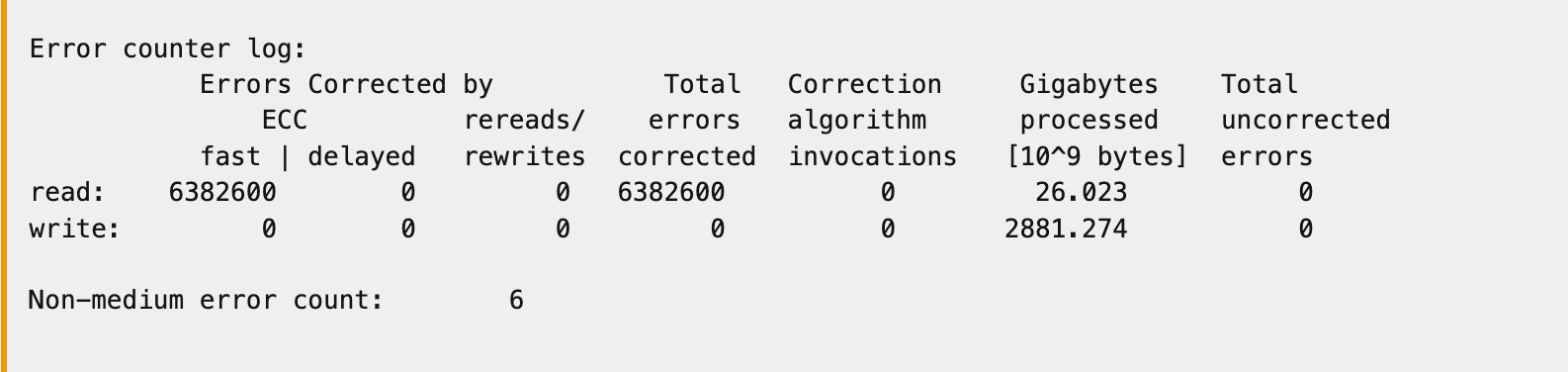
If the screenshots from your post #16 are from the same disk as the SMART output in your initial post, I would guess that on your disk, not only the power-on hours but also the “Gigabytes processed” value was reset.
To me it seems that almost all of the GBs now shown under “Gigabytes processed” are practically coming from your badblocks run.
It seems that “some people” are able to do (reset) these values.
I personally doubt it was a factory re-certification, because in that case, probably all values would have been reset, i mean: that would look “cleaner”…
Indeed - though even the data from the post I found with the same identical drive seemed to have been reset and the guy in the thread said the drive was being used.
Oh well. I might not want to overthink this too much.
Next time I’ll buy the 12GB version though which seems to be much less prone to failure.