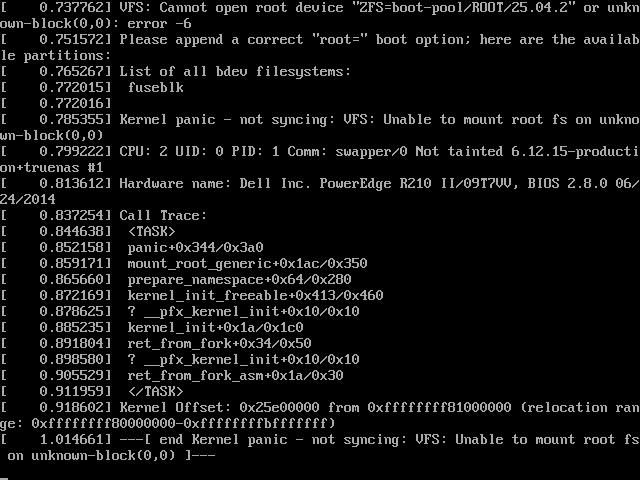
I get a kernal panic on update. Dell r210ii will not boot with latest update. Booting with 25.04.1 works just fine…
Are you getting Kernel Panic while updating or did the update apply successfully and then you can’t boot?
You can try removing the 25.01.2 boot environment and then trying the update again. Please read all release notes and the Announcement section for that update before you begin.
I will have to try and boot it again to give you more info. But basically the process was as follows:
Clicked update on main page (from 25.04.1 to 25.04.2)
Saved the backup file that give you an option to do. Clicked “update and reboot”.
Gets Kerbal panic booting into latest version. At grub I boot 25.04.1 and go back to original and tried process second time… still same issue.
I will have to pull the screen up on my idrac when I get a sec to see if I can send a screenshot.
I have no vm’s running or anything else. I of course read release notes before all of this, nothing in there seemingly applied to me…
To answer more clearly, I updated to 25.04.2 from 25.04.1 but after downloading and applying the new update i am unable to compete the boot process after reboot. There is a kernal panic early in the boot process. I am able to revert back and boot previous version of 25.04.1.
If it helps….
Dell r210ii Xeon E3-1270 V2. 32gb ecc ddr3 1600ram. 4x4TB sata raidz1 with 512gb Samsung 870evoboot disk…. Running onboard 2x1Gb Ethernet bonded to 2gb up/down. Onboard graphics only.
You never “upgraded” the boot-pool, did you?
I’m not familiar with that… I upgraded my pool when I went from that last version of true nas to this version… but as far as upgrading my boot pool, is that accomplished by pressing “update” on the main web screen?
If I have to “upgrade” the boot pool, what does that consist of? Do I just go to storage and select my boot pool hdd and “upgrade” it like I had to upgrade my pool0 (apps and data)?
Then you probably didn’t, since it can only be done in the command-line. You should never upgrade your boot-pool, since it can cause issues wit the boot process and Grub.
I doubt that’s the issue, but it’s worth checking if the boot-pool received any “upgrades”:
zpool history boot-pool | grep feature@
The output should be blank.
I looked up the “upgrade boot pool” and yes, you are correct I have never upgraded the boot pool. Is this what is being problematic?!
What re the benefits/drawbacks of upgrading my boot pool? If I decide to do it, what is the best way/practice to upgrading the boot pool?
Thanks for any advice.
Output was blank
No. You don’t want to ever upgrade the boot-pool in TrueNAS.
We ruled that out.
At this point, not sure what the kernel panic is triggered by from the minor update to SCALE.
1 Like
I have an idrac6 on that machine, I have to bust out one of my win7 laptops to get into it and screen shot what the panic looks like while it’s booting (jre7 just doesn’t want to load the virtual machine on my windows 11 pc)… I’ll do it tomorrow… I’m able to revert back to 25.04.1 just fine so I’ll try and update again tomorrow and post the output, maybe it’ll give us a better idea of what’s going on…
Thank you
Was there anything in the updates that you needed on version 25.04.2?
Boot into 25.04.1 and remove the 25.04.2 boot environment. You can try doing the upgrade again, if you want.
Other options to upgrade would be the manual file download or booting the install iso from USB to do a new install and then loading your System Configuration file back. If you download TrueNAS 25.04.2, you could at least see if the installer boots the sytem or gives you kernel panic
1 Like
thanks I’ll mess with it tomorrow it’s late here on the east coast… I’ll post an update when I have one… thanks again
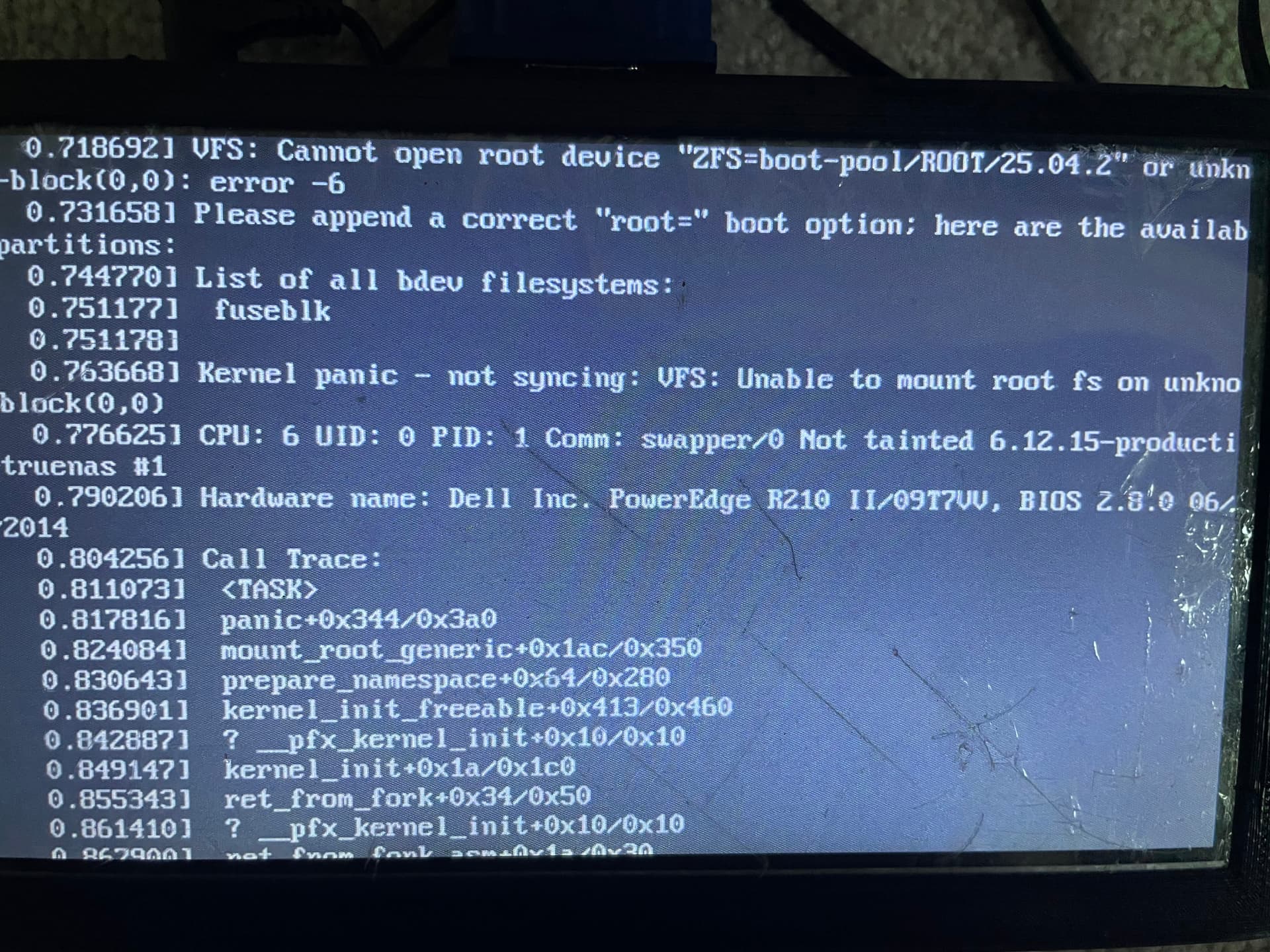
i removed the updates from the boot section on the admin page and i tried to update again by pressing “update” on the main page… this is the error i get (i know crappy pic, but its what i have right now). I am currently tryin to update manually by downloading the update file from the website, I will report back how that goes…
same result with a manual update… i will have to try doing an install from usb drive… thatll be later
Hi.
From the GUI in 25.04.1, can you capture the configuraiton and create a ticket noting the panic and also attach the config file and the above screencapture as well? You can do this from the GUI feedback icon.
Thanks
1 Like
And in in addition to what Patrick has said, please include debug from the working version, so that we could see where your boot device is connected.
1 Like
will do, ill have that to you all in a bit, thank you
1 Like
ticket is sent with the afore-mentioned description of kernel panic as well at i exorter my config for you and added it to the ticket… let me know what else i may be able to help with. Thank you