Add option in Replication Task to abort a replication if destination is newer than source

Problem/Justification
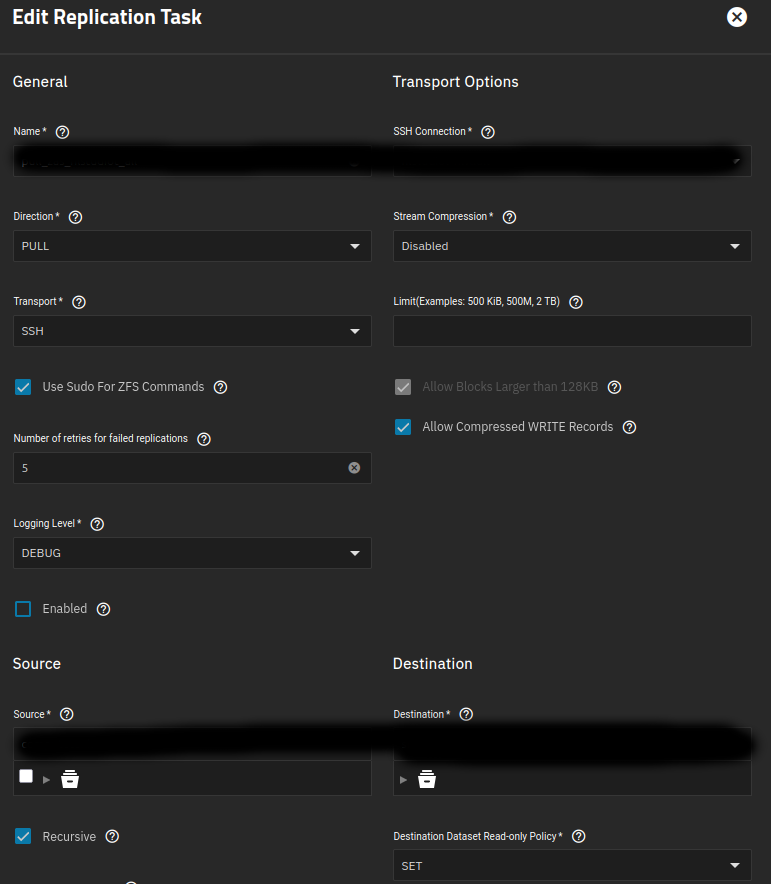
As of 24.10.2.3, I can find no way in the GUI to prevent an automated pull replication task from rolling back a destination dataset in response to an unintended source dataset rollback. If I am correct, then there is no way to use a TrueNAS replication task as a standalone backup process, rather than a sort of mirror. I doubt most users understand this. Please add a simple warning message via email and the GUI that requires a manual override in the event that a replication task that is not set to “Replication from scratch” discovers that the destination has snapshots that are newer than the source.

Impact
This will prevent an unplanned rollback at a degraded source pool from automatically destroying at the next replication event the intermediate snapshots at the destination pool that might be used to recover the source pool after the degradation at the source is addressed.

User Story
A few days ago I was transported back in time by roughly two weeks on my Ubuntu Desktop host as I sat down for my morning therapy session with ChatGPT and the like. After verifying my sanity I typed in “zpool status” and discovered a degraded pool. Closer inspection revealed that my snapshot hierarchy had been rolled back. Yea but I’m all set cuz I built myself a super duper TrueNAS fortress with replicants of all my ZFS datasets, right? Wrong. When I went to pull the latest snapshot from the vault, it was gone. Since then I’ve tried every combination of replication settings, hand waving, and special words to address this scenario with the TrueNAS GUI, to no avail.

Have you tried to diagnose the problem before putting in a Feature Request?

At the code level or in the GUI? I’ve tried every combination of settings in the GUI to prevent a rollback at the source from automatically propagating to the destination at the next replication event without warning. I have not run through the logs beyond a cursory glance because I’ve concluded that this a feature of zettarepl, not a bug, so the solution is simply to offer a warning and a manual override. I can’t post a link here but do a search in the old forum for “unveiling-zfs-replication-quirk-your-destination-snapshots-at-risk”.

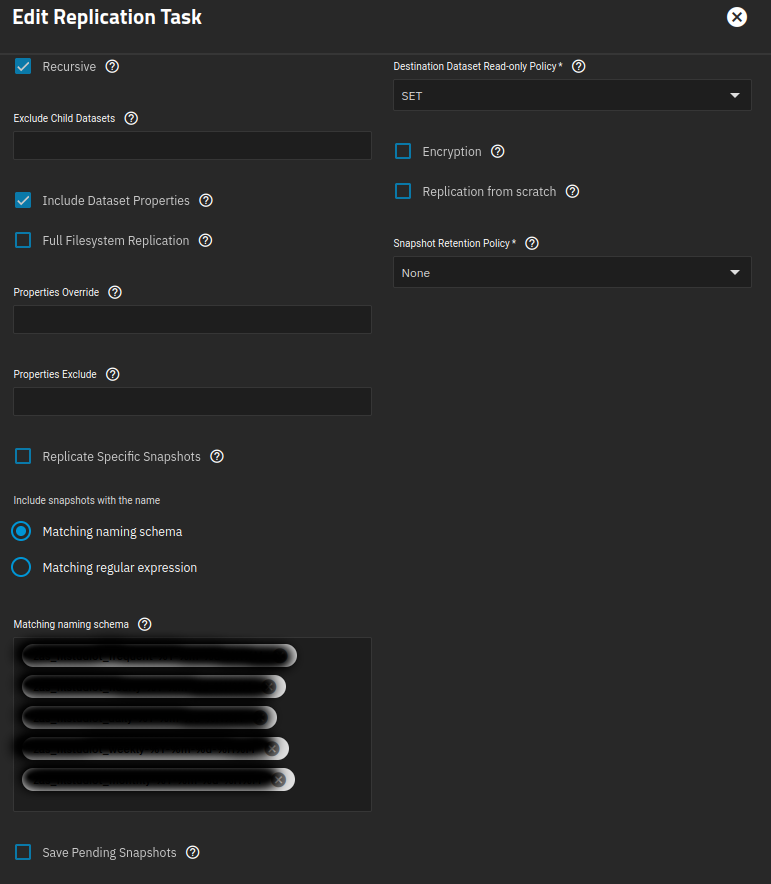
In my testing this doesn’t occur unless “Allow replication from scratch” is selected :-/

1 Like

I’ve spent most of my efforts testing this for the following scenario:

  • Unbuntu Desktop source running zfs-auto-snapshot.
  • TrueNAS 24.02 and TrueNAS 24.10.2.3 destination
  • Pull recursive replication task for entire source pool using naming schema for frequent, hourly, weekly, monthly
  • Allow replication from scratch deselected after first run
  • Rollback a dataset at source by an hour or two.
  • Wait for next snapshot or a few snapshots to occur at source.
  • Run pull replication task manually
  • Pull snapshot list in GUI or run zfs list at command line
  • Intermediate snapshots at destination are gone without warning

Also changing up the retention policy does not resolve

Okay. Ive only tested using truenas to truenas replication and push.

Its zeta-repl which had the protection.

You can try using Report A Bug in the TrueNAS GUI, smile icon on upper right for Feedback / Report A Bug. Give as much details as you can.

It sounds like -F was invoked under the hood for the zfs recv side.

I don’t know which GUI option in the Replication Task window is responsible for this.

Can you share screenshots of your task’s configuration? You can redact any sensitive information.


You can also consider creating a job that takes a checkpoint of your pool at 3:00 am every day. This would have given you enough time to stop the job and rewind/view the checkpoint, after you realized something bad happened.

1 Like

I will look at the checkpoint feature. I tried using a script to place holds on all of the snapshots. This works but it also hoses up the middleware and forces a reboot, so not an option I want to pursue.

I tested this feature again using the same destination TN 24.10.2.3 and a TN 24.10.2.3 source with a recursive push replication task for an entire pool that uses a snapshot hierarchy setup in the GUI of the source. When I perform a rollback on a source dataset I get a very impressive warning about the risk of data loss and I am forced to manually override to proceed. Then I manually run the replication task, which proceeds to rollback the destination dataset without any additional warning. All of this is fine for an intentional rollback, but is not fine for an unintentional rollback. I suppose one could argue that a source TN would never perform an unintentional rollback, and I’m not really equipped to prove otherwise, but I know from experience that a non-TN source with a degraded pool can perform an unplanned rollback at boot.

At a minimum, if anyone is using the TN 24.x replication task feature at a TN destination to pull from non-TN sources, including for example some Proxmox bare metal nodes, I urge you to prove me wrong. Rollback a dataset on the source and see what happens at the next pull.

I’ll reiterate that I’m not treating this as a bug. I think this is just a feature of the zettarepl logic that is used automate replication tasks in TN. As such, a simple warning with manual override generated by the replication task, similar to the one presented by the rollback task, would be sufficient to address most scenarios involving an unplanned rollback of the source.

I did have the retention policy set to “Same as source” for the push test. I’ll go back and test with every combination of retention policy to be sure there’s no way around it for a TN to TN push on 24.10.2.3, which is what I found for the pull scenario from a non-TN source.

Maybe for noble reasons, TrueNAS invokes -F for all receives, so that a Replication Task will not fail if the destination has newer snapshots than the source? I wouldn’t even know where to look in the source code.

If you don’t invoke -F, then any such recv will fail, which is the desired outcome to prevent data loss on the destination. I don’t see any GUI option that obviously controls whether or not -F is used.

The decision to destroy snapshots on the target occurs in pre_retention.py, at least according to the zettarepl repo on GitHub that I can see and the log messages that I get with the replication task logging set to default. This appears to involve a set of logic invoked on the source prior to the initiation of the replication. I do not believe a ZFS recv -F scenario applies in this case.

1 Like

Sorry. I mean invoked on the target, apparently:

destroy_snapshots(target_shell, snapshots_to_destroy)

1 Like

Nice…

I agree. The task should fail, rather than destroy any snapshots on the destination. The user should be able to diagnose and decide what to do next.

There should be an option that lets you choose whether you want the task to fail or destroy destination snapshots.

I had assumed leaving “From Scratch” unchecked would prevent destroying snapshots on the destination.

1 Like

I stand corrected. Here’s an anonymized version of the log entry for the dataset that I am using to test the issue:

[2025/08/03 15:55:59] DEBUG    [replication_task__task_8] [zettarepl.transport.local] [shell:1] [async_exec:646] Running ['zfs', 'umount', 'blahblah/isobin']
[2025/08/03 15:55:59] DEBUG    [replication_task__task_8] [zettarepl.transport.local] [shell:1] [async_exec:649] Running Pipe((['ssh', '-i', '/tmp/tmpsz3zzk86', '-o', 'UserKnownHostsFile=/tmp/tmpxons2n6q', '-o', 'StrictHostKeyChecking=yes', '-o', 'BatchMode=yes', '-o', 'ConnectTimeout=10', '-p22', 'root@xxx.xxx.xxx.xxx', 'sh -c \'PATH=$PATH:/usr/local/sbin:/usr/sbin:/sbin sh -c \'"\'"\'(zfs send -V -p -I blah/isobin@autosnap_2025-08-0
3_19:45:00_frequently -L -c blah/isobin@autosnap_2025-08-03_20:45:00_frequently & PID=$!; echo "zettarepl: zfs send PID is $PID" 1>&2; wait $PID)\'"\'"\'\''], ['zfs', 'recv', '-s', '-F', '-x', 'mountpoint', '-x', 's
haresmb', '-x', 'sharenfs', 'blahblah/isobin']))

So the destination set is dismounted, then a replication pipe is invoked that uses -F option on the destination side, which of course is destructive for the intermediate snapshots on the destination side.

I decided to dual path this issue so I switched out zfs_auto_snapshot for sanoid on the source side, then changed the replication task to use naming convention rather than schema since schema does not work with sanoid’s naming convention. This way I have more optionality in getting to a final resolution. This is working well but I just wanted to note the configuration change.

I also doubled down on some scripting to address the issue. I use a cron job to prune the destination snapshots and put a hold on the retained snapshots to block the -F invocation. This works but on the second run that fails the middleware hangs up, so I have to kill the process, disable the replication task, disable the cron job, resolve the issue on the source, manually release the holds (scripted), manually run the replication task, manually re-establish the holds (scripted), restart the replication task, and then restart the cron job.

I suppose it’s fine for now.

1 Like

Why is TrueNAS (zettarepl) invoking -F by default? This is needlessly destructive and dangerous. You shouldn’t have to do anything extra to prevent data loss from a pull replication.


I was being sarcastic when I wrote “noble”.

I still stand by this opinion:

Maybe for enterprise customers, destroying snapshots on the destination is preferable to a replication task that fails?

1 Like