
Hi all,
anybody else seeing this?
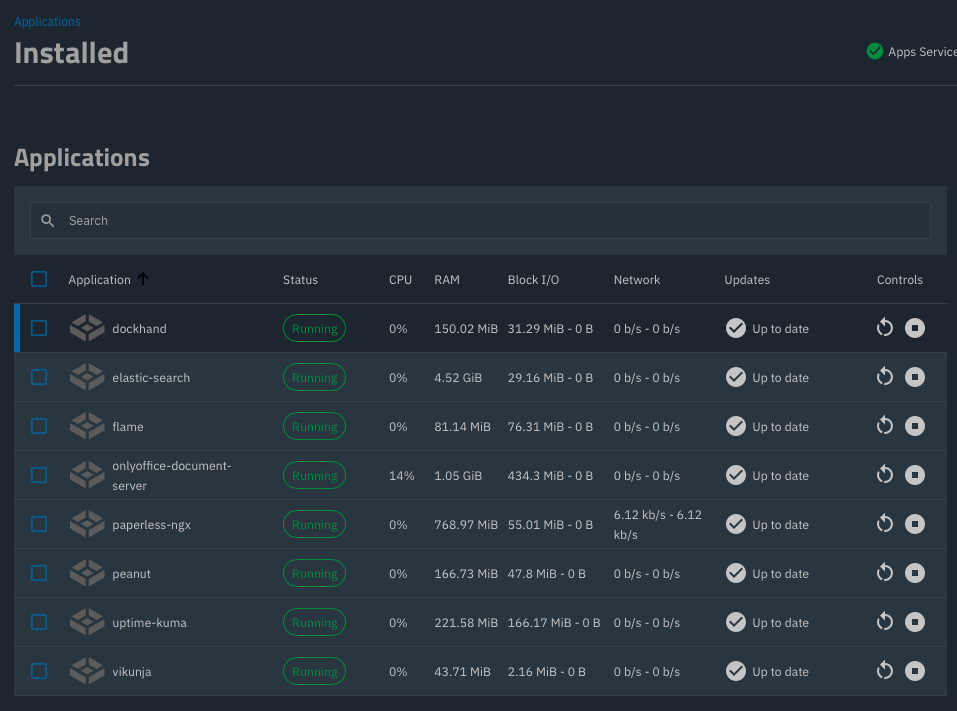
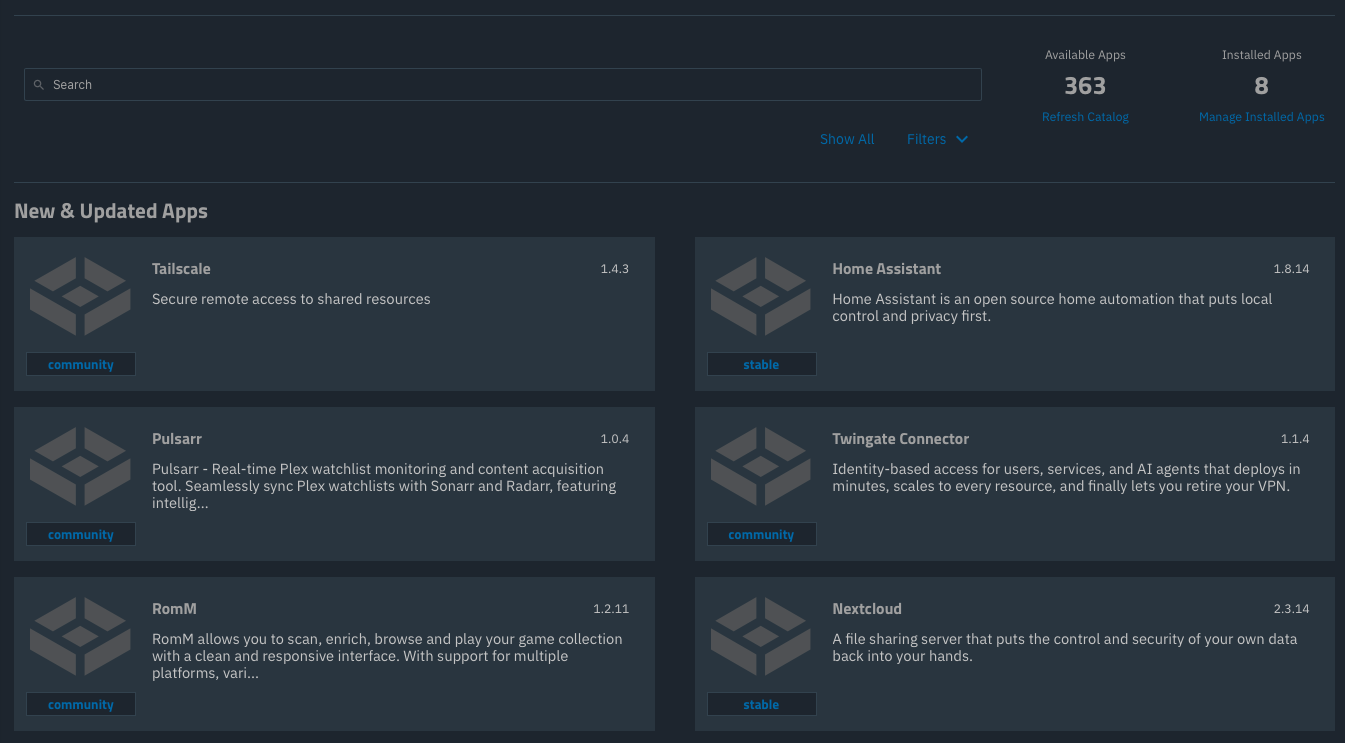
25.10.2.1 - noticed just now. Yesterday all looked ok.
I am able to update the App catalog and get the normal view on 25.10.1 - Goldeye. No apps installed on my system though. Your second screen is the normal look for me, not like you posted
All looks normal at my end
Found it.
All icons are live pulled from applovin.com by your browser whatever that is.
Why are the app icons not stored on my TrueNAS and delivered once from Github when I first deploy the app?
You are pulling external assets for display in the UI? Seriously?
Just like storjshare.io is this applovin.com domain is now blocked by Hagezi’s DNSBLs at least by the “Pro” and more severe versions.
No, not going to whitelist. I already block “imgur” and every “image hosting” service I can get hold of.
Just. Don’t. Do. This. In. A. Web. Application. Ever.
Don’t live pull fonts, JS, … from google or any place on the Internet. Place all your assets on the same web server that serves your application.
I am surprised beyond belief and pretty angry this needs to be said in 2026.
Kind regards,
Patrick
P.S. This could earn you a GDPR violation lawsuit in the European Union should someone feel like it. People have successfully sued about embedded fonts pulled from google.
P.P.S. Also there seem to be requests for media.sys.truenas.net - which is a CNAME for storjshare.io. Same reasoning applies - external assets in an appliance UI?
Danke für den Deepdive in dieser Sache!!
Thanks for your investigation!
Much better than stupid comments…
P.P.S. Also there seem to be requests for media.sys.truenas.net - which is a CNAME for storjshare.io. Same reasoning applies - external assets in an appliance UI?
They use CDN’s, they don’t have the local capacity to host the images/assets themselves, easier/cheaper to use Storj’s network
I know they use a CDN. But they should not host assets for a local UI on the Internet.
This appears to be where the app catalog is pulling icons and screenshots from:
https://github.com/search?q=repo%3Atruenas%2Fapps+media.sys.truenas&type=code
I can’t find any hits on applovin.com in either the apps or webui repository, nor do I see any assets loaded from there using the inspect tab in my browser, so I’m curious where that comes from. Where are you seeing it?
I’m not a dev on this but I assume the intention was to host image assets for a dynamically updated catalog on the CDN. Your alternative suggestion would be to host the assets in github with the app catalog and pull local copies of them whenever the catalog is updated?
Personally I don’t think it matters for things that are dynamic, since it’s an external component also, but I’m not European so I don’t have strong feelings about it lol
So, if I understood this correctly, the app icons stop showing if your NAS lacks internet access?
That seems like bad design, since the app itself may work just fine without constant internet access. It obviously depends on the app.
Why wouldn’t you download and store the app icon? Having the icons be dynamically downloaded every time adds absolutely nothing of value.
Since I only use yaml-apps I haven’t seen the behaviour myself.
This is what an app icon looks like as rendered:
<ix-app-card-logo _ngcontent-ng-c3521349188="" _nghost-ng-c161171443="">
     <div _ngcontent-ng-c161171443="" class="logo-container logo-loaded">
          <img _ngcontent-ng-c161171443="" class="logo  ng-lazyloaded" src="https://media.sys.truenas.net/apps/nextcloud/icons/icon.svg">
     </div>
</ix-app-card-logo>
It’s lazy loading the image in the brower, so afaict the icons would not show if your client/browser lacked internet access (or if it that url was blocked like in this case), but it doesn’t really matter if your NAS has internet access.
When the UI pulls the app catalog, the parameters include URLs for an icon and screenshots (see App Metadata on Nextcloud | TrueNAS Apps Market for example):
            "icon": "https://media.sys.truenas.net/apps/nextcloud/icons/icon.svg",
...
            "screenshots": [
                "https://media.sys.truenas.net/apps/nextcloud/screenshots/screenshot1.png",
                "https://media.sys.truenas.net/apps/nextcloud/screenshots/screenshot2.png",
                "https://media.sys.truenas.net/apps/nextcloud/screenshots/screenshot3.png"
            ],
Then when you load a page with that app, the UI just loads the placeholder (which is stored locally) and tells the browser to go fetch the image from the CDN at that URL to replace it. So with the current design the images are not “downloaded” or stored locally at all.
(FYI I’m not necessarily for or against the current design, just trying to understand what it’s actually doing and what @pmh’s suggested alternative is.)
Whenever I reload the “Apps” menu in my browser I see a ton of denied requests for that domain in my AdGuard Home logs.
None for me in the browser add on:
The only mention of “applovin” in the TrueNAS repository is the author email in this Linux kernel file: linux/net/netfilter/ipvs/ip_vs_twos.c at 54ad4cb63f545b67049fb7a5160719a89fbdf4b8 · truenas/linux · GitHub
Could they be coming from something you have installed? Applovin is apparently a large ad tracker/server used by many mobile apps, among other things
@pmh Is your above screenshot showing all the apps you have installed? I am wondering if it is tied to a specific app you have.
Yes, that’s all my apps. TrueNAS managed, that is. I have three more in Dockhand.
I’ll check the Applovin stuff in the logs. Maybe I was wrong.
Thank you.
So it’s the client that tries to dynamically load the icon from the internet.
Ideally, the icons should be provided by the server, everything else on the apps page is.
Exactly. Even if “applovin” is out, it’s still a very bad idea to load UI elements from anywhere not the exact same source as the UI.
I mean, I could have been a bit more polite in the wording. Still, loading assets from storj in a local UI can earn you a GDPR case in the EU. As I wrote people have successfully sued over google fonts.
Applovin was a different system - it’s media.sys.truenas.net.
Effectively, it gives data on when and how often a user actively accesses the apps page, even though that user expressly turned metrics off.
We still don’t have proof that it is TrueNAS and not an APP that is doing it or Dockhand?
The TrueNAS Apps UI makes the browser fetch the app icons from media.sys.truenas.net.
