Hi Fellows
Just has alert that all 4 drives in my RAID 5 pool showing “degraded”. All with checksum errors…
Do I need to replace all 4 of them? (and how to?)
Rgds
JL
Hi Fellows
Just has alert that all 4 drives in my RAID 5 pool showing “degraded”. All with checksum errors…
Do I need to replace all 4 of them? (and how to?)
Rgds
JL
Most likely your drives are ok.
Similar amount of checksum errors on all drives point to a single point of failure:
Run a memtest, check your cables and inspect your PSU.
If that all checks out ok, it could be a failing motherboard or CPU.
Your info shows ‘4x4TB WD Purple in RAIDZ1’. Are those disks CMR or SMR types? Check the model number specs. I think they are CMR but after the Red incident and labeling, I would check anyway.
Thank you. All are WD purple though which I suppose they are all CMR …
Oh… really.. hmm.. how come PSU will cause this? (intermittence power drops causing issue?)
I am running Scrub now, if Scrub reports no problem can I rule out disk issue?
(otherwise will need to buy spare disk which … now is super expensive YoY)
No. To rule out drive issues you have to run SMART tests. Start with a short one. If it fails then the drive is toast. If smart short says its alright, run a LONG test.
Failing PSU most likely affects RAM and CPU.
A scrub now will not do you any good. Probably reporting Millions of errors.
Thanks for your advice.
Ran for short all 4 no issue, running long test now … wish me luck …
I wouldnt be too worried. Checksum errors are as explained usually not from bad drives.
an undersized PSU for the anticipated load of all peripherals can certainly be an issue that might cause the errors. A failing PSU can also fluctuate and be the issue. Best course of action (IMO) is to methodically eliminate each variable. But 4 drives failing at once is not very likely.
I have experience with something similar to this. Luckily, I caught it while upgrading my drives. The PSU was not undersized and there was no obvious signs of failure. I had been using the PSU with no problems up until I wanted to upgrade. Having all my HDDs physically connected would cause one of the drives to endlessly spin up and down. The specs of the PSU were more than enough the power all the drives, so I assume it had to do with the PSU failing or being unable to provide consistent voltage to every drive. Replacing the PSU resolved the problem.
This might have nothing to do with the OP. They only shared that they had ZFS errors, which could be due to many different reasons, even if the drives are fine.
@JCS You never said if you’re using an HBA.
Oh… thanks for your detail explanation. 
Replacing PSU a bit tricky .. lucky I have a spare one to try.
Will make sometimes on it after all long SMART test completed.
J
Paste the output in preformatted text.
sudo smartctl -q noserial -a /dev/sda
Are you using an HBA? How are the drives connected?
Oh.. thank you so much Winnie.
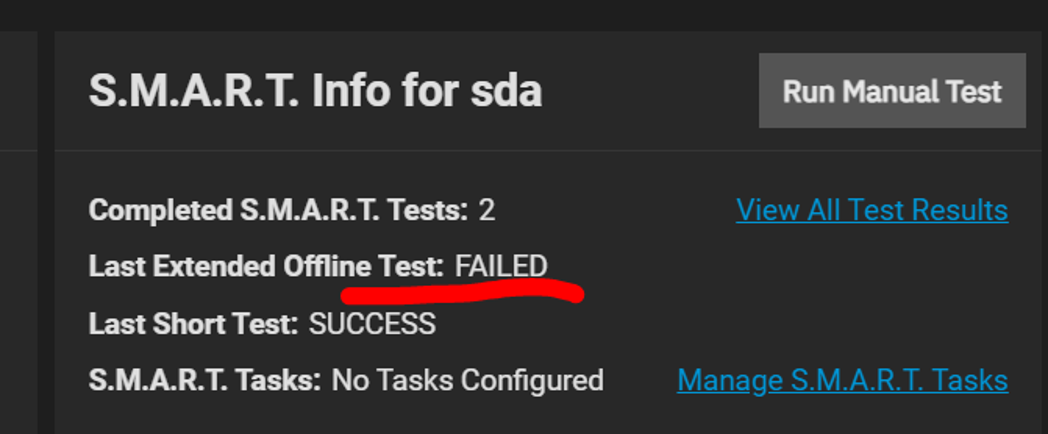
hmm.. I am not very tech while the return says “No error logged” but then there is a read failed…something bad?
(Meanwhile the drive SMART summary shows failed… YoY)
=== START OF READ SMART DATA SECTION ===
SMART overall-health self-assessment test result: PASSED
General SMART Values:
Offline data collection status: (0x00) Offline data collection activity
was never started.
Auto Offline Data Collection: Disabled.
Self-test execution status: ( 113) The previous self-test completed having
the read element of the test failed.
Total time to complete Offline
data collection: ( 1500) seconds.
Offline data collection
capabilities: (0x7b) SMART execute Offline immediate.
Auto Offline data collection on/off support.
Suspend Offline collection upon new
command.
Offline surface scan supported.
Self-test supported.
Conveyance Self-test supported.
Selective Self-test supported.
SMART capabilities: (0x0003) Saves SMART data before entering
power-saving mode.
Supports SMART auto save timer.
Error logging capability: (0x01) Error logging supported.
General Purpose Logging supported.
Short self-test routine
recommended polling time: ( 2) minutes.
Extended self-test routine
recommended polling time: ( 416) minutes.
Conveyance self-test routine
recommended polling time: ( 5) minutes.
SCT capabilities: (0x3039) SCT Status supported.
SCT Error Recovery Control supported.
SCT Feature Control supported.
SCT Data Table supported.
SMART Attributes Data Structure revision number: 16
Vendor Specific SMART Attributes with Thresholds:
ID# ATTRIBUTE_NAME FLAG VALUE WORST THRESH TYPE UPDATED WHEN_FAILED RAW_VALUE
1 Raw_Read_Error_Rate 0x002f 200 200 051 Pre-fail Always - 0
3 Spin_Up_Time 0x0027 202 201 021 Pre-fail Always - 2858
4 Start_Stop_Count 0x0032 100 100 000 Old_age Always - 34
5 Reallocated_Sector_Ct 0x0033 200 200 140 Pre-fail Always - 0
7 Seek_Error_Rate 0x002e 200 200 000 Old_age Always - 0
9 Power_On_Hours 0x0032 072 072 000 Old_age Always - 20635
10 Spin_Retry_Count 0x0032 100 253 000 Old_age Always - 0
11 Calibration_Retry_Count 0x0032 100 253 000 Old_age Always - 0
12 Power_Cycle_Count 0x0032 100 100 000 Old_age Always - 33
192 Power-Off_Retract_Count 0x0032 200 200 000 Old_age Always - 4
193 Load_Cycle_Count 0x0032 200 200 000 Old_age Always - 29
194 Temperature_Celsius 0x0022 103 096 000 Old_age Always - 44
196 Reallocated_Event_Count 0x0032 200 200 000 Old_age Always - 0
197 Current_Pending_Sector 0x0032 200 200 000 Old_age Always - 0
198 Offline_Uncorrectable 0x0030 100 253 000 Old_age Offline - 0
199 UDMA_CRC_Error_Count 0x0032 200 200 000 Old_age Always - 0
200 Multi_Zone_Error_Rate 0x0008 200 200 000 Old_age Offline - 1
SMART Error Log Version: 1
No Errors Logged
SMART Self-test log structure revision number 1
Num Test_Description Status Remaining LifeTime(hours) LBA_of_first_error
SMART Selective self-test log data structure revision number 1
SPAN MIN_LBA MAX_LBA CURRENT_TEST_STATUS
1 0 0 Not_testing
2 0 0 Not_testing
3 0 0 Not_testing
4 0 0 Not_testing
5 0 0 Not_testing
Selective self-test flags (0x0):
After scanning selected spans, do NOT read-scan remainder of disk.
If Selective self-test is pending on power-up, resume after 0 minute delay.
The above only provides legacy SMART information - try ‘smartctl -x’ for more
So 10% of the way into the test the drive was unable to read sectors & immediately ended the test as a failure.
Value 200 confirms there is whatever a ‘multi_zone_error’ increase (from 0 to 1). Interestingly values 1/3/5/7/197/198 haven’t increased… I’m guessing they’d only update after the drive actually tries to use the impacted sector? Not 100%, I’d personally have thought the test enough to get those values to update. (I guess this’d explain why ‘overall’ healthy is currently ‘passed’ since none of the values have updated to bellow thresholds even though smart test itself is failing?)
If drive is in warranty I’d be opening a case with manufacturer & giving them the “1 Extended offline Completed: read failure 10% 20633 3439398024” as proof of failure & swapping it asap.
I’m guessing you’re using raidz1 (you said ‘raid 5’), so you can only really afford to lose the 1 disk atm.
This drive failing a long selftest might be a coincidence along with the fact that all 4 drives are reported as “degraded” by ZFS.
Could be an HBA, bad RAM, or something else. It might be a coincidence that this specific drive is also failing on its own.
I doubt that all 4 drives are failing at the same time.
We still don’t have all the necessary info.
@JCS More info can help.
When did you build this NAS?
It appears you’re using a “gaming” motherboard. Is that correct?
When did you purchase and start using these HDDs? Were they purchased at the same time?
Are you using an HBA?
Did you run and pass several memtests?
Can you paste the output of your pool status?
zpool status mypool
Isn’t smart run on the drive itself? You’re right in the sense that it doesn’t explain at all why three other drives started having issues at the same time.
@JCS Any chance you can provide full system details, including how the drives are attached to the system (directly to motherboard; hba, something less kosher?) No chance you dropped your system recently?
@JCS may in fact have caught a failing HDD (or one that suffers infant mortality) by coincidence, while trying to troubleshoot the reason for why all 4 drives were reported as “degraded” by ZFS. It’s like calling the police to help rescue a kitten on a tree branch, and they accidentally catch a burglar trying to sneak out of a neighbor’s house.