Oh.. thanks all for so much info and help… sadly need to rush now.
I started long test for sdb now and will continue for the remaining 1 by 1.
Will read and reply again.
thanks again for all of your help and advice 
Oh.. thanks all for so much info and help… sadly need to rush now.
I started long test for sdb now and will continue for the remaining 1 by 1.
Will read and reply again.
thanks again for all of your help and advice
You can run all tests at same time, but I mean, Winnie is right in the sense that additional info about your system & why everything started alarming could prove very useful

Hi All.
Thank you so much for your help. First maybe a little background of my NAS build @winnielinnie
Motherboard & CPU: Indeed a gamming motherboard that I used as gaming PC like 7 years ago. Then 4 years ago I upgraded my PC and built this nas with it.
RAM: Some random … Chinese brand DDR4 RAM… also used as long as this PC exist.
Disk controller: Just onboard SATA.
PSU: Originally a random ATX PSU but then it broke so like 1.5 (or 2 years) year ago changed with a SilverStone SX650-G
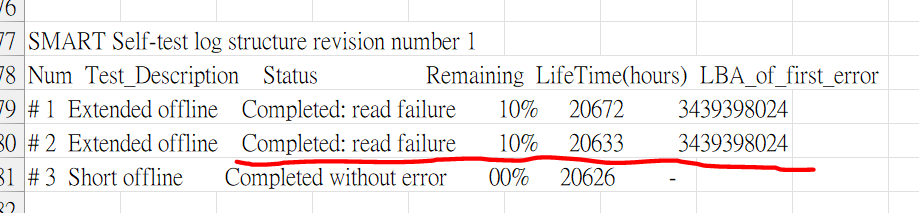
So @Fleshmauler I ran full SMART for other 3 and seems ok, Then I ran again for the first one still having read error:
I leave the NAS operate a while with some game files update and then multiple drives have chksum error again. (Oh.. BTW, I switched it off for a day and switched it on again, the the long SMART test error reside as sdc not sda … I thought the sdx always tagged to the same physical drive? or every time restarting the system will change?)
So I am thinking:
Thanks in advance.
JL
Drive letters can be reassigned at each boot, so always track by serial number or UUID.
Failing a SMART test is the textbook definition of a failing drive => RMA
(If possible, have the replacement in advance so you can replace with the old drive still in and full redundancy.)
Checksum errors:
This might not be the reason for your current problem, but a former gaming PC with questionable RAM from 7 years ago and drives from 4 years ago? Do you have a backup of everything?  I would not entrust that system to store invaluable data.
Oh, and remove any overclocking setting and make sure to run this RAM at stock speed.
hmm… I didn’t have any overclocking applied. Though those RAM is random brand which not sure about the reliability …
Well.. I have made 1 replication to a 10T pool on a single HDD and also backed up useful data with 3 different SSD (except iTune back up and Time machine share for another iMac). So pretty much important data are safe… .still want nail down the problem and fix the system.
Do you recommend me to replace the drive that failed 2 times on long SMART test?
(hmm… and BTW, why it will change from sda to sdc …)
Rgds
JL
Actually… how to run MemTest in TrueNas? :S
You don’t run a memtest in TrueNAS. You need to make a bootable USB with Memtest86+ and boot from it.
There’s currently a feature request to add Memtest to the TrueNAS boot menu, which would make things much easier, since users won’t need to create a bootable USB.
My advice:
zpool status -v on the pool. Report the entire results. No need to hide any data.zpool clear poolname where poolname is you pool name.zpool scrub poolnameThat is a lot to do and hours of testing, if not days.
Good luck.
IMO steps 1-3 are already completed. 3 drives passed, 1 drive failed twice. So I’d start filling out RMA forms for the dead drive if it is under warranty; else replace.
Still do the rest. This’ll shave at least half the testing time.
I missed that, sorry.
Especially on the cheaper PSUs. Just because there is a plug on the cable for a drive, does not mean it will supply enough power. The voltage drop at the end of the cable can be quite a lot, to the extent it cannot power a drive correctly (constant on/off). Also the max power output is for the whole PSU combined and not individual rails.
I had this issue with a cheap PSU, large enough power output but on the end of one of its wires it would not power a HDD properly. This issue can also happen if you try and power PCI cards where you need a guaranteed 5v supply.
I got a PSU voltage tester thing and checked so I have seen this with my own eyes.
What is your HDD Standby and Adv. Power Management setting?
I enabled them before and keep getting random disk fail message and sometime checksum error. The “failed” disk will tested fine out of the pool.
I had none of this issues after I put the HDD always on and disabled adv. power management.
WoW!! quite a lot to try… I need some times to digest and try it out…
I don’t apply any power management … I keep the simplest setting.
Hmm… I replaced SilverStone one after the first one failed few years back… I … guess still fine …
Yo!
So ran long test for all drives once more. The same drive failed again.
So quick q:
Rgds
Johnny Leung