Doubt an RMA is an option for a drive that is 7 years old.
@JCS Is it correct that you ran long selftests on all four drives, but three out of the four passed? No memtest failures for the RAM?
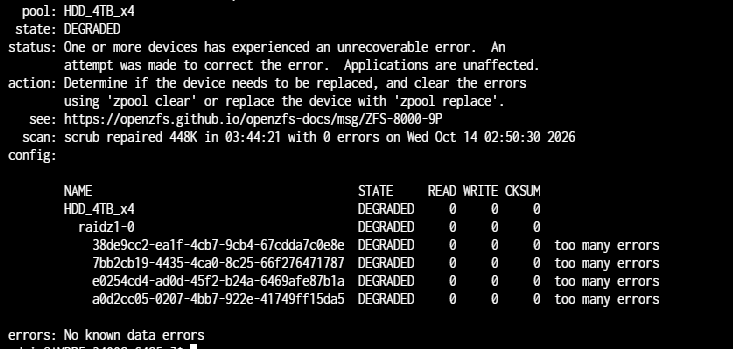
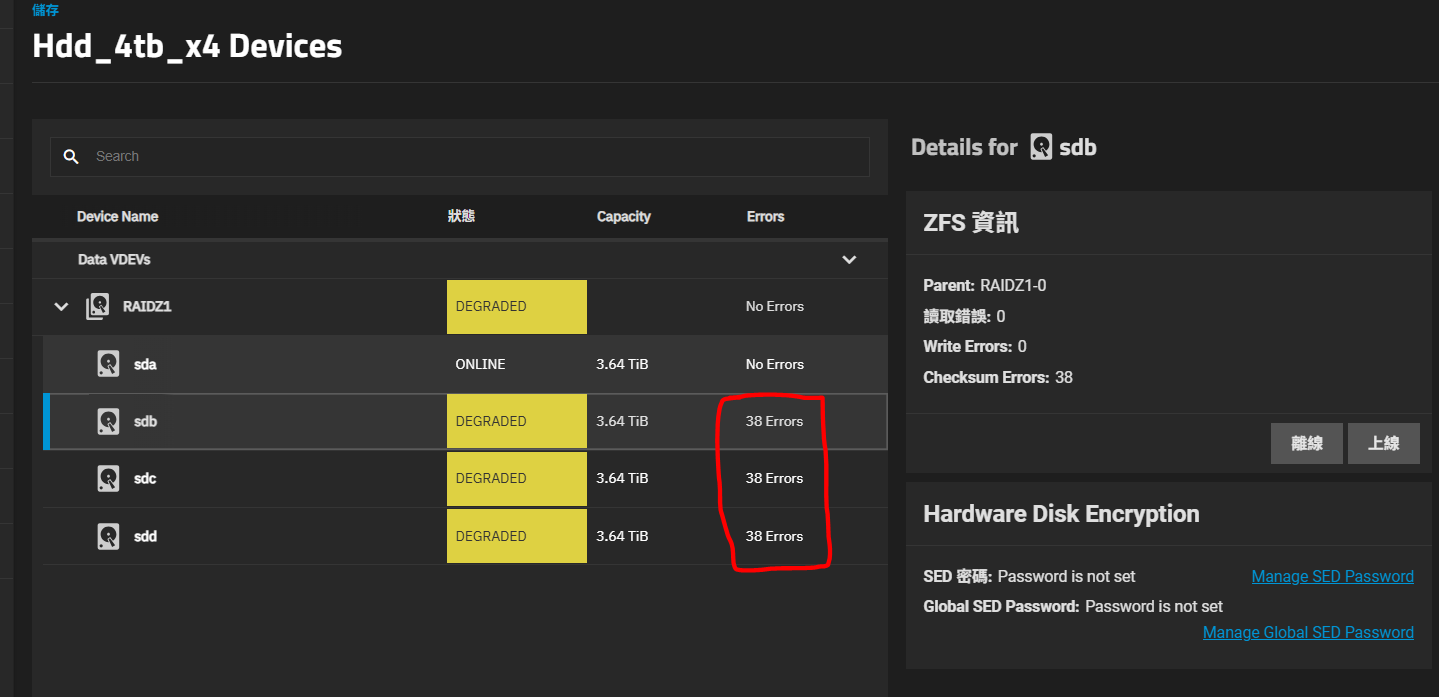
Your current status is you have one drive failing in a 4-wide RAIDZ1. All drives are 7 years old. This is concerning, since you cannot lose another drive.
I wouldn’t wait. Run multiple memtest passes as soon as you can. If bad RAM is causing corruption, you want to address it immediately. If the RAM passes multiple memtests, then at least we can rule it out and move on to the next thing.
Three disks passed long SMART selftests, yet according to ZFS, all disks have too many errors to report.
You need to find out what the problem is sooner than later, since you could be coming close to data loss or losing your entire pool.
Please vote for this feature request. It needs to be part of the TrueNAS boot menu so that people don’t need to fetch and create separate bootable USB sticks just to do this fundamental test.
Notwithstanding that I’m long out of votes, no longer concerned, and that the usefulness of Features Requests is questionable, the best results—at least for ECC RAM— would come from the paid version of Passmark MemTest. TrueNAS is not going to bundle that, and even the free version would likely require some negociations between the two companies across the Pacific.
Users should just make their own MemTest stick, like they make TrueNAS installers or establish a SSH link. Basic tools.
A little update that still didn’t manage to start Memtest… though bought a new drive and resilvered (Ah!!! it’s 3 times more expensive now than few years ago!!! And hard to find stock )
1 thing notice when I power on the system (l leave it off last couples of days before I get a new HDD) and done the resilvering, CHKSUM error occurred again for other 3 drives with same numbers of times… does it sort of explain it’s a RAM problem affecting all drives with the same number of error counts? (I will try do the test asap … )
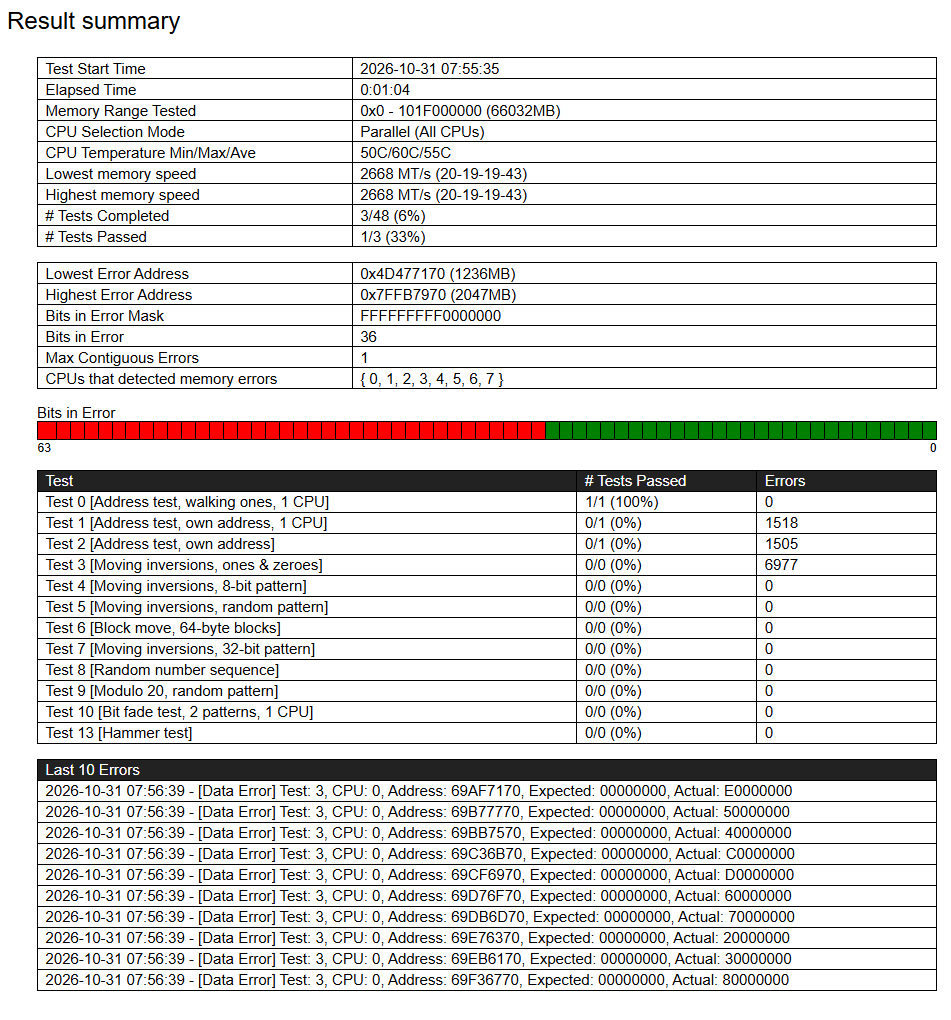
So … performed MemTest (Oh.. I used the PassMark one)… test failed very quickly YoY… need to replace then I suppose.
1 Quick q, is that worth to try ECC? (my CPU and motherboard should be supporting) and if I try ECC is there any special thing/setting I need to be aware for TrueNAS?
Indeed, ECC requires a CPU (no G) or a PRO APU (G), with a few exceptions (the 5500 is an APU with disabled/defective iGPU, so no ECC). You can find Pro APUs (say, a 5350G) on eBay but make sure that it is not locked to a specific manufacturer (Lenovo). Other than that, the obvious issue is the current price of ECC RAM, and the quality of ECC support on consumer boards is a bit of a lottery, but there’s no special setting: It should just work.
I have a serious question. Please don’t take this the wrong way. How come you waited almost three weeks to run memtests? Nothing was stopping you from doing it. It’s one of the quickest things to do and you want to make sure you’re not saving files with bad RAM.
Before you spend money on new RAM sticks, there are three things you can still try.
Reseat the sticks securely. Run several memtest passes again.
Test one stick at a time. Run several memtest passes again.
What brand and model is your RAM? Check your BIOS for any XMP or overlock settings being used. If there are any, reset them to their defaults. Check what speeds the sticks are meant to run. You might have to set their speeds to a lower setting manually. Run several memtest passes again.
These three things are an attempt to save you money, if the problem is something other than all sticks themselves failing.
Since you’re not using ECC RAM, I would default to the open-source Memtest86+, which uses up less memory for itself so that more of your RAM will be tested.
You have a serious concern now. Because you have been using your NAS with corrupt memory, it’s very possible that you were saving corrupt files with “good” ZFS checksums or good files with “bad” ZFS checksums. After you resolve or replace your bad RAM, this can still manifest as checksum errors on your pool (even if the files might have been properly written) or corrupt files “passing” a scrub. The damage might have already happened.
Oh… I didn’t aware severity of this.. and need to find monitor and input device to setup to test … hmm.. does it mean once a CHKSUM error occurred this corrupted data issue might happened already and couldn’t avoid? Will that help to Scrub again? Or is there any way to check corrupted file?
I am not familiar these mechanics and thinking TrueNAS will supply some degree of protection on suddenly hardware failure …
A little update, I replaced 1 stick of spare DDR4 tested with 4 Memtest pass.
No system I am aware of, is able to recognise “corrupted” data on its own. Its always checksum comparison between state A vs B. This is what ZFS does. A computer doesnt know what a picture is supposed to look like or what exactly you want to have in a text file.
So if data gets corrupted by RAM, ZFS dutifully checksums the already now garbage data.
Thanks all for the help … hmm I have following questions (sorry a bit long):
I have a replication done before these things happened and when CHKSUM error occurred I stopped any replication.. I suppose the replication will be good? And if I start replication again and my primary dataset has corrupted file it will be replicated to that?
I kept data in NAS and another 3 SSDs separately, so I can try like using FreeFileSync in Windows to compare content between NAS share vs stand alone SSD copy to identify any corrupted files?
Can I assume that any data file written before CHKSUM error happens are all good? So I only need to focus files written in this period?
Or.. since I also have 1 drive failed and replaced and resilvered… will that a chance other data written before this period also might have issue since resilvered with bad CHKSUM or written bad data with fake good CHKSUM?
The file went through a corrupt portion of memory before being saved. A checksum was calculated and the data was faithfully written to disk. The checksum was calculated in a healthy portion of memory. Its checksum is 08D6E294, which is stored on disk.
Let’s say you later discover your RAM is bad. You fix a setting in the BIOS or replace the sticks. Now your RAM passes memtests. You run a scrub. When it gets to this file, it calculates the checksum to be 08D6E294. According to ZFS, the checksum matches the expected value! No corruption!
The truth is that you have silent corruption that ZFS is unaware of.
Is this JPEG file corrupted? According to ZFS it is!
The file went through a healthy portion of memory before being saved. A checksum was calculated and the data was faithfully written to disk. The checksum was calculated in a corrupt portion of memory. Its checksum should be A4D49451, but it is instead calculated as 6AF8F197, which is what gets stored on disk.
Let’s say you later discover your RAM is bad. You fix a setting in the BIOS or replace the sticks. Now your RAM passes memtests. You run a scrub. When it gets to this file, it calculates the checksum to be A4D49451. According to ZFS, the checksum doesn’t match the expected value of 6AF8F197! Corruption!
The truth is that your file is perfectly fine, but ZFS thinks it is corrupted.
Bad RAM isn’t uniquely problematic for ZFS, but ZFS cannot offer additional protection if silent corruption is originally due to bad RAM. ↩︎
Thank you all and sorry asking so many q .. I am not very tech and have very limited resources .. still didn’t manage to do MemTest early enough is my fault YoY.
I missed to do zpool status -v ..following the result. (not sure if it’s still useful after changed a few things…)
pool: HDD_4TB_x4
state: ONLINE
status: One or more devices has experienced an error resulting in data
corruption.  Applications may be affected.
action: Restore the file in question if possible.  Otherwise restore the
entire pool from backup.
see:

scan: scrub repaired 0B in 03:45:15 with 3 errors on Sun Nov  1 03:45:21 2026
config:

    NAME                                      STATE     READ WRITE CKSUM
    HDD_4TB_x4                                ONLINE       0     0     0
      raidz1-0                                ONLINE       0     0     0
        a15e77aa-47f6-4f5c-a5aa-9126c1c11763  ONLINE       0     0     6
        7bb2cb19-4435-4ca0-8c25-66f276471787  ONLINE       0     0     6
        e0254cd4-ad0d-45f2-b24a-6469afe87b1a  ONLINE       0     0     6
        a0d2cc05-0207-4bb7-922e-41749ff15da5  ONLINE       0     0     6

errors: Permanent errors have been detected in the following files:

    HDD_4TB_x4/Games@auto-2026-09-27_16-04:/World_of_Tanks_ASIA/res/packages/shared_content_hd-part2.pkg
    HDD_4TB_x4/Games@auto-2026-09-27_16-04:/World_of_Tanks_ASIA/res/packages/shared_content_sandbox_hd-part2.pkg

pool: boot-pool
state: ONLINE
scan: scrub repaired 0B in 00:00:27 with 0 errors on Fri Oct 30 03:45:28 2026
config:

    NAME        STATE     READ WRITE CKSUM
    boot-pool   ONLINE       0     0     0
      sde3      ONLINE       0     0     0

errors: No known data errors
So:
Is that those 2 files with data error (thanks god! they just game files) associated with those CHKSUM errors?
I have a replicated image in a 1 disk pool long before CHKSUM error happens, does it worth to restore from that backup?
Or as I have many snapshots for my pool, is that I can restore from some snapshot 1 month ago before all these started happening?
Oh… the old 4TB disk failed Long SMART test still there, is that I should use it rather then the resilver new drive which may carry issue over?


 )
 )


 It’s beautiful.