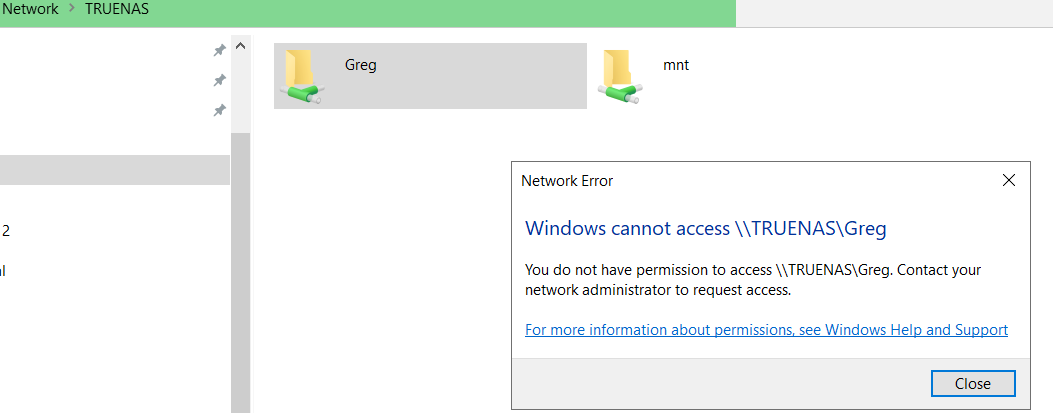
Recently migrated to Scale, which went very (encouragingly and surprisingly) smoothly for the first two incarnations 24.04 and 24.10 respectively. Everything behaved as expected, with shares available on the network, etc.
The primary motivation for the migration was to replace Plex with Jellyfin, as Jellyfin was unavailable on Core.
After reviewing an instructional video for setting up Jellyfin, I followed the recommendation of adding (or changing) a password to the NAS SMB share which was the parent folder for media accessed by Plex, along with everything else.
That is when the nightmare began and continues. I don’t recall having a password for that parent folder, although SMB won’t allow saving without one, so perhaps I did. It was never entered as a Windows credential.
I’ve tried all the usual things and things that worked before: Checking SMB share, Guest logon enable, Lanman Workstation policy, removing any stored credentials (none were stored and the addition of the the Truenas SMB share UN and PW goes nowhere).
Any tips tricks or help would be greatly appreciated. I did backup all the data before the migration, and at this stage, I am almost tempted to start from scratch with a clean install so I have a more clear understanding of why simply mapping a network drive in Windows has to be such a project. Unfortunately, I don’t know that would be an improvement in status. I may simply end up with the same issues.
So, long story short:
Migrated to Scale. Two iterations were fine
Changed SMB PW
Broke the share and can’t get it back.
I thank all in advance for any suggestions!