
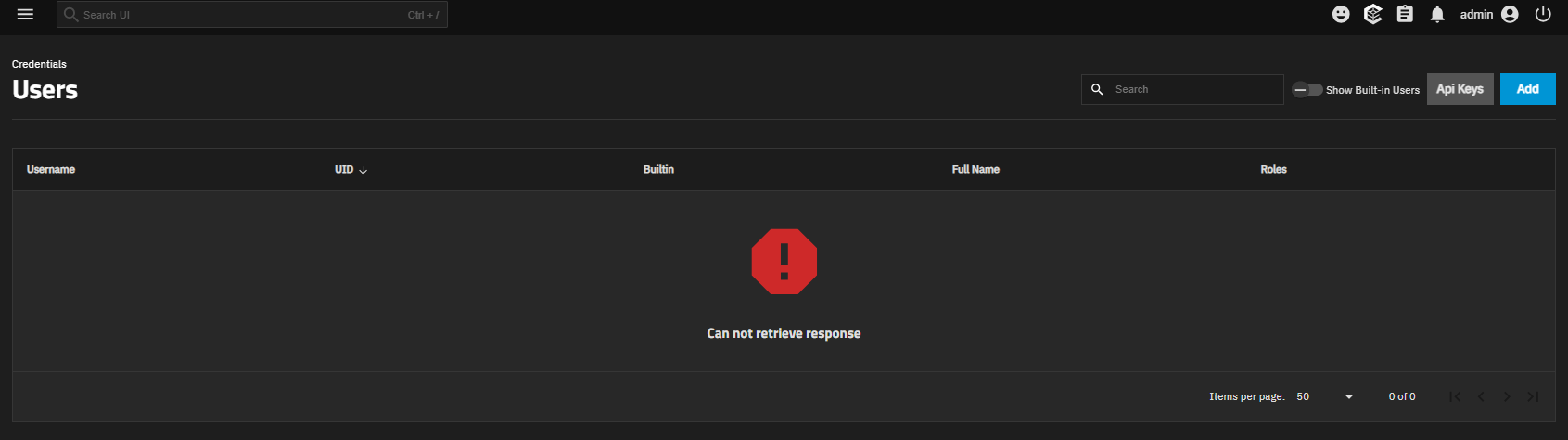
I have the message “Can not retrieve response” on the users page. Do you have the same thing ? Is there a solution available ?
Versions 25.04.2 and 25.04.2.1
Are you sure about the version?
I’ve gotten this once or twice on 24.10.2.1 but logging out and back in solved it for me.
Is this happening consistently for you?
Sorry it’s 25.04.2. It is happening consistently, I cleared the browser cache, log out/ log in, reboot …
Here is the message in the middlewared.log file
[2025/08/15 08:37:28] (WARNING) middlewared.process_method_call():357 - Exception while calling user.query(*[[['OR', [['builtin', '=', False], ['username', '=', 'root']]]]]) @cee:{"TNLOG": {"exception": "Traceback (most recent call last):\n File \"/usr/lib/python3/dist-packages/middlewared/api/base/server/ws_handler/rpc.py\", line 323, in process_method_call\n result = await method.call(app, params)\n ^^^^^^^^^^^^^^^^^^^^^^^^^^^^^^\n File \"/usr/lib/python3/dist-packages/middlewared/api/base/server/method.py\", line 61, in call\n return await self._dump_result(app, methodobj, result)\n ^^^^^^^^^^^^^^^^^^^^^^^^^^^^^^^^^^^^^^^^^^^^^^^\n File \"/usr/lib/python3/dist-packages/middlewared/api/base/server/method.py\", line 64, in _dump_result\n return self.middleware.dump_result(self.serviceobj, methodobj, app, result)\n ^^^^^^^^^^^^^^^^^^^^^^^^^^^^^^^^^^^^^^^^^^^^^^^^^^^^^^^^^^^^^^^^^^^^\n File \"/usr/lib/python3/dist-packages/middlewared/main.py\", line 819, in dump_result\n return serialize_result(new_style_returns_model, result, expose_secrets)\n ^^^^^^^^^^^^^^^^^^^^^^^^^^^^^^^^^^^^^^^^^^^^^^^^^^^^^^^^^^^^^^^^^\n File \"/usr/lib/python3/dist-packages/middlewared/api/base/handler/result.py\", line 13, in serialize_result\n return model(result=result).model_dump(\n ^^^^^^^^^^^^^^^^^^^^\n File \"/usr/lib/python3/dist-packages/pydantic/main.py\", line 212, in __init__\n validated_self = self.__pydantic_validator__.validate_python(data, self_instance=self)\n ^^^^^^^^^^^^^^^^^^^^^^^^^^^^^^^^^^^^^^^^^^^^^^^^^^^^^^^^^^^^^^^^^^^^^\npydantic_core._pydantic_core.ValidationError: 3 validation errors for UserQueryResult\nresult.list[UserQueryResultItem].5.email\n value is not a valid email address: The part after the @-sign is a special-use or reserved name that cannot be used with email. [type=value_error, input_value='admin@truenas.local', input_type=str]\nresult.UserQueryResultItem\n Input should be a valid dictionary or instance of UserQueryResultItem [type=model_type, input_value=[{'id': 1, 'uid': 0, 'use...DMIN'], 'api_keys': []}], input_type=list]\n For further information visit https://errors.pydantic.dev/2.9/v/model_type\nresult.int\n Input should be a valid integer [type=int_type, input_value=[{'id': 1, 'uid': 0, 'use...DMIN'], 'api_keys': []}], input_type=list]\n For further information visit https://errors.pydantic.dev/2.9/v/int_type", "type": "PYTHON_EXCEPTION", "time": "2025-08-15 06:37:28.225112"}}
It seems like I have to change the e-mail address of the admin user. How can I do that in CLI ?
So, i was right about it being the same bug as the VM bug.
Ie, putting pydantic validation on the query, not the update.
I’d report a bug. TrueNAS should not break like this because they update the database validation scheme in an update.
Agrred… its a bug. The validation should be handled more functionally.
Can we get a bug report and NAS-ticket id.
What was the email address that caused the issue?
admin@truenas.local
So its objecting to a truenas.local because its not a usable domain name.
I assume you don’t want to use that??
Can you report a bug… the bug is really that you can’t fix the problem in the UI as you are “blocked”.
Update user email from the CLI
Indeed, midctl cannot update an invalid email because it reads the invalid email address before updating it, so if fails before doing anything.
But there is a workaround.
1/ Find the invalid email address
Connect with SSH as root
The prompt will look like
root@truenas:~#
Run midclt to get the exact error message
midclt call user.query
Check the first line of the error message
3 validation errors for UserQueryResult
result.list[UserQueryResultItem].66.email
  value is not a valid email address: The part after the @-sign
  is a special-use or reserved name that cannot be used with email.
[type=value_error, input_value='foo@bar, input_type=str]
In this example, the invalid email address is foo@bar
2/ Update user email address with sqlite3
Since midclt does not work, you have to use sqlite3 to edit directly the configuration database, located in /data/freenas-v1.db
Backup the configuration database before modifying the database
cp /data/freenas_v1.db /data/freenas_v1.db-my_backup
Edit the configuration database with sqlite3
sqlite3 /data/freenas-v1.db
The prompt is now
sqlite>
Tips:
sqlite3provides built-in commands to explore the database schema
- Use
.tablesto see the tables list- Use
.schemato see the columns listThey are built-in commands without semi-column at the end unlike SQL statements.
The users and their emails are defined in the table account_bsdusers
Use a SELECT statement to list the usernames and their emails
SELECT bsdusr_username,bsdusr_email FROM account_bsdusers ;
Note: SQL statement must end with a semi-column
To update a record, you need the UPDATE statement
If you know the username, you can filter with the username and then update the email address. For example to update the email address of user truenas_admin
UPDATE account_bsdusers SET bsdusr_email='foo.bar@gmail.com'
WHERE bsdusr_username='truenas_admin' ;
if you do not know the username, you can replace directly the email address, without filtering on username
UPDATE account_bsdusers SET bsdusr_email='foo.bar@gmail.com'
WHERE bsdusr_email='foo.bar' ;
Note:
- the effect is immediate, you need not to restart the NAS to see it.
midcltshoud work nowmidclt call user.query | jq
if something goes wrong
In this case, just overwrite /data/freenas-v1.db with the backup file you have just created before.

It worked ! Thank you very much !
The whole check is misconceived, as it is perfectly ok to use local email addresses. They can always be rewritten by a local MTA if you want to send them outside.
I agree with you ! I put a fake e-mail address because I use smtp-to-gotify and gotify docker apps for notifications