I am in the nightmare of trying to setup OPNsense and Unifi (my advice is don’t do it at this point). So I’m in a never-ending loop of issues. SO, I’m trying to get the Unifi controller running as a “container” in Scale 25.04.2.3. So with that in mind it looks like I want to create a bridge for that to communicate on.
Overall goal: Setup the container with a static IP that shows up so that I can point the Unifi switch to it as the controller, so I can manage the switch, to then connect to the OPNsense router.
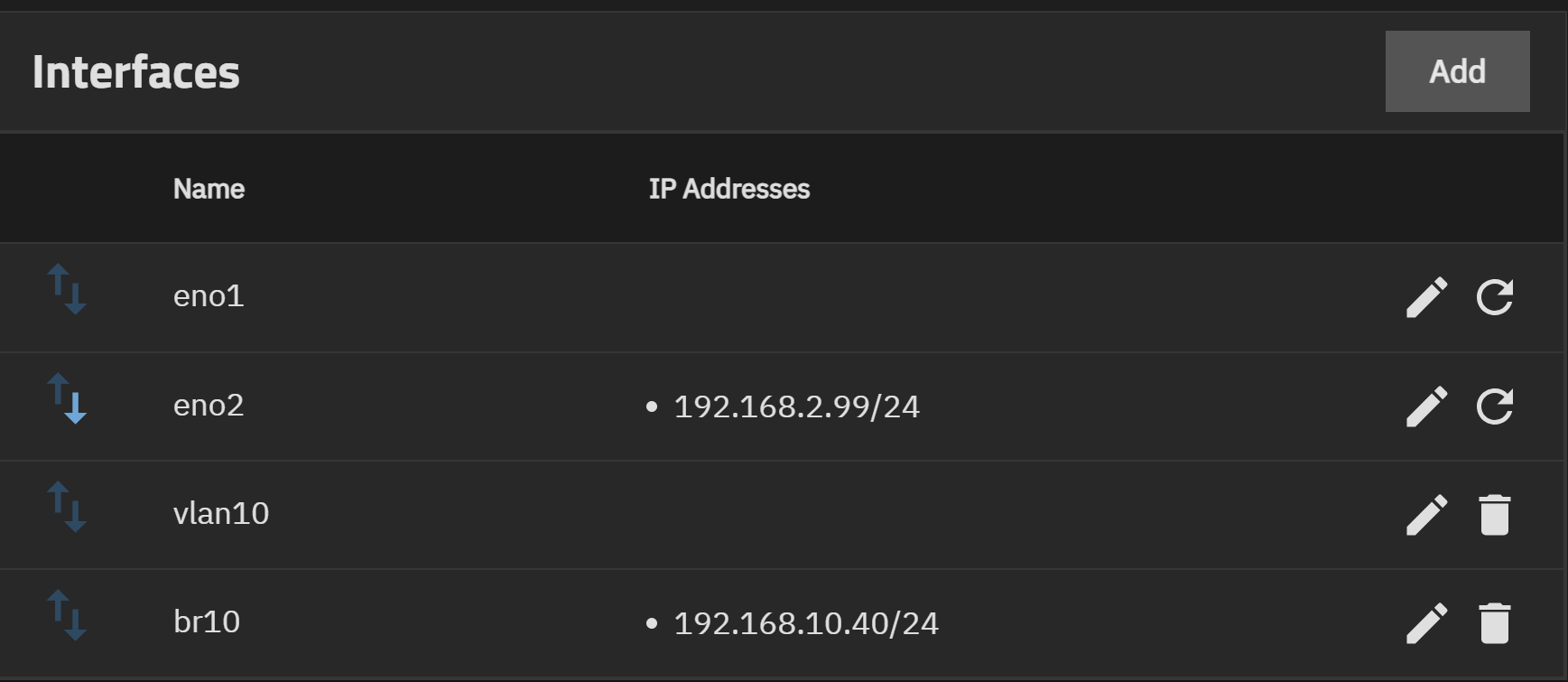
br10 with the static IP (192.168.10.40) has vlan10 as a member
vlan10 with a tag of 10 is on eno1 as a parent interface
eno1 is there as an interface
I am trying to connect through a switch only with my laptop and I can’t for the life of me connect to the interface on the IP. It works fine switching to the other NIC as a backup.
I have tried rebooting the NAS a couple times, I have rebooted my laptop. Nothing seems to be working. When I had it set on the interface, it seemed to work fine. Really not sure what else to try. Happy to run any commands.
Depending on your level of expertise, you may feel like the following is the equivalent of asking, “did you turn it off and on again?”. If so, ignore it.
You didn’t say anything about how your switch and laptop are set up. I’d also check your switch config; if your laptop is not tagging packets, then not only do you need the laptop’s switch port to be a member of vlan10, but you probably also need to configure it so that untagged packets are placed into vlan10.
You may want to run both tcpdump and ping from both the TrueNAS and laptop direction to get a hint as to what is going on. Ping from one direction only at a time.
Cavaeat: I’m not running scale (still on core), so I’m making some assumptions based on that screen.
My switch is a Unifi switch that I can’t really access the mgmt of at the moment because I bought a switch I need to be able to create a controller for before I can get anything to work (not loving Unifi right now), so am trying to take any weird switch config out of the equation I am using an unmanaged switch as it’s my understanding that it should at least let me connect (I was trying through the managed switch as well and that wasn’t working either even though I “think” I was going through two ports that should have been set for the mgmt VLAN.
My laptop is set to 192.168.10.x subnet. It could be a VLAN thing which sort of gets back to the chicken and egg thing of how do I set this switch up without the controller if I need the switch setup to get the controller online. If, from a setup perspective everything seems correct, then it’s probably just a weird networking thing that I need to get figured out.
I did just realize that there is a Unifi App, that I could try and run that on just the default interface and take the bridge out of it potentially but I’d still like to be able to get this working at some point to make sure that containers and VMs can run on the appropriate network.
Let’s start with the basics before people go tell you to reboot or use ping:
How exactly did you setup the Container so such container would have it’s own NIC, MAC address, so it can set an IP address on it?
Answer: Unless you didn’t add those details: You didn’t.
The container is using the default NAT.
I did this with jailmaker, still working perfectly, but I do have to migrate to
the new container solution, so I’ll come back with examples, if you cannot google it enough, before that.
I hadn’t got to that step yet to try and give the container it’s own IP. Was first just trying to get a bridge setup and be able to log into the interface. Everything I read seemed to point to how I had it setup correctly, so I’m wondering if it is a switch thing.
My current attack is to go back to the single interface, get the Unifi App running, be able to manage the switch, “hopefully” get that all running, then try and setup the bridge again.
So, this is not an LXC Container, but a Docker Container then?
If it is a Docker Container and you are using the provided Unifi Controller APP, you cannot setup your own IP address (you have to do it with YAML or Docker Compose), BUT, you can run the Docker Container in “Host Network” mode and access the Unifi APP with the TN IP Address (and the proper port for the Unifi app).
I’m in kitchen sink mode so initially tried the LXC container but wasn’t getting a container IP on the network to point to, thus was trying to set things up as a bridge on the vlan.
When that wasn’t working have been trying the App approach as a docker container, haven’t had luck there yet. I might just say I value my time and buy a Unifi cloud key. I want to be spending this time on my TrueNas services and not getting these stupid switches setup.
I will most likely want to get this working eventually with home assistant or other containers/VMs but at this point I think I need to get the network setup and working so I know vlans are doing what they should be. I understand the storage side of the house much better than the networking side of things. Which that is most likely the crux of my issues.
What commands and logs are good to be looking at to help troubleshoot vlans, bridges, etc on TrueNAS?
Thanks for stepping in. As I said, I’m not yet using scale (although I use vlans/VMs/containers elsewhere), so I didn’t want to go too far into that side of it.
Turned out this was a VLAN tagging issue. A classic Unifi chicken and egg problem where I was trying to get this setup to adopt and setup my unifi switch but needing a switch to do it.
I ended up buying a Unifi cloudkey, getting the switch setup properly with VLAN tagging at the port for the MGMT network that Truenas will run on. Then I was able to setup a bridge with the parent interface. I was also able to setup an additional VLAN for a secondary subnet on that parent interface as well. So seems like everything is working just fine.
The idea of VLANs and managed switching vastly outweighed my skills at implementing such a network. BUT after a few weeks contemplating starting a large bonfire with overpriced networking gear… I think I got it all working and learned quite a bit in the process.