
I have 2x 2TB drives setup in a stripe configuration. Currently have <1TB of data on this stripe. I want to convert these to a mirror. Can I accomplish this in the gui? I didn’t see many options in Storage>Disks.
You would first have to remove one of the disks from the pool. Better to choose the one with least data on it. Check with zpool list -v <poolname>
The data will be evicted and saved onto the remaining disk.
Now you can use the removed disk to “extend” (attach) the single drive into a 2-way mirror.
Do you have a backup of your data? Is it not feasible to create a new pool from scratch and replicate everything over from a backup source?
Great, thanks for this. I can’t figure out how to remove a disk in Storage>Disks. Can I do it from there?
Yes, I do have a backup and starting from scratch does seem easier, but less fun! I may still go this route. To do this I would just remove both disks, then add them back? (Again, haven’t figured out how to remove a disk)
You have to do it from the Storage → VDEVS page. Be very careful.
No. There is no “adding them back”. You would essentially destroy the pool and do a quick wipe on the disks. Then you create a new pool from scratch and replicate everything over.
You can try the first approach, since you won’t need to copy or transfer any data.
The safer approach involves a third disk, which is used to make a mirror (Storage>Pool> Extend) with one of the stripe members, and the you remove the other stripe member.
I guess you mean Storage>pools. For there I can select Pool Status and select one of the disks. I think I then want to Offline disk #1. Then Extend disk #2 to the offline disk #1? Sound about right?
This does sound alot safer, unfortunately I do not have a third disk.
You don’t need a third disk if one of your current disks uses Quantum Storage™. It can be full of data and empty at the same time.
No. You want to “Remove” one of the disks. You technically have 2 vdevs and want to remove one of them. Whichever you remove, all its data will be evacuated to the remaining vdev (single disk). Now your pool with be comprised of a single vdev (single disk). You can “Extend”[1] this single-disk vdev to convert it to a 2-way mirror by using the previously removed disk.
It makes more sense to remove the vdev (single disk) that has less data on it. You can check with zpool list -v <poolname>
The TrueNAS GUI and tooltips use strange names. “Extend” is really the
attachsubcommand inzpool. There is noextendin thezpoolcommand. ↩︎
Yeah, I can’t find a Remove option. I see Edit, Offline, Replace, and Extend.
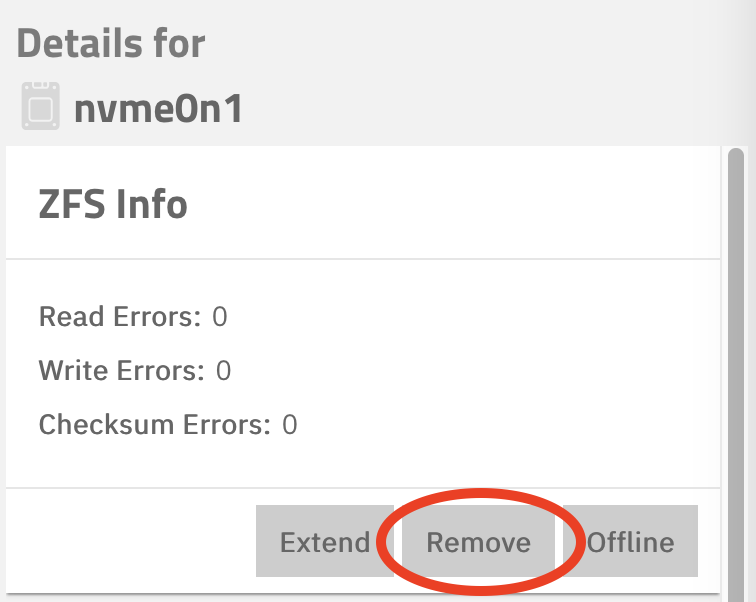
Thank you, but I am just not seeing that. I’m on Core, maybe you are using Scale?
If I go to Storage>Pools>[pool gear] there is an Export\Disconnect option. It gives me a pretty severe warning when I click on it, but maybe this is the way to Remove it from the pool?
Which version?
With an SSH session, what is the output for these two commands?
zpool status -v <poolname>

zpool list -v <poolname>
As @dan requested, the version of Core is important too, since older versions did not support this feature.
version 13.0-U4
root@freenas:~ # zpool status -v Spare
pool: Spare
state: ONLINE
status: Some supported and requested features are not enabled on the pool.
The pool can still be used, but some features are unavailable.
action: Enable all features using ‘zpool upgrade’. Once this is done,
the pool may no longer be accessible by software that does not support
the features. See zpool-features(7) for details.
scan: scrub repaired 0B in 00:41:43 with 0 errors on Sat Nov 15 04:41:43 2025
config:
    NAME                                          STATE     READ WRITE CKSUM
    Spare                                         ONLINE       0     0     0
      gptid/fa2eb3b1-98b2-11e8-90f1-0cc47a7558b5  ONLINE       0     0     0
      gptid/90b7d36c-2f38-11ea-8442-0cc47a7558b5  ONLINE       0     0     0
gptid/90b7d36c-2f38-11ea-8442-0cc47a7558b5 ONLINE 0 0 0
errors: No known data errors
root@freenas:~ # zpool list -v Spare
NAME SIZE ALLOC FREE CKPOINT EXPANDSZ FRAG CAP DEDUP HEALTH ALTROOT
Spare 3.62T 559G 3.08T - - 0% 15% 1.00x ONLINE /mnt
gptid/fa2eb3b1-98b2-11e8-90f1-0cc47a7558b5 1.82T 145G 1.67T - - 0% 7.80% - ONLINE
gptid/90b7d36c-2f38-11ea-8442-0cc47a7558b5 1.82T 414G 1.41T - - 0% 22.3% - ONLINE


Is the pool feature enabled?
zpool get feature@device_removal Spare
value=disabled 
Do you plan to import this pool into an older version of TrueNAS or ZFS? If not, you can safely upgrade your pool’s features:
zpool upgrade Spare
IIRC, this can also be done in the GUI from the pool’s page. Click on its cogwheel icon.