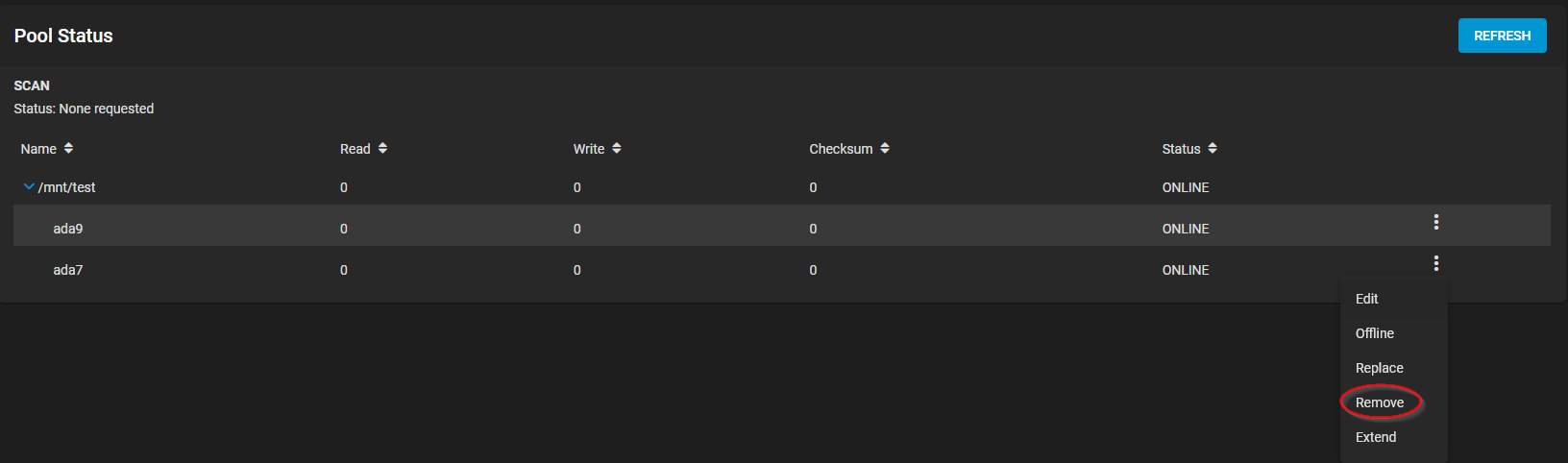
I think the GUI does that automatically when you select it as a the disk to “Extend” the current disk with.
Before signing back into the GUI, restart the middleware while in SSH:
service middlewared restart
Then sign into the GUI.
Then “Extend” the device gptid/90b7d36c-2f38-11ea-8442-0cc47a7558b5 and choose the newly freed disk. (You might not see the GPTID shown in the GUI, but instead as ada0 or something.)
If it doesn’t work, you might first need to do a “Quick Wipe” of the freed disk from the Storage → Disks menu.
Oops, I took off ahead of you, did not do the middlewared restart, but the disks are mirrored and the resilver is in process!! thanks for your help!!!
I’ve got several truenas housekeeping tasks on my list including upgrading to Scale over the holidays (yikes!) and I thought this task was going to be the easiest!
I would be surprised… but it’s not impossible…
I really can’t say… I haven’t yet had the need to remove a vdev (a single drive “stripe”) from a pool that has two vdevs (single drive “stripe”).
You need to remove the platters from inside the hard drives and place them under an electron microscope. Confirm each and every bit. When you’re done, we’ll be one step closer to concluding this case.