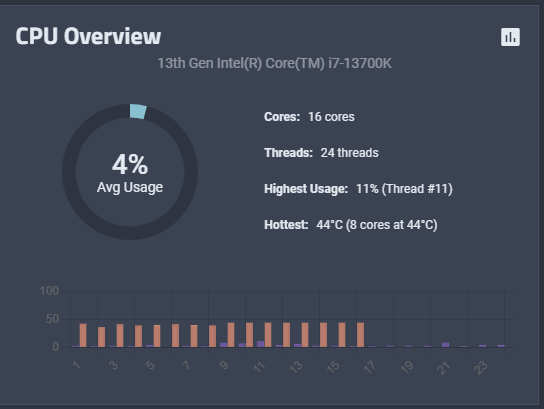
Why don’t I see temps for some of the cores of my CPU?
It was an intentional change
We are pleased to release TrueNAS 24.10.2!
This maintenance release includes refinement and fixes for issues discovered or outstanding after the 24.10.1 release.
Do not retrieve hidden zpool properties in py-libzfs by default (NAS-132988 ). These properties include name, tname, maxblocksize, maxdnodesize, dedupditto and dedupcached. Users needing these properties can see the linked ticket for the zpool command to retrieve them.
New cloud backup option: Use Absolute Paths (NAS-132920 ).
Fix loa…
Simplify CPU widget logic to fix reporting issues for CPUs that have performance and efficiency cores (NAS-133128 ).
tontze
February 15, 2025, 8:53am
3
Hm, i have 20 core system, and it shows 40 cores to me, or is it showing threads instead (2/core) ?
LarsR
February 15, 2025, 12:47pm
4
Temp is only shown for physical cores, but utilization is displayed per thread.
tontze
February 15, 2025, 5:12pm
5
Thats what i though too, it just says “Per core”, not “per thread” . But why show cores that do not exist in core temp window?
LarsR
February 15, 2025, 5:26pm
6
originally temp and utilization were both changed to per physical core, but there were problems with intel chips with p and e-cores. So i guess they made a compromise.