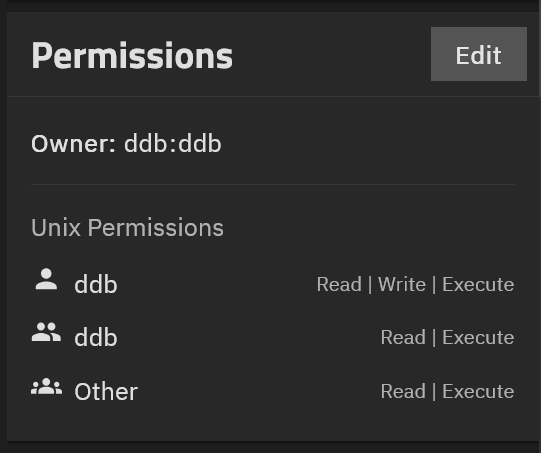
Thought I’d posted this last night, but it doesn’t show up under “my posts”.
I want a share to be mounted on various systems where I do development – windows, Linux (including virtuals), Raspberry Pi are the current examples. This lets me keep my work together (and back it up as part of the overall NAS backup), and it lets me do things like edit the files on one system but test them on another (useful for very small systems, where the editor strains it). Most of these projects include git repos in the share.
I had this under CORE; the transition to SCALE/CE (the switch to Linux) broke my existing example, and I haven’t been able to fix it.
Elsewhere, I’m having trouble with an existing share that I’m trying to use for this, where the permissions don’t work – created files are all executable, and while chmod returns success, it doesn’t actually change them (to 0600, say, or 0660).
Well, I’ve tried creating from scratch a new top-level dataset, and sharing it, for this purpose – and I get the exact same weird behavior. Which is that newly created files all have execution permission set, and chmod won’t change it.
This seems like an extremely basic, I would expect common, use case! So it can’t possibly really not work this blatantly. So I’m doing something stupid. Can we figure out what? Either how to create a new such share, or how to fix an existing one?
Running TrueNAS community edition 25.10.6. Latest test dataset created as multiprotocol share, owned by user ddb. Shared via smb as multi-protocol share.
Trying to guess what profile was best adapted to multi-environment work. Should I go back to default? I think I started, before, with default, and started playing around when that didn’t work. (One of the problems of these big “doesn’t work at all” situations; so many things to try, and keep track of having tried.)
I can’t find what’s forcing created file protections to 755, or what’s causing chmod to not work (silently; it returns success). In particular, it’s not the SMB parameters create mask or force create mode.
This seems like the most basic, broadly useful kind of share; why is it so hard to create? Shouldn’t this be the default, and you could do other things if you had special needs?
On the (vm) linux box I’m mounting it on, the share shows as:
//fsfs.local/ddbshare3 on /home/ddb/shr3 type cifs (rw,relatime,vers=3.1.1,cache=strict,upcall_target=app,username=ddb,uid=1000,forceuid,gid=1000,forcegid,addr=192.168.1.205,file_mode=0755,dir_mode=0755,soft,nounix,serverino,mapposix,rsize=4194304,wsize=4194304,bsize=1048576,echo_interval=60,actimeo=1,closetimeo=1)
It is a most basic kind of share because it is single protocol as you use it; “multiprotocol” is for a share that is accessed both through SMB and NFS, and that brings in complexeties and subtleties. chmod 600 is old-style NFSv3 but your share has the more complex NFSv4 ACLs. @awalkerix might come and explain what happens with chmod commands in this context.
I suggest creating a new share that is SMB-only, and see whether you can get the expected behaviour starting from that.
Looking at how the mount on the virtual actually plays out, I think the root cause is that the mount is happening in “nounix” mode (no SMB extensions).
That seems to be the TrueNAS CE default.
Converting the share to the Legacy profile, and adding SMB3 unix extensions = yes as an additional SMB parameter, seems very hopeful.
But I can’t get the mount to come up in any way but “nounix”. Made sure the mount was inactive when the cifs service was restarted, then re-mounted, all that sort of thing. Always comes up nounix. (I thought I had gotten a previous share to mount in unix mode, over under the old thread tracking back from the failed share instead of starting from scratch; but that test share, ddbshare2, also mounts in nounix mode when tested today.)
The log file /var/log/samba4/log.smbd shows I’m running Samba version 4.22.10-truenas. I’m running Truenas CE 25.10.6.
I suppose it’s worth doing, it’s not that much trouble. There are so many layers between me and the software that it’s hard to be at all confident anything is doing what I think I’m telling it to do. Okay, here comes ddbshare4!
Nope, the mount comes up nounix even on a brand-new share that’s never been shared as anything but SMB, and was never multi-protocol. (Created as default, then immediately switched to legacy and added the additional SMB parameter for unix extensions before it was ever mounted.)
I wonder, is there any point to trying to step forward to the “early adopter” update profile? I think that gets the version of Samba that defaults to supporting Unix Extensions.
What’s the risk? Obviously some. I’m not heavily loaded, I’m not mission-critical to making a living, I have 3 separate backup sets, one off-site. (But having to fall back to a backup set would take days and be a royal pain.)