Hi friends, please critique my home NAS build plans! I’d like to get at least 7-10 years out of this one. Yes, I am basing this on Brian Moses’s DIY 2025 edition.
Use cases
RAID-Z2 pool: Replace 16-year old Windows desktop serving as storage hub (~9 TB stored in NTFS on a mix of software RAID-5 and RAID-10; mix of video, audio, documents, and compressed archives)
Plex: mostly a single local stream (no transcoding), occasionally remote streaming (don’t foresee more than a single simultaneous 4K stream)
Dovecot container: target for email backup from multiple providers, ~20 GB total
UniFi container: local UniFi Controller instance for various network gear
Back-up target for Apple devices (namely MacBook Pro)
Back-up target for Microsoft OneDrive
Central hub for backing up subset of datasets to off-site storage, e.g. BackBlaze B2, for critical data (e.g. photos, email, stuff that can’t be replaced)
General NAS storage, nothing fancy like video or photo editing or music production, for everything else (that could be replaced but would be annoying)
The Plex, Dovecot, and UniFi functions are currently running as Proxmox containers on a NUC. I can keep the NUC around but if not needed, I’d rather have fewer devices running 24/7.
I have always liked SFF computers, and in particular with the Jonsbo N2 I have somewhere in my living room that it will fit. A larger case like the Node 304 or N3 would not fit there and running wires would be annoying. My (headless) desktop is also sitting in my living room, it’s noisy, and the ethernet cable crosses the floor in front of my patio door
5-bay has felt like the right sweet spot for me for a long time, although I admit that I flop back and forth between RAID-Z1 and RAID-Z2. Either way I think I can 5x my storage capacity with sweet-spot drives. You could convince me to go 4-bay or 6-bay.
Low power is desirable, every 5 W is about $20/year to operate.
I do not currently have anything faster than GbE, but a little future proofing never hurt anyone. The next time I upgrade my core networking equipment I would expect to put in a 2.5 GbE switch (or 10G if it comes down far enough).
I am familiar with the arguments for and against ECC memory. If your recommendation is ECC, please provide a specific motherboard and CPU combo you think would work, which is purchasable from somewhere in the US and I’ll consider it
Hardware
Case: Jonsbo N2
PSU: SilverStone 300 SFX or similar
CPU and motherboard: N150 Mini-ITX, top contenders:
Topton N18, 6 SATA, 2 NVME, 2x2.5GbE, 1x10GbE
CWWK M8, 8 SATA, 2 NVME, 2x2.5GbE, 1x10GbE
RAM: Crucial 48GB DDR5 SODIMM or similar
Boot: Silicon Power 128GB SSD or similar
If I skip the app pool, may use an NVME boot drive instead, e.g. Patriort 128GB NVME or similar
App pool: Mirror 2x TEAMGROUP 1TB NVME
Optional; not sure I need this
Data pool: 5x CMR
I have not selected specific hard drives yet, but I’ll be filtering for CMR and TLER and pick a size somewhere between 10TB and 20TB
e.g. WD Red Plus/Pro, Seagate IronWolf/IronWolf Pro, Toshiba N300, HGST Ultrastar, etc.; if there’s a current “best recommendation” feel free to drop it.
Have not reviewed other items, but here are some comments:
Your plan for boot drive seems sound
The various families for data drives seem sound as well
Not sure why you think the N150, i3-N305 or N355 processors can support 48GBs of memory, Intel Ark states 16GBs max for all. There have been various rumors that some Intel processors with limited memory support, could support more. But Caveat Emptor, (buyer beware…).
For the last, this is the official word, (which, because it’s Intel, does not mean it’s perfectly correct):
The usual recommendation for mini-ITX motherboards with ECC and enough SATA ports for a NAS are embedded boards based on a Xeon D-1500 (Supermicro X10SDV series, 6 SATA, often 10GBase-T) or Atom C3000 (A2SDi, 8 ports with caveats for C3558, 12 ports with 10GBase-T for C3758 in A2SDi).
These are low power (actually cannot find lower), and at least X10SDV should be easy enough to find second-hand in the US.
Helium-filled drives are very quiet and consume less power than their air-filled cousins. I’d go Z2. For a Mini-ITX file-server-oriented board with 10GbE and 12 SATA Ports, consider the ASDi-H-TP4F or like series. For something more modern and capable of upgrading to NVME, I’d consider the X570D4I-2T, which offers 2 Oculink connectors that either run NVME or SATA channels. The upside of the latter board is a wide variety of processors (including low power unlocked Pro -GE APU versions available on eBay) but the use of SODIMM may make memory hard to find. At the same time, DDR4 is allegedly a lot cheaper than DDR5, so there is that.
Larger boards offer even more options. I have a fully embedded board here and with the benefit of hindsight, getting something less integrated would have helped re: power consumption - the 2116 HBA runs very hot, for example.
I’ve got a fanless N5105 system from TopTon. Yes, it does work. However, it is not stable enough for me to do anything critical on it. I’ve had some strange problems that required me to power off and keep powered off for some time.
The whole experience is more like an exgineering sample. The edges are still a bit rough. You will never ever get BIOS updates or any other support for these types of systems.
Second this. Love that board. Low power, 10GBit, IPMI, rock solid like always with Supermicro.
CPU fan is not really needed if you have enough airflow and don’t use your CPU much.
Thanks for the note! Yes, Ark states 16GB max, but there are many reports from users showing these processors working with single 32GB and 48GB SO-DIMMs (including meatiest burn-in). Seems like Intel marketing and not a technical limitation of the chips.
Because in this case newer is NOT better.
Xeon D-1500 (and its 1600 refresh, if you find it) is low power and generally storage friendly.
Atom C3000 (A2SDi) is low power and very storage friendly (A2SDi-H: 12 SATA in mini-ITX), but has few PCIe lanes if you want an SSD mirror pool for apps on top of your HDD storage.
Xeon D-2100 (X11SDV) idles around 60 W (see ServeTheHome).
Xeon D-1700 (X12SDV) is lower power than D-2100 but the Devil is in the details… (Anyway, in your (Jonsbo) case, you need a mini-ITX board so X12SDV is a complete no-go.)
There is no X13SDV.
Atom C5000/P5000 (Supermicro A3S_) is meant for networking and is downright hostile to storage: Look it up… Few SATA ports and not enough exposed PCIe lanes to add a HBA.
X14SDV (Xeon 6) is a very high power affair.
Browsing ark.intel.com should do. Or the introductory pieces on ServeTheHome for each generation.
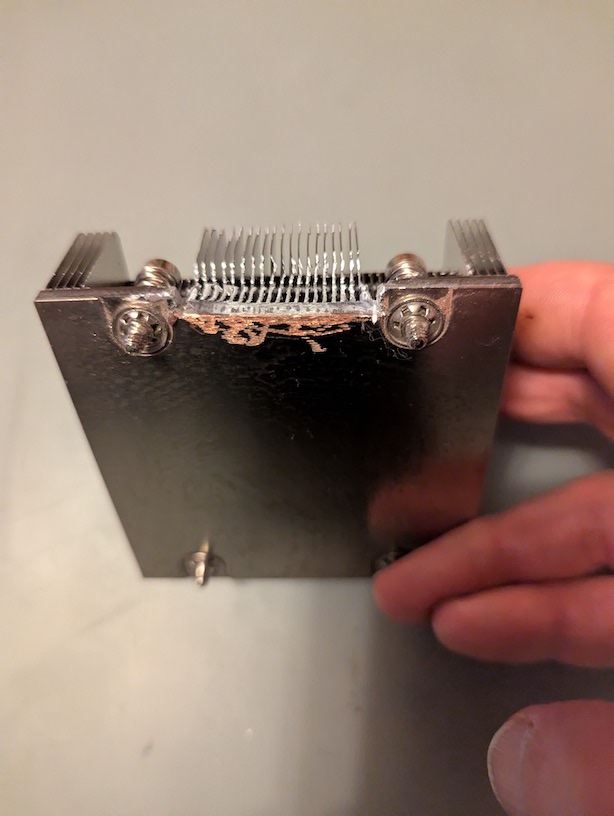
Now X12SDV… Look it up CLOSELY: The fins of the heatsink are folded at the top; you can NOT slap a fan on top for quiet active cooling, as you’d do for X10SDV, and call it a day. The thing is strictly meant to go in a 1U rack, with front-to-back cooling by case fans, the top lid serving as airflow guide, and nowhere else. You cannot make a wide HDD array in 1U. To cool the CPU in any larger case, you’d need to either build some big weird shroud to reproduce the front-to-back 1U cooling model, or remove the heatsink (instantly voiding your warranty on your not-so-unexpensive new board) and make your own metal work to fit a different CPU cooler.
In the STH forum at the bottom of that review (thank you for the link!), a user noted how a SNK he bought from WiredZone almost fit perfectly and how a different one could have potentially been a prefect replacement for the stock one.
I voided my D-1537 warranty with a Cu HX from JagCool, IIRC and it has been working great. If only there was a better way to cool the 2116 HBA chip, which runs super hot. I fitted a low profile fan on it.
This board is a spiritual successor to my motherboard, now with a SFP28 instead of SFP+. The higher clock speed and lower core count make it quite attractive for SOHO SMB use. The main downside is the missing SATA ports (it has ten, mine has 20), this thing would need a PCIe based HBA.
Flex-ATX X12SDV use the same holes as X11SDV boards, whose cooler is open at the top. So you could replace the X12SDV closed-top heatsink by the open-top heatsink from a X11SDV…
…provided that you find the part…
…and provided that you cut a bit of the heatsink to accomodate the VRMs of the X12SDV. (Yay! An excuse to buy and play with a Dremel or Proxxon micro-tool! )
You can make a home NAS out of a X12SDV-4C-SP6F if you really, really, want to (or thought it was a cool idea…until you unpacked the board—ask me how I know if you haven’t guessed).
But it would be hard to recommend the board for NAS use and keep a straight face when building the NAS begins with THAT
Beside the Flex-ATX X12SDV, there are some “sub-micro-ATX” X12SDV boards which appear to retain the open-top heatsink, but these boards feature the more expensive, higher power, Xeon D-2700 and expose less possible SATA ports. Supermicro just does NOT want X12SDV boards to be used for storage…
Honestly, ten is great but the main downside of X12SDV is the cooling situation—no contest!
If you need more SATA ports, implying a HBA in any case, forget embedded boards and get a MSI D3052 with an EPYC4000/Ryzen PRO 8000—or just any (socketed) micro-ATX board of your liking and a SFP28 NIC for the second PCIe slot.
Beyond Xeon D-1500/1600 and Atom C3000 boards, there are NO embedded boards which are designed for NAS use or even suitable for NAS use without jumping through hoops, and there will not be any storage successor to X10SDV and A2SDi. In current motherboard design the only way for SATA ports is the way out.
OK, more seriously, I fully agree with you and also note how prevalent it has become to design components out of boards. There is something to be said for it, i.e. a Intel 550 generation NIC will consume 2x the power of a 710 and if one doesn’t need 25GbE performance, then that will save some power too.
What was too bad about Patricks review of various motherboards at STH, is that they usually omit power consumption data that one could hang a hat on. I wish he could include data on a server at idle, full power, and so on. Instead we get graphs re: SSL performance, which I doubt is super relevant in a home setting but admittedly easier to measure.
As I understand it, the D-17xx series has a 700-generation ethernet NIC built into the CPU, suggesting a power reduction of 7W right there vs. my built-in 500-series SFP+ NIC, on top of whatever the smaller transistor sizes in the CPU allow. But given that the 17xx NIC is now a 28GbE, that potential power savings may be lost.
As for file-server-oriented motherboards that are tasty for SATA and low power, I agree with you that there is little out there. The D3052 is an awesome motherboard for folk who want to go NVME, even if the number of available PCIe lanes is somewhat constrained. For effective use with SATA, you’d have to use up all the PCIe slots for HBAs.
I have been also looking into the W680 WS workstation motherboard as an alternative to the H13SAE-MF from Supermicro, the former is a LGA1700 board, the latter a AM5 that could take a Ryzen Pro 8300GE and sip power. The former lacks IPMI (which I never use), has14 SATA ports and plenty of expansion room for a X710-DA2. The latter has superior SuperMicro support but would require a HBA and a NIC.
Then there is a variant of the D3051 that it has all the features of the D3052, except it’s x710 10GbE, but sadly copper-only. I’d really prefer SFP+ because of the power savings + electrical isolation.
Ok I’ve been reading up on the Atom C3xxx, Xeon D-15xx, Xeon D-17xx, and Ryzen 5xxx families. Allow me to summarize some of my take-aways in plain English and tell me if I’m off-base.
Intel N150: lowest up-front cost, lowest power, “good enough” performance, no ECC, no “robust” motherboards, QuickSync acceleration
Atom C3000: highest up-front cost, low power, similar performance to N150, ECC and robust options available, no transcoding acceleration
Xeon D-1500: highest up-front cost, high power, similar performance to N150, ECC and robust options available, no transcoding acceleration
Ryzen Pro 5650G/GE: high up-front cost (lower than the Intel ECC options), medium power (lower than Xeon, higher than N150/C3000), highest performance on this list, ECC and robust options available, Vega acceleration; CPU probably from resale market
I really don’t love that the Xeon D-1500 line is aging out, and the Atom C3000 solutions don’t seem to compete very well with the Ryzen options on “bang for buck”.
The X570D4I-2T (or similar) and a Pro 5650 G or GE is looking intriguing, and worth trading against my original plan IMO. What’s the best way to find these chips, eBay? Anything in particular to watch out for, other than explicitly listing that they are unlocked?
What does “ECC available but not guaranteed” really mean for the non-Pro 5600G/GE? Is it that its hit-or-miss with specific motherboards/SKUs, or even unit-to-unit it may or may not work, or it works but you don’t get all the features, or it happens to work but the docs say it shouldn’t…?


 )
) when building the NAS begins with THAT