I am running TrueNAS Scale Electrc Eel 24.10.1, I set it up a couple of years ago maybe. I am in the process of transferring some more data to the NAS however before I do I need to clear up some confusion.
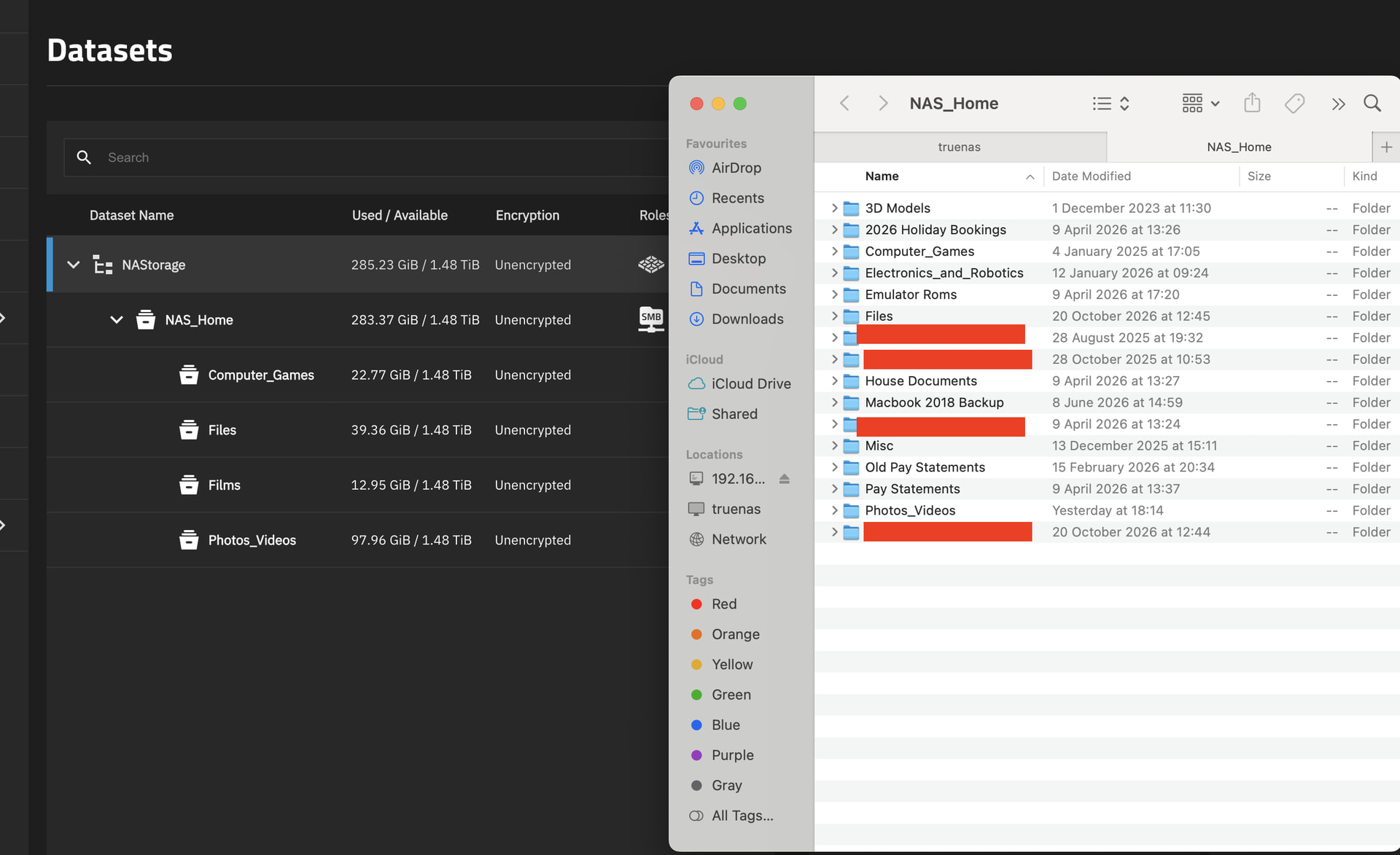
When viewing the datasets from within the Trues NAS Admin Page can see the top level dataset name ‘NAS_Storage’ with a sub level ‘NAS_Home’ and under this there are four further sub levels (as shown in the attached image).
When viewing the Share from within Finder on a Mac, I can see the top level of the SMB Share ‘NAS_Home’, but then I have 16 sub folders, four of which share names with the lowest sub level datasets.
I am assuming that I created the four sub level datasets under ‘NAS_Home’ when I set this up and then added the additional folders in finder within the Mac OS.
This mismatch is very confusing, should I have created the sub level datasets if I don’t need different access permissions? If I delete them I assume I’d need to move the data into a different folder on the Mac before doing so?
Many thanks for any clarification that you can offer.
First things first sharing out the top level dataset is generally discouraged for a few different reasons and it’s best practice to create another dataset underneath called something (I call mine ZFS). From this I then create the datasets I want. The ZFS dataset is what I call a stub, we don’t actually use it to hold data but it acts like a control point and it allows you to set snapshot schedules and replication that recursively filters down to all other existing and new datasets.
What you’re looking at in your imagine is as you say a combination of datasets and directories.
A good time to create a dataset is when you want something like a different quota, compression ratio, block size, etc. You can create different datasets for different permission groups but it’s not specifically needed. For most people a single dataset and a single share will do and then you can create as many directories as you wish within it.
Personally I’d create a new structure similar to the above mentioned, copy your data across and then stop sharing the root dataset and remove the sub-datasets.
Finally if you haven’t already don’t forget to setup your snapshot schedules as they may save you one day.
Thanks for the response and sorry for the delay in replying.
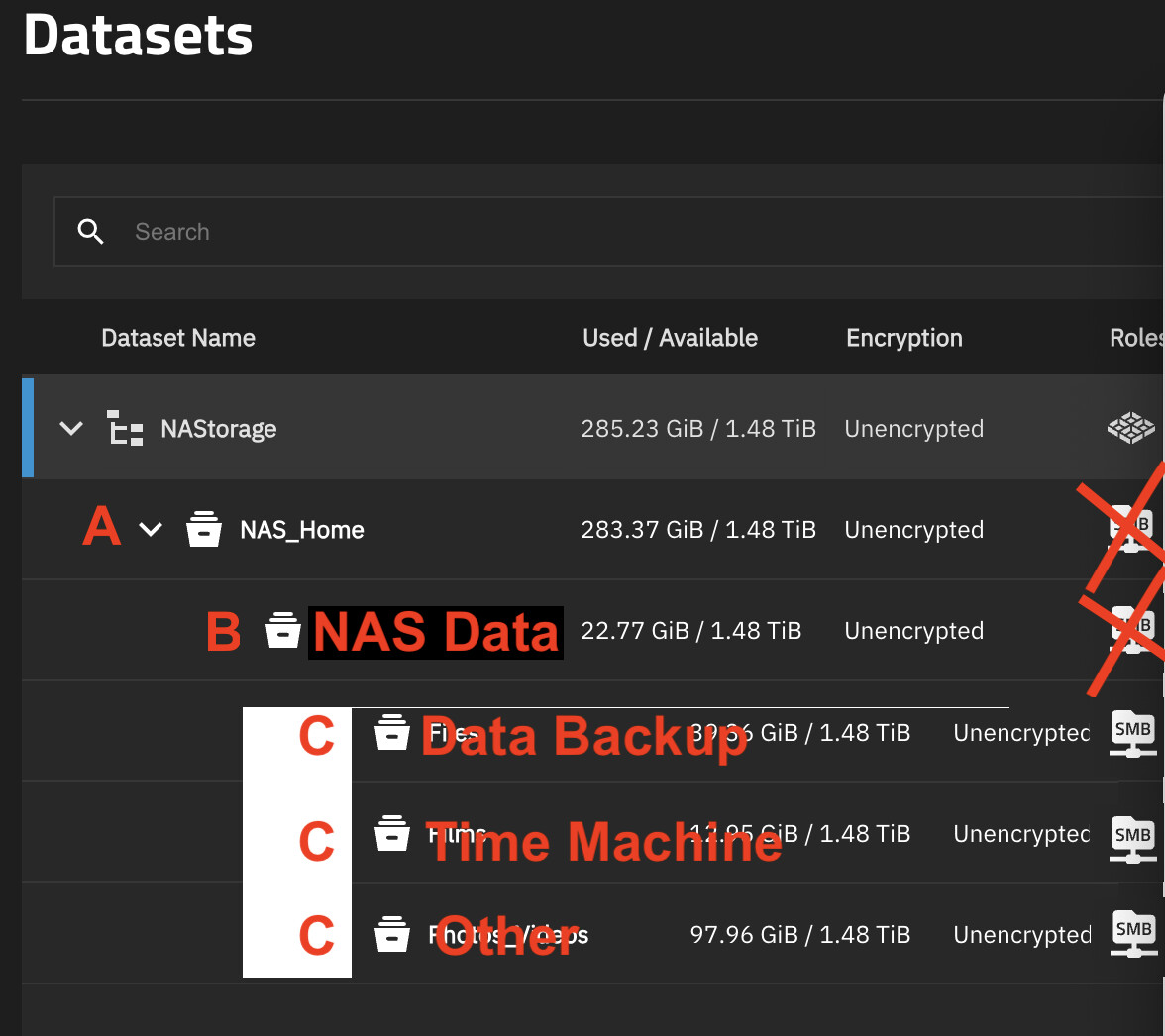
So if I understand correctly, looking at my edited image below and the letters A - C in red, I need to stop sharing A (NAS_Home) and create a new dataset B, called NAS Data (or whatever) but don’t share this. I then need to create however many datasets within NAS Data in which to store my data and share them for whoever needs them. Data Backup may be for all my photos and documents, Time Machine may be for a Mac Backup, Other may be called Films and share it for use with my Home Cinema or whatever.
i then need to move any data in the existing datasets and then delete them from within TrueNAS Admin. I also need to setup a Snapshot schedule (need to read up on that as I only ever turn the server on when I need it ).
It would help if you showed the size of the folders on the Mac side… because there’s the other possibility that you created both a dataset and a folder with the same name, so that one hides the other and your files are maybe not where you think they are.
Maybe, if you want to be able to move one subset independentently of the other, or if you have different backup policies for different subsets. Read into snapshots and replication.

 ).