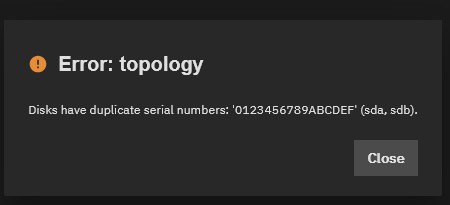
I have two SSD (250 and 240gb) connected to an IBM M1015 (sas9211-8i) flashed in IT mode (along other 6 rotating drives).
It should be an ideal configuration, yet it won’t allow me to put them in a stripe array (yes I know it’s dangerous, it’s just to have high I/O to the download folder): I’m getting an “Disks have duplicate serial numbers: None (sdi, sdj).” error message
I’m running the latest version of the general profile: normally I don’t use the early adopter train unless needed and I didn’t see anything in the changelog to suggest this is the case.
The system is a Dell Optiplex with a IBM M1015 SAS card, it’s an i5-3570 CPU @ 3.40GHz with 16gb of ram, nothing fancy. Dual USB drives as boot, the main pool is 6x8TB drives with an old 64gb as zlog… nothing special
It has been running fine since FreeNAS 9, this looks either like a bug or that I’m overlooking something simple.
A mirror? Not strictly necessarily, but a lot of people do it.
Pretty sure there a quite a few threads with USB devices and duplicates serials on this forum. I think one case was like yours, the usb serial was listed as empty, so two drives, two empty serials → duplicates.
This is a bug that should be solved in 26 Beta 1 as well as 25.10.2.2 according to this ticket if it is the same issue. You can always create another one with as much information as you can and see if it will be closed with a reference to this one.
Thanks for chiming in with that. It is a very odd issue for certain, especially since the serial number are displayed on TrueNAS.
You could try using the CLI and manually creating the stripe.
Here is the basic command zpool create pool_name /dev/sda /dev/sdb /dev/sdc
And you just keep adding on the drives in the single command. If you add 8 drives, then you need 8 /dev/sd?. Do some google searching if you need more clarification.
I just checked, it is not available in the General or Early Adopter Train yet. I’m waiting for it too. Would really like to be create my pool from the GUI and know that TrueNAS (appliance) sees the serials correctly. Who knows what else this could impact.
@pushacoustics I just found out something: Changing one of the USB Sticks to a USB SSD fixed the issue. I have no idea why. But maybe this is an option for you.
You mean to physically replace it with an SSD USB or to change its type via software somehow? Because I’ve looked for that option but only found how to change the drives description. And I don’t want to purchase new hardware for a gui bug.
I physically replaced it. Had an old external enclosure and an unused and reserved for such a thing 120GB SSD lying around. I didn’t want to do it this way since there is no space in the enclosure to fit it but it was the only sane option. Killed 2 sticks already. But purchasing a tiny m.2 enclosure with a tiny m.2 disk doesn’t make sense currently.
Remove one of the two boot drives from your mirror using zpool detach boot-pool sdi. You should be able to create your new SSD stripped pool and then just add SDI back to your boot pool using the GUI and boot pool menus.
I have very similar situation (running on 26.0.0-BETA.1), so the truenas is reporting serial numbers of my disks correctly, but when I try to create pool with a new disk I get duplicate serial error message:
The way I solved this is that I have exported my existing data pool (which was sda), created new pool with new disk, exported that one (and repeated for every disk) and then truenas allowed me to import all pools and now it appears to work fine (subject to more testing, but they appear ok and I can manage them all from GUI).
Enclosure in question is Cenmate 4 bay usb (I know, do not use usb enclosures for pools), it is “just” that I wish to use this enclosure for offline backup.