I’ve installed both PocketID and Outline on a TrueNAS server. The integration between the two works on desktop, but when I try to login on mobile, I get an error from Outline about a failed authentication.
Looking in Outline’s log file, I find this:
2025-08-30 16:36:11.326153+00:00{"error":"getaddrinfo ENOTFOUND login.xxxxx.net","level":"error","message":"Error during authentication","stack":"Error: getaddrinfo ENOTFOUND login.xxxxxx.net\n at GetAddrInfoReqWrap.onlookupall [as oncomplete] (node:dns:122:26)"}
The DNS settings for my TrueNAS server is set to the IP address of my network’s gateway (10.10.20.1), which in turn points to a AdGuard installation on my TrueNAS server (10.10.20.2) where I have configured a wildcard for *.xxxxx.net pointing to NPM on the server.
What I don’t get is
a) why I can log in on desktop but not on mobile
b) why login.xxxxx.net doesn’t resolve inside the Outline container
Any ideas?
EDIT: Seems like the container doesn’t use the server’s DNS settings? Isn’t it expected to?
thoresson@truenas:~$ sudo docker exec 0e77c988b2aa cat /etc/resolv.conf
# Generated by Docker Engine.
# This file can be edited; Docker Engine will not make further changes once it
# has been modified.

nameserver 127.0.0.11
search xxxxx.net
options ndots:0

# Based on host file: '/etc/resolv.conf' (internal resolver)
# ExtServers: [10.10.20.1]
# Overrides: []
# Option ndots from: internal
I have to admit that my experience with the built in catalogue is almost 0, but in case i would try to set it as an environment variable
edit: i think to have said a totally wrong thing
Use Custom DNS Setup to enter any DNS configuration settings required for your application. By default, containers use the DNS settings from the host system. You can change the DNS policy and define separate nameservers and search domains. See the Docker DNS services documentation for more details.
but watching inside the only catalogue app i have (Portainer) i don’t have this options in the networking tab, so i’m quite confused (maybe only certain apps have this option?).
Yes, I was reading the same in the Docs, which is what confuses me.
But I have a vague memory that Outline was actually working on mobile right after I installed it a couple of weeks ago. I think I’ll just delete the container and reinstall.
Yeah, that’s something I consider by now. But being new to the whole galaxy of selfhosting, Docker, TrueNAS, etc, I would not only like to get this working, but also understand why something is not. As part of the learning.
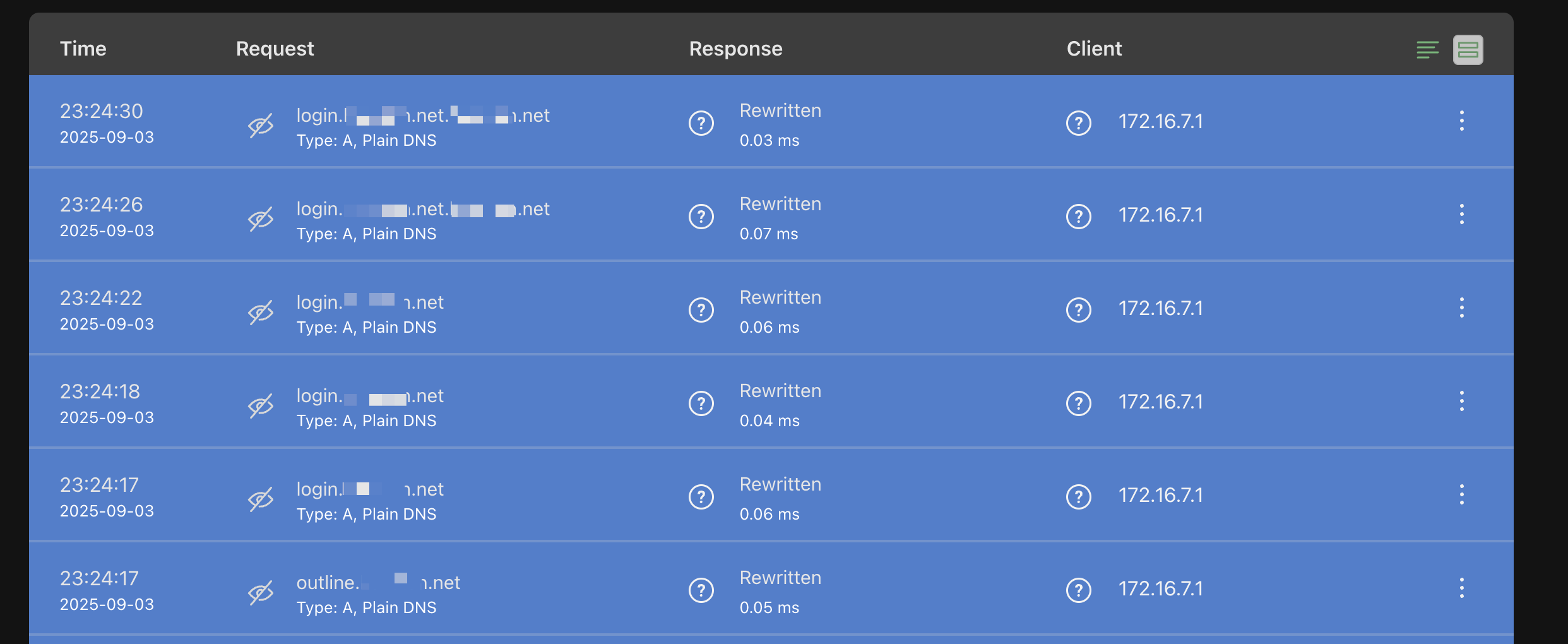
I just had a look in the log files for AdGuard. When I try to login, there are a series of DNS requests sent, where the last two probably hints at the root cause: The domain name is repeated twice. Probably due to a misconfig of mine, but I can’t figure out where. Have had a look both in my Outline and PockedID configuration and can’t find any place where I have repeated the domain name twice.
Ok at least you know that the container Is using adguard (and i was totally wrong on that ).
But i don’t know if the repeated domain Is the culprit or a conseguence… Maybe the app perform some fallback when the first attempt fails? Why some entry Is well formatted and the last two no?
Have you set some rewrite rule in npm?
If you try to lookup the domain from each container what Is the result?