how do i run docker w/o root privs? when i try to compose up i get a permission error:
$ docker compose up -d
unable to get image ‘amir20/dozzle:latest’: permission denied while trying to connect to the Docker daemon socket at unix:///var/run/docker.sock: Get “http://%2Fvar%2Frun%2Fdocker.sock/v1.51/images/amir20/dozzle:latest/json”: dial unix /var/run/docker.sock: connect: permission denied
i dont even see a docker group to add the default truenas_admin to.
tangentially, is there a future where instead of having to use the “yaml include” workaround:
to be able to run containers from our own compose files, could it just be a field where we give the path to our compose and it adds and runs it from there?
You can use sudo docker compose up. Or is there a reason why you want to avoid using sudo? There is a docker group, but the TrueNAS Web UI doesn’t allow adding users to built-in groups.
Why do you say that? I added the docker auxiliary group to my user with no trouble using the UI (in Fangtooth), and plain docker CLI works fine for that user now. (Of course, sudo works too.)
if i dont want to use the apps, or the provided yaml interface via includes, so to get an initial manager(dockage/arcane/etc) up and going i need to manually up it on my compose. im not exactly sure how that container can then start and manage others unless its because it was initially started with root
is it possible to get files and directories created by a container(arcane) to not be owned by root?
If you have containers that start other container then that is usually done by passing the docker socket to the container. Usually that looks like this (in compose yaml):
The docker daemon dockerd runs as root in most installations. That daemon is responsible for all container management, including launching of containers. Anyone who has access to the socket file (unix domain socket) can send docker API commands to dockerd and thus has full access to all docker functions.
Any management interface (dockage/portainer/..) don’t do any container management directly - they all use Docker API instead.
File owner is related to which user the container runs as. You can directly instruct docker on which user/group to user, which can look in the YAML file like this:
servives:
  myservice:
    image: ...
    user: 3003:3003
This is the most secure option. This won’t work with container management apps - they need to be root or at least in the docker group to access the socket file. At least for opening the socket file, you could drop privileges after opening. Doesn’t improve things from a security perspective - having access to docker socket means having full root access to the system (at least in the default configuration).
Many containers also have options where you can set user/group, usually via environment variables. Looking at the arcane documentation it would seem that you can set user using PUID and PGID variable.
this would be another reason to put my user in the docker group. another is so when i ssh in with vscode its containers plugin can function because it also needs to be in the docker group.
I don’t think there is a “TrueNAS supported” way of making it work. But you can always add the user to the docker group manually:
sudo gpasswd -a "$USER" docker
Note: This only affects new ssh sessions. After that you can execute docker without sudo. Might break after a reboot and/or update, but can probably be added to a init script if really required.
Edit: For completness, to remove the user from the docker group:
ok it looks like ill go that route then. do you know what the difference is between adding the user via gpasswd and using usermod -aG?
error adding user to group:
$ sudo gpasswd -a “$USER” docker
Adding user truenas_admin to group docker
[sss_cache] [confdb_init] (0x0010): Unable to open config database [/var/run/sssd-cache/db/config.ldb]
Could not open available domains
[sss_cache] [confdb_init] (0x0010): Unable to open config database [/var/run/sssd-cache/db/config.ldb]
Could not open available domains
$ sudo gpasswd -a “$USER” docker
[sudo] password for truenas_admin:
Adding user truenas_admin to group docker
[sss_cache] [confdb_init] (0x0010): Unable to open config database [/var/run/sssd-cache/db/config.ldb]
Could not open available domains
[sss_cache] [confdb_init] (0x0010): Unable to open config database [/var/run/sssd-cache/db/config.ldb]
Could not open available domains
$ groups
truenas_admin builtin_administrators
$ docker compose ls
permission denied while trying to connect to the Docker daemon socket at unix:///var/run/docker.sock: Get “http://%2Fvar%2Frun%2Fdocker.sock/v1.51/containers/json?filters=%7B%22label%22%3A%7B%22com.docker.compose.config-hash%22%3Atrue%2C%22com.docker.compose.project%22%3Atrue%7D%7D”: dial unix /var/run/docker.sock: connect: permission denied
thanks for pointing that out. that was a duh moment
so if i want to be able to use vscode to remote in and manage containers(solved) and run sudo for whatever needed(already possible), how do i get it to allow vscode to install itself in the home dir of truenas_admin? apparently allowing that changed in a previous release: VSCODE SSH Server Error - #3 by awalkerix and i need to use a different home dir on my pool. can i just change truenas_admins home dir like that or whats the best way to go about setting this up?
since i was adding truenas_admin to the docker group i thought i might as well just keep that restricted to it since im doing all the other admin stuffs in the ui via that user. is there a reason not to use it or how would you structure this?
I would also suggest creating a new user. Changing the home directory of the truenas_admin user isn’t supported via the web user interface. Creating a new user will definitely have less chance of breaking things.
In general, it’s probably a good idea to keep the truenas_admin home on the boot pool. If the main pool ever fails to import you still have a user with a valid home directory. Don’t know what would happen if truenas_admin has a non-existent or non-accessible home directory. Shell access would probably would still work, but why risk it.
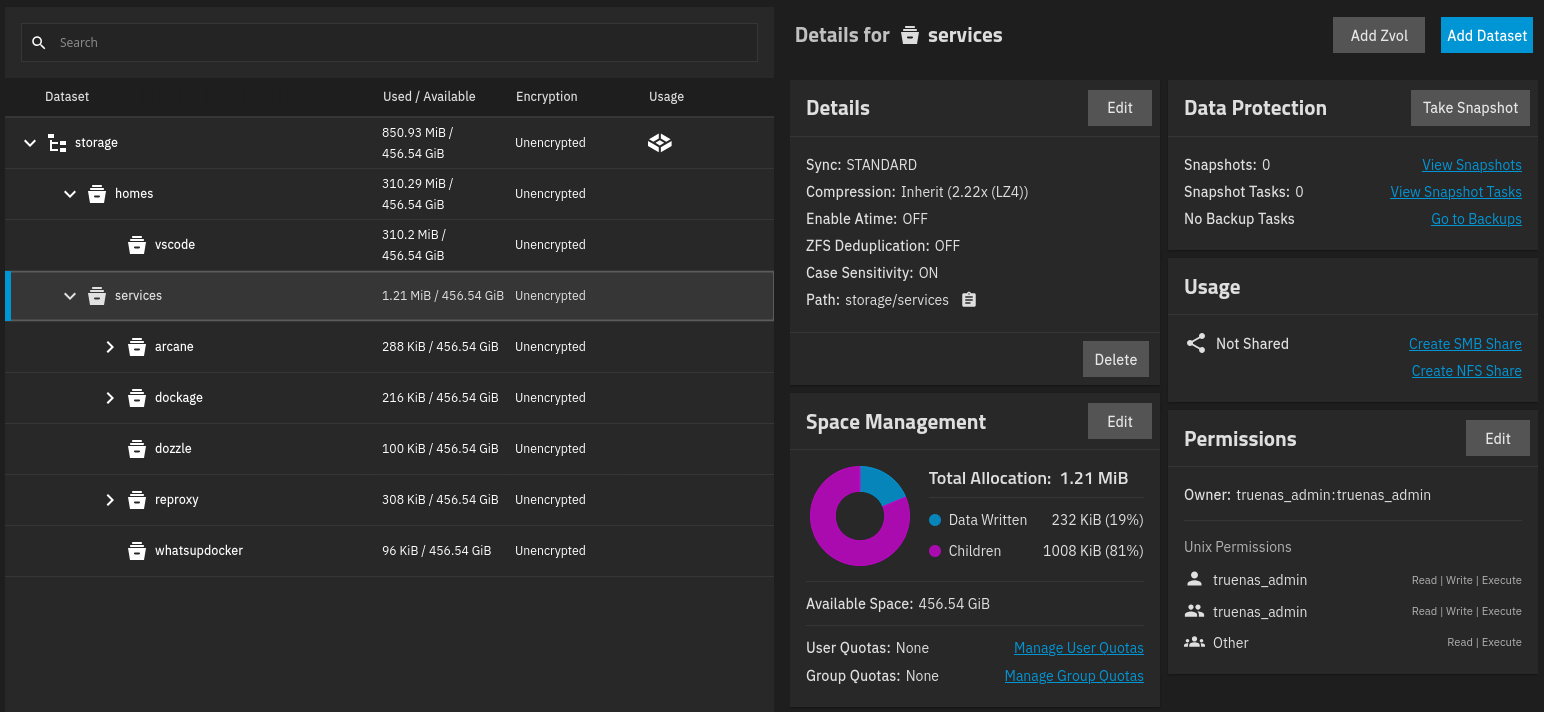
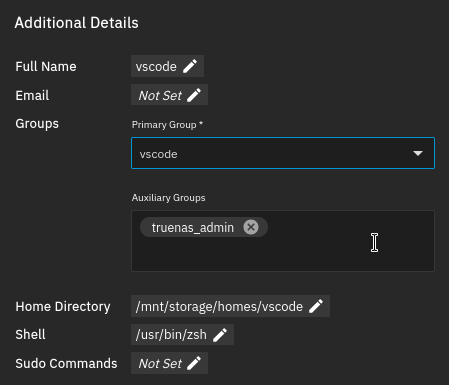
im now trying to give my vscode user that i created, and made a home for, ability to write into my services dataset, which is owned by truenas_admin. here are the current settings:
if i manually ssh in i can create files as exampled here with git init:
% ls -la
total 26
drwxrwxr-x 10 truenas_admin truenas_admin  11 Dec  4 14:34 .
drwxr-xr-x  4 root          root            4 Dec  1 14:16 ..
-rwxrwxr-x  1 root          root          112 Nov 29 11:20 .env.global
drwxr-xr-x  7 vscode        vscode         10 Dec  4 14:34 .git
drwxrwxr-x  3 truenas_admin truenas_admin   4 Dec  1 10:41 arcane
...
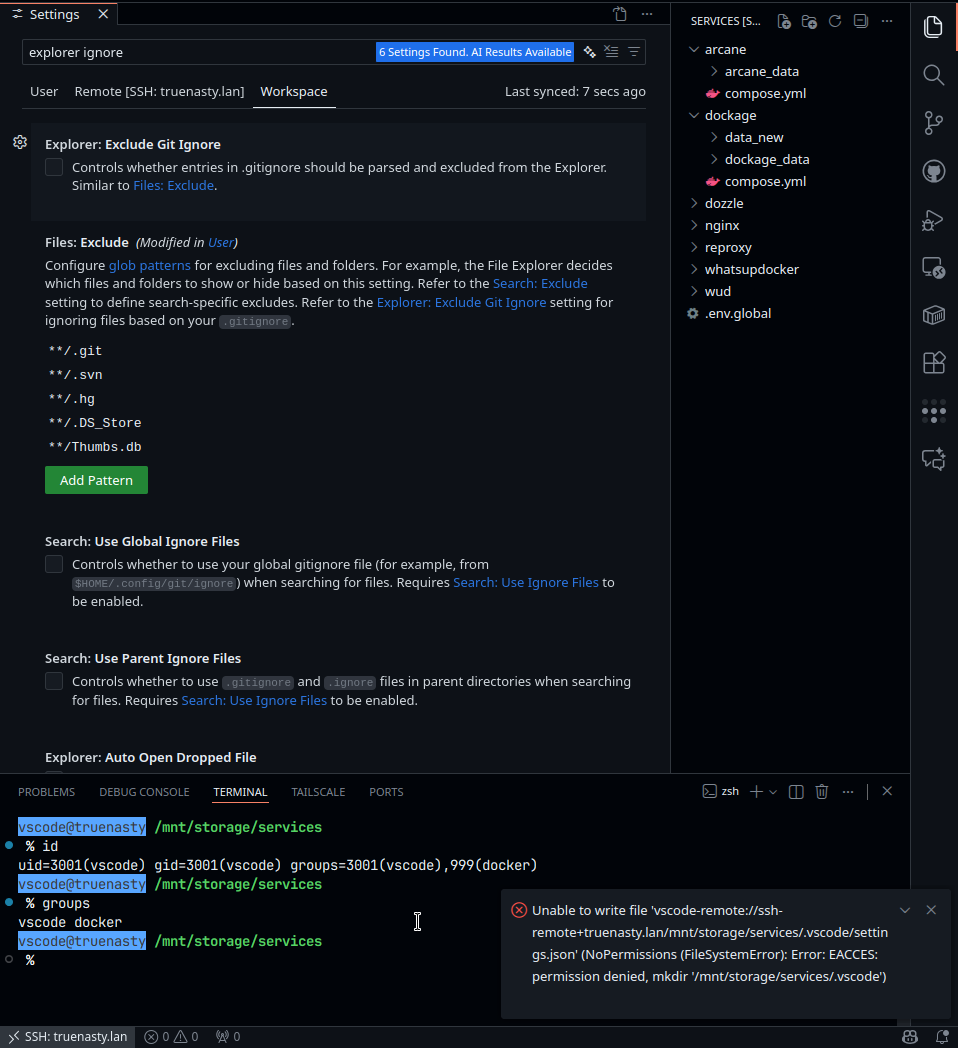
vscode groups(notice its not showing the docker group i added previously):
% groups
vscode truenas_admin
when i connect with vscode and try to create a workspace file in the same services dataset i dont have permission. ive closed the terminal, reloaded vscode and reconnected and its the same. also notice it show the vscode user in the docker group but not the truenas_admin group:
upon further digging it appears that vscode keeps the server alive after disconnect for faster future connects. the provide kill commands to terminate the server but those dont work and you have to run: ps uxa | grep .vscode-server | awk '{print $2}' | xargs kill -9 and reconnect or restart truenas
relevant issues:
it turns out that manually adding a user to the docker group will get overridden if you change that users groups on the frontend.
in trying to setup a user as the owner of all my data with a UID:GID of 1000:1000 but when i created it with an UID of 1000 it still set the GID as something else(3000). maybe i missed that i can set the GID as well when creating a user manually creating a group with the ID of 1000 is possible and i can put the user in that group but it still has the primary group of 3000. can i change that somehow? it wont let me remove my user from that group so i can delete it:
Error Name: EINVAL
Error Code: 22
Reason: [EINVAL] group_update.users: This group is primary for the following users: kinghat. You can’t remove them.
Error Class: ValidationErrors
Extra: [
[
“group_update.users”,
“This group is primary for the following users: kinghat. You can’t remove them.”,
22
]
]
Trace: Traceback (most recent call last):
File “/usr/lib/python3/dist-packages/middlewared/api/base/server/ws_handler/rpc.py”, line 360, in process_method_call
result = await method.call(app, id_, params)
^^^^^^^^^^^^^^^^^^^^^^^^^^^^^^^^^^^
File “/usr/lib/python3/dist-packages/middlewared/api/base/server/method.py”, line 57, in call
result = await self.middleware.call_with_audit(self.name, self.serviceobj, methodobj, params, app,
^^^^^^^^^^^^^^^^^^^^^^^^^^^^^^^^^^^^^^^^^^^^^^^^^^^^^^^^^^^^^^^^^^^^^^^^^^^^^^^^^^^^^^^^^
File “/usr/lib/python3/dist-packages/middlewared/main.py”, line 954, in call_with_audit
result = await self._call(method, serviceobj, methodobj, params, app=app,
^^^^^^^^^^^^^^^^^^^^^^^^^^^^^^^^^^^^^^^^^^^^^^^^^^^^^^^^^^^^^^^^
File “/usr/lib/python3/dist-packages/middlewared/main.py”, line 771, in _call
return await methodobj(*prepared_call.args)
^^^^^^^^^^^^^^^^^^^^^^^^^^^^^^^^^^^^
File “/usr/lib/python3/dist-packages/middlewared/service/crud_service.py”, line 186, in update
return await self.middleware._call(
^^^^^^^^^^^^^^^^^^^^^^^^^^^^
File “/usr/lib/python3/dist-packages/middlewared/main.py”, line 771, in _call
return await methodobj(*prepared_call.args)
^^^^^^^^^^^^^^^^^^^^^^^^^^^^^^^^^^^^
File “/usr/lib/python3/dist-packages/middlewared/service/crud_service.py”, line 214, in nf
rv = await func(*args, **kwargs)
^^^^^^^^^^^^^^^^^^^^^^^^^^^
File “/usr/lib/python3/dist-packages/middlewared/api/base/decorator.py”, line 108, in wrapped
result = await func(*args)
^^^^^^^^^^^^^^^^^
File “/usr/lib/python3/dist-packages/middlewared/plugins/account.py”, line 2093, in do_update
verrors.check()
File “/usr/lib/python3/dist-packages/middlewared/service_exception.py”, line 71, in check
raise self
middlewared.service_exception.ValidationErrors: [EINVAL] group_update.users: This group is primary for the following users: kinghat. You can’t remove them.
i was able to do it there, thanks. was mentally stuck in the groups tab.
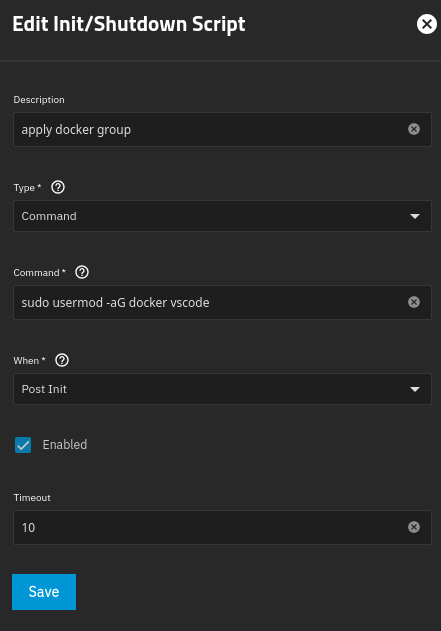
im trying to setup an init command to set the docker group where i want it because it keeps being reset on reboot. maybe im not allow to run this here, though, because its not functioning using sudo or not, or increasing the timeout: