Failed to sync catalog after placing the computer in another home

After, me being a beginner, building a Truenas system and also a Truenas backup-system, yesterday I brought the backup-system to my mothers place. This in order to make a 3-2-1 backup system. I found it thrilling that connecting to the www the tailscale connection was as good as testing it in my house for several weeks. No trouble changing setting or whatever.

The (little) trouble now is that I got the notification that the catalog could not be synced. So after all there is some little trouble. I don’t know how to solve this probem. Any ideas? I don’t think it has to do with the bios time setting, since I didn’t change that. I did change the Global config from the Network settings to suit the new router. Here’s the notification:

Traceback (most recent call last):
File “/usr/lib/python3/dist-packages/middlewared/plugins/catalog/git_utils.py”, line 34, in pull_clone_repository
clone_repository(repository_uri, destination, branch, depth)
File “/usr/lib/python3/dist-packages/middlewared/utils/git.py”, line 25, in clone_repository
raise CallError(
middlewared.service_exception.CallError: [EFAULT] Failed to clone ‘GitHub - truenas/apps’ repository at ‘/mnt/.ix-apps/truenas_catalog’ destination: Cloning into ‘/mnt/.ix-apps/truenas_catalog’…
During handling of the above exception, another exception occurred:

Traceback (most recent call last):
File “/usr/lib/python3/dist-packages/middlewared/job.py”, line 515, in run
await self.future
File “/usr/lib/python3/dist-packages/middlewared/job.py”, line 560, in __run_body
rv = await self.method(*args)
^^^^^^^^^^^^^^^^^^^^^^^^
File “/usr/lib/python3/dist-packages/middlewared/api/base/decorator.py”, line 93, in wrapped
result = await func(*args)
^^^^^^^^^^^^^^^^^
File “/usr/lib/python3/dist-packages/middlewared/plugins/catalog/sync.py”, line 27, in sync
await self.middleware.call(
File “/usr/lib/python3/dist-packages/middlewared/main.py”, line 1005, in call
return await self._call(
^^^^^^^^^^^^^^^^^
File “/usr/lib/python3/dist-packages/middlewared/main.py”, line 731, in _call
return await self.run_in_executor(prepared_call.executor, methodobj, *prepared_call.args)
^^^^^^^^^^^^^^^^^^^^^^^^^^^^^^^^^^^^^^^^^^^^^^^^^^^^^^^^^^^^^^^^^^^^^^^^^^^^^^^^^^
File “/usr/lib/python3/dist-packages/middlewared/main.py”, line 624, in run_in_executor
return await loop.run_in_executor(pool, functools.partial(method, *args, **kwargs))
^^^^^^^^^^^^^^^^^^^^^^^^^^^^^^^^^^^^^^^^^^^^^^^^^^^^^^^^^^^^^^^^^^^^^^^^^^^^
File “/usr/lib/python3.11/concurrent/futures/thread.py”, line 58, in run
result = self.fn(*self.args, **self.kwargs)
^^^^^^^^^^^^^^^^^^^^^^^^^^^^^^^^^^
File “/usr/lib/python3/dist-packages/middlewared/plugins/catalog/sync.py”, line 55, in update_git_repository
return pull_clone_repository(repository, location, branch)
^^^^^^^^^^^^^^^^^^^^^^^^^^^^^^^^^^^^^^^^^^^^^^^^^^^
File “/usr/lib/python3/dist-packages/middlewared/plugins/catalog/git_utils.py”, line 36, in pull_clone_repository
raise CallError(f’Failed to clone {repository_uri!r} repository at {destination!r} destination: {e}')
middlewared.service_exception.CallError: [EFAULT] Failed to clone ‘GitHub - truenas/apps’ repository at ‘/mnt/.ix-apps/truenas_catalog’ destination: [EFAULT] Failed to clone ‘GitHub - truenas/apps’ repository at ‘/mnt/.ix-apps/truenas_catalog’ destination: Cloning into ‘/mnt/.ix-apps/truenas_catalog’…
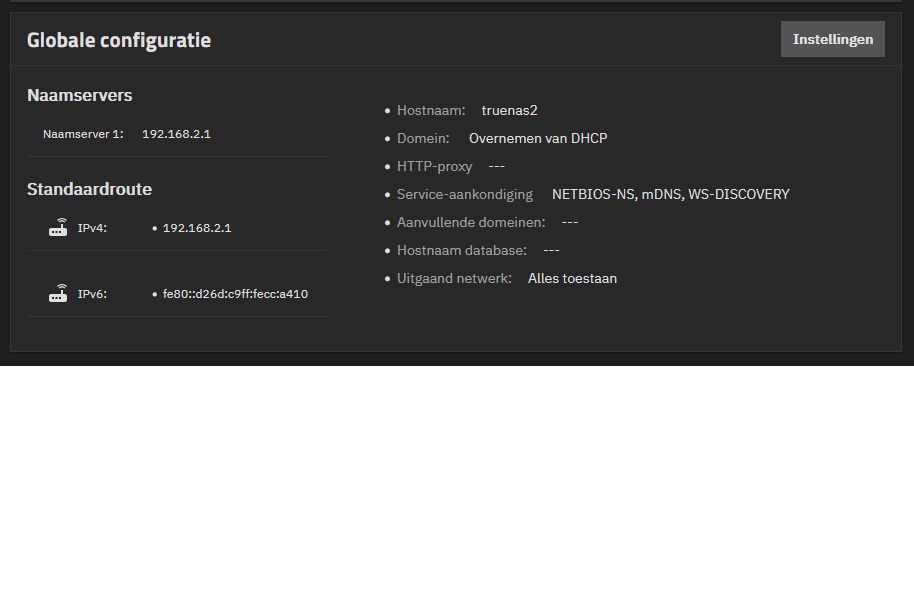
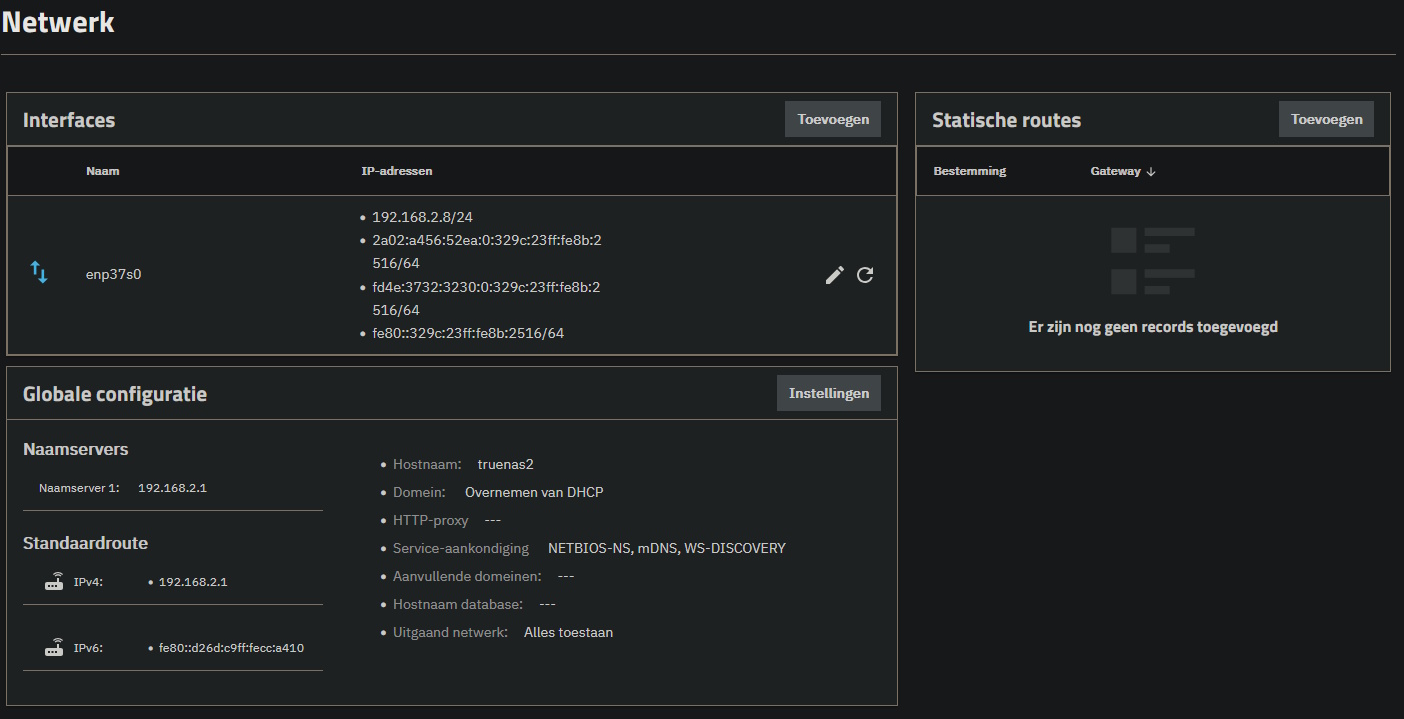
Please post a screenshot of the configuration you ended up with. The error points at a networking issue, so the Network-screen is the place to start.

Tanks for your reply @neofusion. Here are my network settings. Any ideas?

Presumably 192.168.2.1 is the IP of your router?
That looks okay.
As long as you don’t have any static routes set on the right hand side of the Network screen.

Perhaps there is something wrong with the handling of ssl sites, try this and post the output:
curl -s -o /dev/null -v http://google.com

Is 192.168.2.1 the IP of your router or your mothers router? If you’ve set it up with a static IP in your home and your mothers router uses a different subnet you have to adjust the network settings

1 Like

This is a great point, you only posted a subset of the network page.
And validating that the specified gateway/DNS corresponds to the one in the house that the server now lives in is wise.

The response was:

  • Could not resolve host: google.com
  • Closing connection 0

Yes, I can confirm that 192.168.2.1 is the routers address.

Of your mothers router? You didn’t really clarify that…

Sorry, yeah 192.168.2.1 is the IP from my mothers router.

Looks like it’s set to get an IP using DHCP.

That curl command should have worked, but since it didn’t, does ping 8.8.8.8 work?

Ping reply: PING 8.8.8.8 (8.8.8.8) 56(84) bytes of data.

That’s it?
That’s not what the complete output should look like.

Here’s a sample on my system:

% ping 8.8.8.8
PING 8.8.8.8 (8.8.8.8) 56(84) bytes of data.
64 bytes from 8.8.8.8: icmp_seq=1 ttl=117 time=1.87 ms
64 bytes from 8.8.8.8: icmp_seq=2 ttl=117 time=2.22 ms
64 bytes from 8.8.8.8: icmp_seq=3 ttl=117 time=1.94 ms
64 bytes from 8.8.8.8: icmp_seq=4 ttl=117 time=1.94 ms
64 bytes from 8.8.8.8: icmp_seq=5 ttl=117 time=2.27 ms
^C
--- 8.8.8.8 ping statistics ---
5 packets transmitted, 5 received, 0% packet loss, time 4005ms
rtt min/avg/max/mdev = 1.872/2.046/2.267/0.161 ms

That’s really it. Nothing more. Tried the ping on my home Truenas system and got an outcome similar to yours.

I’m running out of ideas…

Can you confirm that the client system you’re using to connect to the server (and presumably write these posts with) also has 192.168.2.1 as router and DNS?

It’s odd that DHCP would seeming work, handing out the IP, gateway and DNS and then not be able to route any data outside your network. The TN-server is on your local network, since you are able to connect to it, but not much more than that.

Is your server connected directly to your the router? Maybe try a different cable if you have a suitable one available?

Is this due to some IPv6 shenanigans? Is Autoconfigure IPv6 enabled for your interface? If so, try disabling it.

OK, thank you, @neofusion. At this moment i’m not able to get into my mothers’ router from distance, so I have to go to her house 15km from here. Wil do this sometime this week. Check out the settings once more. Strange, but I am able to SSH into the Truenas in my mothers’ house and write a replication task every night.

Wait a minute, forgive me for asking, but how do you get those screenshots if you’re not there?

Hopefully you haven’t forwarded ports from the router directly to the TrueNAS server, it’s not made to internet facing, it’s a security risk.

Another possibility is the usage of a VPN like tailscale or similar, in that case there could be something wrong with the VPN config causing routing issues.

Edit: Rereading your first comment I now see I glossed over tailscale… I suspect the likely culprit is in the tailscale config…

Hi,

have been testing at my mother’s place. Tried switching on and off IPv6. Disabled DHCP and set a static IP. Took a look in the modem, set the IP from Truenas as DMZ, lowered the firewall settings. Even tried without Tailscale running. But no difference in the outcome. Still a failure notification when trying to update the appstore. Also, the response to ping 8.8.8.8 is still the same as before. The Tailscale config is default, as is my Tailscale at home. No problem to SSH trough Tailscale and do replication.

Also when trying if there is an update for Truenas, I get a failure response, see below. So I am at the end of my imagination of what could be wrong.

Traceback (most recent call last):
File “/usr/lib/python3/dist-packages/aiohttp/connector.py”, line 1317, in _create_direct_connection
hosts = await self._resolve_host(host, port, traces=traces)
^^^^^^^^^^^^^^^^^^^^^^^^^^^^^^^^^^^^^^^^^^^^^^^^^^^
File “/usr/lib/python3/dist-packages/aiohttp/connector.py”, line 971, in _resolve_host
return await asyncio.shield(resolved_host_task)
^^^^^^^^^^^^^^^^^^^^^^^^^^^^^^^^^^^^^^^^
File “/usr/lib/python3/dist-packages/aiohttp/connector.py”, line 1002, in _resolve_host_with_throttle
addrs = await self._resolver.resolve(host, port, family=self._family)
^^^^^^^^^^^^^^^^^^^^^^^^^^^^^^^^^^^^^^^^^^^^^^^^^^^^^^^^^^^^^
File “/usr/lib/python3/dist-packages/aiohttp/resolver.py”, line 38, in resolve
infos = await self._loop.getaddrinfo(
^^^^^^^^^^^^^^^^^^^^^^^^^^^^^
File “/usr/lib/python3.11/asyncio/base_events.py”, line 868, in getaddrinfo
return await self.run_in_executor(
^^^^^^^^^^^^^^^^^^^^^^^^^^^
File “/usr/lib/python3.11/concurrent/futures/thread.py”, line 58, in run
result = self.fn(*self.args, **self.kwargs)
^^^^^^^^^^^^^^^^^^^^^^^^^^^^^^^^^^
File “/usr/lib/python3.11/socket.py”, line 962, in getaddrinfo
for res in _socket.getaddrinfo(host, port, family, type, proto, flags):
^^^^^^^^^^^^^^^^^^^^^^^^^^^^^^^^^^^^^^^^^^^^^^^^^^^^^^^^^^^
socket.gaierror: [Errno -3] Temporary failure in name resolution

The above exception was the direct cause of the following exception:

Traceback (most recent call last):
File “/usr/lib/python3/dist-packages/middlewared/api/base/server/ws_handler/rpc.py”, line 323, in process_method_call
result = await method.call(app, params)
^^^^^^^^^^^^^^^^^^^^^^^^^^^^^^
File “/usr/lib/python3/dist-packages/middlewared/api/base/server/method.py”, line 52, in call
result = await self.middleware.call_with_audit(self.name, self.serviceobj, methodobj, params, app)
^^^^^^^^^^^^^^^^^^^^^^^^^^^^^^^^^^^^^^^^^^^^^^^^^^^^^^^^^^^^^^^^^^^^^^^^^^^^^^^^^^^^^^^^^
File “/usr/lib/python3/dist-packages/middlewared/main.py”, line 911, in call_with_audit
result = await self._call(method, serviceobj, methodobj, params, app=app,
^^^^^^^^^^^^^^^^^^^^^^^^^^^^^^^^^^^^^^^^^^^^^^^^^^^^^^^^^^^^^^^^
File “/usr/lib/python3/dist-packages/middlewared/main.py”, line 731, in _call
return await self.run_in_executor(prepared_call.executor, methodobj, *prepared_call.args)
^^^^^^^^^^^^^^^^^^^^^^^^^^^^^^^^^^^^^^^^^^^^^^^^^^^^^^^^^^^^^^^^^^^^^^^^^^^^^^^^^^
File “/usr/lib/python3/dist-packages/middlewared/main.py”, line 624, in run_in_executor
return await loop.run_in_executor(pool, functools.partial(method, *args, **kwargs))
^^^^^^^^^^^^^^^^^^^^^^^^^^^^^^^^^^^^^^^^^^^^^^^^^^^^^^^^^^^^^^^^^^^^^^^^^^^^
File “/usr/lib/python3.11/concurrent/futures/thread.py”, line 58, in run
result = self.fn(*self.args, **self.kwargs)
^^^^^^^^^^^^^^^^^^^^^^^^^^^^^^^^^^
File “/usr/lib/python3/dist-packages/middlewared/schema/processor.py”, line 178, in nf
return func(*args, **kwargs)
^^^^^^^^^^^^^^^^^^^^^
File “/usr/lib/python3/dist-packages/middlewared/plugins/update.py”, line 105, in get_trains
trains_data = self.middleware.call_sync(‘update.get_trains_data’)
^^^^^^^^^^^^^^^^^^^^^^^^^^^^^^^^^^^^^^^^^^^^^^^^^^^
File “/usr/lib/python3/dist-packages/middlewared/main.py”, line 1030, in call_sync
return self.run_coroutine(methodobj(*prepared_call.args))
^^^^^^^^^^^^^^^^^^^^^^^^^^^^^^^^^^^^^^^^^^^^^^^^^^
File “/usr/lib/python3/dist-packages/middlewared/main.py”, line 1070, in run_coroutine
return fut.result()
^^^^^^^^^^^^
File “/usr/lib/python3.11/concurrent/futures/_base.py”, line 449, in result
return self.__get_result()
^^^^^^^^^^^^^^^^^^^
File “/usr/lib/python3.11/concurrent/futures/_base.py”, line 401, in _get_result
raise self.exception
File "/usr/lib/python3/dist-packages/middlewared/plugins/update
/trains.py", line 63, in get_trains_data
**(await self.fetch(f"{self.update_srv}/trains.json"))
^^^^^^^^^^^^^^^^^^^^^^^^^^^^^^^^^^^^^^^^^^^^^^^^^^
File "/usr/lib/python3/dist-packages/middlewared/plugins/update
/trains.py", line 25, in fetch
async with client.get(url) as resp:
File “/usr/lib/python3/dist-packages/aiohttp/client.py”, line 1359, in aenter
self._resp: _RetType = await self._coro
^^^^^^^^^^^^^^^^
File “/usr/lib/python3/dist-packages/aiohttp/client.py”, line 663, in _request
conn = await self._connector.connect(
^^^^^^^^^^^^^^^^^^^^^^^^^^^^^^
File “/usr/lib/python3/dist-packages/aiohttp/connector.py”, line 563, in connect
proto = await self._create_connection(req, traces, timeout)
^^^^^^^^^^^^^^^^^^^^^^^^^^^^^^^^^^^^^^^^^^^^^^^^^^^
File “/usr/lib/python3/dist-packages/aiohttp/connector.py”, line 1032, in _create_connection
_, proto = await self._create_direct_connection(req, traces, timeout)
^^^^^^^^^^^^^^^^^^^^^^^^^^^^^^^^^^^^^^^^^^^^^^^^^^^^^^^^^^
File “/usr/lib/python3/dist-packages/aiohttp/connector.py”, line 1323, in _create_direct_connection
raise ClientConnectorDNSError(req.connection_key, exc) from exc
aiohttp.client_exceptions.ClientConnectorDNSError: Cannot connect to host update.ixsystems.com:443 ssl:default [Temporary failure in name resolution]

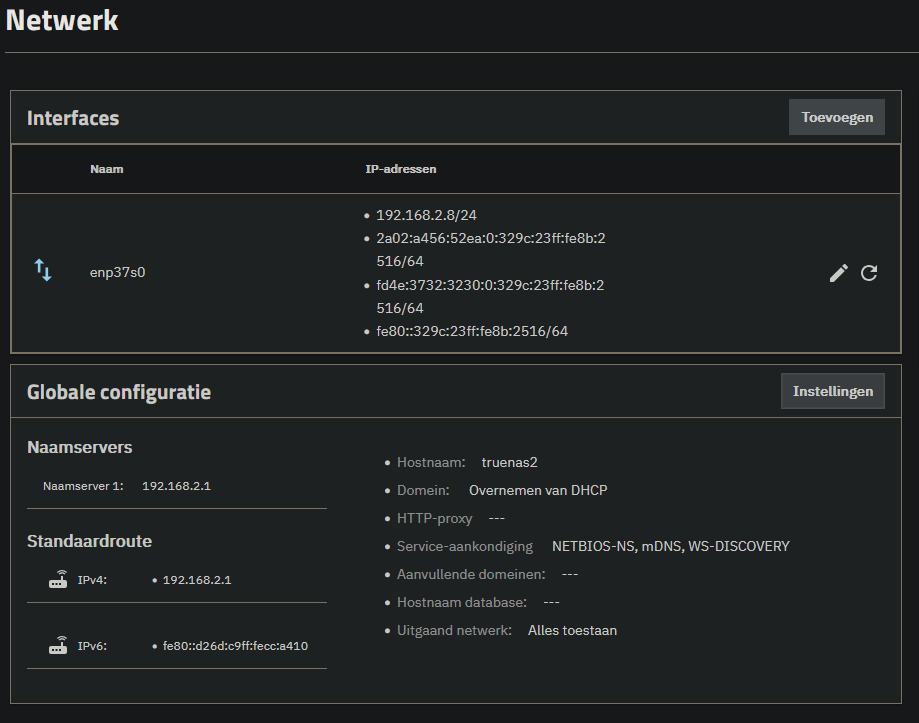
My current network setup: