As indicated by the title, I am embarking on my first bare metal TrueNAS server build and am seeking your sage wisdom. I have been casually using SCALE on a Mini 3.0 XL+ over the past few years, which has performed reasonably well for my use case. I am looking to upgrade to a slightly more powerful system in order to future-proof (at least for a few years) and open up the Mini XL+ for another use case.
In shortest summary, my use case is defined as:
4k media server for 3–4 users
Personal storage
Home automation
With a budget of less than $3k USD (not including storage), here is the system which I have outlined thus far:
Boot drive: Samsung 850 EVO M.2 2280 120 GB 3D NAND (model: MZ-N5E120BW)
Storage: 8x 18TB Western Digital Red CMR HDD (model: WD181KFGX)
PSU:unknown
Auxiliary fans:unknown
These components were mainly selected based on the desire for server-grade components (e.g. those which will survive 24/7 operation, ECC RAM, etc), availability on Newegg, and an attempt to maintain the budget based on the first two criteria (ECC RAM and server grade CPUs are expensive!). I already own the case, so there is at least one already-known variable. For the HDDs I went with 18TB capacity, as this was the maximum capacity supported by the Mini XL+; however with a properly spec’d out PSU, is there any other limitation which would prevent me from using higher capacity drives (e.g. 26 TB) ?
Two open questions that I have currently are A) is there any need for a dedicated GPU in such a system? and B) is there any need for a dedicated NIC, given the motherboard selection? My initial assumption is ‘no’ for both questions, but I thought I’d gather opinions here as well.
FYI: This is my first ever PC build, so it’s been quite the learning curve. Any feedback or advisement is welcome.
And thanks in advance for your time and consideration!
A Xeon Scalable is massive overkill for your stated home use case, and “Nemix” is a brand I’ve heard of… for overpriced RAM.
If you go for RDIMM, second-hand DDR4 RDIMM is probably a better idea right now.
A GPU is only useful if “4k media server” includes transcoding, and you don’t want to do it on CPU.
Small point: Get a cheap NVMe drive for boot and keep your SATA ports for HDDs.
I’ve pointed to the E3C246D4U2-2T deals on eBay quite a few times. That’s certainly more than enough for the stated use case, including the likely pair of NVMe drives for apps/VMs which have not been listed, with a caveat about the price and/or availability of ECC UDIMM right now…
Thanks so much for all of the quick and helpful replies. I’m very glad to learn about the ASRock Rack motherboard, which seems to be more in alignment with my needs.
Very decent list.
Any well-sized Gold-rated PSU from a reputable brand should do.
I’m personally no fan of Define cases in storage mode, so make sure you understand the constraints (extra trays are costly, fiddly to put in place and somewhat hinder cooling).
Thanks for the hint on the PSU With the rest of the list mostly defined, I can start to sum up the load and see where I’m at.
Regarding this— the Define r5 case was leftover from someone else’s project. I figured I could use it to get the system up and running and perhaps later upgrade to something fancier like SilverStone Technology CS381B Micro-ATX (https://a.co/d/4Q0K6qn), considering the constraints which you mentioned (unless there’s another case which you’d recommend).
As far as cooling goes, any tips to share there? I read in the PSU thread about having a dedicated fan for every 4 drives, and I’m assuming that the Intel Xeon E-2276G (SRF7M), coming used, won’t come with any compatible cooling solution. Would a liquid cooled solution be necessary, or could a heat sink + fan work for the CPU as well?
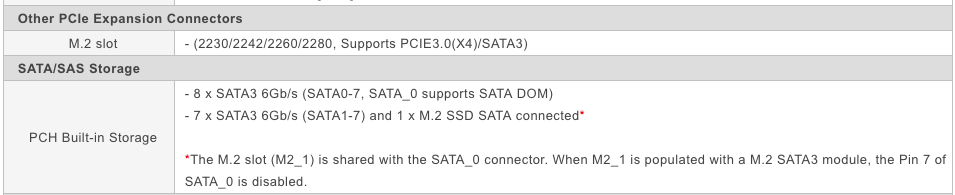
Perhaps I misunderstood, but from the ASRock Rack E3C246D4U2-2T’s page, it seems like using the M.2 slot sacrifices one of the SATA ports— unless the M2_1 implies there is a M2_0 that can be used in conjunction with 8 SATA ports.
PSU: Thermaltake GF1 (2024) Fully Modular ATX 850W Power Supply - 80 PLUS Gold - Ultra Quiet - Zero RPM, PS-TPD-0850FNFAGU-P
(The SeaSonic CORE GX 850 seemed unnecessary, but if it’s worth the extra money then I would consider it).
Motherboard fan headers: 1CPU / 3Front / 2Rear
CPU fan: Noctua NH-Li9 (Similarly, the Noctua NH-U12S seemed like overkill?)
HDD fan (x2): Noctua NF-A12x25 G2
The Fractal Define r5 case that I planned to use also comes pre-installed with 2 Fractal Design Dynamic Gp14 140mm fans— which would leave room on the motherboard for 1 additional fan, if needed, which there should also be plenty of room on the PSU for. However, with 1 CPU fan, 2 HDD fans, and a front/rear case fan, plus an NVMe boot drive heatsink, I think this would be enough to get started.
Any other components that I might have missed, overlooked, or need to take a second look at?
it is always easy to pay more but not sure if you need that much. again our use cases are different but i did run a home video library for a while - 1-2 users on a 2C/2T SC440 with 4GB. no problem whatsoever.
so rather than buying new parts, you may want to find an old PC and see how your setup works on that first before shelling out some serious money on a new machine.
Noctua’s compatibility list suggests that it falls somewhat short for cooling a Xeon E-2100/2200, so bump that a little. But a D15S would be MASSIVE overkill.
As for the fans, see first what you can achive with the supplied ones.
Nice, Noctua’s page is super helpful. I decided to go with the NH-C14S as something more middle of the road— more powerful than the NH-Li9, but not as heavy duty as the NH-D15S.
Thanks again for all of the incredibly helpful recommendations!
My <$1000 scratch-built home server running TrueNAS scale 25.10 serves media to multiple UHD TVs around the home, regularly transcoding content on the fly using Jellyfin… and when I spotted your post the first thing that jumped out was how entirely over-spec’d your build appears to be, relative to your use case.
From experience I can attest that a budget AMD Ryzen 5800G on a modest AM4 motherboard will serve your use case.
Going with 3-4 x 30TB drives is a better idea that 8 x 18TB drives… remember that you’re gonna have to pay the power bill for keeping this thing turn on, so fewer drives with higher capacity is better long-term value, and puts less strain on your PSU.
You definitely don’t need a Xeon CPU - again a component which is going to cost a lot to run, and you are gain better flexibility with a lower spec CPU that has a built-in GPU… I’ve found a surprising number of [docker] apps that benefit from having GPU access.
ECC ram is possibly overkill too, unless you absolutely simply never can tolerate a hiccup… in which case you might consider moving your workload to a data center.
How much resilient storage you really need?… I have hundreds of 4K movies on my 2 x 10TB Ironwolf drives, they’re far from full, and all of the content on them could be reacquired if disaster struck. My entire family photo and home-video collection is < 1TB… so my question is - what content do you have that’s bulky enough to warrant 72TB of storage (assuming mirrored arrays) or so irreplicable to warrant 4-way arrays and still occupy 36TB? (that’s the math on 8 x 18TB disks)
Not having a go at you wickedwombat - just trying to point to some practicalities.
My suggestion: Do a ~$1000 build, invest the remaining $2K and rest easy knowing that you’re paying a lower power bill and also have spare funds laying around for anything the future throws at you.
… ‘cause let’s be honest: Future proofing and technology aren’t bed mates!
Just because its called Xeon, doesnt mean its overpowered or overly expensive.
The Xeon-E 22xxG stem from mobile CPUs, so low idle power and include an iGPU that runs circles around AMD APUs of that generation.
Also it comes with official ECC support, which is a bonus. Used on ebay you get them for 100 -150 USD. Same for the motherboard ( 250 USD on ebay) that is designed to run 24/7. Unlike your - probable- gaming motherboard. Also includes 10G ethernet and BMC/IPMI.
So you can do everthing remotely, even mount disk images.
As to why he needs that much storage, that should be his concern only.

 With the rest of the list mostly defined, I can start to sum up the load and see where I’m at.