Hi,
I am quite new with truenas but after installation few months ago everything was ok.
After updating the system was not able to boot anymore.
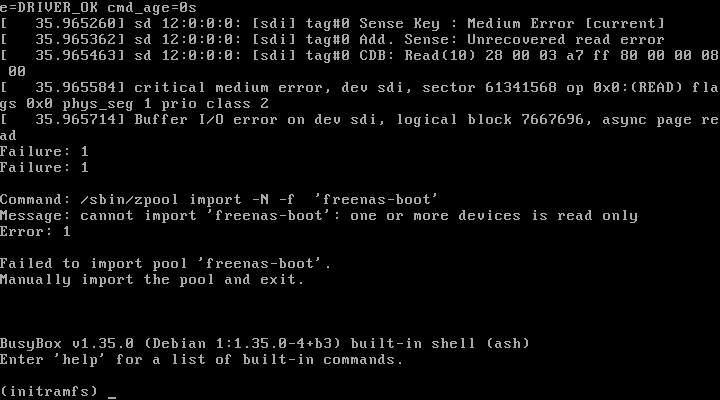
I get the failure shown within the picture.
Truenas version is 23.10.1
I do not know how to solve it, do you have suggestions?
thank you in advance
I could be wrong but it seems to be reporting a drive failure on the boot pool. If you got a mirrored boot pool see if taking out drive x or y lets you boot successfully. If it does, replace the failed drive & resilver the new drive.
If you have a single boot pool & have a backup of your config I’d personally just try an install on a different drive & then if that works import the config.
If you don’t have a backup of the config or any spare drives, I guess you can temporarily make a bootable USB (not recommended for long term use) & see if it lets you boot in & confirm whatever issues you’re getting reported on device ‘sdi’ (sdi may change to a different name after a reboot, so just double check what drive you previously had on that pool & check smart -a /dev/whatever & consider running some smart tests).
You should post your Hardware and pool config. Look at Fleshmauler’s post and expand ‘See My freeNAS system’ for an example.
@Fleshmauler thank you so much for your support.
Yes, I have mirrored boot pool so I’ll try to remove it and let’s see what happen
Yeah the only downside with mirror boot pool is that if a disk goes faulty & it is the disk your bios is set to boot from - the NAS will continue to try to boot to faulty disk (due to bios) until disk is either removed or setting is changed.
Good luck!
boot is from USB pen drive (mirrored). I tried to reboot removing before x and after y usb stick but without success.
With x stick I had the same errors while with just y stick installed I had a different error (this is a freenas disk and cannot be open. system halted)
suuucks - hopefully you got config backed up… time for clean install imo.
yes I think so.
I have just order SSD (mirrored)…
I save all dataset once a day, data pools should be ok…I hope.
I am not sure about the config, I am still searching
is it possible to try the cloning of damage usb stick? just to save the config file
Everything is possible - time spent doing so vs manually restoring config is the argument. I have a fairly simply setup so I know what I’ve done in the past & won’t be the one who can help with this  Hopefully someone more knowledgeable on the forums could help if you go that route!