I currently have the HA app running fine (port 30103). I wanted to explore some of the feature of using the HA OS that I do not have access to using the app. I followed coltenkrauter’s instructions here. I do not see the HA OS system in my router like my other linux VMs, nor can I access it using the TrueNAS IP using port 8123. The VM log for the haos VM does not seem any different than my other VMs.
Are the VM logs from your deleted post still relevant to this VM? If so I/m going to guess that you used the wrong path when importing the zvol because the guide you followed uses the wrong path.
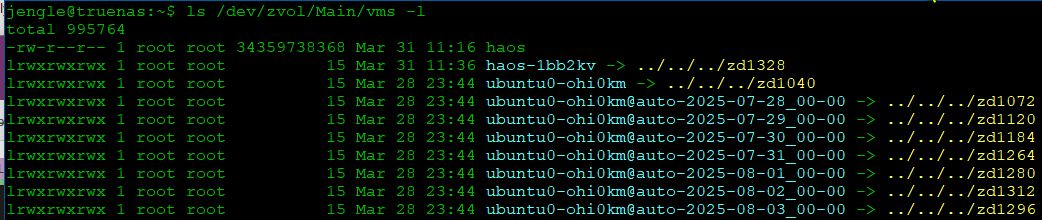
Basically, the zvol path should begin with /dev/zvol/, not /mnt/. You can now import the uncompressed qcow2 image directly from the TrueNAS UI when creating the VM. That’s probably the easiest thing to do. Or please refer to the original guide from which the AI-generated(?) one you followed was based copied, which may provide more (accurate) information.
Also you HAOS VM will have it’s own IP address, not share TrueNAS IP like the app,
Thanks! Yes, I expected to get a new unique IP address like all the other VMs I created. I now understand the /dev/zvol location. I tried again, but still did not get an IP but I understand the steps and locations much better. Never had to explore the zvol folder! Thanks.
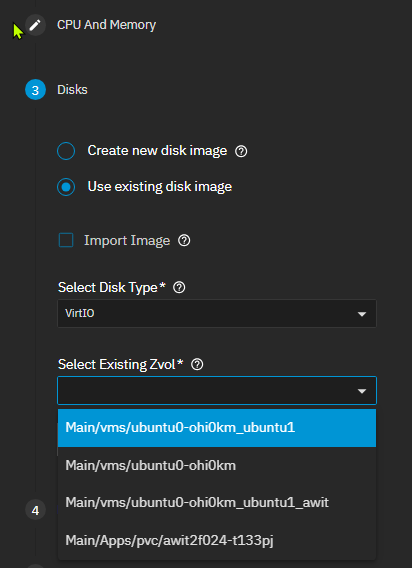
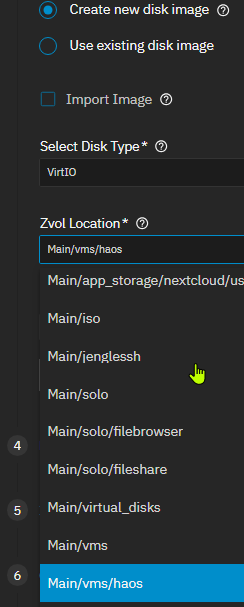
Here’s my issue - I am now following the instructions as indicated here. I have created my dataset /mnt/Main/vms/haos and successfully copied the HAOS to the /dev/zvol/Main/vms/haos. However that dataset is not included as one of my existing Zvols:
Are the instructions noted wrong for 25.10.2.1 - Goldeye because I don’t see the behavior indicated there.
Error when Selecting existing zvol and try to start VM
|
[EFAULT] VM will not start as DISK Device: /dev/zvol/Main/vms/haos/haos-msd644 device(s) are not available.
LOG: Error Name: EFAULT
Error Code: 14
Reason: [EFAULT] VM will not start as DISK Device: /dev/zvol/Main/vms/haos/haos-msd644 device(s) are not available.
Error Class: CallError
Trace: Traceback (most recent call last):
File “/usr/lib/python3/dist-packages/middlewared/api/base/server/ws_handler/rpc.py”, line 361, in process_method_call
result = await method.call(app, id_, params)
^^^^^^^^^^^^^^^^^^^^^^^^^^^^^^^^^^^
File “/usr/lib/python3/dist-packages/middlewared/api/base/server/method.py”, line 57, in call
result = await self.middleware.call_with_audit(self.name, self.serviceobj, methodobj, params, app,
^^^^^^^^^^^^^^^^^^^^^^^^^^^^^^^^^^^^^^^^^^^^^^^^^^^^^^^^^^^^^^^^^^^^^^^^^^^^^^^^^^^^^^^^^
File “/usr/lib/python3/dist-packages/middlewared/main.py”, line 956, in call_with_audit
result = await self._call(method, serviceobj, methodobj, params, app=app,
^^^^^^^^^^^^^^^^^^^^^^^^^^^^^^^^^^^^^^^^^^^^^^^^^^^^^^^^^^^^^^^^
File “/usr/lib/python3/dist-packages/middlewared/main.py”, line 773, in _call
return await methodobj(*prepared_call.args)
^^^^^^^^^^^^^^^^^^^^^^^^^^^^^^^^^^^^
File “/usr/lib/python3/dist-packages/middlewared/api/base/decorator.py”, line 108, in wrapped
result = await func(*args)
^^^^^^^^^^^^^^^^^
File “/usr/lib/python3/dist-packages/middlewared/plugins/vm/vm_lifecycle.py”, line 57, in start
await self.middleware.run_in_thread(self._start, vm[‘name’])
File “/usr/lib/python3/dist-packages/middlewared/main.py”, line 670, in run_in_thread
return await self.run_in_executor(io_thread_pool_executor, method, *args, **kwargs)
^^^^^^^^^^^^^^^^^^^^^^^^^^^^^^^^^^^^^^^^^^^^^^^^^^^^^^^^^^^^^^^^^^^^^^^^^^^^
File “/usr/lib/python3/dist-packages/middlewared/main.py”, line 667, in run_in_executor
return await loop.run_in_executor(pool, functools.partial(method, *args, **kwargs))
^^^^^^^^^^^^^^^^^^^^^^^^^^^^^^^^^^^^^^^^^^^^^^^^^^^^^^^^^^^^^^^^^^^^^^^^^^^^
File “/usr/lib/python3.11/concurrent/futures/thread.py”, line 58, in run
result = self.fn(*self.args, **self.kwargs)
^^^^^^^^^^^^^^^^^^^^^^^^^^^^^^^^^^
File “/usr/lib/python3/dist-packages/middlewared/plugins/vm/vm_supervisor.py”, line 68, in _start
self.vms[vm_name].start(vm_data=self._vm_from_name(vm_name))
File “/usr/lib/python3/dist-packages/middlewared/plugins/vm/supervisor/supervisor.py”, line 162, in start
raise CallError(
middlewared.service_exception.CallError: [EFAULT] VM will not start as DISK Device: /dev/zvol/Main/vms/haos/haos-msd644 device(s) are not available.
Create VM indicating ‘create new disk image’, no installation media, in default VM folder ( in my case /mnt/Main/vms). I named the VM haos when creating the VM. Note zvol created in /dev/zvol/….. folder, using the haos-1bb2k as indicated below for the install folder.
Instructions should be correct, but I don’t run through the guide with every point release. I generally only update for major version changes (Last tested on 25.10.0). I’m not sure why your zvol doesn’t show up correctly, but I’m glad you were able to work around the issue and get HAOS up and running.