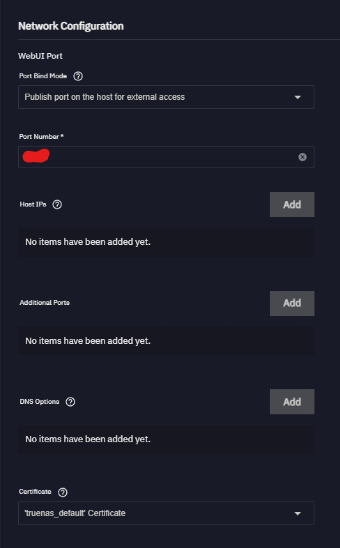
Just playing with Home Assistant, while trying to discover local smart devices I know are there, Home Assistant cannot find them. I assume because the IP address is the bridged network, not the actual network. It does not appear clear in the setup how to bind to host instead, lookin for help. In the network config of the app, there is “Host IPs”, and I chose the correct IP (the IP of the host), but in the settings of HA, I see get the bridged network.
I think that you may need additional functionality to find smart devices. I know I needed to install HASS and some HASS add-ons to find and make available the data and controls for my smart PV inverter and my smart switches.
Interesting. Unfortunately I do not see an add-on option in my install from the TN app. I looked and it seems you have to install a specific version to get add-ons. Knowing how subnets work, I am thinking it could be the fact that the subnet the app is running on and the subnet the devices are on are not talking to each other.
Add-ons are a whole different thing - and they require Home Assistant running as an operating system of its own (which you can run in a VM but probably isn’t necessary).
You install the Home Assistant app, putting the configuration dataset as a Host Path rather than an iX Volume.
Then you open a shell, go root and follow the instructions on the HASS site to install HASS.
Then you can use HASS to download community functionality to integrate with smart stuff.
Seems like this a way too much for something so stupid. I don’t know if I am going to bother with Home Assistant. There are 235432525 ways to install 2134234 different versions. Stupid.
All I wanted to do was see what more automations I can do that I cannot on Google Home. Like my Maytag washer and dryer. I have the dryer setup to announce on the Google Homes that it’s done. The washer will not work no matter what I do.
But this appears it’s going to take HOURS to setup Home Assistant properly. Unless, of course, I want to pay a month service fee.
It’s NOT an add-on - an “add-on” is a specific type of additional functionality and they only work with HA-OS and not HA containerized.
You install HA, you stop the HA docker container, you open a shell and go sudo and navigate to the HA directory you specified as the config host path when you installed the HA app.
Then you run the commands as stated on the HASS page.
Then you start HA again and HASS is included. And then you can use HASS to add more community functionality. They may be added in to HA, but they are not “add-ons” as defined by HA.
As for being “way too much”, you wait until you try to do something with this stuff once you can see your smart switches etc.
So sorry, what does installing HACS allow me to do? I was trying to add stuff like Govee, will this allow me to see the devices?
Edit, nope still cannot see them. I found a post from Home assistant forums, I am correct it cannot see the devices because they are not on the same subnet. I am going to have to figure out how to have HA run on the host network not the bridged network.
Highly recommend you read through this thread and use a MACVLAN or custom-yaml if you want to discover devices on your local network, since TrueNAS by default takes mDNS so you cannot use it for Home-Assistant
Well if you need to “Discover” through Home-Assistant you can’t. I was using it fine by manually typing the IPs of devices and etc. The MACVLAN approach is complicated but allows you to use the full networking stack of Docker.
Otherwise, HAOS is another option, but I already have everything in HAOS I want in separate Docker containers, so it’s a waste for me (HAOS is an appliance OS that runs Docker / containers anyways)
I used HAOS on TN CORE and it was a perfectly smooth experience.
It is also the officially (by the HA project) supported method to run HA.
You might want to wait for Fangtooth 25.04.2 when the dust around VMs is supposed to settle. Planning to migrate one VM from CORE to CE this week or the next. (It’s at my friend’s home - I continue to run CORE)