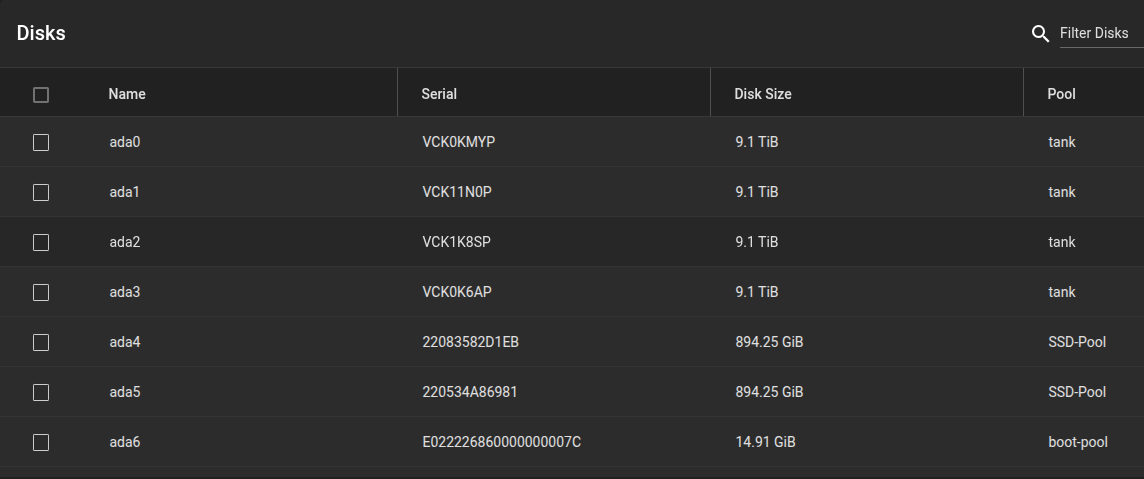
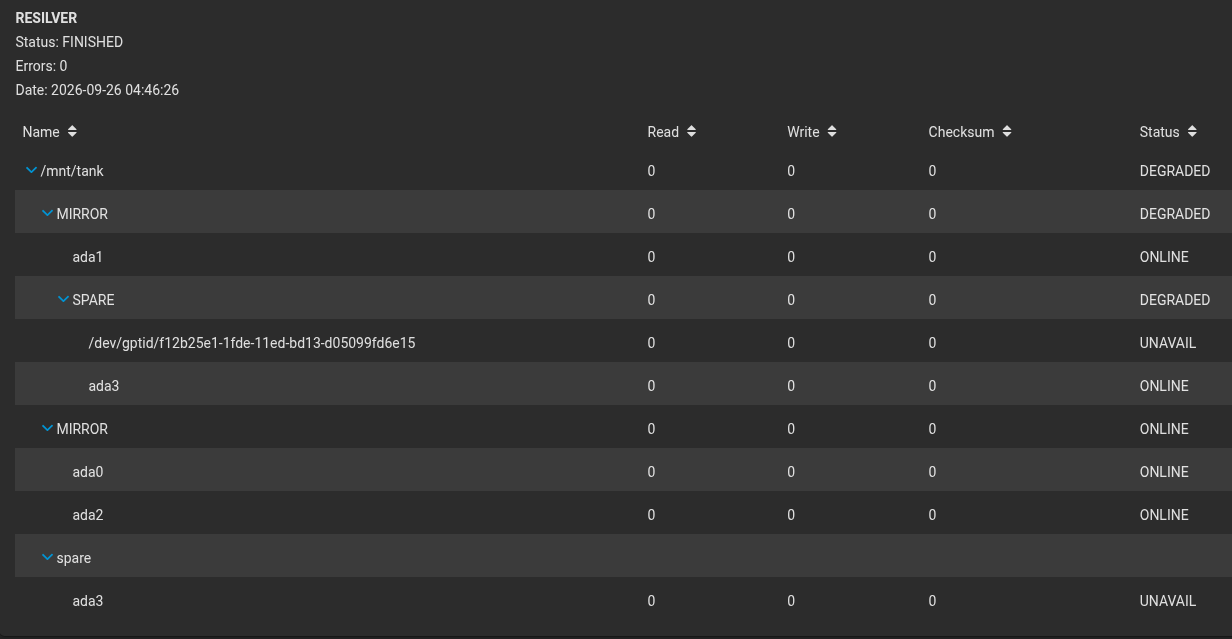
This pool was set up by the people at iX if I remember correctly and I left it the way it was since I figured they know better than me and had a reason. It is 4 10TB drives with a 5th as spare. ada0 + ada2 in a mirror and ada1 + ada3 in a mirror, with the mirrors together as the complete pool.
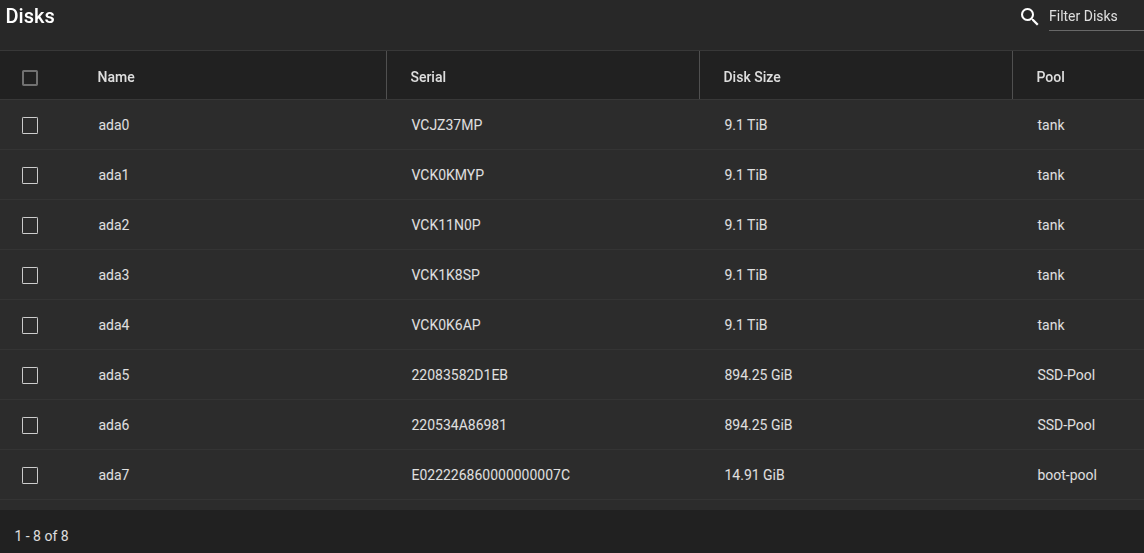
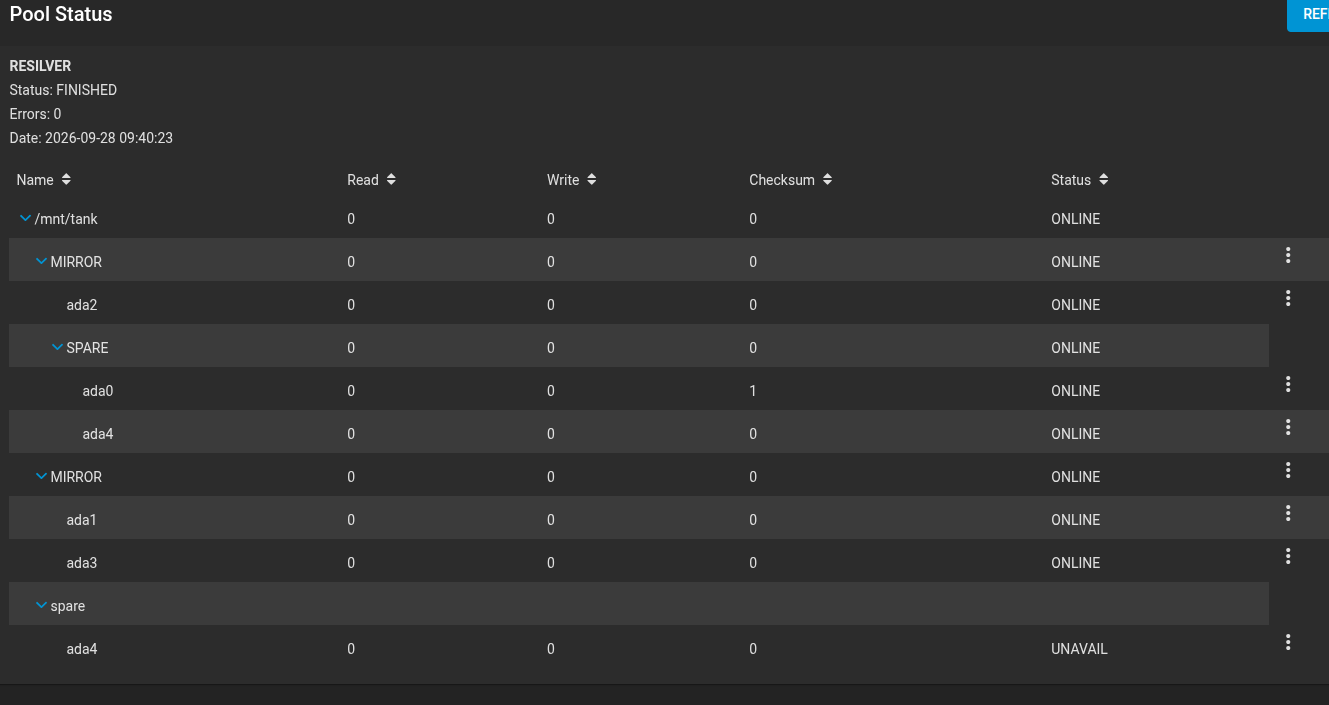
I had a drive go missing over the weekend (ada0). After a reboot it did not come back and all the drives were off by 1 in their ada designation. The spare for the pool was showing as UNAVAIL. I shut down the server, pulled every drive to make note of the serial numbers that are in each slot. After powering back up, the missing drive (ada0) is showing again but is listed as a spare rather than showing up as part of the mirror. Additionally, ada4 is still showing as UNAVAIL but also as a spare for mirror 1. This web interface is version 13 and none of the options presented to me in the menus allow me to add a drive to the mirror and I can’t replace the ada0 since it isn’t even showing up in the correct place. The old interface from the FreeNAS days was much clearer for stuff like this and this is my first time trying to fix a mirror since the interface change. Can I even do this through the web interface or am I going to have to learn the terminal commands to fix this? Support was nice enough to send a suggestion (despite it turning out I am past support) but that was for the status prior to my shutting down, which has now changed and I am hesitant to proceed.
Should I detach ada0, which is showing 1 checksum error after reappearing? If so, will the spare then automatically get pulled into the mirror or is there more I have to do? This interface is not clear at all. Any suggestions would be greatly appreciated. (I was trying to add images to this for clarity but it keeps telling me I can’t add media files)
Post your OS version so we can try to follow along or point to the correct online documentation section. Drive position can change at every boot so only track the drives by serial number. You probably want to run SMART Long test on your ‘bad’ drive before attempting to use again.
Browse some other threads and do the Tutorial by the Bot to get your forum trust level up and post images and links
TrueNAS-Bot
Type this in a new reply and send to bring up the tutorial, if you haven’t done it already. @TrueNAS-Bot start tutorial
track by serial only, ada numbers will keep flipping. smart long on that drive b4 u trust it again
on CORE 13 the gui is rough for this. shell path that worked for me:
-zpool status -v YOURPOOL
-camcontrol identify /dev/adaX | rg Serial
(or geom disk list) so serial → current ada is clear
if the mirror is degraded and the old disk came back listed as spare:
-zpool detach YOURPOOL
-zpool replace YOURPOOL <OFFLINE/UNAVAIL member> /dev/adaX
or if the vdev still has a hole and the disk is free:
-zpool attach YOURPOOL /dev/adaX
Thanks for the info, I didn’t look around for details on the posting since I am in crisis mode. I will run the tutorial later.
OS version is TrueNAS-13.0-U6.8. I did tell it to run the long SMART test on the sketchy drive but there doesn’t appear to be any place in the interface that will tell me the status so I assume I am waiting for a notification to let me know it finished. I was planning to pull that drive and run SpinRite on it before I consider using it again. I am assuming I will be taking it out of service, though.
Meanwhile, I just want to pull that spare in to replace the one that is sketchy but cannot figure out how. The way support suggested would lead me to think that it SHOULD get automatically pulled in but that did not happen. Perhaps I have to Detach the sketchy one first? That doesn’t seem right, though, since it did not pull the spare in while the sketchy one was missing entirely from the list.
Use the command zpool status -v YOURPOOL and change YOURPOOL to the pool name. This lets us see the current status of drives associated with that pool along with the spare info. Post the results back using Preformatted Text mode. </> on the tool bar or Ctrl+e
If you want to post images of your system, do the tutorial. It should send you a direct message (DM) and just take a few minutes.
  pool: tank
 state: ONLINE
status: One or more devices has experienced an unrecoverable error.  An
        attempt was made to correct the error.  Applications are unaffected.
action: Determine if the device needs to be replaced, and clear the errors
        using 'zpool clear' or replace the device with 'zpool replace'.
   see: https://openzfs.github.io/openzfs-docs/msg/ZFS-8000-9P
  scan: resilvered 1.66G in 00:00:31 with 0 errors on Mon Sep 28 09:40:54 2026
config:

        NAME                                              STATE     READ WRITE CKSUM
        tank                                              ONLINE       0     0     0
          mirror-0                                        ONLINE       0     0     0
            gptid/f12753e4-1fde-11ed-bd13-d05099fd6e15    ONLINE       0     0     0
            spare-1                                       ONLINE       0     0     0
              gptid/f12b25e1-1fde-11ed-bd13-d05099fd6e15  ONLINE       0     0     1
              gptid/0606b363-1ff6-11ed-bd13-d05099fd6e15  ONLINE       0     0     0
          mirror-1                                        ONLINE       0     0     0
            gptid/060a7ee7-1ff6-11ed-bd13-d05099fd6e15    ONLINE       0     0     0
            gptid/06117bda-1ff6-11ed-bd13-d05099fd6e15    ONLINE       0     0     0
        spares
          gptid/0606b363-1ff6-11ed-bd13-d05099fd6e15      INUSE     currently in use

errors: No known data errors
Good! For, er, “reasons” (which you may want to investigate) a disk dropped and the spare kicked in. The original drive is back online and now you have the choice of which one you want to detach (which is where checking whether original “f12b…” has an issue could help).
SMART tests run on the drive itself. TrueNAS is not informed when it completes.
When intiated on the command line you get an indication of when the test is expected to complete—assuming no other activity.
10 TB? Come back to it tomorrow.
Is the spare actually being used, though? This web interface is not clear. Also, on the list of Pools, this pool is still listed as “Online: Unhealthy”, which would suggest that it’s not “safe”. So, I should just “Detach” the drive that went on a vacation then?
Thanks for the assist everyone. After detaching the sketchy drive in the web interface, the pool now shows all is well, although it no longer has a spare. That was not a very clear UI design for someone who only ever has to mess around in the pool settings when I buy a new system or a drive fails, which is once every 3 to 5 years at this point. I will keep checking the SMART results on the entry of the drive every day until I see a new entry for the long test, then probably pull it and put in in my bench SpinRite machine to see what it says. Hopefully adding a new spare will be clearer when I either put the drive back or replace it.