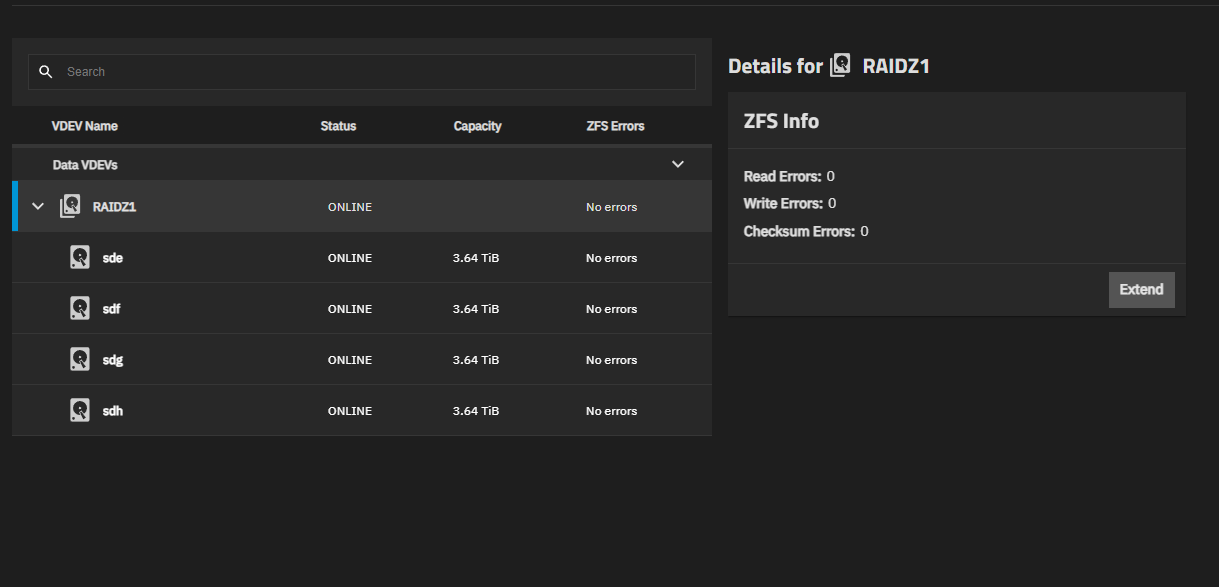
I’m running Truenas Scale (25.10.1 - Goldeye) and I would like to add a hard drive to the existing pool, but I am unable to find the Manage Devices button. I know I added a hard drive a year ago. I know I have the permission to view and make administrative changes, because I logged in as the admin. The Manage Devices button should be under the Storage tab and in the Topology section. There is no Topology section any more.
Anyone has any idea? Thanks in advance for your help!
First, what is your current pool layout?
(Easiest for us is the output of zpool status POOL in CODE tags.)
Next, how are your current disks connected to the system board?
And, how do you plan to connect the new disk to the system board?
Of course, the other more common question is that did you “burn in” your new disk?
That can detect early disk failure from actually impacting your pool.
The storage gui has been remodeled. To add a disk now go to storage, click on “view vdevs” on the pool you want to extend, clock on the vdev to expand the view and a tile should pop up at the right side of the screen with a button labeled “extend”