How to Fix Degraded VDEV?

I have a 45Drives HL15 running TrueNAS Goldeye 25.10.0.1. I have a single pool with 15x 8TB drives in RAIDZ2 configuration. I see the VDEV listed as DEGRADED. Based on hard drive serial numbers, I have identified which drive in my HL15 is “removed” and which is “unavailable.” I’ve never dealt with a degraded VDEV before so I’m wanting to confirm what my next steps should be. Based on my understanding I should unplug the “unavailable” drive and plug it back in. Is this correct? What should happen next? Any troubleshooting steps for the drive in the HL15 that is listed as “removed?” Happy to share any other info that would be helpful.

RAIDZ2 [DEGRADED]
├── sda ONLINE
├── sdb ONLINE
├── sdc ONLINE
├── sdd ONLINE
├── sde ONLINE
├── sdf ONLINE
├── sdg ONLINE
├── 4093135140654049519 REMOVED
├── sdh ONLINE
├── sdj ONLINE
├── sdk ONLINE
├── sdl ONLINE
├── sdm ONLINE
└── sdn ONLINE
└── 16325599693649201829 UNAVAIL

The unavailable drive is in slot 9 of my HL15 and the removed drive is still physically seated in slot 12 of my HL15.

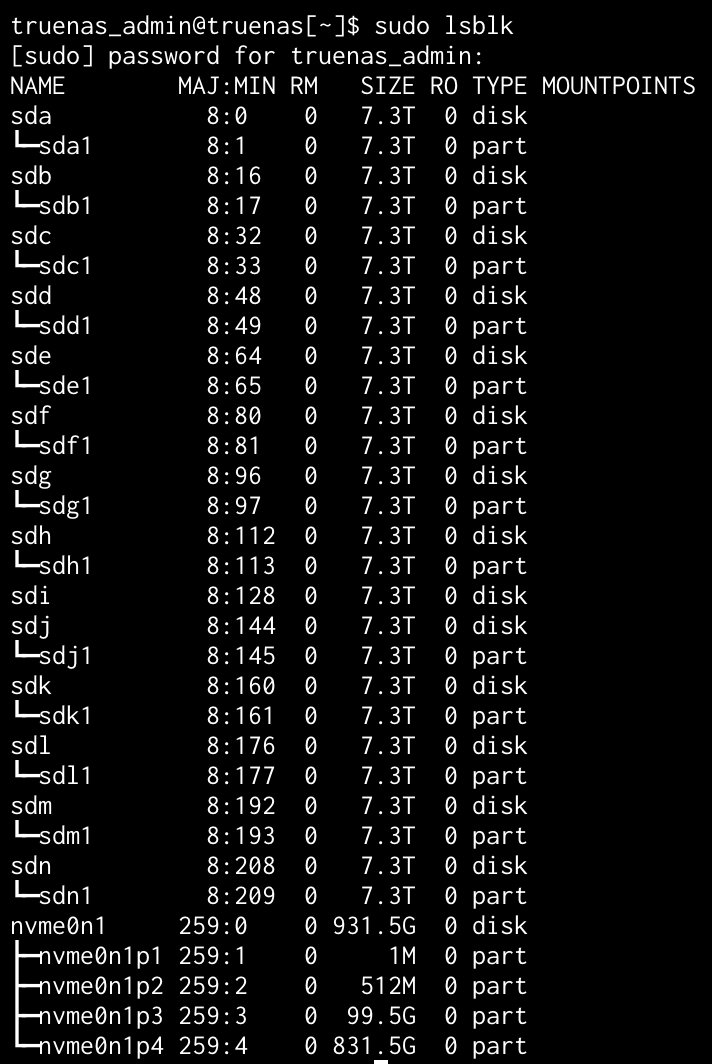
15-wide is wider than most would feel comfortable with, and unfortunately leaves you without a free bay. But the motherboard and/or HBA may have some free ports; that could come handy.
Does sudo zpool status reports errors?

If the missing sdi and sdo (?) are still visible to the system, run
smartctl -x /dev/sdX on them (where X is the appropriate letter)
and post the output as formatted text (</> button).
If they are not, you can power down, reseat these drives and power up again.
Keep tracking drives by serial number :+1:

Expectation is that the drives are failing, so your should prepare to replace them by new, preferably burnt in, drives.
Do you have a backup?

sudo zpool status
[sudo] password for truenas_admin:
pool: NAS
state: DEGRADED
status: One or more devices could not be used because the label is missing or
invalid. Sufficient replicas exist for the pool to continue
functioning in a degraded state.
action: Replace the device using ‘zpool replace’.
see: Message ID: ZFS-8000-4J – OpenZFS documentation
scan: scrub repaired 0B in 05:03:58 with 0 errors on Sun Nov 16 05:04:04 2025
config:

    NAME                                      STATE     READ WRITE CKSUM
    NAS                                       DEGRADED     0     0     0
      raidz2-0                                DEGRADED     0     0     0
        5eba54cd-7a08-4b07-b91f-d3acce4a0399  ONLINE       0     0     0
        c5b1e26b-5750-486f-8f8e-ee792a762766  ONLINE       0     0     0
        392b307d-5c54-4f75-8dd9-ebd05027baf5  ONLINE       0     0     0
        3574d667-20d2-4563-af09-0d9c950023bb  ONLINE       0     0     0
        5a2deeab-77f8-4402-aabe-4fbf2a942810  ONLINE       0     0     0
        5b872f92-2a1b-497f-8bb0-57fbd6ca8d5a  ONLINE       0     0     0
        1f5aba53-39c8-4b74-9fb3-57d235c47c5e  ONLINE       0     0     0
        862b94e4-2494-45f6-ad7d-fa6419bac8c7  ONLINE       0     0     0
        16325599693649201829                  UNAVAIL      0     0     0  was /dev/disk/by-partuuid/6da8eb82-5a5a-4fec-bb49-e61a259ca731
        07979b3b-a51c-489e-9367-296b3be30626  ONLINE       0     0     0
        9e4a1e31-4a04-408d-bd48-c8e022c2a03e  ONLINE       0     0     0
        6eb66f47-cb2a-4ac5-8678-bd58d14e658f  REMOVED      0     0     0
        41ce1f88-f294-4a34-8904-2e80b63f1f13  ONLINE       0     0     0
        6917bb71-77b7-4a51-8a2f-144267f97652  ONLINE       0     0     0
        84ddeff7-4997-4eff-ac09-5a5264d9ec82  ONLINE       0     0     0

errors: No known data errors

Based on this, am I good to power down, reseat these drives and power up again?

I have backed up my data using syncthing. I’m a total noob and don’t really understand everything yet in terms of proper backup of TrueNAS itself. That said, I am backing up the data stored on my NAS pool and my nvmestorage pool via syncthing to an external USB drive connected to an iMac. I then used rSync on the iMac to copy the backup of the USB drive to another USB drive. That 2nd USB drive now sits at a friends house where I use syncthing to sync any new data.

Backup overview:

Syncthing server (running in Dockge) sync data on NAS and nvmestorage pools to USB Drive on iMac. Then Syncthing syncs the USB drive connected to the iMac to a USB Drive at a friends house.

My hope is to use time off from work between Christmas/New Years to learn more about proper backup of TrueNAS and the data pools.

If you have backed up your data to satisfaction (15*8 TB could be a lot…), basically yes.
But first tell us more about your hardware (bare metal vs. virtualised, motherboard, HBA, how drives are attached, etc.), check whether the missing drives are sill seen by the system (lsblk), and if so get SMART data.

It’s bare-metal TrueNAS SCALE 25.10.0.1 (Goldeye) installed directly on a 45Drives HL15. I use dockge to run apps and SMB shares for accessing my data.

Hardware summary (I found this online from my build):

  • • Chassis: 45Drives HL15
    • Motherboard: Supermicro X11SPH-nCTPF (onboard)
    • CPU: Single Xeon Silver 4210R (10c/20t)
    • RAM: 128 GB ECC (8×16 GB RDIMM)
    • Boot device: 2 × 500 GB SATA SSD in mirror on the motherboard SATA ports (rear 2.5" bays)
    • HBA #1 (rear expander bay 1–15): Broadcom 9500-16i in IT mode (SAS3916 chip) – drives 1-15
    • HBA #2 (rear expander bay 16–45): Broadcom 9500-16i in IT mode – drives 16-45
    • Backplanes: 45Drives uses SAS expanders behind each 15-bay backplane, cabled from the 9500-16i with internal Mini-SAS HD cables
    • All 45 data drives are connected through the two 9500-16i cards (no motherboard SATA, no on-board LSI in the HL15)
    • NICs: Onboard Intel X722 (2×10GbE SFP+) + Intel X710-DA2 (2×10GbE SFP+ in PCIe slot) – currently using the X722 ports
    • PSU: 2 × redundant 1280 W Titanium

The pool that’s having the VDEV problem is made up of 15 drives from these HBAs

Based on this, it looks like I can’t get SMART data. Is that correct?

Wow! That’s a bigger system than I tought.
Are these “SAS expanders” or merely backplanes? You wouldn’t need two HBAs with actual expanders (not to mention the one that sits on-board…). i want to check for possible double pathing issues here.
It seems you could get something from smartctl -x /dev/sdi
The other drive is AWOL.

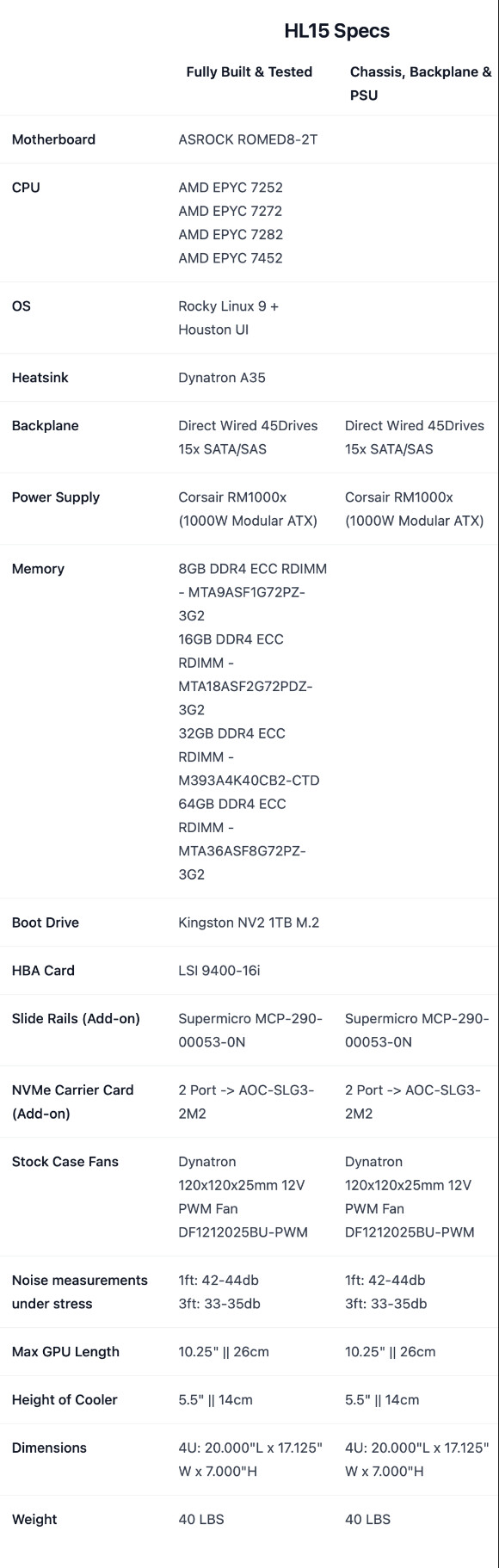
Honestly I don’t 100% know the answer here but I believe they’re just backplanes. The unit was configured using the standard configuration options at 45HomeLab Store

They’re selling “version 2.0” of the hardware now, mine was version 1 but it appears most everything is similar with the exception of motherboard options. My HL15 was a “fully built & tested” model:

sudo smartctl -x /dev/sdi
[sudo] password for truenas_admin:
smartctl 7.4 2023-08-01 r5530 [x86_64-linux-6.12.33-production+truenas] (local build)
Copyright (C) 2002-23, Bruce Allen, Christian Franke, www.smartmontools.org

=== START OF INFORMATION SECTION ===
Model Family: Seagate Exos 7E8
Device Model: ST8000NM000A-2KE101
Serial Number: WSD6J0F3
LU WWN Device Id: 5 000c50 0e0db7b38
Firmware Version: SN04
User Capacity: 8,001,563,222,016 bytes [8.00 TB]
Sector Sizes: 512 bytes logical, 4096 bytes physical
Rotation Rate: 7200 rpm
Form Factor: 3.5 inches
Device is: In smartctl database 7.3/5528
ATA Version is: ACS-4 (minor revision not indicated)
SATA Version is: SATA 3.3, 6.0 Gb/s (current: 6.0 Gb/s)
Local Time is: Sat Nov 29 12:02:09 2025 CST
SMART support is: Available - device has SMART capability.
SMART support is: Enabled
AAM feature is: Unavailable
APM feature is: Unavailable
Rd look-ahead is: Enabled
Write cache is: Enabled
DSN feature is: Disabled
ATA Security is: Disabled, NOT FROZEN [SEC1]
Read SCT Status failed: scsi error aborted command
Wt Cache Reorder: Unknown (SCT Feature Control command failed)

Read SMART Data failed: scsi error aborted command

=== START OF READ SMART DATA SECTION ===
SMART Status command failed: scsi error aborted command
SMART overall-health self-assessment test result: UNKNOWN!
SMART Status, Attributes and Thresholds cannot be read.

Read SMART Log Directory failed: scsi error aborted command

ATA_READ_LOG_EXT (addr=0x00:0x00, page=0, n=1) failed: scsi error aborted command
Read GP Log Directory failed

SMART Extended Comprehensive Error Log (GP Log 0x03) not supported

Read SMART Error Log failed: scsi error aborted command

SMART Extended Self-test Log (GP Log 0x07) not supported

Read SMART Self-test Log failed: scsi error aborted command

Selective Self-tests/Logging not supported

Read SCT Status failed: scsi error aborted command

Read SCT Status failed: scsi error aborted command
SCT (Get) Error Recovery Control command failed

Device Statistics (GP/SMART Log 0x04) not supported

Pending Defects log (GP Log 0x0c) not supported

ATA_READ_LOG_EXT (addr=0x11:0x00, page=0, n=1) failed: scsi error aborted command
Read SATA Phy Event Counters failed

I’m not sure how to interpret all that.

Not being able to retrive SMART data certainly qualifies as failure…
If it is under warranty, proceed to RMA. If not, you may dispose of it.

It wasn’t really necessary here, but formatted text (</>) helps with readability when pasting shell output.

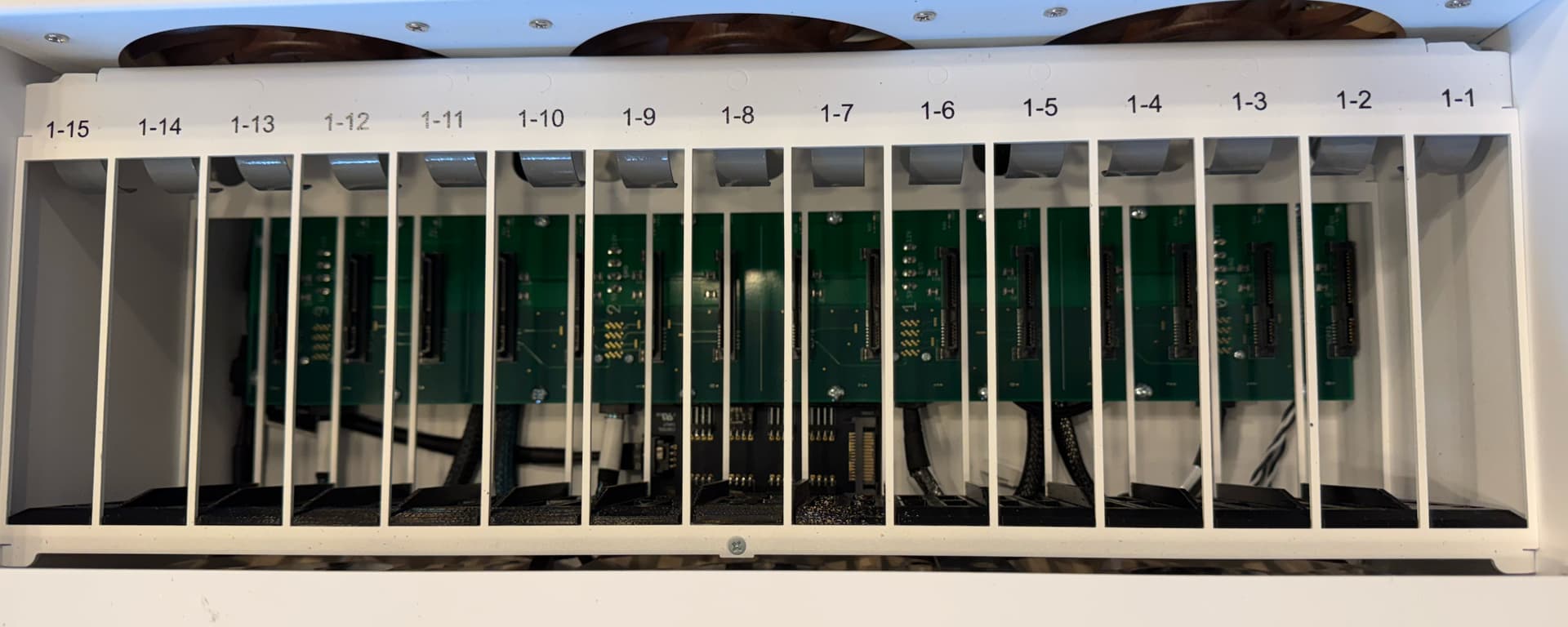
Do you have pictures of the backplane?
Is there a component with a sizeable heatsink?
How many data connectors?
(If the answers to the last two are “no” and “4 SFF-8643 for 15 drives”, they are passive.)

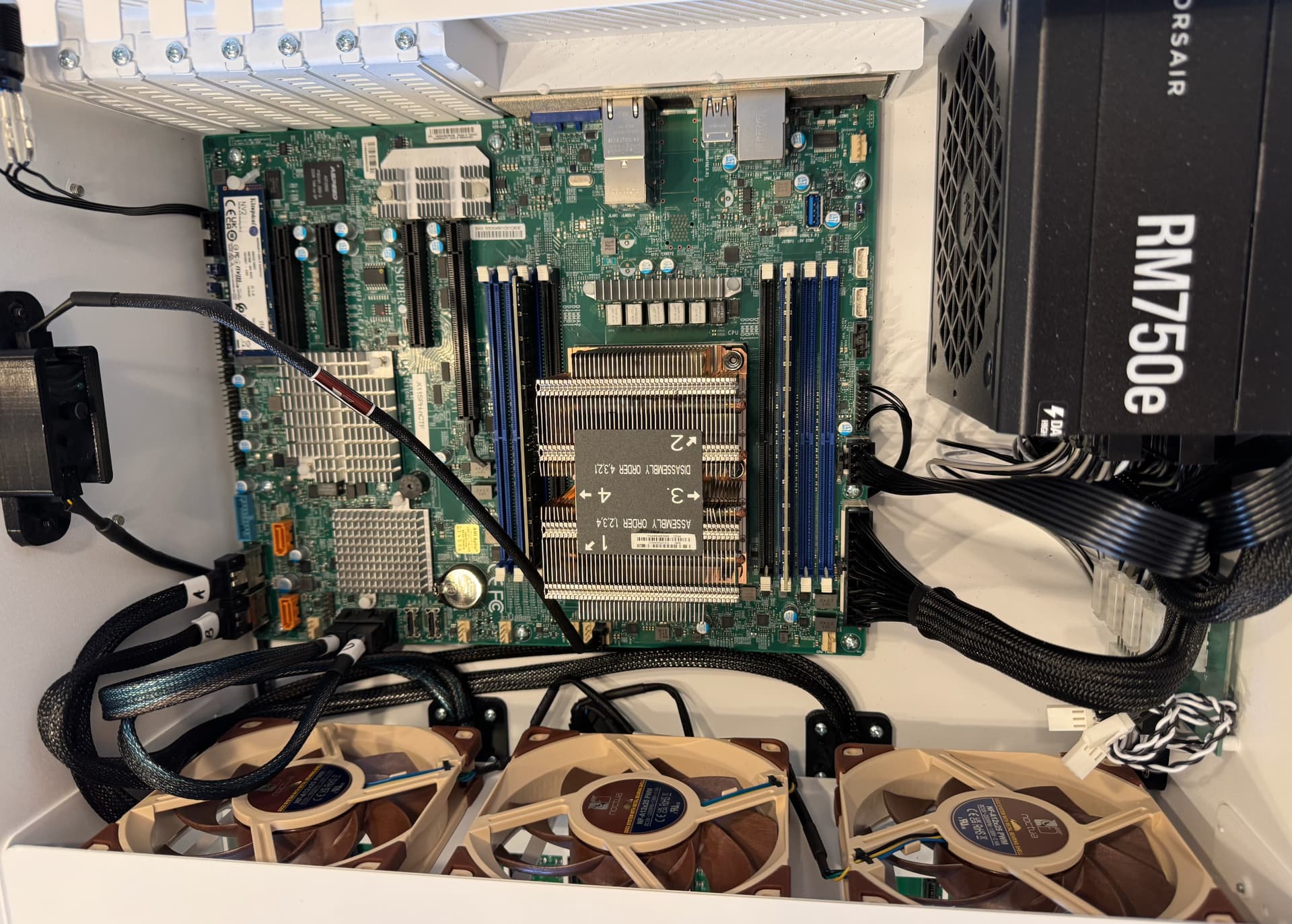
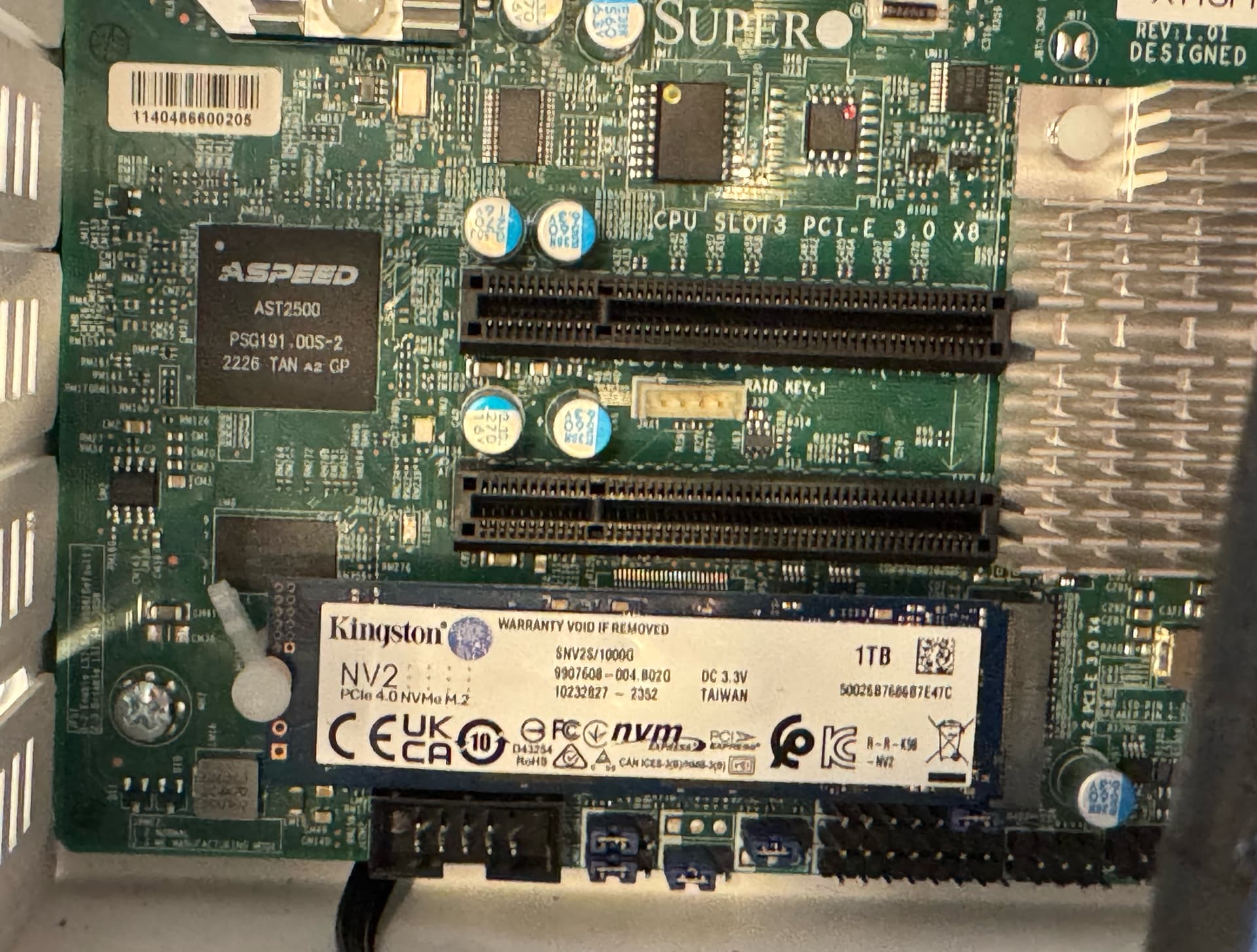
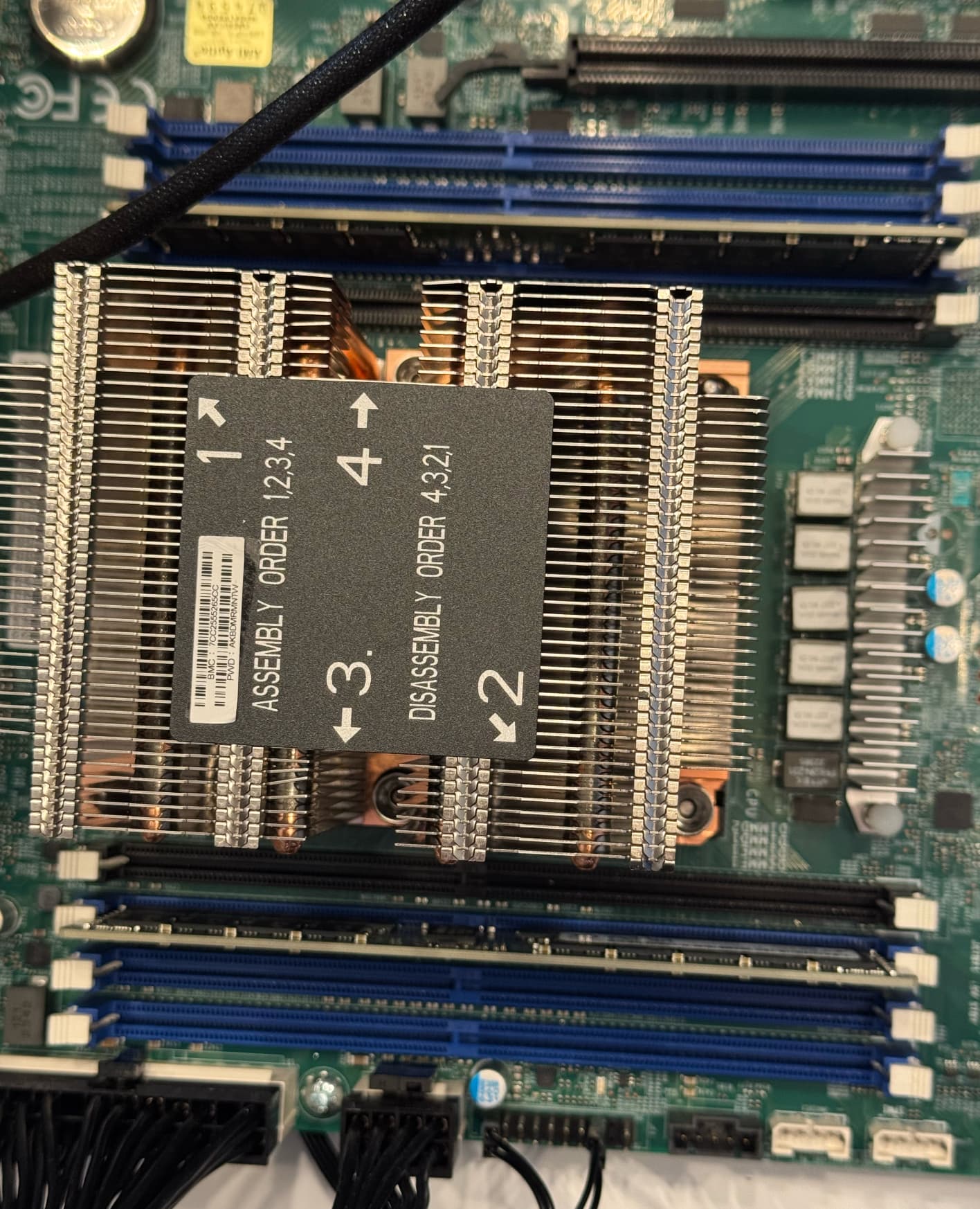
Yes, I have several pictures I took of the inside of the HL15 the day I got it:

The user removes the lid from the top of the HL15 and lowers the drives down onto the connectors on the backplane.

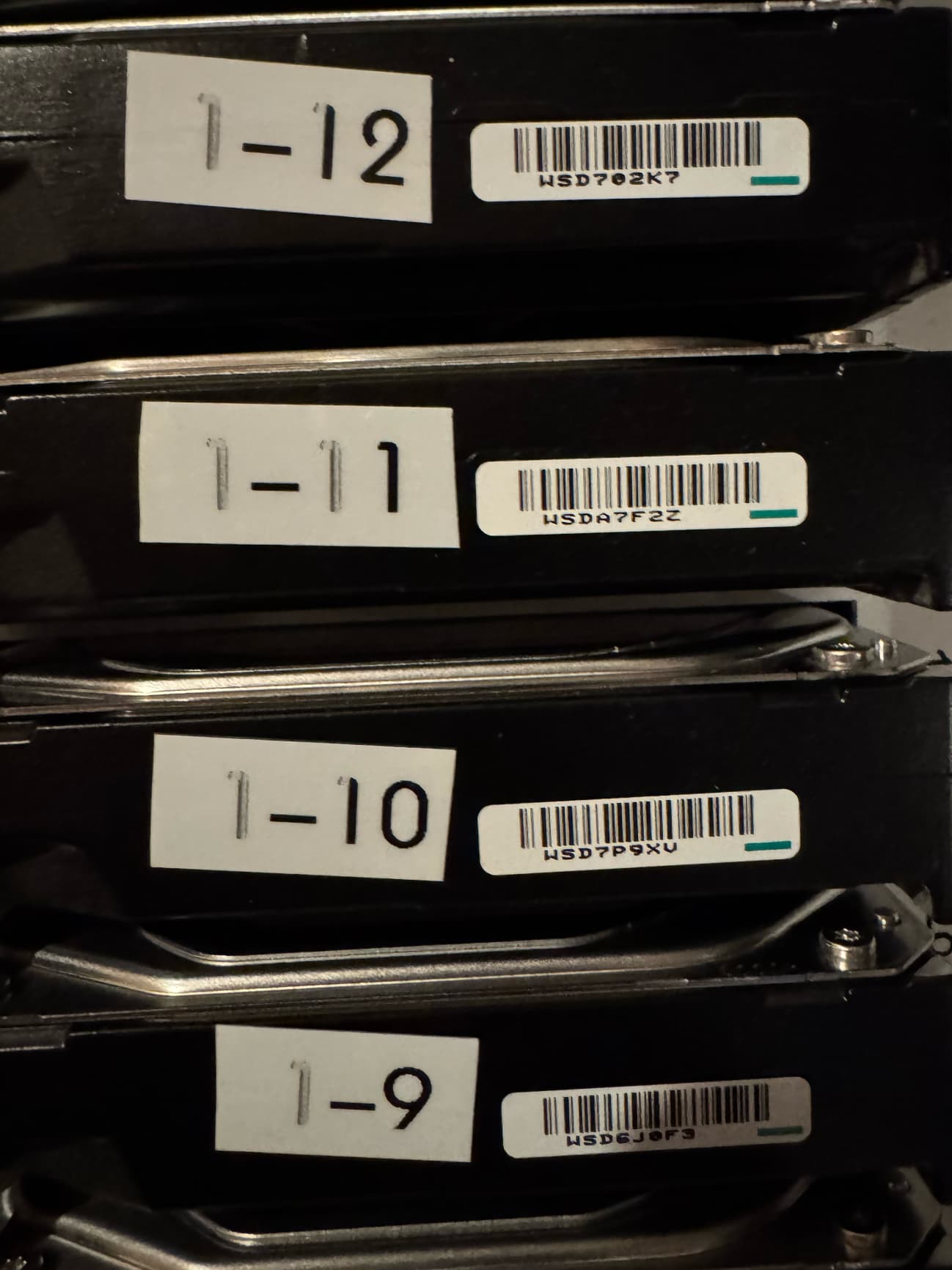
When inserting drives, I label them with the slot they’ll be in, the serial # of the drive is next to the label:

I keep these drive slot numbers and the serial numbers in a text file as reference/backup.

Yep…

I am not sure I’m providing what you’re looking for but the HL15 website refers to the backplane as: Direct Wired 45Drives 15x SATA/SAS and refers to HBA Card LSI 9400-16i.

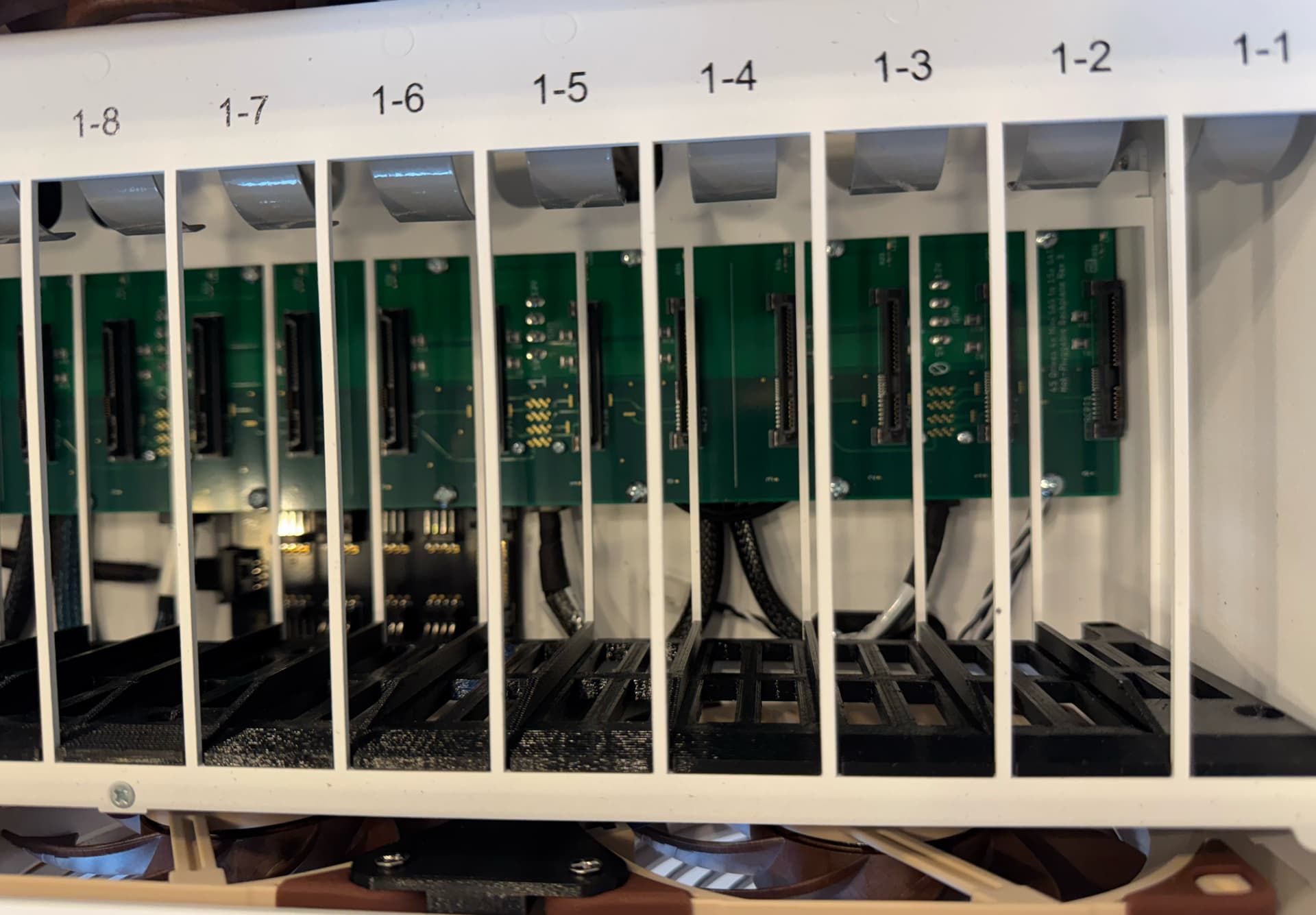
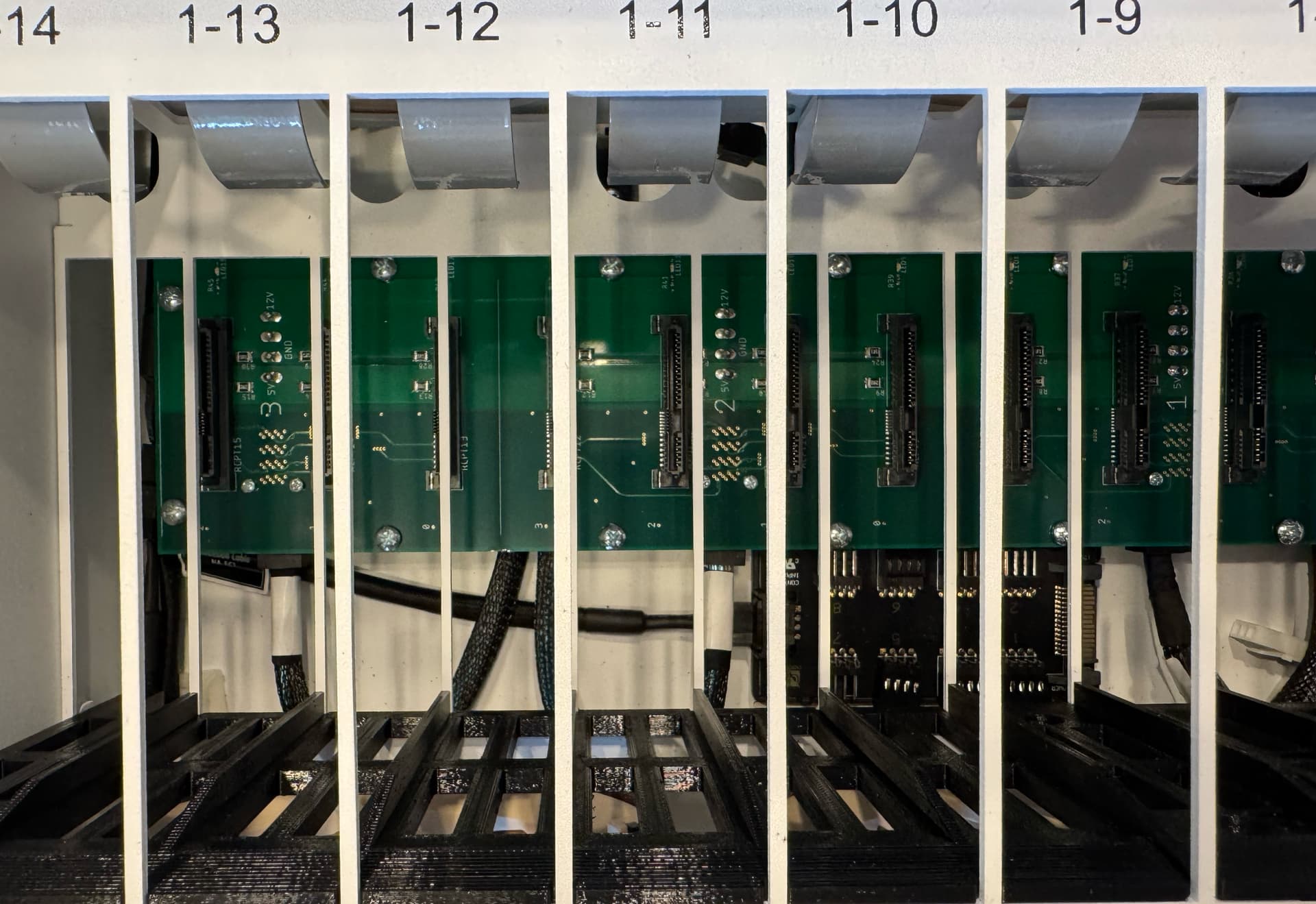
More photos:

Status Update:

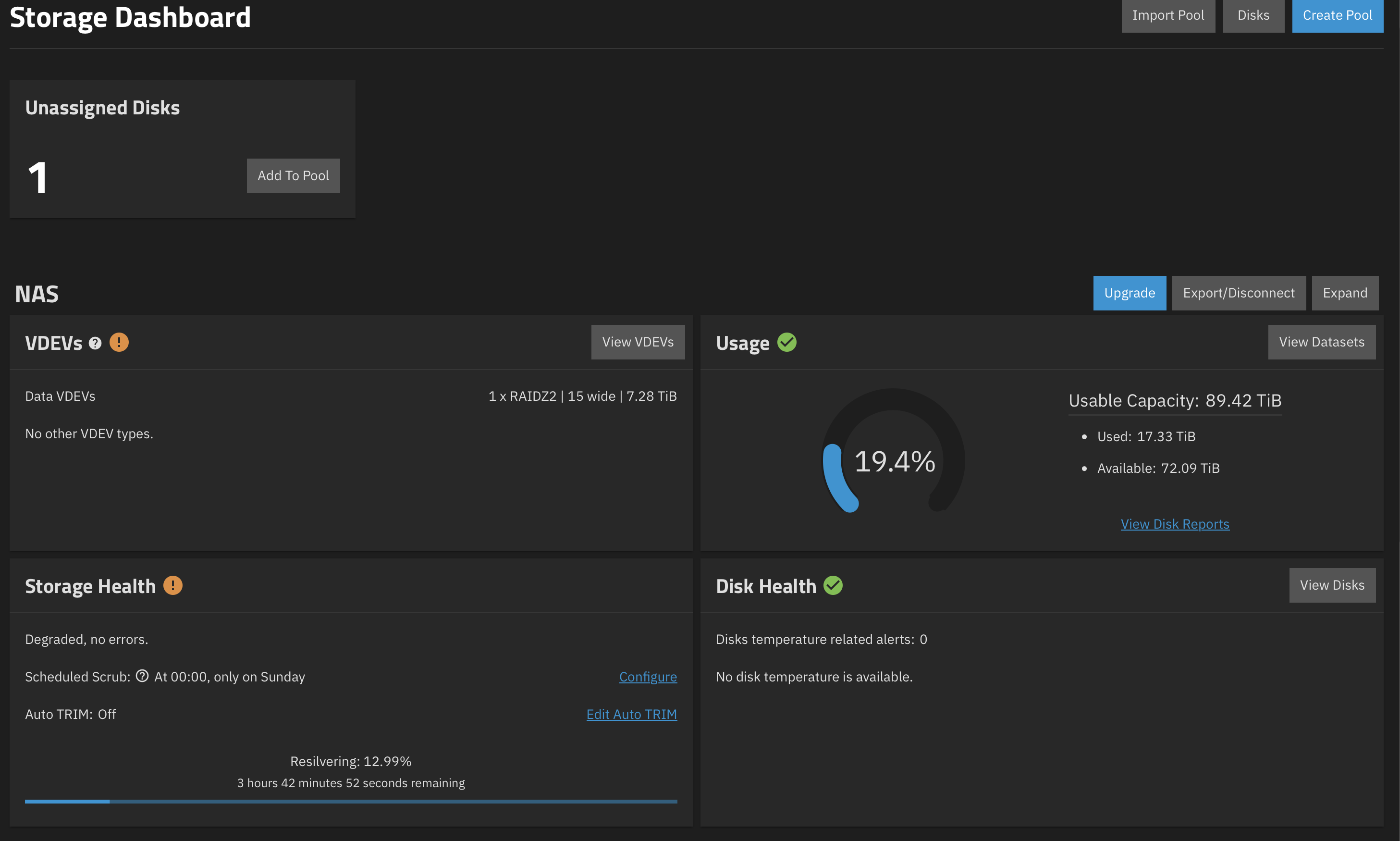
I shutdown TrueNAS via the webUI, removed drives from slots 9 and 12, after 45 seconds I reinstalled them in the same bays. Now in the storage dashboard I see:

In the shell:

sudo zpool status NAS -v[sudo] password for truenas_admin:pool: NASstate: DEGRADEDstatus: One or more devices is currently being resilvered.  The pool willcontinue to function, possibly in a degraded state.action: Wait for the resilver to complete.scan: resilver in progress since Sat Nov 29 13:14:46 20254.16T / 21.1T scanned, 3.00T / 21.1T issued at 1.42G/s185G resilvered, 14.20% done, 03:37:24 to goconfig:
    NAME                                      STATE     READ WRITE CKSUM
    NAS                                       DEGRADED     0     0     0
      raidz2-0                                DEGRADED     0     0     0
        5eba54cd-7a08-4b07-b91f-d3acce4a0399  ONLINE       0     0     0
        c5b1e26b-5750-486f-8f8e-ee792a762766  ONLINE       0     0     0
        392b307d-5c54-4f75-8dd9-ebd05027baf5  ONLINE       0     0     0
        3574d667-20d2-4563-af09-0d9c950023bb  ONLINE       0     0     0
        5a2deeab-77f8-4402-aabe-4fbf2a942810  ONLINE       0     0     0
        5b872f92-2a1b-497f-8bb0-57fbd6ca8d5a  ONLINE       0     0     0
        1f5aba53-39c8-4b74-9fb3-57d235c47c5e  ONLINE       0     0     0
        862b94e4-2494-45f6-ad7d-fa6419bac8c7  ONLINE       0     0     0
        6da8eb82-5a5a-4fec-bb49-e61a259ca731  REMOVED      0     0     0
        07979b3b-a51c-489e-9367-296b3be30626  ONLINE       0     0     0
        9e4a1e31-4a04-408d-bd48-c8e022c2a03e  ONLINE       0     0     0
        6eb66f47-cb2a-4ac5-8678-bd58d14e658f  ONLINE       0     0     0  (resilvering)
        41ce1f88-f294-4a34-8904-2e80b63f1f13  ONLINE       0     0     0
        6917bb71-77b7-4a51-8a2f-144267f97652  ONLINE       0     0     0
        84ddeff7-4997-4eff-ac09-5a5264d9ec82  ONLINE       0     0     0
errors: No known data errors

:up_arrow: that’s me trying to learn how to use </> properly.

Some progress. 16325599693649201829 came back, and is resilvering. If you know its current device name, get SMART data (smartctl -v /dev/sdX ).
Do you see all 15 drives in lsblk now, or still just 14? There is an unassigned disk.

I meant “a sizeable heatsink on the backplane”, most likely on the “back” side, opposite the drive connectors. One the motherboard, these are, of course CPU, chipset and on-board HBA.

“Direct” means it is just a passive backplane. No expander.

In progress. :wink: Just select the whole block and click on </> .
Alternatively, type two lines with three backquotes, and paste the shell output between these lines:
```
multiline shell output
goes here
```

Let’s try with sas3flash -list to check the firmware on the on-board HBA, which you’re using after all. (Or was it a picture as received, and then you’ve unplugged the SAS cables and put your 9500s instead?)

I have no idea but I’m guessing the answer is no. There are a total of 6 noctua fans (3 in front of the drives and 3 behind as you may have seen in the photos) but I’m not aware of anything attached to the backplane.

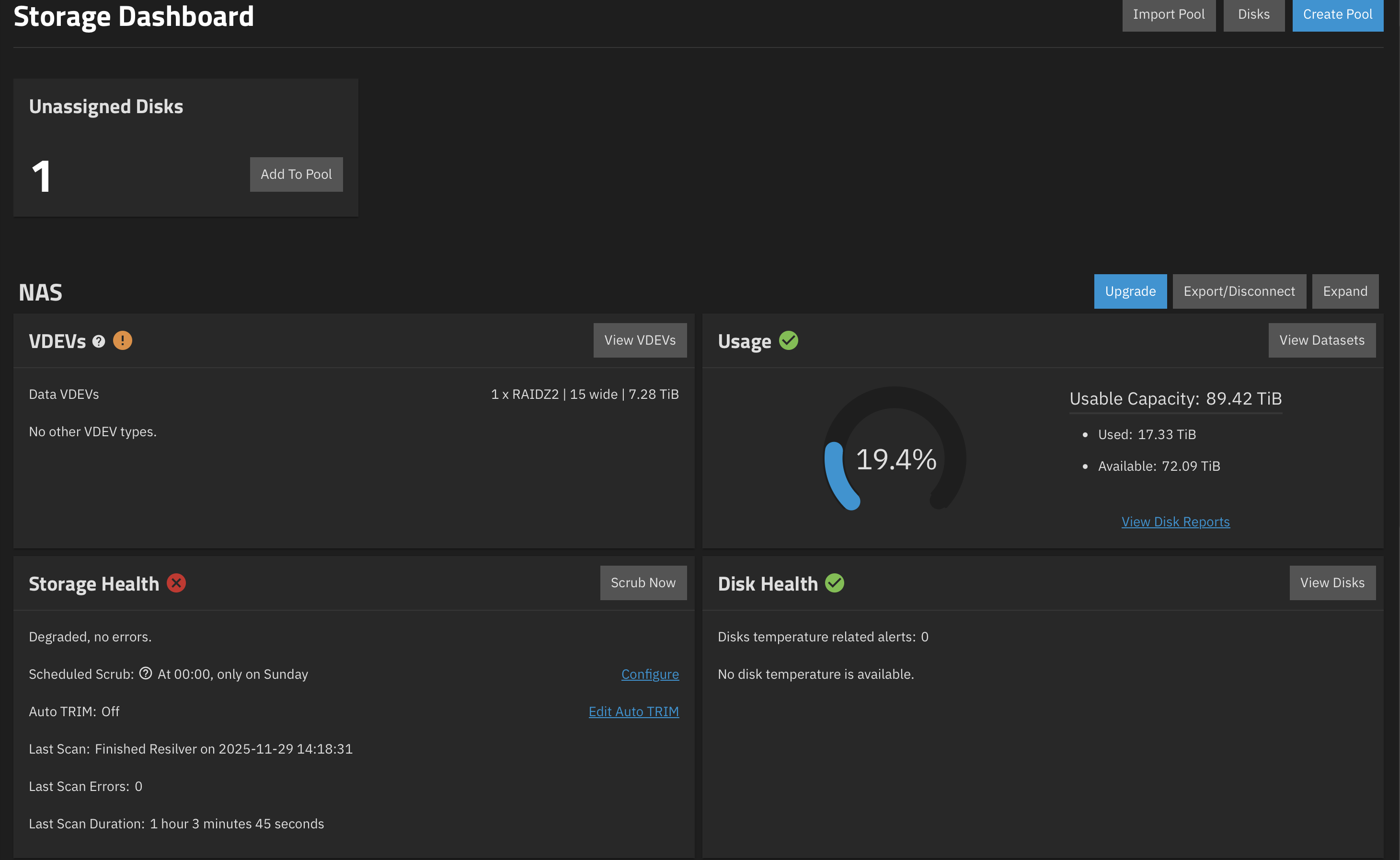
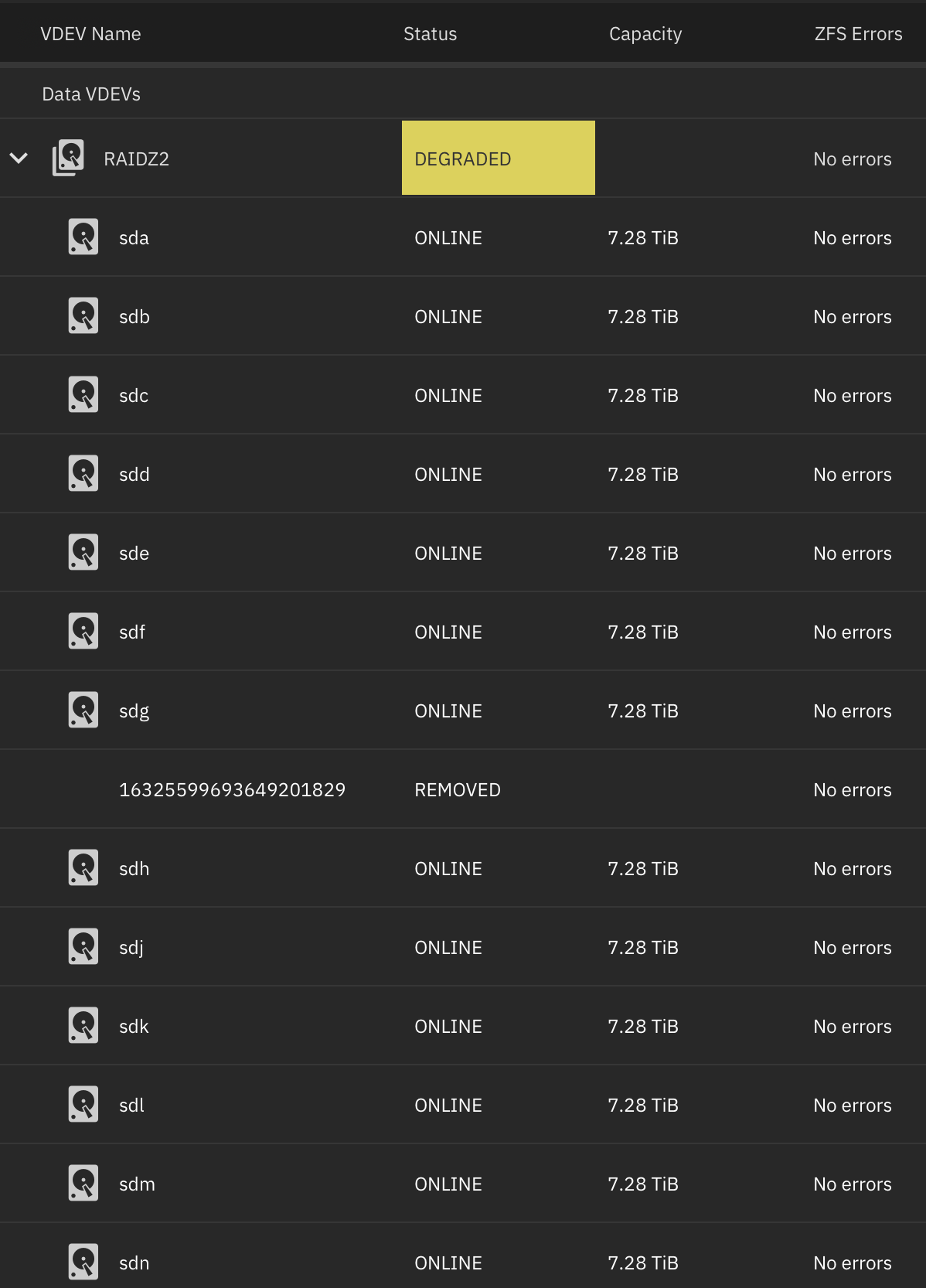
It seems that resilvering must’ve failed as I now see the following in the VDEV dashboard:

lsblk
NAME        MAJ:MIN RM   SIZE RO TYPE MOUNTPOINTS
sda           8:0    0   7.3T  0 disk 
└─sda1        8:1    0   7.3T  0 part 
sdb           8:16   0   7.3T  0 disk 
└─sdb1        8:17   0   7.3T  0 part 
sdc           8:32   0   7.3T  0 disk 
└─sdc1        8:33   0   7.3T  0 part 
sdd           8:48   0   7.3T  0 disk 
└─sdd1        8:49   0   7.3T  0 part 
sde           8:64   0   7.3T  0 disk 
└─sde1        8:65   0   7.3T  0 part 
sdf           8:80   0   7.3T  0 disk 
└─sdf1        8:81   0   7.3T  0 part 
sdg           8:96   0   7.3T  0 disk 
└─sdg1        8:97   0   7.3T  0 part 
sdh           8:112  0   7.3T  0 disk 
└─sdh1        8:113  0   7.3T  0 part 
sdi           8:128  0   7.3T  0 disk 
sdj           8:144  0   7.3T  0 disk 
└─sdj1        8:145  0   7.3T  0 part 
sdk           8:160  0   7.3T  0 disk 
└─sdk1        8:161  0   7.3T  0 part 
sdl           8:176  0   7.3T  0 disk 
└─sdl1        8:177  0   7.3T  0 part 
sdm           8:192  0   7.3T  0 disk 
└─sdm1        8:193  0   7.3T  0 part 
sdn           8:208  0   7.3T  0 disk 
└─sdn1        8:209  0   7.3T  0 part 
sdo           8:224  0   7.3T  0 disk 
└─sdo1        8:225  0   7.3T  0 part 
nvme0n1     259:0    0 931.5G  0 disk 
├─nvme0n1p1 259:1    0     1M  0 part 
├─nvme0n1p2 259:2    0   512M  0 part 
├─nvme0n1p3 259:3    0  99.5G  0 part 
└─nvme0n1p4 259:4    0 831.5G  0 part 

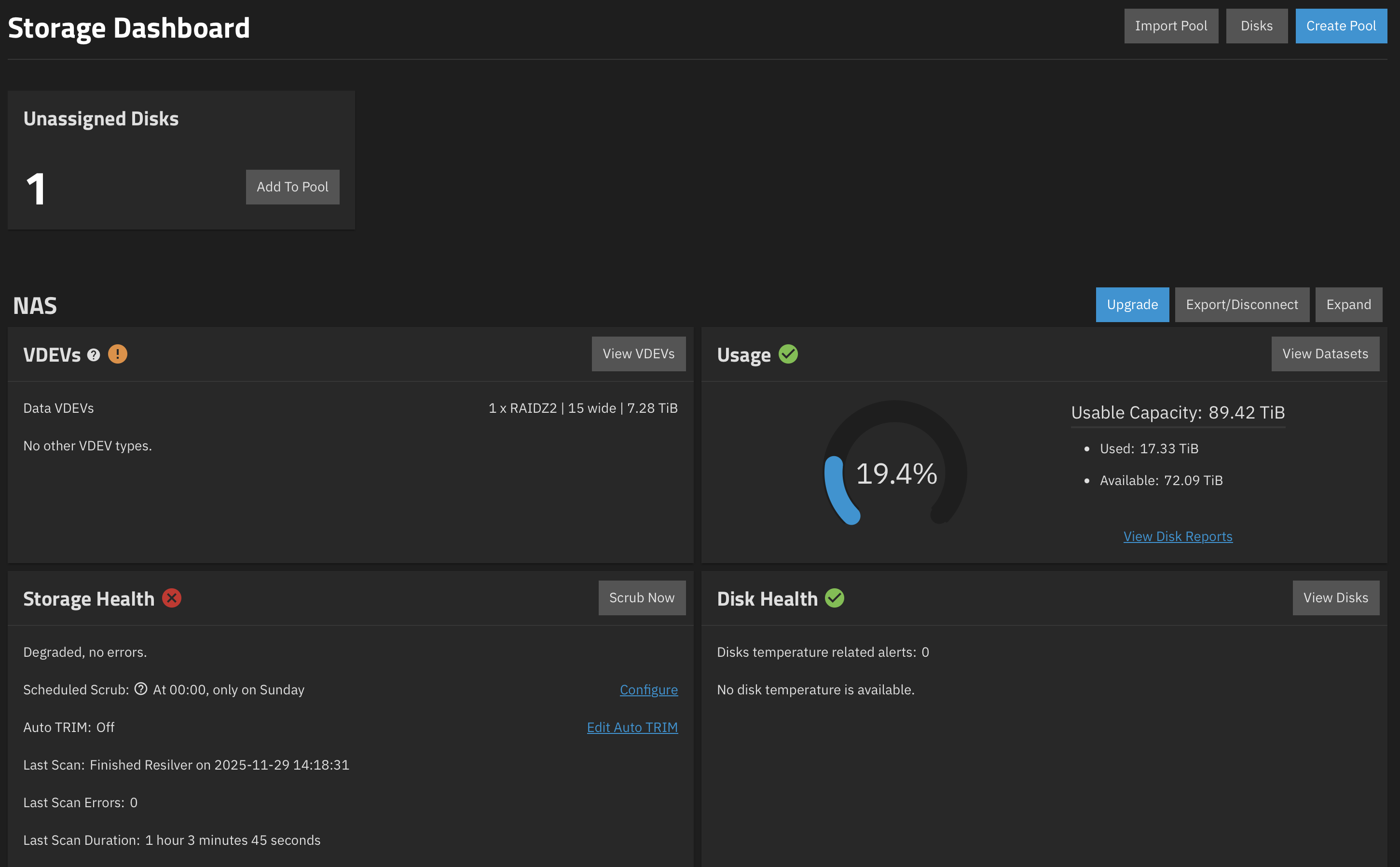
Here’s what I see at the main storage dashboard:

sas3flash -list
Avago Technologies SAS3 Flash Utility
Version 16.00.00.00 (2017.05.02) 
Copyright 2008-2017 Avago Technologies. All rights reserved.

        No Avago SAS adapters found! Limited Command Set Available!
        ERROR: Command Not allowed without an adapter!
        ERROR: Couldn't Create Command -list
        Exiting Program.

I didn’t do any cabling once I received the HL15, I just inserted the drives, powered it up and installed TrueNAS OS.

We know the answer is ‘no’ because it is a passive backplane. There is no SAS expander to cool—and if it were it wouldn’t get any air.

Let’s see:
sudo zpool status -v
sudo smartctl -x /dev/sdo

(On-board HBA must be disabled in BIOS, but formatted text test is passed. :clap: )

sudo zpool status -v
sudo smartctl -x /dev/sdo
[sudo] password for truenas_admin: 
  pool: NAS
 state: DEGRADED
status: One or more devices have been removed.
        Sufficient replicas exist for the pool to continue functioning in a
        degraded state.
action: Online the device using zpool online' or replace the device with
        'zpool replace'.
  scan: resilvered 263G in 01:03:45 with 0 errors on Sat Nov 29 14:18:31 2025
config:

        NAME                                      STATE     READ WRITE CKSUM
        NAS                                       DEGRADED     0     0     0
          raidz2-0                                DEGRADED     0     0     0
            5eba54cd-7a08-4b07-b91f-d3acce4a0399  ONLINE       0     0     0
            c5b1e26b-5750-486f-8f8e-ee792a762766  ONLINE       0     0     0
            392b307d-5c54-4f75-8dd9-ebd05027baf5  ONLINE       0     0     0
            3574d667-20d2-4563-af09-0d9c950023bb  ONLINE       0     0     0
            5a2deeab-77f8-4402-aabe-4fbf2a942810  ONLINE       0     0     0
            5b872f92-2a1b-497f-8bb0-57fbd6ca8d5a  ONLINE       0     0     0
            1f5aba53-39c8-4b74-9fb3-57d235c47c5e  ONLINE       0     0     0
            862b94e4-2494-45f6-ad7d-fa6419bac8c7  ONLINE       0     0     0
            6da8eb82-5a5a-4fec-bb49-e61a259ca731  REMOVED      0     0     0
            07979b3b-a51c-489e-9367-296b3be30626  ONLINE       0     0     0
            9e4a1e31-4a04-408d-bd48-c8e022c2a03e  ONLINE       0     0     0
            6eb66f47-cb2a-4ac5-8678-bd58d14e658f  ONLINE       0     0     0
            41ce1f88-f294-4a34-8904-2e80b63f1f13  ONLINE       0     0     0
            6917bb71-77b7-4a51-8a2f-144267f97652  ONLINE       0     0     0
            84ddeff7-4997-4eff-ac09-5a5264d9ec82  ONLINE       0     0     0

errors: No known data errors

  pool: boot-pool
 state: ONLINE
  scan: scrub repaired 0B in 00:00:13 with 0 errors on Sun Nov 23 03:45:15 2025
config:

        NAME         STATE     READ WRITE CKSUM
        boot-pool    ONLINE       0     0     0
          nvme0n1p3  ONLINE       0     0     0

errors: No known data errors

  pool: nvme-storage
 state: ONLINE
status: Some supported and requested features are not enabled on the pool.
        The pool can still be used, but some features are unavailable.
action: Enable all features using 'zpool upgrade'. Once this is done,
        the pool may no longer be accessible by software that does not support
        the features. See zpool-features(7) for details.
  scan: scrub repaired 0B in 00:01:09 with 0 errors on Sun Nov  2 00:01:11 2025
config:

        NAME          STATE     READ WRITE CKSUM
        nvme-storage  ONLINE       0     0     0
          nvme0n1p4   ONLINE       0     0     0

errors: No known data errors
smartctl 7.4 2023-08-01 r5530 [x86_64-linux-6.12.33-production+truenas] (local build)
Copyright (C) 2002-23, Bruce Allen, Christian Franke, www.smartmontools.org

=== START OF INFORMATION SECTION ===
Model Family:     Seagate Exos 7E8
Device Model:     ST8000NM000A-2KE101
Serial Number:    WSD9VFL6
LU WWN Device Id: 5 000c50 0f173e15d
Firmware Version: SN04
User Capacity:    8,001,563,222,016 bytes [8.00 TB]
Sector Sizes:     512 bytes logical, 4096 bytes physical
Rotation Rate:    7200 rpm
Form Factor:      3.5 inches
Device is:        In smartctl database 7.3/5528
ATA Version is:   ACS-4 (minor revision not indicated)
SATA Version is:  SATA 3.3, 6.0 Gb/s (current: 6.0 Gb/s)
Local Time is:    Sat Nov 29 15:47:03 2025 CST
SMART support is: Available - device has SMART capability.
SMART support is: Enabled
AAM feature is:   Unavailable
APM feature is:   Unavailable
Rd look-ahead is: Enabled
Write cache is:   Enabled
DSN feature is:   Disabled
ATA Security is:  Disabled, NOT FROZEN [SEC1]
Write SCT (Get) Feature Control Command failed: scsi error aborted command
Wt Cache Reorder: Unknown (SCT Feature Control command failed)

=== START OF READ SMART DATA SECTION ===
SMART overall-health self-assessment test result: PASSED

General SMART Values:
Offline data collection status:  (0x82) Offline data collection activity
                                        was completed without error.
                                        Auto Offline Data Collection: Enabled.
Self-test execution status:      (   0) The previous self-test routine completed
                                        without error or no self-test has ever 
                                        been run.
Total time to complete Offline 
data collection:                (  559) seconds.
Offline data collection
capabilities:                    (0x7b) SMART execute Offline immediate.
                                        Auto Offline data collection on/off support.
                                        Suspend Offline collection upon new
                                        command.
                                        Offline surface scan supported.
                                        Self-test supported.
                                        Conveyance Self-test supported.
                                        Selective Self-test supported.
SMART capabilities:            (0x0003) Saves SMART data before entering
                                        power-saving mode.
                                        Supports SMART auto save timer.
Error logging capability:        (0x01) Error logging supported.
                                        General Purpose Logging supported.
Short self-test routine 
recommended polling time:        (   1) minutes.
Extended self-test routine
recommended polling time:        ( 712) minutes.
Conveyance self-test routine
recommended polling time:        (   2) minutes.
SCT capabilities:              (0x70bd) SCT Status supported.
                                        SCT Error Recovery Control supported.
                                        SCT Feature Control supported.
                                        SCT Data Table supported.

SMART Attributes Data Structure revision number: 10
Vendor Specific SMART Attributes with Thresholds:
ID# ATTRIBUTE_NAME          FLAGS    VALUE WORST THRESH FAIL RAW_VALUE
  1 Raw_Read_Error_Rate     POSR--   083   064   044    -    209677744
  3 Spin_Up_Time            PO----   090   090   000    -    0
  4 Start_Stop_Count        -O--CK   100   100   020    -    8
  5 Reallocated_Sector_Ct   PO--CK   100   100   010    -    0
  7 Seek_Error_Rate         POSR--   079   060   045    -    4370584021
  9 Power_On_Hours          -O--CK   089   089   000    -    9642
 10 Spin_Retry_Count        PO--C-   100   100   097    -    0
 12 Power_Cycle_Count       -O--CK   100   100   020    -    8
 18 Head_Health             PO-R--   100   100   050    -    0
187 Reported_Uncorrect      -O--CK   100   100   000    -    0
188 Command_Timeout         -O--CK   100   100   000    -    0
190 Airflow_Temperature_Cel -O---K   072   066   040    -    28 (Min/Max 28/31)
192 Power-Off_Retract_Count -O--CK   100   100   000    -    4
193 Load_Cycle_Count        -O--CK   081   081   000    -    38050
194 Temperature_Celsius     -O---K   028   040   000    -    28 (0 20 0 0 0)
195 Hardware_ECC_Recovered  -O-RC-   008   001   000    -    209677744
197 Current_Pending_Sector  -O--C-   100   100   000    -    0
198 Offline_Uncorrectable   ----C-   100   100   000    -    0
199 UDMA_CRC_Error_Count    -OSRCK   200   200   000    -    0
240 Head_Flying_Hours       ------   100   253   000    -    2897h+51m+28.286s
241 Total_LBAs_Written      ------   100   253   000    -    4464410128
242 Total_LBAs_Read         ------   100   253   000    -    29213342384
                            ||||||_ K auto-keep
                            |||||__ C event count
                            ||||___ R error rate
                            |||____ S speed/performance
                            ||_____ O updated online
                            |______ P prefailure warning

General Purpose Log Directory Version 1
SMART           Log Directory Version 1 [multi-sector log support]
Address    Access  R/W   Size  Description
0x00       GPL,SL  R/O      1  Log Directory
0x01           SL  R/O      1  Summary SMART error log
0x02           SL  R/O      5  Comprehensive SMART error log
0x03       GPL     R/O      5  Ext. Comprehensive SMART error log
0x04       GPL     R/O    256  Device Statistics log
0x04       SL      R/O      8  Device Statistics log
0x06           SL  R/O      1  SMART self-test log
0x07       GPL     R/O      1  Extended self-test log
0x08       GPL     R/O      2  Power Conditions log
0x09           SL  R/W      1  Selective self-test log
0x0a       GPL     R/W      8  Device Statistics Notification
0x0c       GPL     R/O   2048  Pending Defects log
0x10       GPL     R/O      1  NCQ Command Error log
0x11       GPL     R/O      1  SATA Phy Event Counters log
0x13       GPL     R/O      1  SATA NCQ Send and Receive log
0x15       GPL     R/W      1  Rebuild Assist log
0x21       GPL     R/O      1  Write stream error log
0x22       GPL     R/O      1  Read stream error log
0x24       GPL     R/O    768  Current Device Internal Status Data log
0x2f       GPL     R/O      1  Set Sector Configuration
0x30       GPL,SL  R/O      9  IDENTIFY DEVICE data log
0x80-0x9f  GPL,SL  R/W     16  Host vendor specific log
0xa1       GPL,SL  VS      24  Device vendor specific log
0xa2       GPL     VS   16320  Device vendor specific log
0xa4       GPL,SL  VS     160  Device vendor specific log
0xa6       GPL     VS     192  Device vendor specific log
0xa8-0xa9  GPL,SL  VS     136  Device vendor specific log
0xab       GPL     VS       1  Device vendor specific log
0xad       GPL     VS      16  Device vendor specific log
0xb6       GPL     VS    1920  Device vendor specific log
0xbe-0xbf  GPL     VS   65535  Device vendor specific log
0xc1       GPL,SL  VS       8  Device vendor specific log
0xc3       GPL,SL  VS      32  Device vendor specific log
0xc9       GPL,SL  VS       8  Device vendor specific log
0xca       GPL,SL  VS      16  Device vendor specific log
0xcd       GPL,SL  VS       8  Device vendor specific log
0xd1       GPL     VS     336  Device vendor specific log
0xd2       GPL     VS   10000  Device vendor specific log
0xd4       GPL     VS    2048  Device vendor specific log
0xda       GPL,SL  VS       1  Device vendor specific log
0xe0       GPL,SL  R/W      1  SCT Command/Status
0xe1       GPL,SL  R/W      1  SCT Data Transfer

SMART Extended Comprehensive Error Log Version: 1 (5 sectors)
No Errors Logged

SMART Extended Self-test Log Version: 1 (1 sectors)
Num  Test_Description    Status                  Remaining  LifeTime(hours)  LBA_of_first_error
# 1  Short offline       Completed without error       00%      9482         -
# 2  Short offline       Completed without error       00%      9314         -
# 3  Short offline       Completed without error       00%      9146         -
# 4  Short offline       Completed without error       00%      8977         -
# 5  Short offline       Completed without error       00%      8809         -
# 6  Short offline       Completed without error       00%      8641         -
# 7  Short offline       Completed without error       00%      8473         -
# 8  Short offline       Completed without error       00%      8305         -
# 9  Short offline       Completed without error       00%      8137         -
#10  Short offline       Completed without error       00%      7969         -
#11  Short offline       Completed without error       00%      7801         -
#12  Short offline       Completed without error       00%      7633         -
#13  Short offline       Completed without error       00%      7465         -
#14  Short offline       Completed without error       00%      7297         -
#15  Short offline       Completed without error       00%      7129         -
#16  Short offline       Completed without error       00%      6961         -
#17  Short offline       Completed without error       00%      6793         -
#18  Short offline       Completed without error       00%      6625         -
#19  Short offline       Completed without error       00%      6457         -

SMART Selective self-test log data structure revision number 1
 SPAN  MIN_LBA  MAX_LBA  CURRENT_TEST_STATUS
    1        0        0  Not_testing
    2        0        0  Not_testing
    3        0        0  Not_testing
    4        0        0  Not_testing
    5        0        0  Not_testing
Selective self-test flags (0x0):
  After scanning selected spans, do NOT read-scan remainder of disk.
If Selective self-test is pending on power-up, resume after 0 minute delay.

SCT Status Version:                  3
SCT Version (vendor specific):       522 (0x020a)
Device State:                        Active (0)
Current Temperature:                    28 Celsius
Power Cycle Min/Max Temperature:     28/31 Celsius
Lifetime    Min/Max Temperature:     20/34 Celsius
Under/Over Temperature Limit Count:   0/0
SMART Status:                        0xc24f (PASSED)
Vendor specific:
00 00 00 00 00 00 00 00 00 00 00 00 00 00 00 00
00 00 00 00 02 00 00 00 00 00 00 00 00 00 00 00

SCT Temperature History Version:     2
Temperature Sampling Period:         3 minutes
Temperature Logging Interval:        59 minutes
Min/Max recommended Temperature:     10/40 Celsius
Min/Max Temperature Limit:            5/60 Celsius
Temperature History Size (Index):    128 (57)

Index    Estimated Time   Temperature Celsius
  58    2025-11-24 10:54    29  **********
  59    2025-11-24 11:53    28  *********
  60    2025-11-24 12:52    29  **********
  61    2025-11-24 13:51    29  **********
  62    2025-11-24 14:50    29  **********
  63    2025-11-24 15:49    30  ***********
  64    2025-11-24 16:48    29  **********
  65    2025-11-24 17:47    29  **********
  66    2025-11-24 18:46    29  **********
  67    2025-11-24 19:45    28  *********
 ...    ..(  2 skipped).    ..  *********
  70    2025-11-24 22:42    28  *********
  71    2025-11-24 23:41    29  **********
  72    2025-11-25 00:40    29  **********
  73    2025-11-25 01:39    29  **********
  74    2025-11-25 02:38    30  ***********
  75    2025-11-25 03:37    28  *********
  76    2025-11-25 04:36    28  *********
  77    2025-11-25 05:35    28  *********
  78    2025-11-25 06:34    30  ***********
  79    2025-11-25 07:33    29  **********
  80    2025-11-25 08:32    29  **********
  81    2025-11-25 09:31    28  *********
  82    2025-11-25 10:30    28  *********
  83    2025-11-25 11:29    28  *********
  84    2025-11-25 12:28    29  **********
  85    2025-11-25 13:27    28  *********
  86    2025-11-25 14:26    27  ********
  87    2025-11-25 15:25    29  **********
 ...    ..(  3 skipped).    ..  **********
  91    2025-11-25 19:21    29  **********
  92    2025-11-25 20:20    28  *********
 ...    ..(  3 skipped).    ..  *********
  96    2025-11-26 00:16    28  *********
  97    2025-11-26 01:15    29  **********
 ...    ..(  5 skipped).    ..  **********
 103    2025-11-26 07:09    29  **********
 104    2025-11-26 08:08    30  ***********
 105    2025-11-26 09:07    30  ***********
 106    2025-11-26 10:06    30  ***********
 107    2025-11-26 11:05    29  **********
 ...    ..(  2 skipped).    ..  **********
 110    2025-11-26 14:02    29  **********
 111    2025-11-26 15:01    28  *********
 112    2025-11-26 16:00    29  **********
 113    2025-11-26 16:59    29  **********
 114    2025-11-26 17:58    30  ***********
 115    2025-11-26 18:57    30  ***********
 116    2025-11-26 19:56    29  **********
 117    2025-11-26 20:55    30  ***********
 ...    ..(  4 skipped).    ..  ***********
 122    2025-11-27 01:50    30  ***********
 123    2025-11-27 02:49    29  **********
 124    2025-11-27 03:48    30  ***********
 125    2025-11-27 04:47    31  ************
 126    2025-11-27 05:46    30  ***********
 ...    ..(  2 skipped).    ..  ***********
   1    2025-11-27 08:43    30  ***********
   2    2025-11-27 09:42    29  **********
   3    2025-11-27 10:41    29  **********
   4    2025-11-27 11:40    28  *********
 ...    ..(  3 skipped).    ..  *********
   8    2025-11-27 15:36    28  *********
   9    2025-11-27 16:35    29  **********
  10    2025-11-27 17:34    29  **********
  11    2025-11-27 18:33    27  ********
  12    2025-11-27 19:32    28  *********
  13    2025-11-27 20:31    29  **********
  14    2025-11-27 21:30    29  **********
  15    2025-11-27 22:29    29  **********
  16    2025-11-27 23:28    30  ***********
 ...    ..(  4 skipped).    ..  ***********
  21    2025-11-28 04:23    30  ***********
  22    2025-11-28 05:22    29  **********
  23    2025-11-28 06:21    28  *********
  24    2025-11-28 07:20    28  *********
  25    2025-11-28 08:19    29  **********
  26    2025-11-28 09:18    28  *********
  27    2025-11-28 10:17    29  **********
  28    2025-11-28 11:16    29  **********
  29    2025-11-28 12:15    29  **********
  30    2025-11-28 13:14    28  *********
  31    2025-11-28 14:13    28  *********
  32    2025-11-28 15:12    29  **********
 ...    ..(  7 skipped).    ..  **********
  40    2025-11-28 23:04    29  **********
  41    2025-11-29 00:03    30  ***********
 ...    ..(  4 skipped).    ..  ***********
  46    2025-11-29 04:58    30  ***********
  47    2025-11-29 05:57    29  **********
  48    2025-11-29 06:56    30  ***********
  49    2025-11-29 07:55    29  **********
  50    2025-11-29 08:54    30  ***********
  51    2025-11-29 09:53    29  **********
  52    2025-11-29 10:52     ?  -
  53    2025-11-29 11:51    29  **********
  54    2025-11-29 12:50     ?  -
  55    2025-11-29 13:49    29  **********
  56    2025-11-29 14:48    31  ************
  57    2025-11-29 15:47    28  *********

SCT Error Recovery Control:
           Read:    100 (10.0 seconds)
          Write:    100 (10.0 seconds)

Device Statistics (GP Log 0x04)
Page  Offset Size        Value Flags Description
0x01  =====  =               =  ===  == General Statistics (rev 1) ==
0x01  0x008  4               8  ---  Lifetime Power-On Resets
0x01  0x010  4            9642  ---  Power-on Hours
0x01  0x018  6      4464233456  ---  Logical Sectors Written
0x01  0x020  6        96800474  ---  Number of Write Commands
0x01  0x028  6     29213245554  ---  Logical Sectors Read
0x01  0x030  6       504099760  ---  Number of Read Commands
0x01  0x038  6               -  ---  Date and Time TimeStamp
0x03  =====  =               =  ===  == Rotating Media Statistics (rev 1) ==
0x03  0x008  4            9641  ---  Spindle Motor Power-on Hours
0x03  0x010  4            4470  ---  Head Flying Hours
0x03  0x018  4           38051  ---  Head Load Events
0x03  0x020  4               0  ---  Number of Reallocated Logical Sectors
0x03  0x028  4               0  ---  Read Recovery Attempts
0x03  0x030  4               0  ---  Number of Mechanical Start Failures
0x03  0x038  4               0  ---  Number of Realloc. Candidate Logical Sectors
0x03  0x040  4               4  ---  Number of High Priority Unload Events
0x04  =====  =               =  ===  == General Errors Statistics (rev 1) ==
0x04  0x008  4               0  ---  Number of Reported Uncorrectable Errors
0x04  0x010  4               0  ---  Resets Between Cmd Acceptance and Completion
0x05  =====  =               =  ===  == Temperature Statistics (rev 1) ==
0x05  0x008  1              28  ---  Current Temperature
0x05  0x010  1              29  ---  Average Short Term Temperature
0x05  0x018  1              28  ---  Average Long Term Temperature
0x05  0x020  1              34  ---  Highest Temperature
0x05  0x028  1              21  ---  Lowest Temperature
0x05  0x030  1              31  ---  Highest Average Short Term Temperature
0x05  0x038  1              25  ---  Lowest Average Short Term Temperature
0x05  0x040  1              28  ---  Highest Average Long Term Temperature
0x05  0x048  1              26  ---  Lowest Average Long Term Temperature
0x05  0x050  4               0  ---  Time in Over-Temperature
0x05  0x058  1              60  ---  Specified Maximum Operating Temperature
0x05  0x060  4               0  ---  Time in Under-Temperature
0x05  0x068  1               5  ---  Specified Minimum Operating Temperature
0x06  =====  =               =  ===  == Transport Statistics (rev 1) ==
0x06  0x008  4              52  ---  Number of Hardware Resets
0x06  0x010  4              23  ---  Number of ASR Events
0x06  0x018  4               0  ---  Number of Interface CRC Errors
0xff  =====  =               =  ===  == Vendor Specific Statistics (rev 1) ==
0xff  0x010  7               0  ---  Vendor Specific
0xff  0x018  7               0  ---  Vendor Specific
                                |||_ C monitored condition met
                                ||__ D supports DSN
                                |___ N normalized value

Pending Defects log (GP Log 0x0c)
No Defects Logged

SATA Phy Event Counters (GP Log 0x11)
ID      Size     Value  Description
0x000a  2            4  Device-to-host register FISes sent due to a COMRESET
0x0001  2            0  Command failed due to ICRC error
0x0003  2            0  R_ERR response for device-to-host data FIS
0x0004  2            0  R_ERR response for host-to-device data FIS
0x0006  2            0  R_ERR response for device-to-host non-data FIS
0x0007  2            0  R_ERR response for host-to-device non-data FIS

Seagate FARM log (GP Log 0xa6) supported [try: -l farm]

From everything I can see in online searches, it looks like the drives are ok. That said, the storage dashboard still shows:


I’m not sure what to do. I appreciate all the help you’ve provided, @etorix

Indeed, sdo looks healthy.
But sdi was dropped from the pool and is no longer recognised.
Maybe it was dropped long enough to be out of sync? Or labels are corrupted?

I suppose that expects could investigate why two drives were dropped for the pool in short sucession.
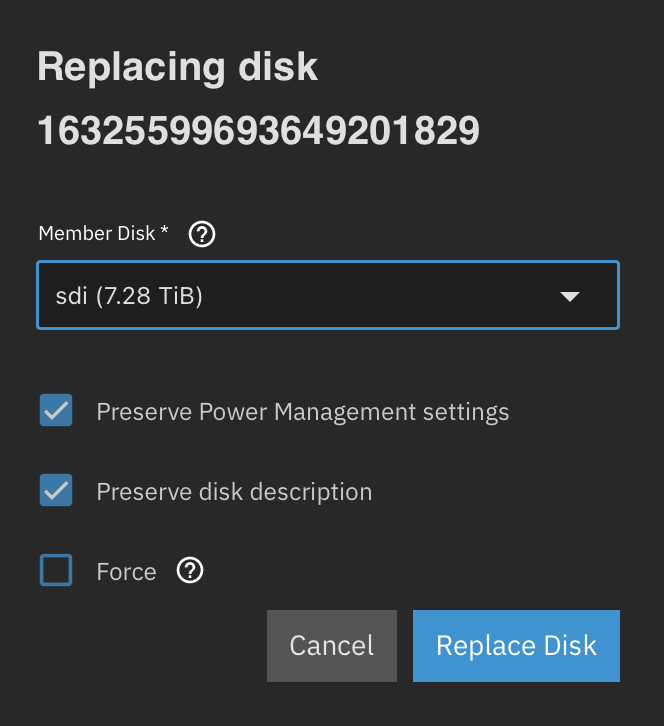
Otherwise, you could (from GUI) “replace” the removed drive by the unassigned disk (that is: replacing the missing drive by itself) and recover full redundancy. But keep an eye on it…

So, trying this is safe?

I would not say it is completely “safe”, since this is the drive which could not give a SMART report, and ultimately you probably should replace it for good, but you may try a “self-replace” to repair the pool. And, well, if this drive cannot complete the resilver, we’ll have another evidence that it is failed.

It probably needs “Force”.


Failed even with force selected.

sudo zpool replace -f NAS 16325599693649201829 sdi
[sudo] password for truenas_admin:
cannot replace 16325599693649201829 with sdi: one or more devices is currently unavailable

So I also suspect that drive is potentially bad. Any other commands to attempt to resolve? If it really is bad, I do have a spare drive to replace with.

Just replace with the spare.

1 Like