Hi All,
I have a TrueNAS Mini X that is out of warranty as of 5/25/2023.
I wanted to do a fresh install over the holidays and, lacking a VGA monitor, I tried to use the IPMI interface. No luck. My router sees a DHCP request from an AMI SPX device that comes and goes when I plug/unplug the IPMI interface. I can ping the IPv4 address that my router assigns. I can’t connect via HTTP, HTTPS, or ssh.
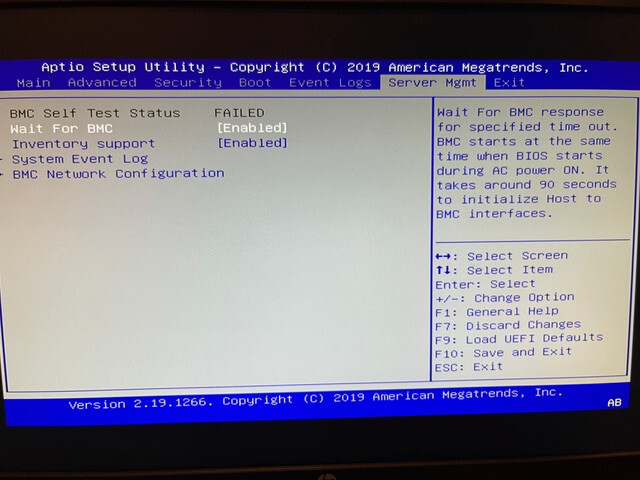
After borrowing a monitor, I found that the “BMC Self Test Status” was FAILED.
Here’s the Server Mgmt screen:
I checked in with IX Systems and they told me to ask here….
I used the monitory/keyboard to do an install, and I’m off and running, but….
I wanted to make sure that the “FAILED” wasn’t due to something I was supposed to have done (user error). The machine works well otherwise.
Any advice, suggestions, or clues?
Thanks,
g.
I’ll make a guess here as I am not familure with this setup. The box to the right wil show some info on each of the lines selectable on the left which will help you.
What you need to do
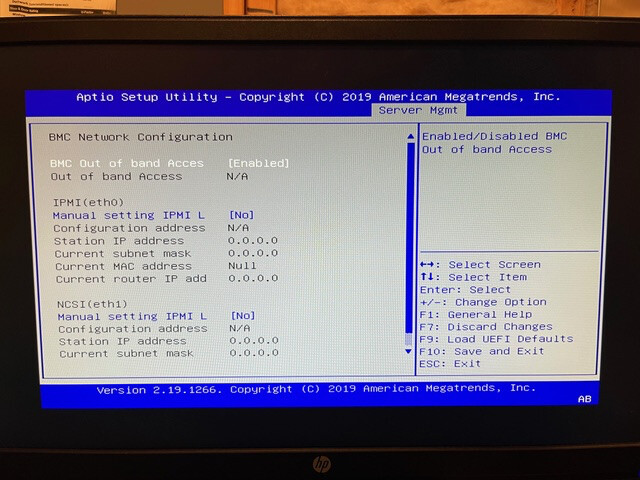
Change Manual setting ipmi address to yes
There should be an option to set DHCP, static (fixed) as the type set to static
change the configuration address to an open ip address on your network
save everything.
you should be able to connect at that address (https ://) to the ipmi using a browser and entering the IPMI username and password
Some systems may fallback to DHCP and failing that to an address of something like 192.168.0.100 as a default address which you can try a laptop set to a static address like 192.168.0.50 and then go to the default static address from the browser. Your motherboard manual should go over what to set, how, and why.