Is this SMART Error?

Hello Guys,

So, I was checking the SMART report for one of my drive. Is it all good?

root@Storage[~]# smartctl -x /dev/ada5
smartctl 7.2 2021-09-14 r5236 [FreeBSD 13.1-RELEASE-p9 amd64] (local build)
Copyright (C) 2002-20, Bruce Allen, Christian Franke, www.smartmontools.org

=== START OF INFORMATION SECTION ===
Device Model:     ST16000NM000J-2TW103
Serial Number:    ZXZXZXZX (Dummy)
LU WWN Device Id: 5 000c50 0e8590180
Firmware Version: SN04
User Capacity:    16,000,900,661,248 bytes [16.0 TB]
Sector Sizes:     512 bytes logical, 4096 bytes physical
Rotation Rate:    7200 rpm
Form Factor:      3.5 inches
Device is:        Not in smartctl database [for details use: -P showall]
ATA Version is:   ACS-4 (minor revision not indicated)
SATA Version is:  SATA 3.3, 6.0 Gb/s (current: 6.0 Gb/s)
Local Time is:    Sun Apr 12 15:12:28 2026 PDT
SMART support is: Available - device has SMART capability.
SMART support is: Enabled
AAM feature is:   Unavailable
APM feature is:   Unavailable
Rd look-ahead is: Enabled
Write cache is:   Enabled
DSN feature is:   Disabled
ATA Security is:  Disabled, NOT FROZEN [SEC1]
Write SCT (Get) Feature Control Command failed: Input/output error
Wt Cache Reorder: Unknown (SCT Feature Control command failed)

=== START OF READ SMART DATA SECTION ===
SMART overall-health self-assessment test result: PASSED

General SMART Values:
Offline data collection status:  (0x82) Offline data collection activity
                                        was completed without error.
                                        Auto Offline Data Collection: Enabled.
Self-test execution status:      (   0) The previous self-test routine completed
                                        without error or no self-test has ever
                                        been run.
Total time to complete Offline
data collection:                (  567) seconds.
Offline data collection
capabilities:                    (0x7b) SMART execute Offline immediate.
                                        Auto Offline data collection on/off support.
                                        Suspend Offline collection upon new
                                        command.
                                        Offline surface scan supported.
                                        Self-test supported.
                                        Conveyance Self-test supported.
                                        Selective Self-test supported.
SMART capabilities:            (0x0003) Saves SMART data before entering
                                        power-saving mode.
                                        Supports SMART auto save timer.
Error logging capability:        (0x01) Error logging supported.
                                        General Purpose Logging supported.
Short self-test routine
recommended polling time:        (   1) minutes.
Extended self-test routine
recommended polling time:        (1389) minutes.
Conveyance self-test routine
recommended polling time:        (   2) minutes.
SCT capabilities:              (0x70bd) SCT Status supported.
                                        SCT Error Recovery Control supported.
                                        SCT Feature Control supported.
                                        SCT Data Table supported.

SMART Attributes Data Structure revision number: 10
Vendor Specific SMART Attributes with Thresholds:
ID# ATTRIBUTE_NAME          FLAGS    VALUE WORST THRESH FAIL RAW_VALUE
  1 Raw_Read_Error_Rate     POSR--   079   073   044    -    88381600
  3 Spin_Up_Time            PO----   095   093   000    -    0
  4 Start_Stop_Count        -O--CK   100   100   020    -    19
  5 Reallocated_Sector_Ct   PO--CK   100   100   010    -    0
  7 Seek_Error_Rate         POSR--   062   060   045    -    1462617
  9 Power_On_Hours          -O--CK   100   100   000    -    7
 10 Spin_Retry_Count        PO--C-   100   100   097    -    0
 12 Power_Cycle_Count       -O--CK   100   100   020    -    19
 18 Unknown_Attribute       PO-R--   100   100   050    -    0
187 Reported_Uncorrect      -O--CK   100   100   000    -    0
188 Command_Timeout         -O--CK   100   100   000    -    0
190 Airflow_Temperature_Cel -O---K   067   061   000    -    33 (Min/Max 33/35)
192 Power-Off_Retract_Count -O--CK   100   100   000    -    8
193 Load_Cycle_Count        -O--CK   100   100   000    -    44
194 Temperature_Celsius     -O---K   033   040   000    -    33 (0 26 0 0 0)
197 Current_Pending_Sector  -O--C-   100   100   000    -    0
198 Offline_Uncorrectable   ----C-   100   100   000    -    0
199 UDMA_CRC_Error_Count    -OSRCK   200   200   000    -    0
200 Multi_Zone_Error_Rate   PO---K   100   100   001    -    0
240 Head_Flying_Hours       ------   100   100   000    -    5 (147 72 0)
241 Total_LBAs_Written      ------   100   253   000    -    4693938015
242 Total_LBAs_Read         ------   100   253   000    -    34467378
                            ||||||_ K auto-keep
                            |||||__ C event count
                            ||||___ R error rate
                            |||____ S speed/performance
                            ||_____ O updated online
                            |______ P prefailure warning

General Purpose Log Directory Version 1
SMART           Log Directory Version 1 [multi-sector log support]
Address    Access  R/W   Size  Description
0x00       GPL,SL  R/O      1  Log Directory
0x01           SL  R/O      1  Summary SMART error log
0x02           SL  R/O      5  Comprehensive SMART error log
0x03       GPL     R/O      5  Ext. Comprehensive SMART error log
0x04       GPL     R/O    256  Device Statistics log
0x04       SL      R/O      8  Device Statistics log
0x06           SL  R/O      1  SMART self-test log
0x07       GPL     R/O      1  Extended self-test log
0x08       GPL     R/O      2  Power Conditions log
0x09           SL  R/W      1  Selective self-test log
0x0a       GPL     R/W      8  Device Statistics Notification
0x0c       GPL     R/O   2048  Pending Defects log
0x10       GPL     R/O      1  NCQ Command Error log
0x11       GPL     R/O      1  SATA Phy Event Counters log
0x13       GPL     R/O      1  SATA NCQ Send and Receive log
0x21       GPL     R/O      1  Write stream error log
0x22       GPL     R/O      1  Read stream error log
0x24       GPL     R/O    768  Current Device Internal Status Data log
0x2f       GPL     -        1  Set Sector Configuration
0x30       GPL,SL  R/O      9  IDENTIFY DEVICE data log
0x80-0x9f  GPL,SL  R/W     16  Host vendor specific log
0xa1       GPL,SL  VS     160  Device vendor specific log
0xa2       GPL     VS   16320  Device vendor specific log
0xa4       GPL,SL  VS     160  Device vendor specific log
0xa6       GPL     VS     192  Device vendor specific log
0xa8-0xa9  GPL,SL  VS     136  Device vendor specific log
0xab       GPL     VS       1  Device vendor specific log
0xad       GPL     VS      16  Device vendor specific log
0xb1       GPL,SL  VS     160  Device vendor specific log
0xb6       GPL     VS    1920  Device vendor specific log
0xbe-0xbf  GPL     VS   65535  Device vendor specific log
0xc1       GPL,SL  VS       8  Device vendor specific log
0xc3       GPL,SL  VS      24  Device vendor specific log
0xc6       GPL     VS    5184  Device vendor specific log
0xc7       GPL,SL  VS       8  Device vendor specific log
0xc9       GPL,SL  VS       8  Device vendor specific log
0xca       GPL,SL  VS      16  Device vendor specific log
0xcd       GPL,SL  VS       1  Device vendor specific log
0xce       GPL     VS       1  Device vendor specific log
0xcf       GPL     VS     512  Device vendor specific log
0xd1       GPL     VS     656  Device vendor specific log
0xd2       GPL     VS   10256  Device vendor specific log
0xd4       GPL     VS    2048  Device vendor specific log
0xda       GPL,SL  VS       1  Device vendor specific log
0xe0       GPL,SL  R/W      1  SCT Command/Status
0xe1       GPL,SL  R/W      1  SCT Data Transfer

SMART Extended Comprehensive Error Log Version: 1 (5 sectors)
No Errors Logged

SMART Extended Self-test Log Version: 1 (1 sectors)
No self-tests have been logged.  [To run self-tests, use: smartctl -t]

SMART Selective self-test log data structure revision number 1
 SPAN  MIN_LBA  MAX_LBA  CURRENT_TEST_STATUS
    1        0        0  Not_testing
    2        0        0  Not_testing
    3        0        0  Not_testing
    4        0        0  Not_testing
    5        0        0  Not_testing
Selective self-test flags (0x0):
  After scanning selected spans, do NOT read-scan remainder of disk.
If Selective self-test is pending on power-up, resume after 0 minute delay.

SCT Status Version:                  3
SCT Version (vendor specific):       522 (0x020a)
Device State:                        Active (0)
Current Temperature:                    33 Celsius
Power Cycle Min/Max Temperature:     33/35 Celsius
Lifetime    Min/Max Temperature:     25/52 Celsius
Under/Over Temperature Limit Count:   0/0
SMART Status:                        0xc24f (PASSED)
Vendor specific:
00 00 00 00 00 00 00 00 00 00 00 00 00 00 00 00
00 00 00 00 02 00 00 00 00 00 00 00 00 00 00 00

SCT Temperature History Version:     2
Temperature Sampling Period:         4 minutes
Temperature Logging Interval:        59 minutes
Min/Max recommended Temperature:     10/40 Celsius
Min/Max Temperature Limit:            5/60 Celsius
Temperature History Size (Index):    128 (43)

Index    Estimated Time   Temperature Celsius
  44    2026-04-07 09:24     ?  -
 ...    ..( 82 skipped).    ..  -
 127    2026-04-10 19:01     ?  -
   0    2026-04-10 20:00    52  *********************************
   1    2026-04-10 20:59     ?  -
   2    2026-04-10 21:58    26  *******
   3    2026-04-10 22:57     ?  -
   4    2026-04-10 23:56    26  *******
   5    2026-04-11 00:55     ?  -
   6    2026-04-11 01:54    26  *******
   7    2026-04-11 02:53     ?  -
   8    2026-04-11 03:52    26  *******
   9    2026-04-11 04:51     ?  -
  10    2026-04-11 05:50    32  *************
  11    2026-04-11 06:49     ?  -
  12    2026-04-11 07:48    25  ******
  13    2026-04-11 08:47     ?  -
  14    2026-04-11 09:46    26  *******
  15    2026-04-11 10:45     ?  -
  16    2026-04-11 11:44    36  *****************
  17    2026-04-11 12:43     ?  -
  18    2026-04-11 13:42    36  *****************
  19    2026-04-11 14:41     ?  -
  20    2026-04-11 15:40    35  ****************
  21    2026-04-11 16:39     ?  -
  22    2026-04-11 17:38    35  ****************
  23    2026-04-11 18:37     ?  -
  24    2026-04-11 19:36    36  *****************
  25    2026-04-11 20:35     ?  -
  26    2026-04-11 21:34    36  *****************
  27    2026-04-11 22:33     ?  -
  28    2026-04-11 23:32    37  ******************
  29    2026-04-12 00:31     ?  -
  30    2026-04-12 01:30    38  *******************
  31    2026-04-12 02:29     ?  -
  32    2026-04-12 03:28    39  ********************
  33    2026-04-12 04:27     ?  -
  34    2026-04-12 05:26    37  ******************
  35    2026-04-12 06:25     ?  -
  36    2026-04-12 07:24    37  ******************
  37    2026-04-12 08:23    35  ****************
  38    2026-04-12 09:22    35  ****************
  39    2026-04-12 10:21     ?  -
  40    2026-04-12 11:20    34  ***************
  41    2026-04-12 12:19    34  ***************
  42    2026-04-12 13:18    33  **************
  43    2026-04-12 14:17    33  **************

SCT Error Recovery Control:
           Read:    100 (10.0 seconds)
          Write:    100 (10.0 seconds)

Device Statistics (GP Log 0x04)
Page  Offset Size        Value Flags Description
0x01  =====  =               =  ===  == General Statistics (rev 1) ==
0x01  0x008  4              19  ---  Lifetime Power-On Resets
0x01  0x010  4               7  ---  Power-on Hours
0x01  0x018  6      4693976927  ---  Logical Sectors Written
0x01  0x020  6         3786570  ---  Number of Write Commands
0x01  0x028  6        34455387  ---  Logical Sectors Read
0x01  0x030  6           86449  ---  Number of Read Commands
0x01  0x038  6               -  ---  Date and Time TimeStamp
0x03  =====  =               =  ===  == Rotating Media Statistics (rev 1) ==
0x03  0x008  4               6  ---  Spindle Motor Power-on Hours
0x03  0x010  4               5  ---  Head Flying Hours
0x03  0x018  4              44  ---  Head Load Events
0x03  0x020  4               0  ---  Number of Reallocated Logical Sectors
0x03  0x028  4               0  ---  Read Recovery Attempts
0x03  0x030  4               0  ---  Number of Mechanical Start Failures
0x03  0x038  4               0  ---  Number of Realloc. Candidate Logical Sectors
0x03  0x040  4               8  ---  Number of High Priority Unload Events
0x04  =====  =               =  ===  == General Errors Statistics (rev 1) ==
0x04  0x008  4               0  ---  Number of Reported Uncorrectable Errors
0x04  0x010  4               0  ---  Resets Between Cmd Acceptance and Completion
0x04  0x018  4               0  -D-  Physical Element Status Changed
0x05  =====  =               =  ===  == Temperature Statistics (rev 1) ==
0x05  0x008  1              33  ---  Current Temperature
0x05  0x010  1               -  ---  Average Short Term Temperature
0x05  0x018  1               -  ---  Average Long Term Temperature
0x05  0x020  1              37  ---  Highest Temperature
0x05  0x028  1              27  ---  Lowest Temperature
0x05  0x030  1               -  ---  Highest Average Short Term Temperature
0x05  0x038  1               -  ---  Lowest Average Short Term Temperature
0x05  0x040  1               -  ---  Highest Average Long Term Temperature
0x05  0x048  1               -  ---  Lowest Average Long Term Temperature
0x05  0x050  4               0  ---  Time in Over-Temperature
0x05  0x058  1              60  ---  Specified Maximum Operating Temperature
0x05  0x060  4               0  ---  Time in Under-Temperature
0x05  0x068  1               5  ---  Specified Minimum Operating Temperature
0x06  =====  =               =  ===  == Transport Statistics (rev 1) ==
0x06  0x008  4              45  ---  Number of Hardware Resets
0x06  0x010  4              17  ---  Number of ASR Events
0x06  0x018  4               0  ---  Number of Interface CRC Errors
0xff  =====  =               =  ===  == Vendor Specific Statistics (rev 1) ==
0xff  0x008  7               0  ---  Vendor Specific
0xff  0x010  7               0  ---  Vendor Specific
0xff  0x018  7               0  ---  Vendor Specific
                                |||_ C monitored condition met
                                ||__ D supports DSN
                                |___ N normalized value

Pending Defects log (GP Log 0x0c)
No Defects Logged

SATA Phy Event Counters (GP Log 0x11)
ID      Size     Value  Description
0x000a  2            3  Device-to-host register FISes sent due to a COMRESET
0x0001  2            0  Command failed due to ICRC error
0x0003  2            0  R_ERR response for device-to-host data FIS
0x0004  2            0  R_ERR response for host-to-device data FIS
0x0006  2            0  R_ERR response for device-to-host non-data FIS
0x0007  2            0  R_ERR response for host-to-device non-data FIS

root@Storage[~]#

I’m worried about the Command failed due to ICRC error. Any help would be really appreciated on this.

Mind using smartctl -a -v 1,raw48:54 /dev/#DRIVENAME# -v 7,raw48:54

This’ll translate the garbage values for fields 1 & 7 to something humans can read.

If it comes back with ā€˜0’s then imo reseat connections & monitor

1 Like

Seagate often does this. They combine bits of data in with the SEEK data report. It can make things look bad. At first glance, I see nothing wrong other than 19 power cycles in 7 hours. I’m sure you are just testing things out but that is a lot. Just my opinion, and you know everyone has one. :clown_face:

You know have 7 hours on the drive, make sure you run a SMART Extended/Long test.
smartctl -t long /dev/ada5 and this test will take a minimum of 24 hours (23 hours and a few minutes with absolutely not NAS activity.)

Will get back to you on this soon.

Hmm. I see. The drive was barely used.

I’m confused about the following:

HeadFlying Hours

EPC Timer

4Kn vs 512e

Head parking

I’m not sure if i’ll have to modify these using SeaChest Utility prior to the deployment in TrueNAS.

Right now it just means that the heads were parked for a while, 44 times. Not alarming unless it continues if this is in a NAS. I prefer to tell people that provided the drive doesn’t spin up more than 4 times in a 24 hour period, then it should be just fine. Warranty speaking, it is okay.

Your drive (likely all drives manufactured today) use Advanced Format (AF) drive. This is where the block of data recorded is 4096 bytes in length. Traditionally data was recorded in 512 bytes, but with the higher capacity drives, 4096 byte blocks are more efficient. 4096 is made up of four 512 byte blocks, also called 512e (emulation). This is normal, nothing to worry about.

When people talk about 4k alignment, they are stating that the drive writes the first 512byte block at the beginning of the 4096 byte block, not in the middle of the block. This is very important if you have an OS which can write 4096 byte blocks natively, like Linux. It is a speed thing.

Well that is not on that output but you ā€œshouldā€ be able to examine that data using the command camcontrol epc /dev/ada5 -v and do a search on the internet for ā€œFreeBSD epcā€ and you should be able to find some details about it. In general you should not need to change these settings. On the old WD drives we could modify the head parking to disable the timer, but that was long ago.

If your drive has been in your NAS the entire time, and you have not set APM for the drives, and the drive keeps clocking up Start_Stop_Cycles and/or Head_Loading/Unloading/Parking numbers, then I’d look into it further, especially if these values really start jumping.

If you do find out that you need to modify the values, you ā€œshould notā€ need Seachest and just use camcontrol. If you do have to pull the drive and use Seachest, then just be careful what computer OS you use. If you use FreeBSD or Linux, you shoudl be fine, if you use Windows :astonished: :face_with_open_eyes_and_hand_over_mouth: :woozy_face:

Hope this helps.

Here you go:

Disk 0: (In use since 2022)

root@Storage[~]# smartctl -a -v 1,raw48:54 /dev/ada0 -v 7,raw48:54
smartctl 7.2 2021-09-14 r5236 [FreeBSD 13.1-RELEASE-p9 amd64] (local build)
Copyright (C) 2002-20, Bruce Allen, Christian Franke, www.smartmontools.org

=== START OF INFORMATION SECTION ===
Model Family:     Seagate Exos X16
Device Model:     ST16000NM001G-2KK103
Serial Number:    ZXZXZXZX
LU WWN Device Id: 5 000c50 0db058de5
Firmware Version: SN03
User Capacity:    16,000,900,661,248 bytes [16.0 TB]
Sector Sizes:     512 bytes logical, 4096 bytes physical
Rotation Rate:    7200 rpm
Form Factor:      3.5 inches
Device is:        In smartctl database [for details use: -P show]
ATA Version is:   ACS-4 (minor revision not indicated)
SATA Version is:  SATA 3.3, 6.0 Gb/s (current: 6.0 Gb/s)
Local Time is:    Tue Apr 14 22:19:40 2026 PDT
SMART support is: Available - device has SMART capability.
SMART support is: Enabled

=== START OF READ SMART DATA SECTION ===
SMART overall-health self-assessment test result: PASSED

General SMART Values:
Offline data collection status:  (0x82) Offline data collection activity
                                        was completed without error.
                                        Auto Offline Data Collection: Enabled.
Self-test execution status:      (   0) The previous self-test routine completed
                                        without error or no self-test has ever
                                        been run.
Total time to complete Offline
data collection:                (  567) seconds.
Offline data collection
capabilities:                    (0x7b) SMART execute Offline immediate.
                                        Auto Offline data collection on/off support.
                                        Suspend Offline collection upon new
                                        command.
                                        Offline surface scan supported.
                                        Self-test supported.
                                        Conveyance Self-test supported.
                                        Selective Self-test supported.
SMART capabilities:            (0x0003) Saves SMART data before entering
                                        power-saving mode.
                                        Supports SMART auto save timer.
Error logging capability:        (0x01) Error logging supported.
                                        General Purpose Logging supported.
Short self-test routine
recommended polling time:        (   1) minutes.
Extended self-test routine
recommended polling time:        (1430) minutes.
Conveyance self-test routine
recommended polling time:        (   2) minutes.
SCT capabilities:              (0x70bd) SCT Status supported.
                                        SCT Error Recovery Control supported.
                                        SCT Feature Control supported.
                                        SCT Data Table supported.

SMART Attributes Data Structure revision number: 10
Vendor Specific SMART Attributes with Thresholds:
ID# ATTRIBUTE_NAME          FLAG     VALUE WORST THRESH TYPE      UPDATED  WHEN_FAILED RAW_VALUE
  1 Raw_Read_Error_Rate     0x000f   080   064   044    Pre-fail  Always       -       0
  3 Spin_Up_Time            0x0003   093   089   000    Pre-fail  Always       -       0
  4 Start_Stop_Count        0x0032   100   100   020    Old_age   Always       -       488
  5 Reallocated_Sector_Ct   0x0033   100   100   010    Pre-fail  Always       -       0
  7 Seek_Error_Rate         0x000f   077   060   045    Pre-fail  Always       -       0
  9 Power_On_Hours          0x0032   099   099   000    Old_age   Always       -       1075
 10 Spin_Retry_Count        0x0013   100   100   097    Pre-fail  Always       -       0
 12 Power_Cycle_Count       0x0032   100   100   020    Old_age   Always       -       492
 18 Head_Health             0x000b   100   100   050    Pre-fail  Always       -       0
187 Reported_Uncorrect      0x0032   100   100   000    Old_age   Always       -       0
188 Command_Timeout         0x0032   100   100   000    Old_age   Always       -       0
190 Airflow_Temperature_Cel 0x0022   063   049   040    Old_age   Always       -       37 (Min/Max 33/37)
192 Power-Off_Retract_Count 0x0032   100   100   000    Old_age   Always       -       53
193 Load_Cycle_Count        0x0032   097   097   000    Old_age   Always       -       6569
194 Temperature_Celsius     0x0022   037   043   000    Old_age   Always       -       37 (0 18 0 0 0)
197 Current_Pending_Sector  0x0012   100   100   000    Old_age   Always       -       0
198 Offline_Uncorrectable   0x0010   100   100   000    Old_age   Offline      -       0
199 UDMA_CRC_Error_Count    0x003e   200   200   000    Old_age   Always       -       0
200 Pressure_Limit          0x0023   100   100   001    Pre-fail  Always       -       0
240 Head_Flying_Hours       0x0000   100   253   000    Old_age   Offline      -       357h+08m+40.490s
241 Total_LBAs_Written      0x0000   100   253   000    Old_age   Offline      -       29423346088
242 Total_LBAs_Read         0x0000   100   253   000    Old_age   Offline      -       80586832405

SMART Error Log Version: 1
No Errors Logged

SMART Self-test log structure revision number 1
No self-tests have been logged.  [To run self-tests, use: smartctl -t]

SMART Selective self-test log data structure revision number 1
 SPAN  MIN_LBA  MAX_LBA  CURRENT_TEST_STATUS
    1        0        0  Not_testing
    2        0        0  Not_testing
    3        0        0  Not_testing
    4        0        0  Not_testing
    5        0        0  Not_testing
Selective self-test flags (0x0):
  After scanning selected spans, do NOT read-scan remainder of disk.
If Selective self-test is pending on power-up, resume after 0 minute delay.

Disk 1: (In use since 2022)

root@Storage[~]# smartctl -a -v 1,raw48:54 /dev/ada1 -v 7,raw48:54
smartctl 7.2 2021-09-14 r5236 [FreeBSD 13.1-RELEASE-p9 amd64] (local build)
Copyright (C) 2002-20, Bruce Allen, Christian Franke, www.smartmontools.org

=== START OF INFORMATION SECTION ===
Model Family:     Seagate Exos X16
Device Model:     ST16000NM001G-2KK103
Serial Number:    ZXZXZXZX
LU WWN Device Id: 5 000c50 0c97516de
Firmware Version: SN03
User Capacity:    16,000,900,661,248 bytes [16.0 TB]
Sector Sizes:     512 bytes logical, 4096 bytes physical
Rotation Rate:    7200 rpm
Form Factor:      3.5 inches
Device is:        In smartctl database [for details use: -P show]
ATA Version is:   ACS-4 (minor revision not indicated)
SATA Version is:  SATA 3.3, 6.0 Gb/s (current: 6.0 Gb/s)
Local Time is:    Tue Apr 14 22:19:57 2026 PDT
SMART support is: Available - device has SMART capability.
SMART support is: Enabled

=== START OF READ SMART DATA SECTION ===
SMART overall-health self-assessment test result: PASSED

General SMART Values:
Offline data collection status:  (0x82) Offline data collection activity
                                        was completed without error.
                                        Auto Offline Data Collection: Enabled.
Self-test execution status:      (   0) The previous self-test routine completed
                                        without error or no self-test has ever
                                        been run.
Total time to complete Offline
data collection:                (  567) seconds.
Offline data collection
capabilities:                    (0x7b) SMART execute Offline immediate.
                                        Auto Offline data collection on/off support.
                                        Suspend Offline collection upon new
                                        command.
                                        Offline surface scan supported.
                                        Self-test supported.
                                        Conveyance Self-test supported.
                                        Selective Self-test supported.
SMART capabilities:            (0x0003) Saves SMART data before entering
                                        power-saving mode.
                                        Supports SMART auto save timer.
Error logging capability:        (0x01) Error logging supported.
                                        General Purpose Logging supported.
Short self-test routine
recommended polling time:        (   1) minutes.
Extended self-test routine
recommended polling time:        (1468) minutes.
Conveyance self-test routine
recommended polling time:        (   2) minutes.
SCT capabilities:              (0x70bd) SCT Status supported.
                                        SCT Error Recovery Control supported.
                                        SCT Feature Control supported.
                                        SCT Data Table supported.

SMART Attributes Data Structure revision number: 10
Vendor Specific SMART Attributes with Thresholds:
ID# ATTRIBUTE_NAME          FLAG     VALUE WORST THRESH TYPE      UPDATED  WHEN_FAILED RAW_VALUE
  1 Raw_Read_Error_Rate     0x000f   076   064   044    Pre-fail  Always       -       0
  3 Spin_Up_Time            0x0003   093   088   000    Pre-fail  Always       -       0
  4 Start_Stop_Count        0x0032   100   100   020    Old_age   Always       -       502
  5 Reallocated_Sector_Ct   0x0033   100   100   010    Pre-fail  Always       -       0
  7 Seek_Error_Rate         0x000f   077   060   045    Pre-fail  Always       -       0
  9 Power_On_Hours          0x0032   099   099   000    Old_age   Always       -       1026
 10 Spin_Retry_Count        0x0013   100   100   097    Pre-fail  Always       -       0
 12 Power_Cycle_Count       0x0032   100   100   020    Old_age   Always       -       501
 18 Head_Health             0x000b   100   100   050    Pre-fail  Always       -       0
187 Reported_Uncorrect      0x0032   100   100   000    Old_age   Always       -       0
188 Command_Timeout         0x0032   100   099   000    Old_age   Always       -       4295032833
190 Airflow_Temperature_Cel 0x0022   062   054   040    Old_age   Always       -       38 (Min/Max 33/38)
192 Power-Off_Retract_Count 0x0032   100   100   000    Old_age   Always       -       60
193 Load_Cycle_Count        0x0032   097   097   000    Old_age   Always       -       7389
194 Temperature_Celsius     0x0022   038   046   000    Old_age   Always       -       38 (0 18 0 0 0)
197 Current_Pending_Sector  0x0012   100   100   000    Old_age   Always       -       0
198 Offline_Uncorrectable   0x0010   100   100   000    Old_age   Offline      -       0
199 UDMA_CRC_Error_Count    0x003e   200   200   000    Old_age   Always       -       0
200 Pressure_Limit          0x0023   100   100   001    Pre-fail  Always       -       0
240 Head_Flying_Hours       0x0000   100   253   000    Old_age   Offline      -       499h+21m+45.669s
241 Total_LBAs_Written      0x0000   100   253   000    Old_age   Offline      -       37670448262
242 Total_LBAs_Read         0x0000   100   253   000    Old_age   Offline      -       67981821165

SMART Error Log Version: 1
No Errors Logged

SMART Self-test log structure revision number 1
No self-tests have been logged.  [To run self-tests, use: smartctl -t]

SMART Selective self-test log data structure revision number 1
 SPAN  MIN_LBA  MAX_LBA  CURRENT_TEST_STATUS
    1        0        0  Not_testing
    2        0        0  Not_testing
    3        0        0  Not_testing
    4        0        0  Not_testing
    5        0        0  Not_testing
Selective self-test flags (0x0):
  After scanning selected spans, do NOT read-scan remainder of disk.
If Selective self-test is pending on power-up, resume after 0 minute delay.

Disk #2: (In use since 2022)

root@Storage[~]# smartctl -a -v 1,raw48:54 /dev/ada2 -v 7,raw48:54
smartctl 7.2 2021-09-14 r5236 [FreeBSD 13.1-RELEASE-p9 amd64] (local build)
Copyright (C) 2002-20, Bruce Allen, Christian Franke, www.smartmontools.org

=== START OF INFORMATION SECTION ===
Model Family:     Seagate Exos X16
Device Model:     ST16000NM001G-2KK103
Serial Number:    ZXZXZXZX
LU WWN Device Id: 5 000c50 0c99f1d36
Firmware Version: SN03
User Capacity:    16,000,900,661,248 bytes [16.0 TB]
Sector Sizes:     512 bytes logical, 4096 bytes physical
Rotation Rate:    7200 rpm
Form Factor:      3.5 inches
Device is:        In smartctl database [for details use: -P show]
ATA Version is:   ACS-4 (minor revision not indicated)
SATA Version is:  SATA 3.3, 6.0 Gb/s (current: 6.0 Gb/s)
Local Time is:    Tue Apr 14 22:20:17 2026 PDT
SMART support is: Available - device has SMART capability.
SMART support is: Enabled

=== START OF READ SMART DATA SECTION ===
SMART overall-health self-assessment test result: PASSED

General SMART Values:
Offline data collection status:  (0x82) Offline data collection activity
                                        was completed without error.
                                        Auto Offline Data Collection: Enabled.
Self-test execution status:      (   0) The previous self-test routine completed
                                        without error or no self-test has ever
                                        been run.
Total time to complete Offline
data collection:                (  567) seconds.
Offline data collection
capabilities:                    (0x7b) SMART execute Offline immediate.
                                        Auto Offline data collection on/off support.
                                        Suspend Offline collection upon new
                                        command.
                                        Offline surface scan supported.
                                        Self-test supported.
                                        Conveyance Self-test supported.
                                        Selective Self-test supported.
SMART capabilities:            (0x0003) Saves SMART data before entering
                                        power-saving mode.
                                        Supports SMART auto save timer.
Error logging capability:        (0x01) Error logging supported.
                                        General Purpose Logging supported.
Short self-test routine
recommended polling time:        (   1) minutes.
Extended self-test routine
recommended polling time:        (1394) minutes.
Conveyance self-test routine
recommended polling time:        (   2) minutes.
SCT capabilities:              (0x70bd) SCT Status supported.
                                        SCT Error Recovery Control supported.
                                        SCT Feature Control supported.
                                        SCT Data Table supported.

SMART Attributes Data Structure revision number: 10
Vendor Specific SMART Attributes with Thresholds:
ID# ATTRIBUTE_NAME          FLAG     VALUE WORST THRESH TYPE      UPDATED  WHEN_FAILED RAW_VALUE
  1 Raw_Read_Error_Rate     0x000f   081   064   044    Pre-fail  Always       -       0
  3 Spin_Up_Time            0x0003   093   089   000    Pre-fail  Always       -       0
  4 Start_Stop_Count        0x0032   100   100   020    Old_age   Always       -       504
  5 Reallocated_Sector_Ct   0x0033   100   100   010    Pre-fail  Always       -       0
  7 Seek_Error_Rate         0x000f   077   060   045    Pre-fail  Always       -       0
  9 Power_On_Hours          0x0032   099   099   000    Old_age   Always       -       1025
 10 Spin_Retry_Count        0x0013   100   100   097    Pre-fail  Always       -       0
 12 Power_Cycle_Count       0x0032   100   100   020    Old_age   Always       -       503
 18 Head_Health             0x000b   100   100   050    Pre-fail  Always       -       0
187 Reported_Uncorrect      0x0032   100   100   000    Old_age   Always       -       0
188 Command_Timeout         0x0032   100   100   000    Old_age   Always       -       0
190 Airflow_Temperature_Cel 0x0022   062   051   040    Old_age   Always       -       38 (Min/Max 33/38)
192 Power-Off_Retract_Count 0x0032   100   100   000    Old_age   Always       -       55
193 Load_Cycle_Count        0x0032   097   097   000    Old_age   Always       -       7404
194 Temperature_Celsius     0x0022   038   045   000    Old_age   Always       -       38 (0 18 0 0 0)
197 Current_Pending_Sector  0x0012   100   100   000    Old_age   Always       -       0
198 Offline_Uncorrectable   0x0010   100   100   000    Old_age   Offline      -       0
199 UDMA_CRC_Error_Count    0x003e   200   200   000    Old_age   Always       -       0
200 Pressure_Limit          0x0023   100   100   001    Pre-fail  Always       -       0
240 Head_Flying_Hours       0x0000   100   253   000    Old_age   Offline      -       498h+34m+39.190s
241 Total_LBAs_Written      0x0000   100   253   000    Old_age   Offline      -       37831871517
242 Total_LBAs_Read         0x0000   100   253   000    Old_age   Offline      -       66178647141

SMART Error Log Version: 1
No Errors Logged

SMART Self-test log structure revision number 1
No self-tests have been logged.  [To run self-tests, use: smartctl -t]

SMART Selective self-test log data structure revision number 1
 SPAN  MIN_LBA  MAX_LBA  CURRENT_TEST_STATUS
    1        0        0  Not_testing
    2        0        0  Not_testing
    3        0        0  Not_testing
    4        0        0  Not_testing
    5        0        0  Not_testing
Selective self-test flags (0x0):
  After scanning selected spans, do NOT read-scan remainder of disk.
If Selective self-test is pending on power-up, resume after 0 minute delay.

Disk 3: (In use since 2022)

root@Storage[~]# smartctl -a -v 1,raw48:54 /dev/ada3 -v 7,raw48:54
smartctl 7.2 2021-09-14 r5236 [FreeBSD 13.1-RELEASE-p9 amd64] (local build)
Copyright (C) 2002-20, Bruce Allen, Christian Franke, www.smartmontools.org

=== START OF INFORMATION SECTION ===
Model Family:     Seagate Exos X16
Device Model:     ST16000NM001G-2KK103
Serial Number:    ZXZXZXZX
LU WWN Device Id: 5 000c50 0c951ffa3
Firmware Version: SN03
User Capacity:    16,000,900,661,248 bytes [16.0 TB]
Sector Sizes:     512 bytes logical, 4096 bytes physical
Rotation Rate:    7200 rpm
Form Factor:      3.5 inches
Device is:        In smartctl database [for details use: -P show]
ATA Version is:   ACS-4 (minor revision not indicated)
SATA Version is:  SATA 3.3, 6.0 Gb/s (current: 6.0 Gb/s)
Local Time is:    Tue Apr 14 22:20:39 2026 PDT
SMART support is: Available - device has SMART capability.
SMART support is: Enabled

=== START OF READ SMART DATA SECTION ===
SMART overall-health self-assessment test result: PASSED

General SMART Values:
Offline data collection status:  (0x82) Offline data collection activity
                                        was completed without error.
                                        Auto Offline Data Collection: Enabled.
Self-test execution status:      (   0) The previous self-test routine completed
                                        without error or no self-test has ever
                                        been run.
Total time to complete Offline
data collection:                (  567) seconds.
Offline data collection
capabilities:                    (0x7b) SMART execute Offline immediate.
                                        Auto Offline data collection on/off support.
                                        Suspend Offline collection upon new
                                        command.
                                        Offline surface scan supported.
                                        Self-test supported.
                                        Conveyance Self-test supported.
                                        Selective Self-test supported.
SMART capabilities:            (0x0003) Saves SMART data before entering
                                        power-saving mode.
                                        Supports SMART auto save timer.
Error logging capability:        (0x01) Error logging supported.
                                        General Purpose Logging supported.
Short self-test routine
recommended polling time:        (   1) minutes.
Extended self-test routine
recommended polling time:        (1421) minutes.
Conveyance self-test routine
recommended polling time:        (   2) minutes.
SCT capabilities:              (0x70bd) SCT Status supported.
                                        SCT Error Recovery Control supported.
                                        SCT Feature Control supported.
                                        SCT Data Table supported.

SMART Attributes Data Structure revision number: 10
Vendor Specific SMART Attributes with Thresholds:
ID# ATTRIBUTE_NAME          FLAG     VALUE WORST THRESH TYPE      UPDATED  WHEN_FAILED RAW_VALUE
  1 Raw_Read_Error_Rate     0x000f   074   064   044    Pre-fail  Always       -       0
  3 Spin_Up_Time            0x0003   092   088   000    Pre-fail  Always       -       0
  4 Start_Stop_Count        0x0032   100   100   020    Old_age   Always       -       462
  5 Reallocated_Sector_Ct   0x0033   100   100   010    Pre-fail  Always       -       0
  7 Seek_Error_Rate         0x000f   077   060   045    Pre-fail  Always       -       0
  9 Power_On_Hours          0x0032   099   099   000    Old_age   Always       -       981
 10 Spin_Retry_Count        0x0013   100   100   097    Pre-fail  Always       -       0
 12 Power_Cycle_Count       0x0032   100   100   020    Old_age   Always       -       460
 18 Head_Health             0x000b   100   100   050    Pre-fail  Always       -       0
187 Reported_Uncorrect      0x0032   100   100   000    Old_age   Always       -       0
188 Command_Timeout         0x0032   100   100   000    Old_age   Always       -       0
190 Airflow_Temperature_Cel 0x0022   062   055   040    Old_age   Always       -       38 (Min/Max 33/38)
192 Power-Off_Retract_Count 0x0032   100   100   000    Old_age   Always       -       44
193 Load_Cycle_Count        0x0032   097   097   000    Old_age   Always       -       7034
194 Temperature_Celsius     0x0022   038   045   000    Old_age   Always       -       38 (0 18 0 0 0)
197 Current_Pending_Sector  0x0012   100   100   000    Old_age   Always       -       0
198 Offline_Uncorrectable   0x0010   100   100   000    Old_age   Offline      -       0
199 UDMA_CRC_Error_Count    0x003e   200   200   000    Old_age   Always       -       0
200 Pressure_Limit          0x0023   100   100   001    Pre-fail  Always       -       0
240 Head_Flying_Hours       0x0000   100   253   000    Old_age   Offline      -       481h+13m+18.256s
241 Total_LBAs_Written      0x0000   100   253   000    Old_age   Offline      -       36173813856
242 Total_LBAs_Read         0x0000   100   253   000    Old_age   Offline      -       61170721589

SMART Error Log Version: 1
No Errors Logged

SMART Self-test log structure revision number 1
No self-tests have been logged.  [To run self-tests, use: smartctl -t]

SMART Selective self-test log data structure revision number 1
 SPAN  MIN_LBA  MAX_LBA  CURRENT_TEST_STATUS
    1        0        0  Not_testing
    2        0        0  Not_testing
    3        0        0  Not_testing
    4        0        0  Not_testing
    5        0        0  Not_testing
Selective self-test flags (0x0):
  After scanning selected spans, do NOT read-scan remainder of disk.
If Selective self-test is pending on power-up, resume after 0 minute delay.

Disk 4: (In use since 2022)

root@Storage[~]# smartctl -a -v 1,raw48:54 /dev/ada4 -v 7,raw48:54
smartctl 7.2 2021-09-14 r5236 [FreeBSD 13.1-RELEASE-p9 amd64] (local build)
Copyright (C) 2002-20, Bruce Allen, Christian Franke, www.smartmontools.org

=== START OF INFORMATION SECTION ===
Model Family:     Seagate Exos X16
Device Model:     ST16000NM001G-2KK103
Serial Number:    ZXZXZXZX
LU WWN Device Id: 5 000c50 0c97b2884
Firmware Version: SN03
User Capacity:    16,000,900,661,248 bytes [16.0 TB]
Sector Sizes:     512 bytes logical, 4096 bytes physical
Rotation Rate:    7200 rpm
Form Factor:      3.5 inches
Device is:        In smartctl database [for details use: -P show]
ATA Version is:   ACS-4 (minor revision not indicated)
SATA Version is:  SATA 3.3, 6.0 Gb/s (current: 6.0 Gb/s)
Local Time is:    Tue Apr 14 22:21:02 2026 PDT
SMART support is: Available - device has SMART capability.
SMART support is: Enabled

=== START OF READ SMART DATA SECTION ===
SMART overall-health self-assessment test result: PASSED

General SMART Values:
Offline data collection status:  (0x82) Offline data collection activity
                                        was completed without error.
                                        Auto Offline Data Collection: Enabled.
Self-test execution status:      (   0) The previous self-test routine completed
                                        without error or no self-test has ever
                                        been run.
Total time to complete Offline
data collection:                (  567) seconds.
Offline data collection
capabilities:                    (0x7b) SMART execute Offline immediate.
                                        Auto Offline data collection on/off support.
                                        Suspend Offline collection upon new
                                        command.
                                        Offline surface scan supported.
                                        Self-test supported.
                                        Conveyance Self-test supported.
                                        Selective Self-test supported.
SMART capabilities:            (0x0003) Saves SMART data before entering
                                        power-saving mode.
                                        Supports SMART auto save timer.
Error logging capability:        (0x01) Error logging supported.
                                        General Purpose Logging supported.
Short self-test routine
recommended polling time:        (   1) minutes.
Extended self-test routine
recommended polling time:        (1420) minutes.
Conveyance self-test routine
recommended polling time:        (   2) minutes.
SCT capabilities:              (0x70bd) SCT Status supported.
                                        SCT Error Recovery Control supported.
                                        SCT Feature Control supported.
                                        SCT Data Table supported.

SMART Attributes Data Structure revision number: 10
Vendor Specific SMART Attributes with Thresholds:
ID# ATTRIBUTE_NAME          FLAG     VALUE WORST THRESH TYPE      UPDATED  WHEN_FAILED RAW_VALUE
  1 Raw_Read_Error_Rate     0x000f   075   064   044    Pre-fail  Always       -       0
  3 Spin_Up_Time            0x0003   093   089   000    Pre-fail  Always       -       0
  4 Start_Stop_Count        0x0032   100   100   020    Old_age   Always       -       494
  5 Reallocated_Sector_Ct   0x0033   100   100   010    Pre-fail  Always       -       0
  7 Seek_Error_Rate         0x000f   077   060   045    Pre-fail  Always       -       0
  9 Power_On_Hours          0x0032   099   099   000    Old_age   Always       -       1024
 10 Spin_Retry_Count        0x0013   100   100   097    Pre-fail  Always       -       0
 12 Power_Cycle_Count       0x0032   100   100   020    Old_age   Always       -       492
 18 Head_Health             0x000b   100   100   050    Pre-fail  Always       -       0
187 Reported_Uncorrect      0x0032   100   100   000    Old_age   Always       -       0
188 Command_Timeout         0x0032   100   100   000    Old_age   Always       -       0
190 Airflow_Temperature_Cel 0x0022   062   049   040    Old_age   Always       -       38 (Min/Max 33/38)
192 Power-Off_Retract_Count 0x0032   100   100   000    Old_age   Always       -       55
193 Load_Cycle_Count        0x0032   097   097   000    Old_age   Always       -       7413
194 Temperature_Celsius     0x0022   038   044   000    Old_age   Always       -       38 (0 18 0 0 0)
197 Current_Pending_Sector  0x0012   100   100   000    Old_age   Always       -       0
198 Offline_Uncorrectable   0x0010   100   100   000    Old_age   Offline      -       0
199 UDMA_CRC_Error_Count    0x003e   200   200   000    Old_age   Always       -       0
200 Pressure_Limit          0x0023   100   100   001    Pre-fail  Always       -       0
240 Head_Flying_Hours       0x0000   100   253   000    Old_age   Offline      -       497h+19m+35.778s
241 Total_LBAs_Written      0x0000   100   253   000    Old_age   Offline      -       37350711946
242 Total_LBAs_Read         0x0000   100   253   000    Old_age   Offline      -       66574986970

SMART Error Log Version: 1
No Errors Logged

SMART Self-test log structure revision number 1
No self-tests have been logged.  [To run self-tests, use: smartctl -t]

SMART Selective self-test log data structure revision number 1
 SPAN  MIN_LBA  MAX_LBA  CURRENT_TEST_STATUS
    1        0        0  Not_testing
    2        0        0  Not_testing
    3        0        0  Not_testing
    4        0        0  Not_testing
    5        0        0  Not_testing
Selective self-test flags (0x0):
  After scanning selected spans, do NOT read-scan remainder of disk.
If Selective self-test is pending on power-up, resume after 0 minute delay.

Disk 5: (Used for testing and then deployed on last Sunday)

root@Storage[~]# smartctl -a -v 1,raw48:54 /dev/ada5 -v 7,raw48:54
smartctl 7.2 2021-09-14 r5236 [FreeBSD 13.1-RELEASE-p9 amd64] (local build)
Copyright (C) 2002-20, Bruce Allen, Christian Franke, www.smartmontools.org

=== START OF INFORMATION SECTION ===
Device Model:     ST16000NM000J-2TW103
Serial Number:    ZXZXZXZX
LU WWN Device Id: 5 000c50 0e8590180
Firmware Version: SN04
User Capacity:    16,000,900,661,248 bytes [16.0 TB]
Sector Sizes:     512 bytes logical, 4096 bytes physical
Rotation Rate:    7200 rpm
Form Factor:      3.5 inches
Device is:        Not in smartctl database [for details use: -P showall]
ATA Version is:   ACS-4 (minor revision not indicated)
SATA Version is:  SATA 3.3, 6.0 Gb/s (current: 6.0 Gb/s)
Local Time is:    Tue Apr 14 22:21:30 2026 PDT
SMART support is: Available - device has SMART capability.
SMART support is: Enabled

=== START OF READ SMART DATA SECTION ===
SMART overall-health self-assessment test result: PASSED

General SMART Values:
Offline data collection status:  (0x82) Offline data collection activity
                                        was completed without error.
                                        Auto Offline Data Collection: Enabled.
Self-test execution status:      (   0) The previous self-test routine completed
                                        without error or no self-test has ever
                                        been run.
Total time to complete Offline
data collection:                (  567) seconds.
Offline data collection
capabilities:                    (0x7b) SMART execute Offline immediate.
                                        Auto Offline data collection on/off support.
                                        Suspend Offline collection upon new
                                        command.
                                        Offline surface scan supported.
                                        Self-test supported.
                                        Conveyance Self-test supported.
                                        Selective Self-test supported.
SMART capabilities:            (0x0003) Saves SMART data before entering
                                        power-saving mode.
                                        Supports SMART auto save timer.
Error logging capability:        (0x01) Error logging supported.
                                        General Purpose Logging supported.
Short self-test routine
recommended polling time:        (   1) minutes.
Extended self-test routine
recommended polling time:        (1389) minutes.
Conveyance self-test routine
recommended polling time:        (   2) minutes.
SCT capabilities:              (0x70bd) SCT Status supported.
                                        SCT Error Recovery Control supported.
                                        SCT Feature Control supported.
                                        SCT Data Table supported.

SMART Attributes Data Structure revision number: 10
Vendor Specific SMART Attributes with Thresholds:
ID# ATTRIBUTE_NAME          FLAG     VALUE WORST THRESH TYPE      UPDATED  WHEN_FAILED RAW_VALUE
  1 Raw_Read_Error_Rate     0x000f   082   066   044    Pre-fail  Always       -       0
  3 Spin_Up_Time            0x0003   094   093   000    Pre-fail  Always       -       0
  4 Start_Stop_Count        0x0032   100   100   020    Old_age   Always       -       21
  5 Reallocated_Sector_Ct   0x0033   100   100   010    Pre-fail  Always       -       0
  7 Seek_Error_Rate         0x000f   068   060   045    Pre-fail  Always       -       0
  9 Power_On_Hours          0x0032   100   100   000    Old_age   Always       -       22
 10 Spin_Retry_Count        0x0013   100   100   097    Pre-fail  Always       -       0
 12 Power_Cycle_Count       0x0032   100   100   020    Old_age   Always       -       21
 18 Unknown_Attribute       0x000b   100   100   050    Pre-fail  Always       -       0
187 Reported_Uncorrect      0x0032   100   100   000    Old_age   Always       -       0
188 Command_Timeout         0x0032   100   100   000    Old_age   Always       -       0
190 Airflow_Temperature_Cel 0x0022   061   061   000    Old_age   Always       -       39 (Min/Max 33/39)
192 Power-Off_Retract_Count 0x0032   100   100   000    Old_age   Always       -       8
193 Load_Cycle_Count        0x0032   100   100   000    Old_age   Always       -       47
194 Temperature_Celsius     0x0022   039   040   000    Old_age   Always       -       39 (0 26 0 0 0)
197 Current_Pending_Sector  0x0012   100   100   000    Old_age   Always       -       0
198 Offline_Uncorrectable   0x0010   100   100   000    Old_age   Offline      -       0
199 UDMA_CRC_Error_Count    0x003e   200   200   000    Old_age   Always       -       0
200 Multi_Zone_Error_Rate   0x0023   100   100   001    Pre-fail  Always       -       0
240 Head_Flying_Hours       0x0000   100   100   000    Old_age   Offline      -       20 (27 55 0)
241 Total_LBAs_Written      0x0000   100   253   000    Old_age   Offline      -       18761341879
242 Total_LBAs_Read         0x0000   100   253   000    Old_age   Offline      -       191159950

SMART Error Log Version: 1
No Errors Logged

SMART Self-test log structure revision number 1
No self-tests have been logged.  [To run self-tests, use: smartctl -t]

SMART Selective self-test log data structure revision number 1
 SPAN  MIN_LBA  MAX_LBA  CURRENT_TEST_STATUS
    1        0        0  Not_testing
    2        0        0  Not_testing
    3        0        0  Not_testing
    4        0        0  Not_testing
    5        0        0  Not_testing
Selective self-test flags (0x0):
  After scanning selected spans, do NOT read-scan remainder of disk.
If Selective self-test is pending on power-up, resume after 0 minute delay.

If i speak about the ada5, then the head flying hours were 5 and Load Cycle Count was 44. A day later, when the NAS was powered on to backup some data, for like 2hrs roughly (after Monday), head flying hours reached to 20 and Load Cycle count seems to be 47. As per your info, i don’t think it is good. Can you confirm?

I think TrueNAS does support 4Kn natively. So, changing the sector size to 4K would bring speed? By speed, i mean the drive speed. For example, X16 16TB has 261MB/s so changing it to 4K would make any difference?

I’ll get you the data soon. But i think the cycle counts are increasing. Provided you the data for old and new disks in my previous reply. If you can have a look at it, would be really nice. Thanks for all your precious help and guidance.

Read this link, specifically @HoneyBadger comments, it will help explain it: How do I change a hard drive's logical sector size from 512 bytes to 4096 bytes? | TrueNAS Community

I would need specifics to tell you if there is anything to be concerned about. Ideally when you power on your NAS, the drive would just continue to spin and the Stop_Start_Count will not increase, the Load_Cycle would remain the same count as the Stop_Start_Count, and Head Flying Hours would equal the Power On Hours. But we do not live in an ideal world.

What I am saying is purely a personal preference, I prefer the head loading to not increase faster than 2 a day, it is better that is never increases except for reboots and power cycling.

Again, my ā€œpersonal preferenceā€ only. In reality the drive is manufactured/warrantied to handle probably 600,000 head loading events for the duration for the warranty. This means for a 5 year warranty, you could have a value increase of 328 per day (13.6 per minute). If anyone has that, they have problems.

Getting back to the original data for drive ada5, you had 19 power cycles, so that is 19 head load, 18 unload events alone, and taking the leftover values (25 events over 7 hours) results in 3.5 events per hour. Is that excessive? Personally it would drive me nuts but it is not excessive, that would be 12,514 events over 5 years at this rate. Look at your APM in the GUI, make sure it is disabled. If it wasn’t, then this may solve the issue.

Now this discussion would not be complete without discussing how you are using these drives.
It is just my opinion that you power this NAS on up to twice a week for about 2.5 hours. I am averaging all the data. You could be powering this system up 4 times a week during summer and 2 times a week during winter. But as I said, I averaged it out.

For your use case, I would not change a single thing, on anything at all. If this is correct, then parking the heads when the drive is not active is better for the life of the heads/platters vs. just dumping power.

Use case matter a lot in your situation and again, everything I have said here is my personal preferences. Technically the drive is well within it warranty specifications. I prefer to leave my NAS running all year around except for maintenance when I clean it out.

I hope this helps.

Just to ensure we’re on the same page, i’ll try to explain the situation.

The NAS was powered on Sunday. It performed a disk replacement (ada5) which took time until Monday. Then, the NAS was shut down. Yesterday, it was powered on again to backup some data and the total uptime was roughly 2hrs and then was shut down again and then again was powered on to check the stats.

Sunday - Monday:

Head flying hours were 5 and Load Cycle Count was 44.

Tuesday:

Head flying hours reached to 20 and Load Cycle count 47.

Breaking this down:
First Reading:
Power_On_Hours = 7
Head_Flying_Hours = 5
Power_Cycle_Count = 19
Load_Cycle_Count = 44

Second reading:
Power_On_Hours = 22
Head_Flying_Hours = 20
Power_Cycle_Count = 21
Load_Cycle_Count = 47

Results between the two readings:
Power On Hours: The drive had power applied for 15 hours.
Head_Flying_Hours: The heads were over the platter surface for 15 hours.
Power_Cycle_Count: You had 2 power removal, application.
Load_Cycle_Count: 2 were for the Power Cycling between the two readings, one from the heads parking during a lack of work. This would be likely APM in the GUI, however it is very minor, not losing any sleep over.

So, you need to put the data into perspective. Now if you tell me that the power remained on for the entire duration, that would be a problem, but looking at the other drive data you provided, it looks like you power the machine off a lot.

Now, how close was I to how you use this computer? Possibly twice a week, on for a few hours to backup your data.

I see nothing wrong from your smart results. Imo reseat connections & move on with your day until reoccurance

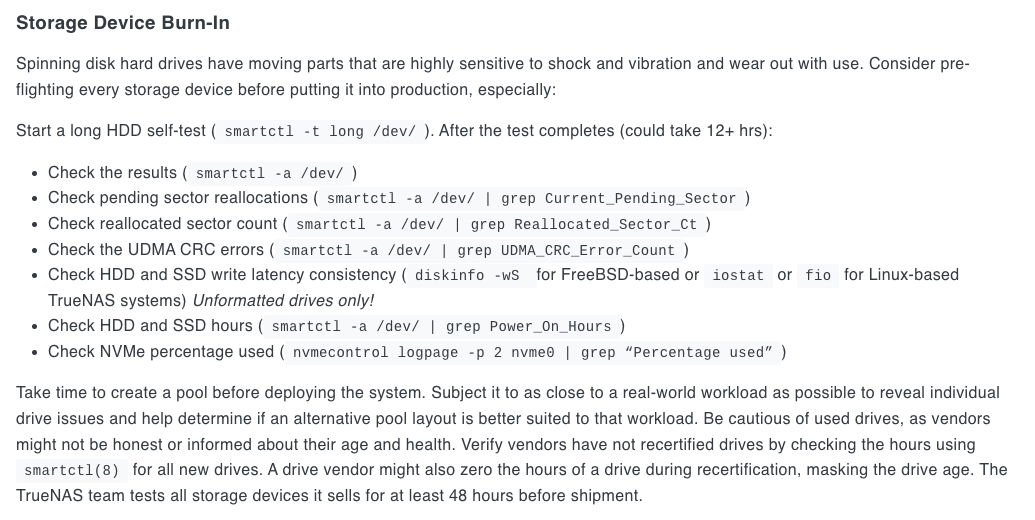
Yes, i think i’ll have to monitor and then get back to you. Meanwhile, i was reading the documentation and it says:

So, just running these tests would be enough to determine if the drive can be deployed worry free or is there any specific kind of test that i should run as well? The drives in the questions are Seagate EXOS HDD and Intel NVMes.

Running SMART Long/Extended test is the absolute minimum just to verify the drive thinks it is okay, but it is far from a Burn-In. For HDDs it is my opinion you should run a full write and read of the drive, which can take a very long time, badblocks, hint hint.

With respect to SSD/NVMe drives, do not run badblocks on it, just do the smartctl long/extended test. Running a test like badblocks on SSD/NVMe drives just increases the drive Percentage Used value. One run won’t kill you but a full pattern of four, naw, I wouldn’t.

Hope this helps.

1 Like

Hmm. So, sufficient enough to deploy after the long SMART test?

How long and how can i do that? Is that recommended to figure out the bad sectors perhaps?

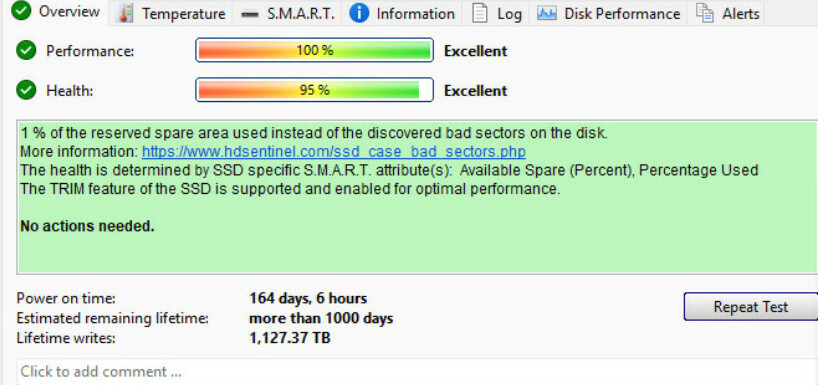
I think that will decrease the health and so the endurance (although not much of a concern for enterprise drives). But how do i test the SSDs for bad sectors? I think one of the Intel drive i have is having bad sectors. I’ll attach the pictures:

That is a personal and very subjective decision. Some will say this is good enough and some will say it requires serious testing. The SMART test is a Read Only test.

First, I want to make sure we are keeping this in the correct lane… This is ONLY for HDDs, not SSD nor NVMe. Badblocks can take a week depending on the size for the drive. Smaller drives can be done in a day. I’m running it right now on a 6TB drive, it has been running for 18:47 minutes and is 25% complete. So, 76 hours for a 6 TB drive. The speed started at approx 300MB/s and drops to about 80MB/s at the end (due to physics of the drive). A 32TB HDD would take 2 weeks. Not to frighten you, just giving you the hard truth.

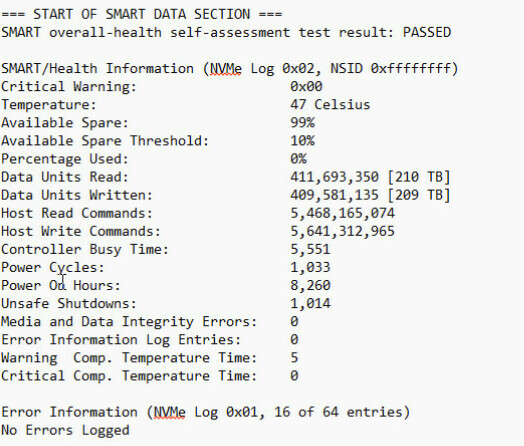
The simple answer is, you do not worry about bad sectors on a SSD or NVMe drive, the controller will map the bad sector out and replace it with a new one. These kind of drive have built in extra blocks of storage for this very purpose. They can also be rotated around to evenly wear all the blocks in the drive, and I think that is what the manufacturers do now, however I’m sure there are some around using the old ways. Anyway, the images you posted tell you that the controller used a SPARE block to replace the failing block. The ā€œHealthā€ values I suspect are directly related to the Percentage Used value. 95% and 99% are great. I have Multi-Report setup by default to generate a Warning at 10% left, to give a person lots of time to buy a new drive.

But if you are having other issues with a SSD/NVMe, you should bring up the specific questions and provide data so we can provide good advice. For example: The 4GB NVMe’s I purchased, one went bad within a few months. It still worked but the controller was not passing SMART. It was a different kind of failure. So, knowing what the messages mean is crucial.

I hope this was helpful.

1 Like

Hmm. So, would this suffice for SSDs?

That’s quite long.

Hmm. I see

You saw the spare area message in the HD Sentinel right? I was worried if my drives were actually having a bad sector or not. That’s what i wanted to confirm and how could i check using any sort of tool to check whether the SSDs have bad sectors or not.

Regarding the HDD, here’s what i plan to do:

  • Update firmware
  • Change to 4Kn
  • Run extended/long SMART to ensure the drive is stable
  • While badblock is great, i’m not sure how to run it so maybe i’ll skip that and just focus on SMART tests
  • Monitor the drive for head flying hours and head parking and if needed, modify the values and then create the pool.

Do you think its a good plan? If not, please provide your valuable suggestions. Thank you

For a home use system, my opinion is Yes.

Are you referring to the Burn-In Testing? I didn’t know where this came from, but yes, I did and I responded to it. Checking the drive SMART data, running a SMART Extended/Long test on a HDD is not ā€œBurn-Inā€, it is a quick test just to see if it is operational. However, many people do not want to put in all that testing time, they want to stick the drive in and let it fly. The drive is covered my a warranty if it is new so you would not need to purchase a new drive, however once you have loaded up all your data, it is a pain in the rear to resilver everything if you have large capacity drives and a lot of data on them, and some people have minimal redundancy which when they have drive problems, will find out they maybe should have increased the redundancy.

I’m not sure what hard drives you have but you can check the firmware and if an update is available, update it. However I rarely see firmware updates for hard drives these days. Any drive made within the past several years is likely to be 4K (Advanced Format) meaning it is 512e. The only benefit to changing to 4Kn is slight speed increase (very slight), you will have more wasted space. Read up on the Pro’s an Con’s of 512e to 4Kn. Starting the partitions at the correct offset (location where a 4k block starts) is key. TrueNAS handles that.

If you can burn in firmware to a HDD, you can run badblocks. A simple Google search for ā€˜badblocks examples linux’ will get you started.

The monitoring head flying hours and parking will not really work until you are actively using the drive. If it is an unused drive installed into a TrueNAS system, you can power the machine up, look at the smart data, let it sit 24 hours (do nothing with the hard drive like create a pool or look at SMART data), after 24 hours, then look at the smart data, did the values increase. If not then the drives heads were flying the entire time, if they parked and the flying hours barely increased, then they may park often. But until the drive is actually active, it would be manual operations to find out how often the heads would park. Just put the data on it, put it in use. If you find out the heads are parking more than you would like, then address the situation. Changing those setting, if possible for the drive you have, does not impact the data on the drive.

My advice, if the drives are new, while I’d run a full badblocks suite, you could just do a SMART Long test, I would not change to 4Kn until after you view the Pros and Cons. And then monitor your drives for head parking issues. Keep it simple.

I will digress a bit on one item, if there is a tool which can change the head parking timer, then I’d use it before putting it into the TrueNAS system as some of those utilities run only on Windows for example.

No, i was asking about the spare area message in the HD Sentinel.

For SSDs, i think just doing a long smart test should work.

The updates are available for the EXOS X16 and X18 drives. X16 probably is what i need to update to SN04.

What do you mean by i would have more wasted space? Are you referring to the usable capacity?

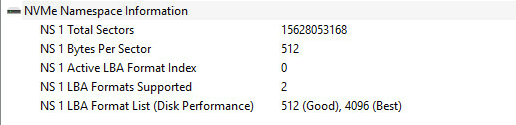
Sorry, i couldn’t get it. Maybe i should leave it to 512 but really not sure for the SSDs especially. Also, if i see in HD Sentinel:

So, this does mean that if i change it to 4K, then it will perform at its best but then i’m confused about the wasted space you mentioned about.

Will look into that. Thanks

Great. Will do that. First the priority is to test the SSDs i have. Setup everything and damn this Windows crap:

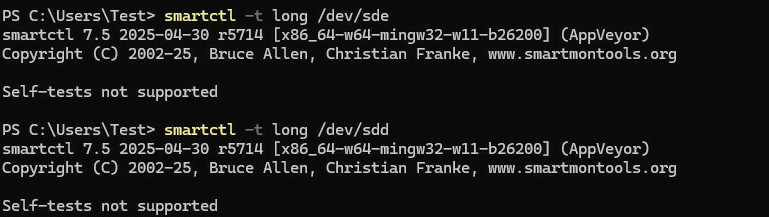
I thought it was something with the Windows and did a clean install of Linux Mint and when doing the smart long test:

Screen Shot 2026-04-23 at 5.39.33 PM

How can a SSD does not support self tests? Upon a deeper check, i came to find this:

For the one of the 8TB disk i mentioned (Intel DC P4510), do you think it would be reliable enough to use it in a TrueNAS pool?

If i’m not wrong, there was a bad sector or could be more than one and the controller remapped it perhaps and this is why the spare area is 99% now? Beside this, power on hours is a big number (roughly meaning 11.3 months). Would this be safe to use?

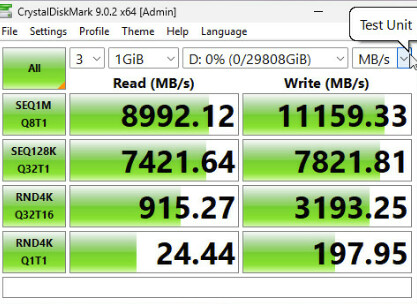
Secondly, I created 4x striped pool and set the allocation size to 64KB. But I was able to get this much speed only. Note that the SSD is connected to U.2 quad port carrier in the CPU slot. The board is MS03-CE0+5411N CPU and card in SLOT 5. I should be able to get 12GB/s in both read/write speeds:

The easiest way to explain it without taking a lot of time is to visit your favorite AI and ask it this:

While 10 byte files are unrealistic, it does provide a visual answer
For demonstration purposes only: What is the waste of 512e vs. 4k hdd block sizes if you have 20,000 files that only had 10 bytes each.

  • On a 512‑byte (512e) HDD: ā‰ˆ 10 MB wasted
  • On a 4096‑byte (4K) HDD: ā‰ˆ 78 MB wasted

Lets flip it to larger files:
While 5000 byte files are unrealistic, it does provide a visual answer
** For demonstration purposes only: What is the waste of 512e vs. 4k hdd block sizes if you have 20,000 files that only had 5000 bytes each.**

  • 512e HDD: ~60 MB wasted
  • 4K HDD: ~320 MB wasted

You AI will generally explain what this all means, much easier than me explaining it.

The manufacturer is to blame. In NVMe Version 1.4, the drive ā€œshouldā€ support SMART tests, assuming the manufacturer follows the specifications.

SSD’s are built with extra Spare block to be swapped out. This appears to have happened, so a tiny bit was used which is why Percent Used is still at 0%.
The drive was bought used, correct? That would explain the 8,260 hours. That is a pretty short period of time for a used SSD.

Where did the 12GB/s value come from? Also, Windows, wrong forum? Your hardware configuration will play a huge part in these kinds of tests. Do some searching on the internet on how to test throughput, and you will find help.

I’m not trying to be mean here but you should make more effort to do more research on the internet, there is a ton of information out there and you would get your answers much faster. Of course if may be easier for me as I have a history of doing a lot of internet searches, I find out what works best, I visit a lot of forums and read, read, read. If after I really cannot find an answer, then I ask for help. If you don’t trust what you are reading, that is slightly different, but compare different sources.